Search Results for 'code'
-
Search Results
-
Topic: Display only the @username
I am trying to remove the author’s real name and only display the @ username.
With the code I found here, I could add the username below the name. But how can I remove the real name and only display the @ username?
I am trying to debug an intermittent 404 issue that has been traced to BBPress. I’ve read several other reports about intermittent 404s and BBPress, but none of them are quite applicable to my situation, so I’m creating a new support topic.
The main page of my website will intermittently load with a 404.The intermittent access issue appears to last between 10 seconds and 3 minutes at a time. When this happens, it’s down for everyone trying to access the site (confirmed while on the phone with hosting service tech support). Other pages on the site appear to load correctly during this time window. Hitting refresh will eventually successfully reload the page correctly.
I am using Query Monitor to examine the rewrite rules. Here are the results when the page is loading incorrectly:
Request account-2/conscious-business-design-dashboard Matched Rule [^/]+/([^/]+)/?$ Matched Query attachment=conscious-business-design-dashboard Query String attachment=conscious-business-design-dashboard Query Vars attachment conscious-business-design-dashboard comments_per_page 50 name conscious-business-design-dashboard order DESC posts_per_page 10 update_post_meta_cache 1 update_post_term_cache 1Here are the results when the page is loading correctly:
Request account-2/conscious-business-design-dashboard Matched Rule (.?.+?)(?:/([0-9]+))?/?$ Matched Query pagename=account-2%2Fconscious-business-design-dashboard &page= Query String pagename=account-2%2Fconscious-business-design-dashboard Query Vars comments_per_page 50 name conscious-business-design-dashboard order DESC pagename conscious-business-design-dashboard posts_per_page 10 update_post_meta_cache 1 update_post_term_cache 1 Queried Object Single Page: #225 (WP_Post)Here is the most relevant query that is being run during the 404:
SELECT wp_posts.* FROM wp_posts WHERE 1=1 AND wp_posts.post_name = 'conscious-business-design-dashboard' AND wp_posts.post_type = 'attachment' ORDER BY wp_posts.post_date DESCHere is the query run when the page successfully loads:
SELECT wp_posts.* FROM wp_posts WHERE 1=1 AND (wp_posts.ID = '225') AND wp_posts.post_type = 'page' ORDER BY wp_posts.post_date DESCWhen I look at the BBPress code, I can identify the rewrite rules here:
// Rewrite rule matches used repeatedly below $root_rule = '/([^/]+)/?$'; $feed_rule = '/([^/]+)/' . $feed_slug . '/?$'; $edit_rule = '/([^/]+)/' . $edit_slug . '/?$'; $paged_rule = '/([^/]+)/' . $paged_slug . '/?([0-9]{1,})/?$';However, all slugs are correctly set in the database, and I can’t figure out how they might be getting corrupted.
Any suggestions for further troubleshooting?
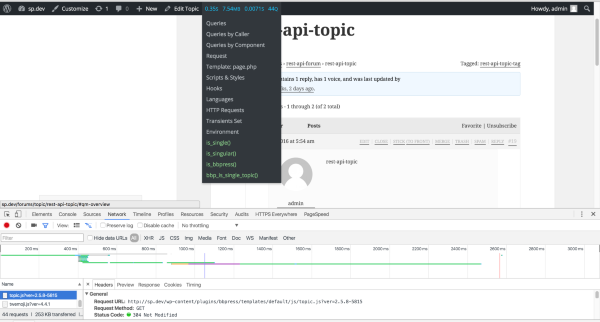
I am trying to figure out why bbPress (inside Buddypress) isn’t enqueueing topic.js on topic pages so that favoriting and subscribing buttons ajax instead of refresh (which they currently do).
In
enqueue_scripts(),bbp_is_single_topic()is being checked before allowing the js files to be enqueued.In the
bbp_is_single_topic()function declaration,is_singular( bbp_get_topic_post_type() ) || bbp_is_query_name( 'bbp_single_topic' )must be satisfied to return true.Issue:
is_singular( bbp_get_topic_post_type() )returns false (alsois_singluar('topic')and justis_singluar()— also, no matter where I go in bbpress,is_singluar()returns false).
Tangential: echoingbbp_get_query_name()returns nothing.Any ideas?
NB: This was tested on fresh Twenty Twelve with all non-essential plugins disabled and bp-custom.php emptied.
WP: 4.4.1
BP: 2.4.3
BBP: 2.5.8Hi,
in the Codex, it says that the automatic loading of locales should begin when they are at 100%. However, the German locale has not been updated in my installation since three days, that is the current date of the files in my webspace. Even though I approved strings in Glotpress every day since then.
Do you know if there is some “push” mechanism? Because WP-Members always gets updated at night (UTC) after I edited some strings. Or maybe bbpress needs to pull translations, but it does not do so, sufficiently?
~Manuel
Hi,
i was doing some performance analysis with the Xdebug and Xhprof profiling tools and noticed that many of my DB queries/per request are something similar to:
SELECT option_value FROM wp_options WHERE option_name = '_bbp_enable_subscriptions' LIMIT 1In Trac Ticket 1550 it is mentioned, that the WordPress Object Cache is used, but this “error_log” (in wp-db.php Version 4.4.1 line 1809) tells me a different story:
private function _do_query( $query ) { if ( defined( 'SAVEQUERIES' ) && SAVEQUERIES ) { $this->timer_start(); } if ( $this->use_mysqli ) { error_log($query . "\n", 3, '/tmp/wpdb.log'); $this->result = @mysqli_query( $this->dbh, $query ); } else { $this->result = @mysql_query( $query, $this->dbh ); } $this->num_queries++; if ( defined( 'SAVEQUERIES' ) && SAVEQUERIES ) { $this->queries[] = array( $query, $this->timer_stop(), $this->get_caller() ); } }Am i missing some Cache Settings here?
I am using WordPress 4.4.1 with bbPress 2.5.8
Hi –
I’m running WordPress 4.4.1
BBpress is the 2.58
Theme is OptimizerI have successfully increased the font size of the forum itself. What I have not been able to do is figure out how to change the text that one sees to get back to the various Forum categories or Forum home – as shown in image below:
https://i.gyazo.com/0882075309c65c8058da2fe97caea9aa.pngI used this info here: https://codex.bbpress.org/bbpress-styling-crib/ and according to that, it is #8 I want to adjust, and on that ‘how-to’ it says that that area is:
8. Breadcrumb and link colors
Inherited from your themeJust wondering where to find this so I can make it larger in size.