Skip to:
Content
Pages
Categories
Search
Top
Bottom

Search Results for 'code'

Viewing 25 results - 7,001 through 7,025 (of 32,505 total)
  • Author
    Search Results
  • #171275
    Pascal Casier
    Moderator

    Different options then. You could try the below code in your 404.php file:

    <?php $actual_link = "http://$_SERVER[HTTP_HOST]$_SERVER[REQUEST_URI]";
    
    	$actual_link = explode('/',$actual_link);
    	if($actual_link[3]=="forums") { ?>
    	<h2 class="article-title"><?php _e( 'This forum is private. Please login to access this forum' ); ?></h2>
    	<?php } else {?>
    <img src="<?php echo get_template_directory_uri();?>/assets/images/404_image.png"><br>

    Hope it helps…
    Pascal.

    #171264
    terranova23
    Participant

    Thanks for your reply, Pascal.

    In that case, that plugin is probably not going to help us anyway. So never mind the shortcode error.

    Our problem is still with the bbPress activity stream, we are hoping to limit its contents to only should be visible to members of a particular group. We are using MemberMouse and the bbPress MemberMouse extension to limit users access to only the forums they are taking a class for, but they are seeing activity from other forums in the feed.

    Also, we would like to limit access to this default bbPress page to be private for admins only, if at all possible: http://www.themysticdreamacademy.com/forums/

    Hope someone can help us with one or both of these issues.

    Thanks,
    Rory

    #171250
    terranova23
    Participant

    Hi there,

    I’m helping a client resolve an issue with their bbPress Activity Stream. Their website has many online classes that are kept separate from each other, and their wish is to have the Activity Stream only show activity that is relevant to the forum a user has access to, and keep info from other forums private (they are using MemberMouse to restrict access). I did some research on here and on Google and found several threads that talked about similar issues, but wasn’t able to find any solutions.

    The site uses the latest version of WP (4.4.2) and bbPress (2.5.8) and is located at http://www.themysticdreamacademy.com/

    I thought the bbPress Activity Stream Shortcode Plugin would do the job, so I installed that and did a quick test, but I’m getting this error: Fatal error: Call to undefined function bp_has_activities() in /home/myst1cadm1n/public_html/wp-content/plugins/bp-activity-shortcode/bp-activity-as-shortcode.php on line 102

    If that issue could be resolved, we may be all set since we can set up shortcodes to display different streams for different forums. Otherwise, we’d like to know if there’s a way to limit the Activity Stream to only show content the user has access to.

    Finally, my client is also concerned about the default forums page, which shows a listing of recent topics from all forums and is visible to anyone who finds it: http://www.themysticdreamacademy.com/forums/ Users who aren’t logged in aren’t able to click any of the links, but they are still concerned about privacy. Is it possible to make this page private so only logged-in admins can see it? Or can it be removed somehow?

    Thanks for your time,
    Rory

    #171249
    Pascal Casier
    Moderator

    Hi,

    To fix when the user logs out, you could use this code. Add it into your functions.php and change $url to whatever you want as page.

    function casiepa_logout ($redirect_to) {
    	$url='/forums/' ;
    	$redirect_to = '<a href="' . wp_logout_url( $url ) . '" class="button logout-link">' . esc_html__( 'Log Out', 'bbpress' ) . '</a>' ;
    	return $redirect_to ;
    	}
    	
    add_filter ('bbp_get_logout_link', 'casiepa_logout') ;

    Pascal.

    #171247
    #171239
    Pascal Casier
    Moderator

    You use v3.8.7 ? Please notify the creators of the Avada theme because it’s a bug on there side.

    In Avada/includes/class-layout-bbpress.php, change line 84 as follows:

    Original:
    <div class="bbp-reply-post-date"><?php bbp_topic_post_date( bbp_get_topic_id() ); ?></div>

    Modified:
    <div class="bbp-reply-post-date"><?php bbp_reply_post_date( bbp_get_reply_id() ); ?></div>

    Pascal.

    #171232
    Pascal Casier
    Moderator

    Copy the file ‘/wp-content/plugins/bbpress/templates/default/bbpress/feedback-no-forums.php’ to a child theme and then modify the file to what you want to obtain.

    Pascal.

    #171228
    boionfire81
    Participant

    Yeah, I still don’t know what I’m doing wrong.

    Changed line 44 like the step-by step guide said to remove the (#,#) after the forum names, but they are still there.

    Step-By-Step Guide

    Robin W
    Moderator

    ok, @membershipsite101

    This old link talks about using templates

    https://optimizepress.zendesk.com/hc/en-us/community/posts/200815558-OptimizePress-2-bbPress-Total-Mess-Let-s-get-this-fixed-now-

    and suggests putting

    if (is_bbpress()) { include 'bbpress.php'; exit; }
    

    on top of index.php (for the forum-index) and single.php (for the topics) and then style the bbpress.php in the /themes/optimizePressTheme/ /themes/1/ (or whatever OP2 blog-theme you’re using) to your liking.

    If you’re a bit techy, might be worth looking at.

    #171208
    Stephen Edgar
    Keymaster

    Using your code I get a blank white page with yes

    Also to note, the screenshot I posted above of Chrome inspector includes at the bottom that topic.js?ver=2.5.8-5815 has correctly loaded.

    Are you sure you haven’t got any other plugins or code stashed in a functions.php or hacks elsewhere that may be causing your issues?

    mauryg
    Participant

    @membershipsite101
    Using the index shortcode on the ‘forum’ page is perfectly normal. If you leave the /forum page blank then you can choose whether to show the forums index or the topics index on the bbpress settings page.
    As I noted before the URL of the Welcome page says it is a subpage of the ‘Help’ page (http://membershipsite101.com/help/welcome). So I would expect it to use the template of the /help page, not the one of the /forum page. Do you perhaps have a page titled ‘Welcome’? Try hovering over the forum title on the /forum page and see what the link says. If the forum root is ‘discussion’ then the /welcome page should be either /discussion/welcome or /forum/discussion/welcome.
    I think you need to review your bbpress settings again. Look at my page http://spaug.net/forums.
    I use the bbpress default settings as follows:
    Forum root slug: forums
    Forum slug: forum
    Topic slug: topic
    And I check the ‘Forum Prefix’ box as recommended.
    Then my URLs are as follows:
    Root page: sitename/forums
    Individual forum page: sitename/forums/forum/forum-name
    Individual topic page: sitename/forums/topic/topic-title
    I suggest that you try changing the forum root slug to ‘forum’ or ‘forums’
    Finally, unless you are very adept at CSS modifications, I recommend the ‘bbp style pack’ plugin. It allows you to modify colors, fonts, font size, etc easily.
    Remember, whatever optimizepress theme template.php you want to use for the forums page (right sidebar, no sidebar, etc) make a second copy of it IN THE SAME FOLDER and rename it bbpress.php. That way bbpress will always use that template. I also make a copy of the bbpress.css file from plugin folder (\wp-content\plugins\bbpress\templates\default\css\bbpress.css) and put it in the theme folder. That way you can use the WordPress Editor (Appearance>Editor) to make changes.
    I just did a quick Google search on ‘Optimizepress and bbPress’ and it looks like there is a lot of incompatibility. I also noted that Optimizepress was discontinuing their support forum in favor of their ‘customer happiness team’. My condolences
    Having fun yet?

    Maury
    Maury

    #171190
    Robin W
    Moderator
    #171168
    Pascal Casier
    Moderator

    Hi,

    Check out the bbpress shortcuts on https://codex.bbpress.org/features/shortcodes/
    Under the ‘Topics’ header you will probably find what you need.

    Pascal.

    #171167
    Robin W
    Moderator
    #171160
    Andrew Tibbetts
    Participant

    Ooops.
    I have been jumping back and forth testing forum home and topics as they both don’t work and I copied the wrong line I was using.
    So, correction:

    …when i put echo is_singular( bbp_get_topic_post_type() ) ? 'yes' : 'no'; exit; on line 255 of bbpress/includes/common/template.php inside bbp_is_single_topic(), I get a white page that says “no”.

    I get the same “no” doing the forum check in the forum function while on the forum page.

    #171159
    Stephen Edgar
    Keymaster

    Your checking for is_singular() on the forum post type rather than the topic post type above in your code above.

    #171157
    Andrew Tibbetts
    Participant

    Thanks, Stephen.
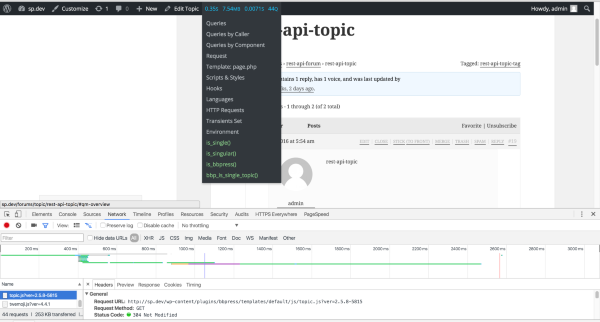
    Ok, so, Query Monitor is telling me that topic pages are returning true on a bunch of is_s:

    is_page()
    is_singular()
    is_bbpress()
    bbp_is_single_topic()
    is_buddypress()
    bp_is_group()
    bp_is_group_forum_topic()
    bp_is_group_single()
    bp_is_groups_component()
    bp_is_single_item()

    But, when i put echo is_singular( bbp_get_forum_post_type() ) ? 'yes' : 'no'; exit; on line 255 of bbpress/includes/common/template.php inside bbp_is_single_topic(), I get a white page that says “no”.

    #171151
    Stephen Edgar
    Keymaster

    @andrewgtibbetts can you install the following two plugins and take another look?

    https://wordpress.org/plugins/query-monitor/
    https://wordpress.org/plugins/query-monitor-bbpress-buddypress-conditionals/

    Here’s what I see, is_single(), is_singular() and bbp_is_single_topic() all return true

    BbPress Topic JS

    #171150
    Stephen Edgar
    Keymaster

    @ dots Nice size forum, heres a few things that I hope will help:

    Firstly, can you try by using bbPress 2.6-alpha, you can find it here https://bbpress.org/download/

    1) Sometimes scripts are automatically stopped and script not start automatically.

    Sometimes things timeout, a workaround for this is to open another tab in your browser to example.com/wp-admin and refresh it occasionally

    2) Currently, lots of data is still pending to import in BBPress but the script is not running and in tools bottom section I can see only “Starting Conversion” and loader.

    This is similar to 1), by refreshing you should in another browser tab this should keep that issue at bay, this particular issue is usually when PHP drops the MySQL connection and needs refreshing to update the connection between WordPress and the database.

    3) I have noticed in the tool having the duplication issue you can see above in Xenforo only 83,813 topics but BBPress tool imported 83,867 records. So 54 records are duplicates. so this issue resolved using BBPress repair forum tabs?

    It could be duplicates, though I’ve only ever tested 3 or 4 Xenforo forums with bbPress, potentially using the repair tools might fix this though without some more information here it will be hard to take a guess. If you can supply a copy of a couple of duplicates I can take a closer look as to the reason why.

    4) BBPress import tool taking random data from the Xenforo database. I have noticed when I have started the script first the users come from the Xenforo. But unfortunately, the users are skipped and the tool has started to import the topic. So, I am a bit confused here BBpress import tool can complete import all the users, topic, forums, and replies successfully? you can see above my total Xenforo user is 1,59,679 and BBPress tool has imported only 94,600. and the now script has started to import replies.

    Again, it should do all of this correctly, though testing with bbPress 2.6-alpha per above will hopefully fix many, or most of the issues you are having, can you try using 2.6-alpha and let me know how that goes for you please 🙂

    Also a couple more tips in our docs:

    Import Troubleshooting

    mauryg
    Participant

    @membershipsite101
    Don’t know if we are talking about the same problem. It seems like your site is using a different HEADER template for the Welcome page. Also noted that the Welcome page is a subpage of the HELP page, not of the FORUMS page. Are you using bbpress shortcodes for this? You might want to check the bbpress settings page and see if the slugs are set correctly.
    But anyway, I looked at your site and I noticed that the bbpress.css file was being loaded from the bbpress plugin directory, not from the theme directory.
    Did you in fact copy the template.php file you want to use into the theme directory and rename it bbpress.php? I also strongly suggest copying the bbpress.css file into the theme directory as well so you can make changes to the bbpress styling easily.
    Hope this helps.
    Maury

    #171131
    dot
    Participant

    When BBPress is turned off, the error stops. When it is turned back on, the error starts again.

    Also, the BBPress rewrite rules, especially the root rewrite stub, are the only place in the entire code base that I can find the rewrite rule RegEx fragment.

    #171126
    Pelowtz
    Participant

    I am having the same problem as @aaronos.

    The bbPress page with the shortcode has the URL /forums, with the page title of “Forum”
    The forum root slug is set to “forum” in the forum settings
    The single forum slugs is set to “forums”
    The yoast SEO breadcrumb I am using shows home>forum on the forum index page (/forums)
    When I click into a topic the URL changes to /forum/forums/[FORUM TITLE]
    On the /forum/forums URLS the Yoast breadcrumb changes to “/forums” but it actually links to “/forum”

    NOTE: /forum is a page that does not technically exist (i.e. I did not create a page with this URL) yet some random topics show up on this page.

    I have tried every iteration of changing the UTL of the index page, the page name, and the two settings in bbPress with no success.

    I have to set the forum index URL to /forums for my forum index page to look properly, but essentially whenever I navigate to any post or topic the breadcrumb breaks.

    Thanks for any guidance and advice.

    http://vapementors.com/forums/

    #171114
    sr3
    Participant

    I am trying to remove the author’s real name and only display the @ username.

    With the code I found here, I could add the username below the name. But how can I remove the real name and only display the @ username?

    #171108
    Manuel Fritsch
    Participant

    @Johnnieasear: To me, MS is the future of WP. Why have one site, if I can have at least one more for testing purposes? That was what I thought about before setting up my network. Of course, that means mostly styling tests, since plugins are integrated with the network and some plugins can only be (de-)activated on network level, so testing is limited. But still.

    Do you refer to this Guide? “Extensive” would too far-fetched a word for that, in my opinion. It’s more of a brief overview. Useful, of course. 🙂

    #171101
    dot
    Participant

    I am trying to debug an intermittent 404 issue that has been traced to BBPress. I’ve read several other reports about intermittent 404s and BBPress, but none of them are quite applicable to my situation, so I’m creating a new support topic.

    The main page of my website will intermittently load with a 404.The intermittent access issue appears to last between 10 seconds and 3 minutes at a time. When this happens, it’s down for everyone trying to access the site (confirmed while on the phone with hosting service tech support). Other pages on the site appear to load correctly during this time window. Hitting refresh will eventually successfully reload the page correctly.

    I am using Query Monitor to examine the rewrite rules. Here are the results when the page is loading incorrectly:

    Request	account-2/conscious-business-design-dashboard
    Matched Rule	[^/]+/([^/]+)/?$
    Matched Query	attachment=conscious-business-design-dashboard
    Query String	attachment=conscious-business-design-dashboard
    Query Vars	attachment	conscious-business-design-dashboard
    comments_per_page	50
    name	conscious-business-design-dashboard
    order	DESC
    posts_per_page	10
    update_post_meta_cache	1
    update_post_term_cache	1

    Here are the results when the page is loading correctly:

    Request	account-2/conscious-business-design-dashboard
    Matched Rule	(.?.+?)(?:/([0-9]+))?/?$
    Matched Query	pagename=account-2%2Fconscious-business-design-dashboard
    &page=
    Query String	pagename=account-2%2Fconscious-business-design-dashboard
    Query Vars	comments_per_page	50
    name	conscious-business-design-dashboard
    order	DESC
    pagename	conscious-business-design-dashboard
    posts_per_page	10
    update_post_meta_cache	1
    update_post_term_cache	1
    Queried Object	
    Single Page: #225 (WP_Post)

    Here is the most relevant query that is being run during the 404:

    	SELECT wp_posts.*
    FROM wp_posts 
    WHERE 1=1 
    AND wp_posts.post_name = 'conscious-business-design-dashboard'
    AND wp_posts.post_type = 'attachment' 
    ORDER BY wp_posts.post_date DESC 

    Here is the query run when the page successfully loads:

    SELECT wp_posts.*
    FROM wp_posts 
    WHERE 1=1 
    AND (wp_posts.ID = '225')
    AND wp_posts.post_type = 'page' 
    ORDER BY wp_posts.post_date DESC 

    When I look at the BBPress code, I can identify the rewrite rules here:

    	// Rewrite rule matches used repeatedly below
    		$root_rule    = '/([^/]+)/?$';
    		$feed_rule    = '/([^/]+)/' . $feed_slug  . '/?$';
    		$edit_rule    = '/([^/]+)/' . $edit_slug  . '/?$';
    		$paged_rule   = '/([^/]+)/' . $paged_slug . '/?([0-9]{1,})/?$';

    However, all slugs are correctly set in the database, and I can’t figure out how they might be getting corrupted.

    Any suggestions for further troubleshooting?

Viewing 25 results - 7,001 through 7,025 (of 32,505 total)
Skip to toolbar