Skip to:
Content
Pages
Categories
Search
Top
Bottom

Search Results for 'code'

Viewing 25 results - 6,376 through 6,400 (of 32,505 total)
  • Author
    Search Results
  • #175030
    semperaye
    Participant

    Is there a way to allow bbpress users with the “participant” role to upload media by url only, i.e. disable the media library. I want my users to be able to put pictures into their post that are hosted other places without having to figure codes and such.

    Thank you!

    #175026

    In reply to: Topic Header Space

    argburs14
    Participant

    I meant ading some  

    AngryGerman
    Participant

    I’m currently developing a WP (4.5.2) site with the bbPress plug-in (2.5.9).

    I have various standard WP pages and posts (e.g. About (slug: about) and Help (slug: help)) on the site.

    The forum runs under the forums root slug.

    When creating a forum or topic, for example, whose slug is the same as that of an existing page, trying to display that forum/topic fails with a 404 error.

    For example, creating a forum with the name “About” (slug: about) leads to the (correct) bbPress URL /forums/forum/about/. However, trying to display that forum at that specific URL fails with a 404 error, apparently because a page with the URL/slug /about/ already exists for a WP page.

    This only seems to happen when a page/post/etc. exists that has such a “conflicting” slug, which is still puzzling because the bbPress forum has its own root slug/URL path /forums/, which should prevent such conflicts.

    Renaming the forum slug manually to something like aboutx fixes the issue, and the forum is then accessible just fine under /forums/forum/aboutx/. (This is obviously not a solution, but illustrates that there must be some sort of slug conflict.)

    1. Is this a known issue, or what could the problem be?
    2. Alternatively, is there a way to automatically append a (e.g. random) string to any bbPress forum/topic/post slug to prevent something like this?

    #175021
    littlemisslanna
    Participant

    So right now I am using Gravity Forms with the Sticky List plugin to create an editable database people can submit information to. I have a hidden field that automatically populates the username of the submitter, which is cool and what I want. But I would like that username in question to link to that user’s BuddyPress profile.

    I have a feeling it has to do with some PHP code, but I’m not savvy with php as I’d like to be. This is what I have so far, from a previous topic I found on the forum.

    
    add_filter( 'gform_field_value_linkuser', 'link_username' );
    
    <?php
    add_filter( 'gform_field_value_linkuser', 'link_username' );
    function link_username($user_login) {
       return '$_COOKIE['utm_campaign']; < NO idea what to return here! 
    }
    ?>
    

    I assume the return value should be something like <a href="URL.com/members/[USERNAME]">Username </a>, but I don’t know how to make that work in PHP!

    Please help me out! BBP Version is 2.5.9, WP version is most recent one, Gravity Forms 1.9.19, Gravity Forms Sticky List plugin 1.4.1.

    Thank you!

    #175009
    Andrew Tibbetts
    Participant

    I can create a topic fine ( and hook into bbp_new_topic ) but when I try to save changes to an existing topic ( change title, description, sticky, etc ) it doesn’t retain the changes ( and bbp_edit_topic never fires ). It redirects to the topic where bbp_template_notices spits out ERROR: Forum ID is missing. Anyone experience this / have any ideas what’s going on?

    WP: 4.5.2
    BP: 2.5.2
    BBP: 2.5.9

    #175005

    Topic: Strip HTML

    in forum Showcase
    Presskopp
    Participant

    Hi there,

    if you please could tell me how to strip out any HTML Code before a post is saved to the db. I tried to make a little plugin, but I don’t get behind it at this point. See working draft on

    http://pastebin.com/5JgFKd0V

    Thank you very much!

    #175001

    In reply to: Undefined Variables

    Robkk
    Moderator

    For the first error, contact the GD bbPress Toolbox plugin support team.

    For the second error, read this https://codex.bbpress.org/bbp_setup_current_user/was-called-incorrectly/

    #175000

    In reply to: Undefined Variables

    WPnolanbretigne
    Participant

    Followup: Found this message using page source:

    <b>Notice</b>: bbp_setup_current_user was called incorrectly. The current user is being initialized without using $wp->init(). Please see Debugging in WordPress for more information. (This message was added in version 2.3.) in <b>/var/www/html/wordpress/wp-includes/functions.php</b> on line <b>3897</b><br />
    <!DOCTYPE html>

    #174993
    karaokelove
    Participant

    Hi, I’m creating a forum where people can post links to their Twitch streams for other users to rate. I want to add specific input fields, such as Embed Code, games streamed, active times, etc, that the user can fill in to populate the post. Is there a way to do this?

    Also, is it possible to add another field to the main list of topics, other than Voices, Posts, and Freshness? I have a good rating plugin installed, and I have it integrated with bbPress to allow and show ratings inside the topic. But I’d like users to be able to see and sort topics by rating.

    Thanks in advance!

    #174985
    Robin W
    Moderator

    bbpress has various widgets and well as shortcodes, so you can call it from pages, posts and sidebars

    check out the documentation !

    Kineta
    Participant

    @robin-w Thanks Robin. I still need to use the loop-single-reply as it is, what I’m trying to do is call an additional custom loop that also threads. (I’m putting an index of linked post titles above the threaded replies. Example on my test site: http://jpr-test.com/boards/topic/lets-make-a-giant-thread/ )

    The solution I came up with isn’t very elegant, but it works. I ended up creating a copy of the BBP_Walker_Reply class with a different name, just to direct it to a different loop. Seems like a lot of duplicated code to change one line. But I can’t think of any other way to do it.

    #174973
    Kineta
    Participant

    @veelow – That was exactly the problem I was having. It seems to be generated from the bbPress function: bbp_buddypress_add_notification (notification with your name instead of the person who responded). The code I posted addresses that problem. Did you try it?

    #174953
    Robkk
    Moderator

    @rainbowgolfcart bbPress can use words that are in your comment moderation and blacklisting input boxes in Settings > Discussion. Some plugins like the mojo marketplace plugin that @mclaurence noted can use a function and inject a custom list of words to these input boxes. Make sure to remove the interfering plugin.

    https://codex.bbpress.org/moderation-and-blacklisting/


    @mclaurence

    Its probably just the mojo marketplace plugin, ninja forms might be fine.

    https://github.com/mojoness/mojo-marketplace-wp-plugin/blob/f5a0985168b06d9202148acce928494b54218a57/inc/spam-prevention.php#L102

    #174951
    Kineta
    Participant

    I came up with a solution, based on the start @davidstriga made. I’ve been meaning to post it for anyone else having the same issue. I don’t have the same goal he did to notify everyone in a forum, just the person being replied to, so I removed the foreach loop. I also wanted the notification to go to the actual replied-to post in the thread and not just the initial topic at the top of the page. The forum I’m working on has titles on all the replies – but if you aren’t using titles on replies the notification just shows the topic title, but the link still goes to the relevant post/reply.

    If anyone is interested, here’s my solution. It’s working great on our site and takes care of the duplicate issues, as well as the GMT timestamp problem.

    Put this in your theme’s functions.php

    /* notifications */
    
    function jpr_buddypress_add_notification( $reply_id = 0, $topic_id = 0, $forum_id = 0, $anonymous_data = false, $author_id = 0, $is_edit = false, $reply_to = 0 ) {
    
    	$current_topic_id = bbp_get_topic_id();
    	$ids_of_subs = bbp_get_topic_subscribers($current_topic_id);
    		
    		// this is who the notification goes to. whose post is replied to
    		$topic_author_id = bbp_get_topic_author_id( $reply_to );
    
    		// Bail if somehow this is hooked to an edit action
    		if ( !empty( $is_edit ) ) {
    			return;
    		}
    
    		// Get author information
    		// $topic_author_id   = bp_loggedin_user_id();
    		$secondary_item_id = $author_id;
    
    		// Hierarchical replies
    		if ( !empty( $reply_to ) ) {			
    			$reply_to_item_id = bbp_get_topic_author_id( $reply_to );
    		}		
    
    		// pass the $reply_id to the function that formats the notification
    		$topic_id = $reply_to;
    		
    		// Get some reply information
    		$args = array(
    			'user_id'          => $topic_author_id,
    			'item_id'          => $topic_id,
    			'component_name'   => bbp_get_component_name(),
    			'component_action' => 'bbp_new_reply',
    			'date_notified'    => get_post( $reply_id )->post_date_gmt,
    		);
    	 	
    		// Notify the topic author if not the current reply author
    	 	if ( $author_id !== $topic_author_id ) {
    			$args['secondary_item_id'] = $secondary_item_id ;
    
    			bp_notifications_add_notification( $args );
    	 	}
    	 	// Notify the immediate reply author if not the current reply author
    	 	if ( !empty( $reply_to ) && ( $author_id !== $reply_to_item_id ) ) {
    			$args['secondary_item_id'] = $secondary_item_id;
    			
    			bp_notifications_add_notification( $args );
    	 }
    }
    // remove the bbpress notification function so we don't get dupicate notifications
    remove_action( 'bbp_new_reply', 'bbp_buddypress_add_notification', 10, 7 );
    add_action( 'bbp_new_reply', 'jpr_buddypress_add_notification', 10, 7 );
    
    // remove the bbpress format notification function before using our custom function
    remove_filter( 'bp_notifications_get_notifications_for_user', 'bbp_format_buddypress_notifications', 10, 5 );
    
    function jpr_format_buddypress_notifications( $action, $item_id, $secondary_item_id, $total_items, $format = 'string' ) {
    
    	// New reply notifications
    	if ( 'bbp_new_reply' === $action ) {
    		$topic_id    = bbp_get_reply_id( $item_id );
    		$topic_title = bbp_get_reply_title( $item_id );
    		$topic_link  = wp_nonce_url( add_query_arg( array( 'action' => 'bbp_mark_read', 'topic_id' => $topic_id ), bbp_get_reply_url( $item_id ) ), 'bbp_mark_topic_' . $topic_id );
    		$title_attr  = __( 'Topic Replies', 'bbpress' );
    
    		if ( (int) $total_items > 1 ) {
    			$text   = sprintf( __( 'You have %d new replies', 'bbpress' ), (int) $total_items );
    			$filter = 'bbp_multiple_new_subscription_notification';
    		} else {
    			if ( !empty( $secondary_item_id ) ) {
    				$text = sprintf( __( 'You have %d new reply to %2$s from %3$s', 'bbpress' ), (int) $total_items, $topic_title, bp_core_get_user_displayname( $secondary_item_id ) );
    			} else {
    				$text = sprintf( __( 'You have %d new reply to %s',             'bbpress' ), (int) $total_items, $topic_title );
    			}
    			$filter = 'bbp_single_new_subscription_notification';
    		}
    
    		// WordPress Toolbar
    		if ( 'string' === $format ) {
    			$return = apply_filters( $filter, '<a href="' . esc_url( $topic_link ) . '" title="' . esc_attr( $title_attr ) . '">' . esc_html( $text ) . '</a>', (int) $total_items, $text, $topic_link );
    
    		// Deprecated BuddyBar
    		} else {
    			$return = apply_filters( $filter, array(
    				'text' => $text,
    				'link' => $topic_link
    			), $topic_link, (int) $total_items, $text, $topic_title );
    		}
    
    		do_action( 'jpr_format_buddypress_notifications', $action, $item_id, $secondary_item_id, $total_items );
    
    		return $return;
    	}
    }
    add_filter( 'bp_notifications_get_notifications_for_user', 'jpr_format_buddypress_notifications', 10, 5 ); 
    #174930
    Stephen Edgar
    Keymaster

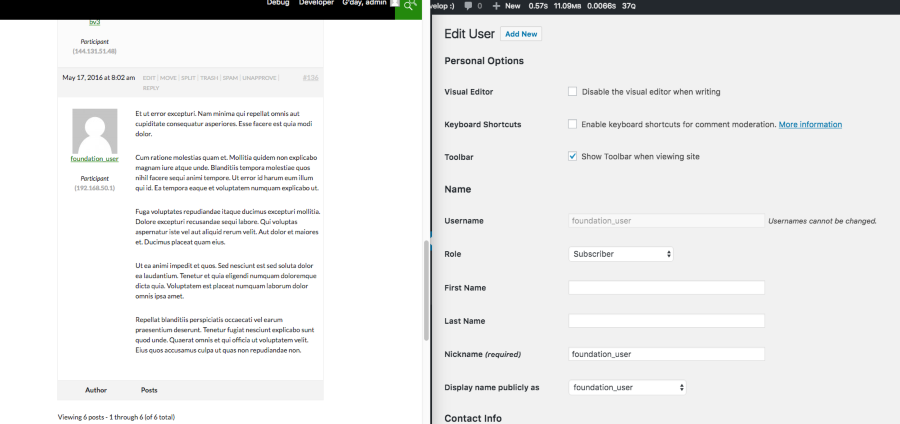
    I also just created a new user on the phpBB board: foundation_user, activated the user and then made the user a founder, posted a reply to a topic and ran the importer and all worked as expected:

    Screen Shot

    #174925
    Stephen Edgar
    Keymaster

    I’m pretty sure the “founder” setting won’t have anything to do with it 🙂

    What I think has happened is when you first import your forums the users will be imported as user1, user2, user3, user4 etc, if you subsequently perform another import and you did not reset the forums, or delete delete the imported users then those same 4 previously imported users will remain and the import rather than overwriting these users will import those 4 users as imported_user1, imported_user2, imported_user3, imported_user4.

    I suspect this is what has happened and hence the mismatched post to author relationships.

    #174921

    In reply to: Link to recent topics

    Pascal Casier
    Moderator

    I’m not aware of a widget per member for that. You will probably have to code something yourself.
    Pascal.

    #174918
    Pascal Casier
    Moderator

    Hi,
    If you want to limit to seeing only 1, you can put this into your functions.php: https://codex.bbpress.org/layout-and-functionality-examples-you-can-use/#22-show%c2%a0only-1-revision-log-on-topics-and-replies
    or if you prefer a plugin, check my bbP-toolkit

    If you do not want revisions at all, you could just switch them off : ‘/wp-admin > Settings > Forums > Forum Features > Revisions’

    Pascal.

    #174916
    dragondad
    Participant

    I enabled the TinyMCE, and use the visual editor, I can copy & paste, but all the code looks only fine in the editor, after submit, it has lots of HTML tags, it did not work, and the image is not copied as well, so it did not work.
    Any idea of how to resolve it, thanks.

    #174915
    fabwintle
    Participant

    Hi,
    We have a membership site with bbpress. I am trying to keep our members informed of the new questions in our forum. I am using mailchimp in conjunction with bbpress topic feed.

    I would like to remove the ‘This topic was last modified by x for the reason y’ line. See this screenshot.

    I am not a programmer but can modify code if i find a good template.

    Would anyone be able to point me in the right direction? to either some code or a developer?

    Thank you!

    #174905
    john2323
    Participant

    Hi, I have the Whoop theme and its designed to use bbPress but the menu shows ALL categories under one menu in a row. Including sub categories. I want to change it so it only shows the parent categories as currently there are at least 30 items in the menu.

    Is the below code what needs to be change and if so can you help me out by doing this? I don’t even want the menus collapsible. Just at link for each main category and thats it.

     <div class="whoop-forum-cats-list">
                            <ul class="whoop-forum-cats-list-inner">
                                <?php
                                
                                $forum_id = bbp_get_forum_id();
                                $forum_args = array(
                                    'posts_per_page' => 100,
                                    'post_type' => bbp_get_forum_post_type(),
                                    'order' => 'ASC'
                                );
                                $forums = query_posts( $forum_args );
                                foreach ($forums as $forum) {
                                    $link = get_permalink($forum->ID);
                                    if ($forum->ID == $forum_id) {
                                        $class = 'active';
                                    } else {
                                        $class = '';
                                    }
                                ?>
                                <li>
                                    <a class="<?php echo $class; ?>" href="<?php echo $link; ?>">
                                        <div class="forum-cat-text-wrap">
                                            <?php echo $forum->post_title; ?>
                                            <div class="forum-cat-last-updated">
                                            <?php echo bbp_get_forum_last_active_time( $forum->ID ); ?>
                                            </div>
                                        </div>
                                    </a>
                                </li>
    </ul>
    
    #174897
    Pascal Casier
    Moderator

    Hi,

    Please put code into the <code> tags (have done it for you now) 🙂

    Try to visualize the outcome of implode(', ', $user_info->roles), because it will give you multiple values separated by a comma, so it will probably never give ‘administrator’.

    Pascal.

    #174892
    mvaneijgen
    Participant

    I have moved my site from my local server to my live server and now after posting a message I get redirected to ?view=all#post-10096 instead of PAGENR/#post-10107 anyway how to fix this?

    #174889
    Pascal Casier
    Moderator

    Bonjour Luc,
    Spending 2 seconds on the code, it seems to add an export or import button on the forum (only for admin), so try in your ‘/wp-admin > Forums’ and check if there is an extra button to export somewhere.

    I am looking around if any other plugins or so would exist to help you out.

    Pascal.

    #174883
    Pascal Casier
    Moderator

    Hi,
    You seem to have this somewhere:

    .site .avatar {
        border-radius: 50%;
    }

    Remove it and you should have the (normal) square ones again.
    Pascal.

Viewing 25 results - 6,376 through 6,400 (of 32,505 total)
Skip to toolbar