Hi all,
I have a function tied to the filter bbp_theme_before_reply_form_submit_wrapper and I noticed that this function was called twice every time I refreshed the topic page. This happens only when pretty permalinks are on (/%postname%/) and only on FireFox.
After investigating bbpress and WordPress source code I found out that the template_include filter (found in wp-includes/template-loader.php) is applied twice.
It only happens on bbpress pages, only on FireFox, only with pretty permalinks on.
I’m using WordPress 3.8 and bbpress 2.5.3
I’m using a custom theme but I already tested on TwentyThirteen and I experience the same problem.
Any help would be appreciated!!!
Thanks!!
Thank you for your answer, but…
-s2member: add new roles in wordpress members, not in bbpress members
-BadgeOS: there is not way to do what I need with this plugin.
-Bbp topic count: this is not what I need. I need to show a specific rank for a specific number of comments.
Thank you anyway.
I’d check to see if two plugins are conflicting or theme issue, or if it is server related.
Check other plugins
Check that no other plugins are affecting this.
Turn off all other plugins apart from bbpress, and see if that fixes the problem. If the problem is resolved, add back one at a time to see which is causing the conflict.
Check themes
If plugins are not the cause, then it may be a theme issue. Switch to a default theme, such as twentytwelve, and test.
Come back and tell us if any of those speeded it. If so then you know the problem, if not contact your service provider as it should be a few seconds at most.
Hi,
Forum search is not working. I am using bbpress version as 2.5.3. When i search the topics its redirecting to home page.
I have changed the Permalinks as default. then search is working fine.
When i changed the permalink as custom structure(/%category%/%postname%/), forum search is not working. I need Permalink as custom structure.
Kindly need help. Thanks in advance.
I would like to create a forum where a user that is not logged in can go to http://www.mywebsite.com/forums and view my five different forums but not click to see the posts.
E.g. (user not logged in)
Bicycle Forum
Topics Posts
Tires 456 567
Seats 45 54
Frames 25 18
But this logged in user cannot click into the forums to view the posts.
After the user logs in and is a participant they can now click in to view the posts.
Is this possible?
Thank You!!!
Scott
Hey guys, just searching around and trying to find answers on another issue I’m having with setting up bbPress w/ BuddyPress on two different sites. Users on both sites are having trouble posting – – if they’re using Chrome. Thing is, apparently most of them are! If they switch to another browser, they can post.
Any direction you can send me in to try and learn more so I can remedy this would be appreciated, thanks.
Versions etc:
WordPress 3.8.1
bbPress 1.0.4
BuddyPress 1.9.2
Theme: Custom Community
I’ve tried it with all plugins deactivated except bbPress and BuddyPress and the problem persists.
Rather than the forum subscribe link we are actually in a topic 😉
bbPress has the two default links ‘Favorite’ and ‘Subscribe’ seperated by a |
The default before args forbbp_get_topic_subscription_link is 'before' => ' | ', so the below fork of Robin’s code should do what you need.
function hide_before ($args = array() ) {
$args['before'] = '';
return $args;
}
add_filter ('bbp_before_get_topic_subscribe_link_parse_args','hide_before')
what capabilities do you need for the other role?
see
https://codex.bbpress.org/bbpress-user-roles-and-capabilities/
It’s quite east to add, just let me know what you need.
On ranking, you can have no. posts quite easily using
https://wordpress.org/plugins/bbp-topic-count/
I cannot replicate this with just bbPress active
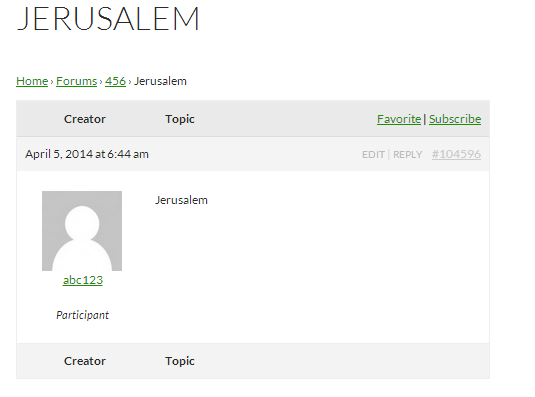
Make sure that ‘Jerusalem’ isn’t in the WordPress bad words list
WordPress Dashboard -> Settings -> Discussion (/wp-admin/options-discussion.php)
Hello,
First of all, my english is not 100% perfect, sorry if you don’t understand me, I’ll try to do it the best that I know.
I’ve spent several days looking for a solution to my situation, in fact I’m very upset with bbpress plugin, I thought this forum would have all classic and basic functions of a forum, but now my website is almost developed and I realise that this plugin is very incomplete. I don’t have time to start over with other forum plugin, I need help with this one.
Usually, forums have different user ranks based on the number of posts that user writes (for 50 posts — > rank 1; for 100posts —> rank 2…….) But in bbpress I didn’t find this function. I was trying to complete this function with a plugin, BBP AUTORANK is one of this, but i don’t want ranks based in points, I need ranks based in posts. Also I would like to add an imagen which represent each rank. Please, could anybody tell me any trick, or way or plugin to do this simple thing? Other of my problems with this plugin is that in case of keymaster, moderator, etc I don’t need to show the rank, only the role.
In fact I need to add one more role to bbpress forum, with almost the same functions that keymaster.
Please I will be very thankful if you help me.
When users try to submit a Topic with the word “Jerusalem” the message “ERROR: Your topic cannot be created at this time.” occurs. If this word is removed the Topic submits with no issues.
I cannot find anywhere is settings where this word is flagged as spam.
Using bbPress 2.5.3 with Stop Spammer Registrations 5.9.3.
When users are posting topics or replies in our private forums it’s taking upwards of 90 seconds before finishing. This tells me that it is sending the data to the server to update the database the forum resides in. The server is for some reason very slow in returning a response to tell the POST function that it can end, and that the next functions to be called can begin. I’ve found is that it is the POST function (ie, posting a post to in our forum) that is taking the amount of time.
How do we fix this? Is it something that will need to come with a bbpress future update? Am I the only one having trouble within our forums doing this? Is there an additional plugin that I need to use? I’m currently using: bbPress Genesis Extend, bbPress Notifications, bbPress Stay Checked, bbP Members Only. Thank you
‘…as I am not really firm in php code ‘ – your coding skills don’t look at all bad to me 🙂
Without testing, that looks fine to me – give it a go.
You could choose to just edit that file, but if you do, keep a note of what you changed, as bbpress updates will overwrite it – purists will say you should never alter core files, but as this is already a plugin, I am less fussy (expecting to be criticised for this!), but do know what you’ve changed.
To do it “properly” you’d need to either
create these as new widgets by copying the code to your functions file and renaming it.
create this as a plugin.
If you need help in how to rename come back, and I’ll make a list of what you need to change, but you’ll need to be a bit patient, as I have loads of queries os, and you’ll need to join a queue !
bbPress is tested against all the common browsers, so unlikely that it is a default issue (indeed mine works fine on all those browsers)
Could be any number of things, but as always start by eliminating plugins and themes viz ;
Check other plugins
Check that no other plugins are affecting this.
Turn off all other plugins apart from bbpress, and see if that fixes the problem. If the problem is resolved, add back one at a time to see which is causing the conflict.
Check themes
If plugins are not the cause, then it may be a theme issue. Switch to a default theme, such as twentytwelve, and test.
Come back and let us know if that helped, and what the issue was, or if still happening.
I’ve set up (bbpress) login widget on the sidebar. All ok on Chrome but on Firefox it’s not appearing though. But I could see the title line e.g. Login there but not the box where I can enter username and password. Strange. However, if I enter the url… /login then I could login via the page (not sidebar). What did I do wrong…. but on Chrome all is good.
I’ve not used it, but try
https://wordpress.org/plugins/bbpress-social-network/
and please come back and let us know if it does what it says !
You’ve been busy with this site, hope it’s getting there !
First I’d eliminate plugins and themes
Check other plugins
Check that no other plugins are affecting this.
Turn off all other plugins apart from bbpress, and see if that fixes the problem. If the problem is resolved, add back one at a time to see which is causing the conflict.
Check themes
If plugins are not the cause, then it may be a theme issue. Switch to a default theme, such as twentytwelve, and test.
If still doing it – come back.
If you set them to wp role -no role for this site and bbpress keymaster and give them toolbar access then
They cannot access the dashboard, but do have tools at the top of the page, including new forum/topic/reply
When viewing any forum or topic/repy, they get “edit” at the top, so they can change all this stuff, and also can amend tools etc.
Set up a test user and see what you get !
I seem to have problem with my newly created forum site on bbpress plugin show not login. Though I’ve logged in but when click on any topic it displays this message.
“You must be logged in to reply to this topic”
But after I click refresh the page F5 then I can see that I’m logged in and now can submit new topic or reply. But when click on another topic, same thing happens again saying I must login to reply. So refresh again then OK again. Why?
The [bbp-topic-index] shortcode will use the default 15 topics based on bbPress ‘Topics per page’ setting, upping this to 25 will show 25 topics per page on the topics view (example.com/topics), the topics page for each single forum and again the same for any place you use the above shortcode.
I have yet to look closely at the code in each of the following plugin (I’m scared of Javascript, jQuery and AJAX ;)) though they might be a good starter for the functionality you are after.
bbPress – Ajax Replies and bbPress – Ajax Topics
This is part of bbPress BTW, just open your site URL and add /topics eg example.com/topics
I’m tinkering with a plugin as a challenge (by the time I’ve finished Stephen and JJJ will have written it into the core!) which I hopefully will finish in a week or so.
In the meantime I documented a version that uses a Justin Tadlocks’ members plugin and Tehnik BBPress Permissions
http://www.rewweb.co.uk/creating-bbpress-groups/
This seems to work, but I would suggest you test the bbpress search functions (it’s on my list to do) to ensure it hides posts from search results. If not, and you can live without search, then just disable search in forums
Layout and functionality – Examples you can use
‘Robin, seriously?’ – yes, but it’s just my view 🙂 I’m just a bbPress user who tries to help others.
Still not sure what being able to edit after a timeout actually gets you, but if others see it differently, then maybe the authors will tackle this.
My bbPress site will be a network of people, many that already have their own wordpress sites.
I want an option or plugin so that when a user creates a blog post on his own site- it will auto post to BB Press as well. Just like there are plugins to post from WordPress to Facebook.
Does this exist?
Another idea would be allowing the user to add an RSS feed to his profile and get the latest content from that rss feed.


