okay what they did was register a menu which is a whole lot easier
so first put this in your functions.php if you have a child theme
function register_menu() {
	register_nav_menu('bbmenu', __('bbpress Forum Menu'));
}
add_action('init', 'register_menu');
and now put this above <?php do_action( 'bbp_template_before_forums_loop' ); ?>
which is inside loop-forums.php inside the bbpress default templates
<nav id="subnav" role="navigation">

<?php
if ( has_nav_menu( 'bbmenu' ) ) { /* if menu location 'bbmenu' exists then use custom menu */
      wp_nav_menu( array( 'theme_location' => 'bbmenu') );
}
?>

</nav>
now put this in your custom css or plugin
#subnav {
	background: none;
	clear: both;
	display: block;
	float: left;
	margin: 0 auto 6px;
	width: 100%;
}

#subnav ul {
	font-size: 13px;
	list-style: none;
	margin: 0;
}

#subnav li {
list-style-type: none;
display: inline-block;
margin: 6px 4px;
}

#subnav a {
text-decoration: none;
color: #555;
background: #ddd;
padding: 2px 8px;
border: 1px solid #e4e4e4;
}

#subnav li a:hover {
background: #333;
color: #fff;
border-color: transparent;
text-shadow: none;
}
tell me if you come into any problems , so i can see if i hadd a problem copy and pasting
Ok, thanks and yes we can fix that.
1. the code is missing ‘);’ by mistake, it should read
function mycustom_breadcrumb_options() {
    // Home - default = true
    $args['include_home']    = false;
    // Forum root - default = true
    $args['include_root']    = false;
    // Current - default = true
    $args['include_current'] = true;

    return $args;
}

add_filter('bbp_before_get_breadcrumb_parse_args', 'mycustom_breadcrumb_options');
The extra ‘);’ is right at the end
I’ve fixed the documentation
2. as stated in https://codex.bbpress.org/functions-files-and-child-themes-explained/
you should not be adding code to the end of a main theme’s functions, but should be creating child theme. By all means leave it there and test that it works, but then create a child theme and move it there or you risk losing the change on an update. I’ll try and make this even clearer in the documentation – it is a first version !
Hope that helps you, and please come back with any further issues ! 🙂
I installed bbpress on my site and it is running the default theme currently I”m going to create my own theme over the next few days but I was wondering how do I enable bbpress breadcrumbs? You can see from http://hearthstoneplayers.com/forums/ that no breadcrumbs are showing, is there a setting I need to turn on? Also I use Yoast breadcrumbs from Yoast SEO plugin could that effect the bbpress breadcrumbs?
I was told that I could either make the breadcrumbs go away completely or modify them. I chose to modify the appearance of the “crumbs of bread”. The following code was offered to me as a possible solution to my desire to modify my breadcrumbs . . .
Layout and functionality – Examples you can use
function mycustom_breadcrumb_options() {
    // Home - default = true
    $args['include_home']    = false;
    // Forum root - default = true
    $args['include_root']    = false;
    // Current - default = true
    $args['include_current'] = true;

    return $args;
}

add_filter('bbp_before_get_breadcrumb_parse_args', 'mycustom_breadcrumb_options'
When inserted at the end of TwentyTen Theme’s functions.php’s code as was instructed in this document . . .
Functions files and child themes – explained !
The result was this message in black against a white screen . . .
Parse error: syntax error, unexpected end of file in /home/sylviannai/public_html/journal/wp-content/themes/twentyten/functions.php on line 568
Is found at the root of my forums . . .
http://hcrd.foundation/journal/forums/
So what I’m asking is there additional code or an error in the code as that last line suggests.
Thank you for reading and please, please help. I’m losing my mind on this project and I didn’t have that many marbles to play with before I started in the first place.
Auriel
Do you know why this fixes the pagination issue when using shortcodes and partnering with a page?
No 😉
I’m not sure what is going on there, I’ll dig around a bit further and see what I can come up with, it should work for any combination of use cases though once you start adding two shortcodes per page it looks like bbPress may have an issue deciding which shortcode to honour the pagination for.
Argh… I can’t reproduce this with either the TWenty Thirteen or Twenty Fourteen theme yet I see the issue on your site!
All of the following combinations work for me
Using a page with the [bbp-topic-index] shortcode
http://example.com/sample-page/ http://example.com/sample-page/page/2/
http://example.com/support/ http://example.com/support/page/2/
http://example.com/forums/ http://example.com/forums/page/2/
Using a page with the [bbp-forum-index] and [bbp-topic-index] shortcode
http://example.com/sample-page/ http://example.com/sample-page/page/2/
http://example.com/support/ http://example.com/support/page/2/
http://example.com/forums/ http://example.com/forums/page/2/
Not using a page (using native bbPress /forums slug with “Forum root should show – Topics by Freshness”)
http://example.com/forums/ http://example.com/forums/page/2/
Any change your using a modified Twenty Thirteen theme?
How about plugin conflicts?
Have you tried resetting/flushing your permalinks?
Hi,
I”m creating my first theme and I have copied over all the bbpress files but for the life of me I cannot figure out how to remove the notification that is at the top of each forum that tells you “This forum contains 1 topic, and was last updated by John 20 hours ago”
The html is the <div class”bbp-template-notice info”> and I have looked through all the template files but I can’t for the life of me figure out what is generating that and how to delete it. I know you can hide it via css but I don’t want to do that I want to actually remove it from my forums.
Thanks
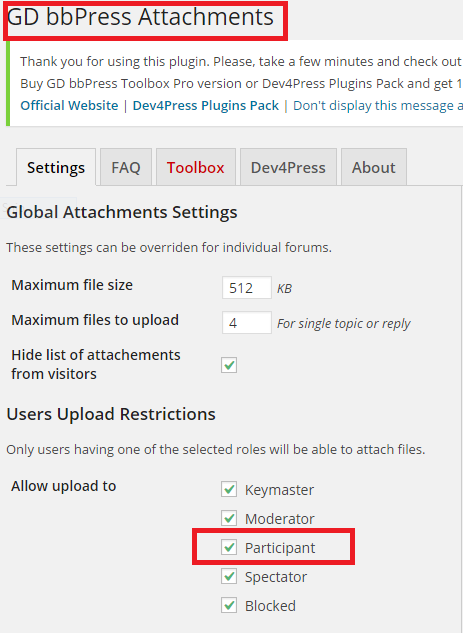
As I have stated numerous times previously use the GD bbPress Attachments plugin, if the GD bbPress Toolbox does not support attachments for bbPress simply do not use it for a purpose it is not intended for.
Here it is installed on my site, with zero configuration changes:
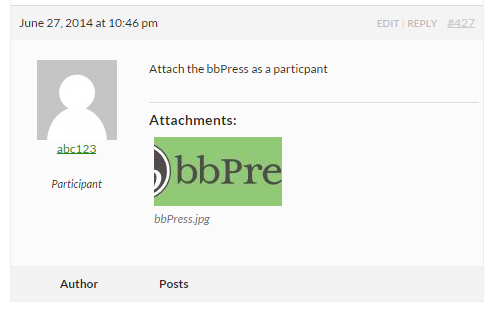
Login as a participant and attach a file:
you’ve paid for this theme, and it says it bbpress compatible, so take this up with the support forum. you should get what you paid for.
Ok, good questions, and I’ve been meaning to write something on this for a while, as I’m always saying ‘drop this in your functions file’
so new page in the codex
Functions files and child themes – explained !
Feedback welcome on what is clear/not clear !!
WP 3.9.1
Theme TwentyTen
I need to add this snippet of code to my functions file in theme/childtheme. The problem is that I haven’t found anything in Documentation telling me where theme/childtheme is. Also will this be overwritten during the next bbPress update?
This is the documentation I was given to modify and insert the following code but it assumes that I know where to put it. Help please.
Layout and functionality – Examples you can use
I’m trying to change how my breadcrumbs look
function mycustom_breadcrumb_options() {

    // Home - default = true

    $args['include_home']    = false;

    // Forum root - default = true

    $args['include_root']    = false;

    // Current - default = true

    $args['include_current'] = true;
return $args;
}
add_filter('bbp_before_get_breadcrumb_parse_args', 'mycustom_breadcrumb_options'
Auriel Kitsu
Hello,
We are working on a WordPress site using a theme.
The website url is: http://tottoncollege.wpengine.com/
The theme is called Smartmag: http://themeforest.net/item/smartmag-responsive-retina-wordpress-magazine/6652608
We want forum functionality and were going to use bbPress, but as soon as we activate the plugin the featured slider breaks and stops displaying properly. We think this is a javascript related issue, but we aren’t quite sure what exactly the issue is.
Please can you advise? We can provide login details to the staging area if needed.
Thanks!
Ok, thanks for your time and help @netweb. I’ve asked @gdragon on the Toolbox support forum but he said it was a BBpress thing:
This is purely WordPress/bbPress feature and my plugin has nothing to do with this. My plugin adds extra control to the WP editor you can use for bbPress, and you can use that to enable different features (like button). But, the way all that actually work is beyond this plugin, and depends on WordPress and bbPress only.
But, you are correct that Participant has no capability to upload files, but I think that bbPress handles this wrong and should not allow media button to be visible in the first place if user has no capability. You need to add ‘upload_files’ capability to bbp_participant user role to enable this.
I am now at the point where I simply need to know how to add ‘upload_files’ to bbp_participant – do you know Steve? Alternatively, do you know how I add a new user type into the BBPress environment (as shown here – http://screencast.com/t/raxzzyIuSL)
Many thanks again.
I’m not frustrated, though I fully understand where you are coming from 😉
It is as simple as (to me at least) that bbPress does NOT include ANY support for uploading attachments, this includes any role or capability to facilitate that.
That said, there is the plugin “GD bbPress attachments” that adds support to bbPress to upload attachments, how it does this and what changes it makes to either bbPress or WordPress roles and capabilities I do not know, as I stated above I have not looked closely at it (i.e. I have not looked at the source code to see how it works)
If you want attachments in bbPress that is the ONLY solution I know of. 🙂
I am still hopeful this will be included as part of bbPress 2.6, with some luck I’ll get to implementing this next week 🙂
on registration, you will need to have auto-registration completed in
dashboard>settings>general and under membership check the anyone can register tab
you’ll then find register is added to the login boxes, and you can add ‘/wp-login.php?action=register’ to the login widget
on your breadcrumb issue see
Layout and functionality – Examples you can use
We have a small forum that’s always worked really well with BBPress. Recently we changed the theme to Montezuma.
Everything works pretty well, but we have a small problem: email notification e-mails take us to replies that just small summaries and stranded from the topic.
For example, this reply: http://www.dexterindustries.com/forum/?reply=2027
Is stranded from the parent topic: http://www.dexterindustries.com/forum/?topic=install-sh-error
Does anyone have any idea on how to correct this with the montezuma theme?
Thanks for that, it lets me know that there are two of you with the issue (so far – there will be more!)
When does the error occur – as soon as you enter the website, when you enter the forums or some other action?
Can you also tell me
What versions of
Bbpress
Wordpress
You are using
And what theme
And what plugins.
Ok sorry @netweb I sense I might be frustrating you with my ignorance (I’m feeling it too!) let me re-phrase my issue:
how do I change the capability of a Participant to allow it to upload media?
Alternatively, how do I add a new user type into the BBPress environment (as shown here – http://screencast.com/t/raxzzyIuSL)
If you can answer either of those issues I can almost guarantee I’ll not bother you again 🙂
Thank you, I didn’t think I could do that because the plugin has all the Template Parts in the bbpress folder and the actual custom post type themes in the extra folder, so can I move the template parts out of the bbpress folder into a new one too? That way I can keep those separate?
I also presume you still have all your plugins except bbPress deactivated? YES, I turn them off when trying everything.
Also what theme is it you are using? http://themeforest.net/item/enfold-responsive-multipurpose-theme/4519990?ref=Kriesi
Have you any custom code in a functions.php file running? NO
Are you not seeing your topics or replies in each section?
Refer to my screen shots before to make sure I am not getting confused to what you are asking here.
For the one I referenced the participant did this:
Forum(General Questions)>Topic(Payout)>
When they go there they see the response to what they entered earlier but they don’t see what they posted earlier.
What is odd though is when I go to the same page I see her original post and my response to her question. She doesn’t see that though, she just sees my response.
———-
This is what she sees as a Participant:

This is what I see as Admin:

Indeed bbPress does this too 🙂
Quick answer, copy the templates you need into your theme folder under /bbpress
More here: https://codex.bbpress.org/theme-compatibility/
I’ve got nothing else at the moment…
Let me think on it for a bit…
I also presume you still have all your plugins except bbPress deactivated?
Also what theme is it you are using?
Have you any custom code in a functions.php file running?
This statement here confuses me… You should see Forums, Topics, and Replies sections like I have in my previous screenshot. All the ‘posts’ should show here, you only see the title of the post and not the full content until you open it with the ‘edit’ row action (mouse over a title).
Are you not seeing your topics or replies in each section?
YES, I do.

Here is Topics screen shot.


