Search Results for 'bbpress'
-
AuthorSearch Results
-
July 31, 2014 at 9:41 am #149991
In reply to: Full Width Forum Help
Robin W
Moderatorsorry, sorry – missed that bit 🙂
Ok will start typing again !
in your bbpress.php
change the lines that say
<div class=”content-wrap”>
<div id=”content”>
to
<div class=”bbpress-wrap”>
<div id=”bbpress-content”>
Then go into
wp-content/themes/oxygen/style.css
and at the end of this file put
.bbpress-wrap {
width : 100% ;
}
#bbpress-content {
float: left;
margin: 0 0 30px;
width : 100% ;
}.bbpress #sidebar-secondary {
display:none ;}
What this does is get bbpress to use the bbpress-wrap with a width of 100% instead of content-wrap, as content-wrap is used by the other pages and need to be 67%.
Then .bbpress #sidebar-secondary is set to display none, so that this disappears
Now if that all works, it is possible that an upgrade of oxygen will take out these changes, so you really need to create a child theme and put both the bbpress.php and the style.css changes in there. See
Do come back if that deosn’t all work, without the theme I can’t test here !
July 31, 2014 at 12:19 am #149973In reply to: Using SSL on login – redirect loop
Stephen Edgar
KeymasterI have just had a quick look at this and with a fresh WordPress 3.9.1 install and bbPress 2.5.4 with
define('FORCE_SSL_ADMIN', true);I cannot see an issue, everything works as expected using both WordPress’ ‘Lost Password’ (https://example.com/wp-login.php?action=lostpassword) or using the bbPress shortcode[bbp-lost-pass]on a page.I also went through using the bbPress login widget with custom pages for ‘lost-password’ and ‘register’ using both
http://andhttps://as the URL’s in the Widget and again everything worked as expected.I’d any other plugins you may be using that change any of WordPress’ login/authentication to narrow down the issue.
July 30, 2014 at 11:48 pm #149971In reply to: Locked up and lost the keys . . .
KeymasterThis is not a bbPress or even WordPress issue 😉
“Whatever” plugin you have to control access will be what it is, just start deactivating all your plugins one by one until you can access the site 🙂
July 30, 2014 at 9:41 pm #149967Topic: Locked up and lost the keys . . .
in forum TroubleshootingK-Path
ParticipantWordPress 3.9.1 running a slightly modified Twenty Ten
The EcoPsi Journal & Forums
http://ecopsi.org/journal/I was up working at around 4am and saw a checkbox for locking the site down and now I can’t remember where that was. I don’t actually even remember if it was even in bbPress although I don’t remember WordPress having that feature but that may be because I’ve never thought of looking for that feature. Anyway, I would appreciate it if someone could tell me the most likely place to open my blog and form to the public. Right now you can only see the landing page and have to register if you want to see more of the site.
July 30, 2014 at 8:47 pm #149965In reply to: Forums index vs custom page shorturl
kopperwoman
ParticipantI’m having a similar problem to dustinarmstrong. But its not exactly the same.
I’m trying to fix a broken forum set up for a client. I did not do the forum installation (he did it himself) AND the forum is installed on a live site that gets lots of web traffic so I don’t want to do anything that might impact the website overall.
Here’s my situation:
1) BBPress was installed (I don’t have details about when and how),
2) a page was created with the[bbp-forum-index]shortcode on it
3) the forum didn’t work, so my client contacted me to fix it
4) I went into settings > forums and changed the forum root slug from the default “forum” to “travel-forums” (the name of the page where the shortcode lives. The error message “Possible bbPress conflict: Forum slug” showed up next to the slug field after saving the settings.
5) I also changed the single forum slug from the default “forum” to “travel-forums”. The error message “Possible bbPress conflict: Forums base” showed up next to the slug field after saving.In my case, the forum page DOES show up at http://foobar.com/travel-forums but it is empty except for the welcome text that I had entered into the forum main window. (So it just says “Welcome to our forum” without any of the discussion topics showing up.
Also, I have the “Recent Topics” widget enabled on my sidebar and my three test discussion topics DO show up there. When I click on any of them they take me to the correct URL but the pages are blank. So, for example, when I click on “test topic” in the widget I land on http://foobar.com/travel-forums/topic/test-topic/ and the page displays the topic header “Test topic” and the topic question “what do you think about travel?” but it doesn’t display any of the posts.
I’m not sure if this behavior is related to the slug conflict error messages or if something else is wrong.
I’m trying to follow the advice that Stephen Edgar gave.
First up, I think this is probably true in my case:
most likely you have something else either titled or using the slug discuss and this includes any items in trash as even though they are in the trash they still reserve that slug and it is not released until the item is removed from the trash.
This is probably a stupid question but How do I empty the trash to make sure that the old slug is removed?
Second, I’d like to try this:
To fix this try resetting your permalinks. In your WordPress Administration Screens navigate to Settings > Permalinks, select a different permalink structure and save. Then select your preferred permalink structure and save again.
but since my website is live and has been for a long time (and has lots of blog posts using the custom structure already) I’m concerned that this could permanently break the existing links. Any thoughts on this?
July 30, 2014 at 8:32 pm #149963KeymasterThere are the two cases:
1. If you enter a ‘moderated keyboard’ that is included in the ‘Comment Moderation’ section of WordPress’ Discussion settings then the topic or reply will be marked as pending (See screenshots below). Currently no notification template is displayed that will notify the user that there topic or reply is waiting in the moderation queue, this will be fixed in bbPress 2.6
2. If you enter a ‘moderated keyboard’ that is included in the ‘Comment Blacklist’ the topic or reply will NOT be created and a generic message is displayed “Your topic cannot be created at this time.”
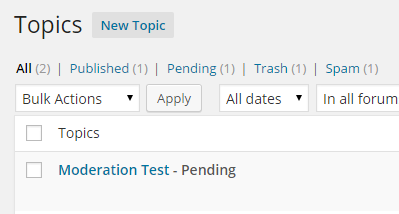
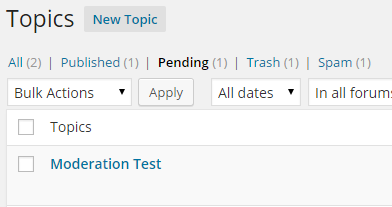 July 30, 2014 at 7:33 pm #149961
In reply to: Forum subscriptions
rzelnik
Participant@wplove3268, I know that this is out of scope of the bbPress project, but IMHO the sender address should be configurable within the WordPress core. The current impossibility to change the sender address doesn’t make sense to me.
Anyway, maybe this article will help you:
Changing the wp_mail from address in WordPress without a plugin
http://www.butlerblog.com/2011/07/08/changing-the-wp_mail-from-address-in-wordpress-without-a-plugin/July 30, 2014 at 6:22 pm #149959Topic: Reply Threading not working
in forum TroubleshootingKillerrabbit2
ParticipantI have the Reply Threading checked and it is not working. It seemed to work right at first but when I erased some nested posts for testing the functionality didn’t come back. In addition I can start a whole new topic and the replies do not nest.
I have switched themes to Twenty Fourteen and that did not fix the issue.
WP 3.9.1
BBpress 2.5.4July 30, 2014 at 2:25 pm #149949In reply to: Unable to view forum root
Moderatorwhich page from my theme does bbpress display using?
your theme is a paid one, so I can’t just download and have a quick look.
July 30, 2014 at 1:48 pm #149947In reply to: Unable to view forum root
dtascher
Participantwhich page from my theme does bbpress display using?
July 30, 2014 at 12:26 pm #149942In reply to: Importing favorites from bbPress 1.x
Doug Smith
ParticipantThanks, Stephen. I was just about to update this conversation with the same thing now that I’ve had a chance to look through the code.
I talked with @jjj about this at WordCamp Milwaukee and he suggested creating a Trac ticket for it, which I have done. https://bbpress.trac.wordpress.org/ticket/2668
July 30, 2014 at 12:01 pm #149941In reply to: small problem with my forum
Robkk
Moderatoridk havent tryed editing the submit button for certain forms yet
but for profile its
#bbpress-forums #bbp-your-profile fieldset.submit button {
float: right;
}for reply form its
#bbpress-forums .bbp-reply-form fieldset.bbp-form button {
float: right;
margin-top: -120px;
}you can try that , other than that try doing what stephen said
You should look up some CSS resources and use your browsers ‘inspector’ to look at how to make CSS changes to your theme, use your favourite search engine to find these.
July 30, 2014 at 11:08 am #149937ModeratorDo you know how I would go about hiding the “Create New Topic” form at the bottom of the page, now that I’ve made the link at the top to go to the “New Topic” standalone page?
copy content-single-forum.php into your bbpress folder
and delete any instance that say<?php bbp_get_template_part( 'form', 'topic' ); ?>that should do it
July 30, 2014 at 10:59 am #149936In reply to: Customizing "Reply To Topic" Area
Moderator@marximusmg yeah this is pretty easy
copy content-single-topic into your bbpress folder in your child theme.
then just move
<?php bbp_get_template_part( 'form', 'reply' ); ?>just below
<?php bbp_get_template_part( 'content', 'single-topic-lead' ); ?>July 30, 2014 at 10:19 am #149935In reply to: Content not showing on using custom template
MilliR
ParticipantWhere to copy the files?
Should I copy the files in /mytheme/bbpress or in /mytheme/ itself? Currently, I have copied all files to /mytheme/bbpress and facing same issue.
July 30, 2014 at 9:37 am #149934In reply to: Forum subscriptions
ParticipantSo I tried a different e-mail configuration plugin: WP SMTP. The forum post notification emails are now delivered well. It’s strange that in the e-mail header there is the right sender address, while in the captured log there is still the default wordpress noreply@domain address, see here:
https://dl.dropboxusercontent.com/u/9349232/bbpress-email-testing/wp-mail-log-wp-smtp-forum-post.txt
Anyway, it is working well for me now.
July 30, 2014 at 8:52 am #149932In reply to: Importing favorites from bbPress 1.x
KeymasterFavourites are not currently supported when importing from bbPress 1.2.
July 30, 2014 at 8:48 am #149931In reply to: url shows forums/forum/myname
KeymasterGo to bbPress settings and uncheck the checkbox to include the ‘forum prefix’
July 30, 2014 at 8:47 am #149930In reply to: Forum subscriptions
ParticipantThank you Stephen for your answer. You are right with the BCC, it works as described. However, something causes that in the forum post notifications the “From” is set back to the default <noreply@domain.com>, although it is set to different/custom address by the WP Mail SMTP plugin. Here are two e-mail logs captured by the WP Mail Log plugin:
1. Forum post, e-mail notification sent to subscribed user(s):
https://dl.dropboxusercontent.com/u/9349232/bbpress-email-testing/wp-mail-log-forum-post.txt2. BuddyPress Friend request sent to the requested user:
https://dl.dropboxusercontent.com/u/9349232/bbpress-email-testing/wp-mail-log-friend-request.txtBoth messages are sent from the same installation with the same configuration. You can see that the friend request has “From” address set to neodpovedaj@tvorivo.sk (the desired address), while the forum post notification has “From” set to noreply@forum-vyvoj.tvorivo.sk (which is wrong).
My web hosting service blocks the PHP mails sent from unknown addresses, so that’s the reason why the e-mails are not delivered. I will try if it works with some other E-mail/SMTP configuration plugins.
July 30, 2014 at 7:08 am #149925In reply to: user profile link giving a 404 error
KeymasterThis is most likely an issue with IIS Rewrite Module not being configured correctly rather than a bbPress issue.
If you plan on deploying this site to an IIS server (e.g. Azure) then I’d look to fixing the IIS Rewrites, if you are looking to host this site on a typical ‘Linux’ server using Apache or Nginx I’d look to swapping your local virtual server infrastructure to match that of your chosen host provider.
July 30, 2014 at 6:59 am #149921In reply to: Content not showing on using custom template
KeymasterbbPress will use that
forum.phpfile as a wrapper template for all of bbPress pages and that is most likely what the issue is.I’d suggest if you need a wrapper template to work with your theme you copy the contents of your themes
page.phpto a file namedbbpress.php.Then copy any bbPress templates you want to customize to your themes folder.
See these for more info on copying bbPress templates and child themes:
July 30, 2014 at 6:55 am #149920In reply to: moderating bbpress
KeymasterSee https://codex.bbpress.org/moderation-and-blacklisting/
And if you are looking for either registration or topic/reply captch check out the plugins available as there are a few that do registration and at least one for captcha topics/replies:
July 30, 2014 at 6:51 am #149918KeymasterMuch of what happens when the ‘moderation’ is triggered from comment moderation has not been added to bbPress until the code I’ve added recently.
If your comfortable with PHP you could take a look at what I have thus far in the following tickets:
This first one handles post of what is coming for moderation:
https://bbpress.trac.wordpress.org/ticket/2645This second one is for the template to notify the user that there topic/reply is pending moderation, I haven’t started on this due to needing to implement everything in the above #2645 first, now that I got most of the code finished for that yesterday I plan on looking at this in the next few days.
https://bbpress.trac.wordpress.org/ticket/2589
Keep an eye on those tickets and that should give some hints of what is happening.
July 30, 2014 at 6:38 am #149915In reply to: Forum subscriptions
KeymasterEmails previous to bbPress 2.5.4 were sent out out to each recipient email individually (one email per user), since bbPress 2.5.4 we now only send a single email with all the recipients as BCC (Blind Carbon Copy) and all emails are sent using as you state a default email address of
noreply@domain.tld.bbPress also works fine to send emails with many of the WordPress mail plugins and should work as we are using WordPress’
wpmailfunction to send them.July 30, 2014 at 6:28 am #149911In reply to: bbPress Codex
KeymasterAs to the details of a project for what UI/UX changes are install for bbPress we will continue to flesh these out and post something when we think we have both the goals of these projects and resource and requirements to help contribute ready to go at the same time.
Much of all this is core to the feedback we received from the survey and just a bit more time for us to get our ducks in a row is in order to get these up and running, but they are important to get up and running 🙂
I haven’t looked at HipChat except for a quick glance now and maybe this is something WordPress may look at in the future.
It’s been a while since one of ‘these’ conversations has occurred here on bbPress.org so it’s been fun and I do look forward to hoping we can find an area that you’d be willing to donate some of your time to help out the project. 🙂
-
AuthorSearch Results

