dont make duplicate topics
you probably dont have to make categories/sub-categories for each forum you are making if you are going to end up putting the forum in a post/page.
But i have no idea why you would need to do this type of thing, why not just use bbPress or just WordPress by itself instead of redirecting one to another.
I’m building a discussion board site that won’t use the standard bbpress forum interface. Forums will be embedded in individual post/pages with shortcodes. And all forum-type URLs will redirect to the appropriate post/page.
So no one will have access to the normal forum structure/hierarchy. Will I still need to create categories/sub-categories/forums for the individual forums?
This site may eventually have hundreds of forums and I’m looking to provide the best possible performance.
Any help welcome, Thanks.
Chad
Robkk – thanks for the clarification. I’m getting a better grip now on how bbPress is set up. Although, in another forum I am working on, sometimes the stickies show up twice, but sometimes they don’t?
Question: So if stickies do show up twice normally, is there are method to get them to only show at beginning of topic (top of page)?
In the “list of topics” view, if it doesn’t have many topics and there is a sticky, the user will see the same topic twice on the same page (once at the top in the sticky area, and again below in the topic list area. Is there a method to prevent this redundancy. It’s not a huge deal, but it seems to me it will improve user experience.
Thanks for any suggestions.
ok i get what you are saying now.
sticky topics show up sticky on the top on the first page, a page after that the sticky topic is shown like any other topic
for example on here
you will see the sticky topic titled “before posting” on the top of the 1st page and like any other topic on the 5th page
Troubleshooting
Troubleshooting
so its all good.
if you use BuddyPress and bbPress together the profiles will most likely merge together, but you could force to just use the bbPress profile i think.
And i think the members page from BuddyPress should link to the users forum profile if you forced it.
i never tried it before but this might help you.
it looks like you create a custom page template, so create a members page then choose that template and i should show up.
http://www.hongkiat.com/blog/wordpress-display-authors-pagination/
i think the 2.4 version was suppose to be bbPress.
so it should be patched up.
see if its something else causing the issue.
It could be a theme or plugin issue
Plugins
Deactivate all but bbpress and see if this fixes. if it does, re-enable one at a time to see which is causing the error.
Themes
If plugins don’t pinpoint the problem, as a test switch to a default theme such as twentytwelve, and see if this fixes.
Then come back
Thanks for the reply. I don’t “think” this a archive scenario, unless I am misunderstanding how archives work.
Here is one of the topics in question (it’s a sticky, not a super sticky):
https://www.lifeleap.org/newcommunitysite/forums/topic/read-before-asking-any-psychic-questions-in-a-post/
The topic is a sticky here:
siteurl/newcommunitysite/forums/forum/lifeleap-cafe/free-psychic-questions/
But it also shows up here:
siteurl/newcommunitysite/forums/forum/lifeleap-cafe/free-psychic-questions/page/2/
(I tried to post all links, but bbpress wouldn’t let me)
Thanks for any suggestions.
Thanks very much @robkk. The link on wp user query is a great tool to solve my problem.
Concerning the use of BuddyPress, i think the link will be a problem in the sense that the links to the profiles that will be displayed will not link to the users forum profile. I want the links to go to user’s bbPress profile page, not the default wordpress user page nor the buddypress profile.
So I have decided to go by the Wp user query way, but please how am I going to create the php code. Am i supposed to wrote it in a page? or where should I put the code and how will i create the page?
Thanks.
@gptxffa
Showing the comment your are replying to next to the reply to: text bbPress does not do that. That sounds like some custom development go to http://jobs.wordpress.net/ and post a job.
as for reply threading , i guess not threading??
see if its a theme or plugin issue
Plugins
Deactivate all but bbpress and see if this fixes. if it does, re-enable one at a time to see which is causing the error.
Themes
If plugins don’t pinpoint the problem, as a test switch to a default theme such as twentytwelve, and see if this fixes.
Then come back
what version of bbPress / BuddyPress / WordPress are you using?
@mentions is not part of bbPress yet.
but for now you can use the @mentions feature from BuddyPress and use on forums with this code.
copy this into your child themes functions.php or use a functionality plugin.
function custom_bbpress_maybe_load_mentions_scripts( $retval = false ) {
	if ( function_exists( 'bbpress' ) && is_bbpress() ) {
		$retval = true;
	}

	return $retval;
}
add_filter( 'bp_activity_maybe_load_mentions_scripts', 'custom_bbpress_maybe_load_mentions_scripts' );
and i think you would get an email notification from BuddyPress anytime you get @mentioned
for multiple users you can just separate it with a space.
There is a way using the wp user query
https://codex.wordpress.org/Class_Reference/WP_User_Query
plugins like BuddyPress have this type of feature too.
bbPress does not have a feature/shortcode like this, but if you use BuddyPress , bbPress is compatible with it.
Thank you, Stephen, for taking the time to create a mapping graphic. Much appreciated!
One question: In my Forum code, the Forum_Parent, which is “0” (zero) identifies it as a thread starter, and because the Forum_Ancestor is not “0” (zero), lists it as a reply, underneath the parent, and multiples are ordered by date DESC. How does bbPress handle this? If I understand the methodology, I’ll do better at the mapping. Do I simply use the Forum_Parent for ALL?
Hope I am clear in my question…
Lisa
I have a bbPress driven forum on http://ictgiants.com/questions/category/all and I want to create a page that will display the registered users on my website similar to http://stackoverflow.com/users.
Please if there is a plugin or shortcode that does this, that is what I need
Any idea and links will be appreciated.
Thanks in advance
Profile counts topics and posts right, but display is wrong. Almost as you moved posts/topics between different Users (owners).
Did you maybe deleted one User and made new one with same username ?
Do you use caching plugin ? Fast, they usually work OK with bbPress.
Hi there,
I have bbp-register shortcode, but I need to implement next step in the registration. Im using Paid Membership Pro to make membership levels. For now, I have only registration into bbpress, but the user is not redirected on the page where he can choose his membership level…Every new member is registered without any membership.
Is it possible to add this feature into registration process?
Thanks!!
ok, undo that previous change by deleting that file, it was rubbish !
Then in your function file add
function default_reply_subscribed() {

		// Get _POST data  IE is this a first post of a topic?
		if ( bbp_is_post_request() && isset( $_POST['bbp_topic_subscription'] ) ) {
			$topic_subscribed = (bool) $_POST['bbp_topic_subscription'];

		// Get edit data  IE either the author or someone else is editing a topic or reply
		} elseif ( bbp_is_topic_edit() || bbp_is_reply_edit() ) {

			// Get current posts author
			$post_author = bbp_get_global_post_field( 'post_author', 'raw' );

			// Post author is not the current user EG a moderator is altering this. In this case we'll leave the default to blank,
			//as much of the time mods are correcting or moderating, their not interested in the topic itself !
			if ( bbp_get_current_user_id() !== $post_author ) {
				$topic_subscribed = bbp_is_user_subscribed_to_topic( $post_author );

			// Post author is the current user  IE you're editing your own post, so default should be to see any replies
			} else {
				$topic_subscribed = true ;
				//the next line is what it used to say instead of true
				//bbp_is_user_subscribed_to_topic( bbp_get_current_user_id() );
			}

		// Get current status
		} elseif ( bbp_is_single_topic() ) {
			//the user is writing a new reply ?
			$topic_subscribed = true ;
			//the next line is what it used to say instead of true
			//bbp_is_user_subscribed_to_topic( bbp_get_current_user_id() );

		// No data
		} else {
			$topic_subscribed = true;
			//used to say false !
		}

		// Get checked output
		$checked = checked( $topic_subscribed, true, false );

		return apply_filters( 'default_reply_subscribed', $checked, $topic_subscribed );
	}

add_filter ('bbp_get_form_topic_subscribed', 'default_reply_subscribed') ;

function default_log_edit_false() {

		// Get _POST data
		if ( bbp_is_post_request() && isset( $_POST['bbp_log_reply_edit'] ) ) {
			$reply_revision = $_POST['bbp_log_reply_edit'];

		// No data
		} else {
			$reply_revision = 0;
		}

		return apply_filters( 'default_log_edit_false', checked( $reply_revision, true, false ) );
	}

add_filter ('bbp_get_form_reply_log_edit', 'default_log_edit_false' ) ;
Functions files and child themes – explained !
that should do both topic edit and reply subscribed.
O.K. Guys, i find the problem by my own.
Typing Error, the right code is:
#bbpress-forums, .article, div#content_box.sidebar_layout {
	width: 100%;
}
But now my Start Page got a full width too, again.
Hmm, ok so i have to try to fix it again.
It would be easier if i would find the Page id from the forum root.
But i dont know, where can i find it.
Normaly i can see the page id in the urls.
Its not possible here.
Hello everyone,
i am very new to CSS & HTMl, i tried to solve my problem by my own, but i didn’t get it.
Maybe someone has a idea how i can fix my new bbpressforum.
Only half of the site is used by BBpress. BBpress should use all the remaining free space.
Thats why i tried yet.
The widget area dissapeard and bbpress should fill out the empty space.
But yeah, how you can see its not working. (http://www.forest-game.de)
My Code:
#bbpress-forums .article, div#content_box.sidebar_layout {
	width: 100%;
}
#bbpress-forums .article, .sidebar.c-4-12 {
	display: none;
}
Edit:, oh i did something wrong. The widgets areas on the other sites dissapeared too ^-^
Kindly regards
I am on my second attempt of using bbPress, but I am having a little issue. When someone creates a discussion post, it doesn’t show up. Check out my forum at DCCollectors.com, and you can see what I am talking about. When clicking on the post link, it doesn’t show what has been posted.
You may need to extract the users out to a separate table, or you may be able to treat these users as “anonymous users”, I’d suggest first though I’d look at mapping some of the fields for the content only as that should not take much time to get up and running.
First you want to do this with bbPress 2.6 ‘alpha’ rather than the current 2.5.6 release as there are significant improvements to the importers in the upcoming version.
You can get your hands on 2.6 alpha via https://wordpress.org/plugins/bbpress/developers/ and it is listed under “Other Versions” as “Development Version”
Or the direct download link https://downloads.wordpress.org/plugin/bbpress.zip
Next you want to make a copy of Example.php from the includes/admin/converters folder of the plugin to MyConverter.php and in that file replace any instance of Example with MyConverter (this is case sensitive to be mindful of that)
Next up start mapping the fields from your schema to the fields in MyConverter.php
In the following screenshot I’ve mapped drawn lines to the easily concluded fields, any field mappings that you do not use you can simply delete, ideally using as many as you can will ensure the best bbPress experience for your data though.
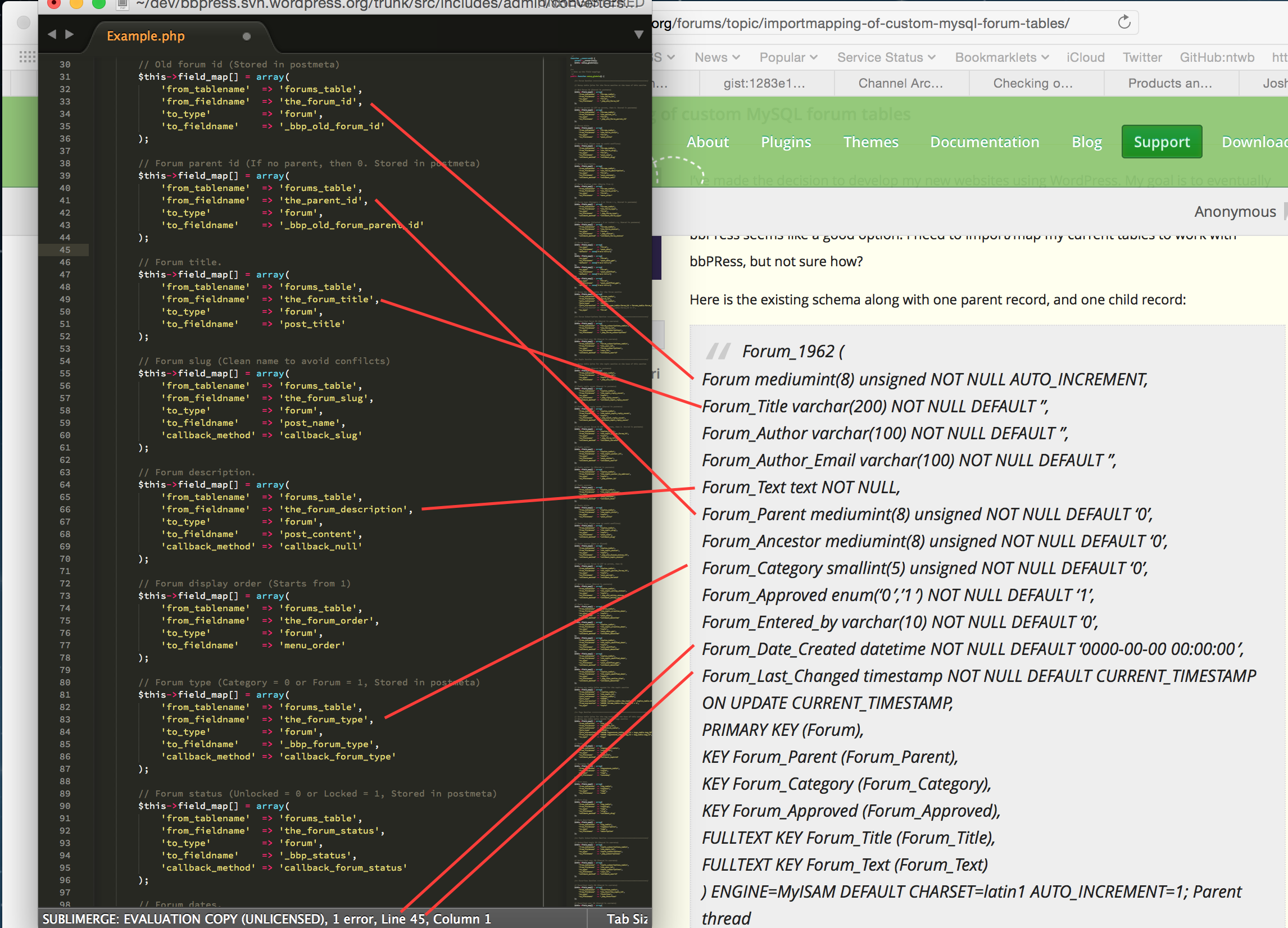
Take a stab at doing the above for the rest of your database, topics, replies etc and get back to us.
If you need a place to host code snippets, use GitHub Gists: http://gist.github.com
ok thanks I can see it now.
create a directory on your theme called ‘bbpress’
ie wp-content/themes/%your-theme-name%/bbpress
where %your-theme-name% is the name of your theme
find
wp-content/plugins/bbpress/templates/default/bbpress/form-topic.php
Make a copy of this file, and put in in the directory called bbpress that you created above, so you end up with
wp-content/themes/%your-theme-name%/bbpress/form-topic.php
bbPress will now use this template instead of the original
then edit this file to change line 183
<input name="bbp_log_topic_edit" id="bbp_log_topic_edit" type="checkbox" value="1"
etc.
to
<input name="bbp_log_topic_edit" id="bbp_log_topic_edit" type="checkbox" value="0"
etc.
It will then be unchecked by default


