Hi RotiSoft,
Could you provide me with a description of how you’re displaying the titles?
I’ve just recently had a longer correspondence with RobW, about what i think is the same issue.
He told me as follows:
Basically a category holds the last active ID of its sub forums, and each sub forum also holds its last active ID. But deleting a sub forum topic seems to get the category last active ID wrong.
I see that he just updated he’s bbpress style pack plugin, with a hotfix for this issue,
while he gave me the snippet of the code used for the fix, it does not work if your tweak is done if you’re using code as in this: https://bbpress.org/forums/topic/freshness-link/
I don’t think Robin would mind me sharing the code snippet, as he implemented it in he’s free plugin, but as requested i would like to know how you’re displaying it.
-Fuske
lots of shortcodes available for putting into pages and posts
Shortcodes
and I have additional shortcodes in my style pack plugin
https://wordpress.org/plugins/bbp-style-pack/
ok, it’s not a released version, so suggest you post a trac ticket for the error
https://bbpress.trac.wordpress.org/newticket
this – it has some parts changed !!
add_filter ('bbp_filter_anonymous_post_data' , 'rew__filter_anonymous_post_data' 10, 2) ;

function rew_filter_anonymous_post_data( $retval, $r  ) {
	// Filter variables and add errors if necessary
	$r['bbp_anonymous_name'] = apply_filters( 'bbp_pre_anonymous_post_author_name',  $r['bbp_anonymous_name']  );
	if ( empty( $r['bbp_anonymous_name'] ) )
		bbp_add_error( 'bbp_anonymous_name',  __( '<strong>ERROR</strong>: Invalid author name submitted!',   'bbpress' ) );

	// Website is optional
	$r['bbp_anonymous_website'] = apply_filters( 'bbp_pre_anonymous_post_author_website', $r['bbp_anonymous_website'] );

	// Return false if we have any errors
	$retval = bbp_has_errors() ? false : $r;

	// Finally, return sanitized data or false
	return apply_filters( 'rew_filter_anonymous_post_data', $retval, $r );
}
i insert code on functions.php on my team
add_filter ('bbp_filter_anonymous_post_data' , 'rew__filter_anonymous_post_data' 10, 2) ;

function rew_filter_anonymous_post_data( $retval, $r  ) {
	// Filter variables and add errors if necessary
	$r['bbp_anonymous_name'] = apply_filters( 'bbp_pre_anonymous_post_author_name',  $r['bbp_anonymous_name']  );
	if ( empty( $r['bbp_anonymous_name'] ) )
		bbp_add_error( 'bbp_anonymous_name',  __( '<strong>ERROR</strong>: Invalid author name submitted!',   'bbpress' ) );

	// Website is optional
	$r['bbp_anonymous_website'] = apply_filters( 'bbp_pre_anonymous_post_author_website', $r['bbp_anonymous_website'] );

	// Return false if we have any errors
	$retval = bbp_has_errors() ? false : $r;

	// Finally, return sanitized data or false
	return apply_filters( 'bbp_filter_anonymous_post_data', $retval, $r );
upload file functions.php on server. open site error.
not sure what you mean, but corrected code here
add_filter ('bbp_filter_anonymous_post_data' , 'rew__filter_anonymous_post_data' 10, 2) ;

function rew_filter_anonymous_post_data( $retval, $r  ) {
	// Filter variables and add errors if necessary
	$r['bbp_anonymous_name'] = apply_filters( 'bbp_pre_anonymous_post_author_name',  $r['bbp_anonymous_name']  );
	if ( empty( $r['bbp_anonymous_name'] ) )
		bbp_add_error( 'bbp_anonymous_name',  __( '<strong>ERROR</strong>: Invalid author name submitted!',   'bbpress' ) );

	// Website is optional
	$r['bbp_anonymous_website'] = apply_filters( 'bbp_pre_anonymous_post_author_website', $r['bbp_anonymous_website'] );

	// Return false if we have any errors
	$retval = bbp_has_errors() ? false : $r;

	// Finally, return sanitized data or false
	return apply_filters( 'rew_filter_anonymous_post_data', $retval, $r );
}
if you know ftp then rename the bbpress folder.
what version of bbpress are you using?
“Warning: A non-numeric value encountered in . . . /wp-content/plugins/bbpress/includes/forums/template.php on line 1441”
Here is line 1441 $retval = $replies + $topics;
http://www.sndg.org/2017/forums/
This kind of thing is out of my knowledge base. Is it something I did, or a bad line in the install?
no insert code on fuctions file. on site error
add_filter ('bbp_filter_anonymous_post_data' , 'rew__filter_anonymous_post_data' 10, 2) ;

function rew_filter_anonymous_post_data( $retval, $r  ) {
	// Filter variables and add errors if necessary
	$r['bbp_anonymous_name'] = apply_filters( 'bbp_pre_anonymous_post_author_name',  $r['bbp_anonymous_name']  );
	if ( empty( $r['bbp_anonymous_name'] ) )
		bbp_add_error( 'bbp_anonymous_name',  __( '<strong>ERROR</strong>: Invalid author name submitted!',   'bbpress' ) );

	// Website is optional
	$r['bbp_anonymous_website'] = apply_filters( 'bbp_pre_anonymous_post_author_website', $r['bbp_anonymous_website'] );

	// Return false if we have any errors
	$retval = bbp_has_errors() ? false : $r;

	// Finally, return sanitized data or false
	return apply_filters( 'bbp_filter_anonymous_post_data', $retval, $r );
}
Hy!
I’m convert my old Invision Power Board forum to bbPress. After that i use the Admin/Tools/Forums functions. Now i see the last activation, but that info is wrong.
So, the last active topic name and writer user is good, correct. But the link on the topic name is bad.
The topic name is the first (last active) and the link is for the second active topic.
How can i fix that?
Thank You!
untested, but try adding this to your functions file
add_filter ('bbp_filter_anonymous_post_data' , 'rew__filter_anonymous_post_data' 10, 2) ;

function rew_filter_anonymous_post_data( $retval, $r  ) {
	// Filter variables and add errors if necessary
	$r['bbp_anonymous_name'] = apply_filters( 'bbp_pre_anonymous_post_author_name',  $r['bbp_anonymous_name']  );
	if ( empty( $r['bbp_anonymous_name'] ) )
		bbp_add_error( 'bbp_anonymous_name',  __( '<strong>ERROR</strong>: Invalid author name submitted!',   'bbpress' ) );

	// Website is optional
	$r['bbp_anonymous_website'] = apply_filters( 'bbp_pre_anonymous_post_author_website', $r['bbp_anonymous_website'] );

	// Return false if we have any errors
	$retval = bbp_has_errors() ? false : $r;

	// Finally, return sanitized data or false
	return apply_filters( 'bbp_filter_anonymous_post_data', $retval, $r );
}
I’m trying to find where the button gets created so I can edit the link then follow the rest of this post: https://bbpress.org/forums/topic/how-to-add-new-topic-button/
yes. i bbPress will now use this template instead of the original. but test don’t work
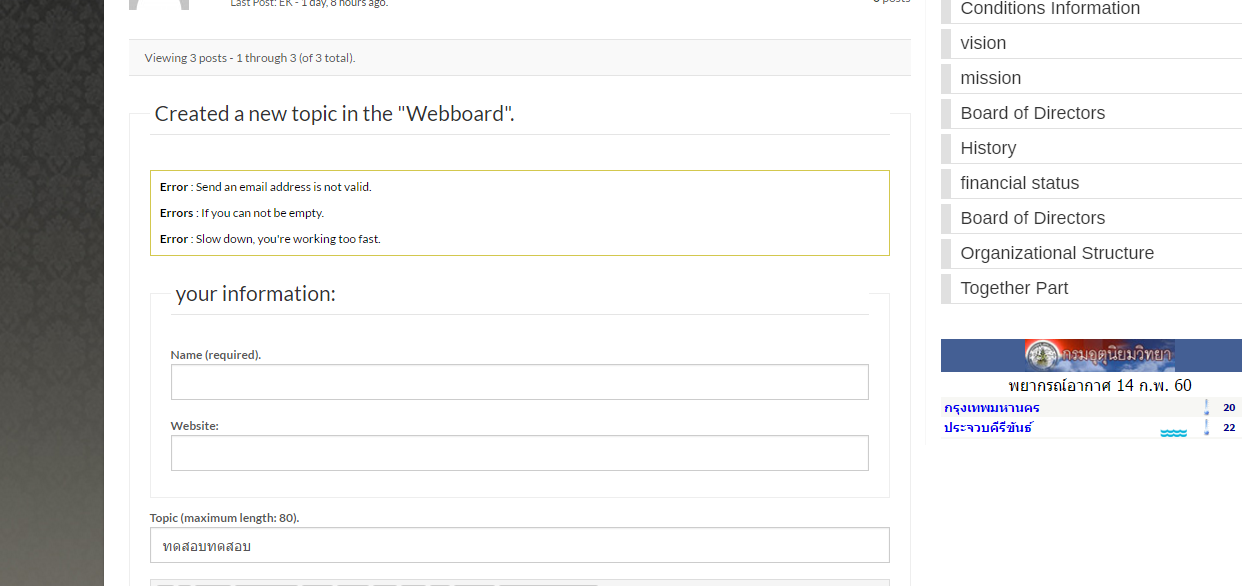
This is in a file called form-anonymous.php :
create a directory on your theme called ‘bbpress’
ie wp-content/themes/%your-theme-name%/bbpress
where %your-theme-name% is the name of your theme
find
wp-content/plugins/bbpress/templates/default/bbpress/form-anonymous.php
Make a copy of this file, and put in in the directory called bbpress that you created above, so you end up with
wp-content/themes/%your-theme-name%/bbpress/form-anonymous.php
bbPress will now use this template instead of the original
and you can amend this
you will see that lines 26-29 contain
<p>
			<label for="bbp_anonymous_email"><?php _e( 'Mail (will not be published) (required):', 'bbpress' ); ?></label><br />
			<input type="text" id="bbp_anonymous_email"   value="<?php bbp_author_email(); ?>" tabindex="<?php bbp_tab_index(); ?>" size="40" name="bbp_anonymous_email" />
		</p>
Just delete this and save, and this field will not be shown
As Robin suggested, you can disable all addons, i would however try disabling bbpress too.
I have had same problem lately after doing some work on my site, and i solved it by disabling and enabling bbpress.
I am creating a forum for users that is part of a larger website. When I tested registration it appears that registered users have access to the website dashboard, even when set to participant or spectator level. How do I configure the log in so users only have access to the actual forum themselves?
I am using WordPress 4.7.2 and bbpress 2.5.12
Thanks!
Hi there,
Does anyone know if there is a plugin that allows for a slightly nicer way of creating a New Topic?
E.g. either a new page as this forum on bbpress.org does, or something that opens at the top of the screen? Anything that doesn’t place the form at the foot of the page.
Thanks 😀
Jack
It could be a theme or plugin issue
Plugins
Deactivate all but bbpress and see if this fixes. if it does, re-enable one at a time to see which is causing the error.
Themes
If plugins don’t pinpoint the problem, as a test switch to a default theme such as twentyfifteen, and see if this fixes.
Then come back
Hi,
Yes I followed the explanation as I found out this is the first thing you asked to do.
I found out, taking a look at a plugin I had previously installed, called “bbpress wp tweaks”, that after a couple of an hour my template was eventually listed, however, it doesn’t make any difference and, yes my FTP software is working nice !
Any idea as there are not many templates and theme Twenty seventeen is quite different from the previous ones !?
Thanks for your kind help
Philippe
bbp additional shortcodes plugin solved the problem 🙂
Hi
I’ve been reading many posts on this forum and tried out many proposed solutions but to no avail up to now 🙁
I first started with the copy of an unmodified and renamed in “bbpress.php” “page.php” file at the root of my theme folder, then with another one with a slight modification of the code substituting the class “content-area”with “content-area-wide”, I then tried another method creating a subfolder in my theme and copying the above mentioned file as well as a modified “style.css” file.
The code was simply :
.content-area-wide {
float: left; margin-right: -100%; width: 100%}
@import url (“../twentyseventeen/style.css”);
Unless the code is not correct or the path or it’s syntax either, of course it didn’t work either.
Surprisingly, the page listing all the forums is using almost the full width, and looks exactly what I’m looking for anyway but as son as I get in one of the forums they are displayed as if on one column way and aligned on the left.
Same thing for the abovementioned page if I go back to it unless I refresh it…
I should point out that I don’t use or have any sidebar for these pages and I’m not concerned by this kind of problem like many other people!
As I’m not a master of the code, could anybody help me and describe each step to solve this frustrating issue so that I can follow each step and not guess intermediate steps considered as obvious are easy by the most learned guys !?
Thanks so much for our site subscribers
Regards,
Philippe
Hi, sry i can’t edit my previous post. I used the bbpress signature plugin.
But also if i add a Link to a normal post, the link is not working because bbpress is adding the root url of the post before my url.
Is this because of permallinks or what is the issue?
thanks!
can’t remember that bbpress has a signature element – are you using an additional plugin to do this?


