Hey,
I have a wordpress forum @ http://www.holysh1t.net for the quake live CTF community.
I recently installed a bbpress forum to go with that. Seems to work pretty fine besides some inital errors.
Yet now I face this problem where It does not automaticly link people’s account when they signed up via front end of the wordpress. All the registered users in wordpress had to be manually given in a role in bbpress. The same thing applies for new registrations in wordpress.
However, if I sign up via the forum stuff works great.
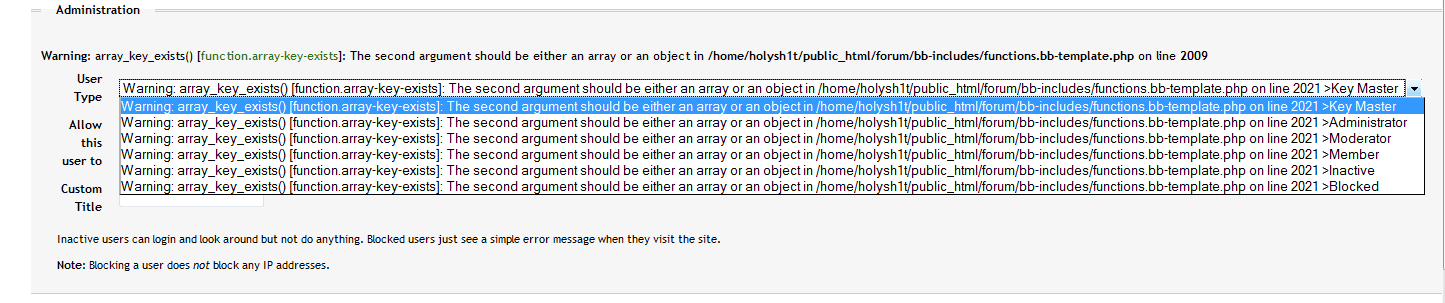
This is the menu I get when someone made an account via front end:
http://www.holysh1t.net/files/bridge_error.png
If I click any role and then save, it corrects itself and the user can post. The long error is replaced by whichever role I chose. (member/admin,etc…)
Now I have to manually assign a role each time someone signs up through wordpress instead of bbpress.
WordPress: 2.7
bbpress: 10 alpha 4
Any ideas?
Thanks for the support and I greatly appreciate the effort put into this great piece of code!
Greetings,
Nico
http://www.holysh1t.net
Wow, this thread has attracted some really well-known (infamous?) WordPress people. 
bbPress has an advanced WHERE filter on every mysql query.
You could write a plugin that simply tallys their post (and cache that cause you don’t want to do it each time) and then manipulate the WHERE filter based on the result.
It’s a very strange request so don’t expect me to do it for you 
See my Hidden Forums plugin to see how the filters work.
@sambauers
I’ve added the issue to Trac:
https://trac.bbpress.org/ticket/1016
This is actually my first time submitting a ticket, so I hope I done everything correctly.
Hi guyz,
To start off, a very exceptionally simple script – thats bbpress.org
I am in the process of modifying the BBpress into not just a forum.. but more.. Most of the stuff is done.
My Question is:
Is it possible to Lock the number of visible topics a member is able to view?
I havent attempted to do this yet.
I want to force participation, in the sense that, when a member posts one topic, about 9 other topics are now visible to That member.
Another topic post by that member brings the visible topics to 20 for him specifically.
In other words, the number of topics visible to a member is the number of topics that member posted!
so is this possible? if so, how difficult would that be?
Okay, so I deleted the entries for the members in “bb_capabilities” aside from the keymasters, and when I try to run the user role map, it doesn’t actually work. I haven’t tried to track this function down yet but as a suggestion I almost wonder if that role map might actually work better as a role alignment tool, overwriting the values with the new ones for all users.
I may just make that a plug-in actually because my trouble shooting attempt may have been a bad idea haha!
bbPress .9 won’t integrate with WP 2.7.
Use the alpha version and things should be okay.
Ok, I went into my phpAdmin (GoDaddy) and deleted all the tables involving bbPress, which allowed me to redo the installation. But now, it won’t connect the tables. When I go through Step 2 and fill in all the information and then go on to Step 3, it tells me I skipped Step 2.
Just tried to integrate bbpress and wordpress, and now I can’t login to bbpress. I had two users set up in my forum — a key master and a normal user — and I’m getting responses that neither exist. I’m wondering if the problem may be related to the “Locked Out” thread of a couple of weeks back, but I’m not getting any error message when I try call the forum. But neither of my user names is recognized, and I donno how to get into admin to see if they’re still there. I’m using 0.9.0.3 bbpress and 2.7 wordpress. I installed both of them separately then later tried to effect the integration; they reside in separate databases on the server (ddigger1_final and ddigger1_bbpress); bbpress is in a subdirectory of public_html, as is wordpress.
Any suggestions on how to fix it would be appreciated. Thanks.
Question, any reason why, after making sure all the keys matched between the two, I’d still be getting this error:
>>> Fetching missing WordPress cookie salts.
>>>>>> WordPress “auth” cookie salt not set.
>>>>>> WordPress “secure auth” cookie salt not set.
>>>>>> WordPress “logged in” cookie salt not set.
@sambauers – Should I define COOKIEHASH in wp-settings or wp-config? I’ve seen both methods mentioned in various places and am curious if one is preferred/required? Thanks!
The missing value in your list is AUTH_SALT
It *may* work in 2.6.5 if you define all the cookie names individually in WPMU.
I followed all the steps and did ‘Complete the Installation’ and it said everything was correct but then said the forum failed to be created. When I try and go to the forum it will load for a little while and then say Firefox can tell that this process won’t end. I tried taking everything off my server and retrying it and I’m following the instructions again and now I can’t get past Step 1. When I try and click to go to Step 2, I get the same page from before saying Firefox can tell that this process won’t end, or something to that effect. Any idea of what the issue could be?
I’m using WordPress 2.7 and the newest Alpha build of bbPress.
A quick note… A new user registered and not only do I get the error message when trying to edit their profile, the role map tool also doesn’t seem to want to line his profile up.
I think I’m going to dive into phpMyAdmin and delete the role maps all together, then see if the tool works.
I’m guessing that because the Role Map Alignment tool doesn’t overwrite existing values, that the partial values the integration are setting up aren’t enough, so even though the admin tool thinks they have a role, their profile doesn’t…
I’ll have more time to look into this after the weekend.
haha that makes 2 of us then just adjusted the stylesheet as I noticed when lot logged in the login form went over the header section, been fixed now.
Is this plugin still available? Anyone got a copy of it?
Or I’d better use the old one…
My concern is forward compatibility because bbPress 1.0 will soon be around and hopefully PM functionality will be in core someday.
You could pretty much make a codex out of your plugins and tips _ck_ Another great one!
@gogoplata, see my reply to jimgroom two posts above yours.
Being a sucker for orange, I really like your design on that one! Good work!
It is all part of of bypassing the content filters. It is dangerous, but I wrote a plugin once for allowing embeds by the administrator and _ck_ wrote a better one!.
https://bbpress.org/plugins/topic/admin-can-post-anything/
Not recommended for an open forum though since it would just be the biggest security risk ever to have it open to everyone….
Trent
Hi,
I’ve been using wordpress for a while was looking for a good way to integrate a forum with my site tried out bbPress seems great so far.
I’ve made a template to match my main site you can find it at http://www.webguideuk.com/forum
My site is a tutorial site for web design with tutorials and forum to get further help/chat.
Let me know what you think.
Jim has it. As well, the bbPress integration shouldn’t work with WPMU 2.6.5 to be honest from my understanding for the “buddypress” parts. It works for login and cookie integration, but needs SVN until release of WPMU 2.7 for the buddypress side.
Trent
@ehegwer,
I was having the same problem, then sambauers told me this:
You can either define the COOKIEHASH in WPMU or define each cookie name individually in WPMU
The COOKIEHASH is the letter jumble part of each cookie name after the last underscore.
So, put define(‘COOKIEHASH’, ” ); in your wp-config file, and place the cookie hash between the single-quote (I found this by viewing my cookies after logging in through the brower and taking the alpha-numeric string following the wordpress_
I saw something like this:
wordpress_f8jhg89q00w…
Make any sense?