Not really just asking. The only way I see it, is forums is just another part of the website every other part of the website has sidebars just not the forums.
“General Notices” is just what I titled my super-stickies.
I thought about including the sidebars, but thought better of it. I think they would just clutter the interface, and they are blog-centric and wouldn’t add much/anything to the information displayed on the forum. Do you think I could use sidebars effectively?
Hello,
I am using the method found at http://bbpress.org/forums/topic/adding-custom-profile-fields#post-1839 to add custom fields to my user signup and profile sheet:
‘add_filter( ‘get_profile_info_keys’, array(‘user_email’ => array(1, __(‘Email’)), ‘user_url’ => array(0, __(‘Website’)), ‘from’ => array(0, __(‘Location’)), ‘occ’ => array(0, __(‘Occupation’)), etc….’
It’s working great.
How can I call the information created here and visible on the profile page of each user and have in visible on the main post page along with the user’s username? I’ve searched the forums and can’t seem to find an answer.
Thanks to anyone who can point me in the right direction.
I hear that. bbPress is missing a lot of the documentation and help that WordPress has. Fortunately, bbPress plugins really are a lot like WordPress plugins. They make use of actions and filters just like WordPress does. The assumption is that you’ll read all about WordPress plugins and then know how to write plugins for bbPress.
You can read all about WordPress plugins and actions and filters at codex.wordpress.org/plugins although this is the page you really want to go to:
https://codex.wordpress.org/Plugin_Resources
You can grep around in the bbPress files to see what actions and filters are available. If you don’t want that much work though go here:
http://www.mittineague.com/dev/bbpaf1_0.php
This site listing all of the bbPress functions is also invaluable:
http://phpxref.ftwr.co.uk/bbpress/nav.html?_functions/index.html
Hi all,
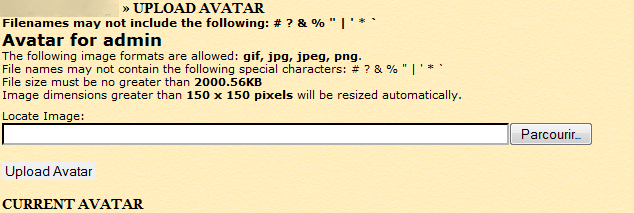
I installed Uplad Avatar, but when i clik on “Avatar”, add “Locate Image” and click on “Upload Avatar” the addition does not work.
view image attest :
http://yazhouzhijia.free.fr/images/images_bug/bubbpress.png
My config :
BBpress 1.0 (use table user form wordpress)
Wordpress : 2.8.4
Thank you
you have to put the bbPress folder in /blog/ where ever that is located in MU, go to your MU section and you click SITE ADMIN-> BLOGS and it should tell you there where it is. Never tried it but that’s where I would start.
Thank you very much johnhiler.
The solution is smtp-mailer-for-bbpress 
If you view the source of the page that’s displayed where the forum list should be, what is present? If you can post the source of that as a text file, someone can look at it and see how far the bbPress functions got and what might have failed.
Or, maybe that forum.php file is incomplete or otherwise damaged? Can you download a new copy and compare to yours?
@ chrishajer: Here are my active plugins:
Akismet
bb-NoSpamUser
BBcode Buttons Toolbar
BBcode Lite
bbPress signatures
bbPress Smilies
bb Topic Views
Best Answer
Bozo Users
Check For Updates
Enhanced Registration
Human Test for bbPress
Ignore Member
Mass Delete Users
Members Online
Mini Stats
My Views
My Views module – Most/Least Posts
My Views module – Most/Least Views
My Views module – Started/Participated Topics
New User Notification Email
Post Count Plus – Dynamic.Titles & More!
Post Count Plus for WordPress
Related Topics
Reputation (Karma) for bbPress
Skip Akismet
Subscribe to Topic
Topic Icons
Unread Posts
The really strange thing is, the Dashboard shows 18 forums (which is the correct number), but bb-admin/forums.php just won’t display them.
I suppose I can try disabling all plugins, and see if forums.php then displays the forums properly?
@ gerikg: I can, but I’m not sure what it would accomplish. I suppose the nuclear option works if all else fails. Though, if it’s a database issue, will reinstalling bbPress help?
@ chrishajer: I have replicated the problem using IE8 and FF3.5 under WinXP. For thoroughness, I can check FF 3.0.x under Linux, but I don’t think it will make a difference.
Everything else about the admin, from the Dashboard on through all the rest of the pages, displays properly – all the settings, the posts, the users, everything.
Which files do I start loking in chris? Or just might change the theme. Can you tell me which themes in the bbpress showcase are newer ones? Maybe “Structure” is an old one not compatible with bbpress 1.0 and above.
Thanks.
The 80 you have set in tags.php is completely unrelated to how the tags are being displayed in front-page.php. You can change tags.php and watch the effect on this page:
http://invictatrader.com/bbpress/tags/
If you noticed, the same function is being called in both files.
I have this near the top of my front-page.php:
<p class="frontpageheatmap"><?php bb_tag_heat_map(); ?></p>
That’s where you would make the modification.
front-page.php does not use tags.php. Those two different php files do two different things. tags.php displays this: http://invictatrader.com/bbpress/tags/
front-page.php displays the front page of your forum:
http://invictatrader.com/bbpress/
And the tags are just a small part of the front page, provided by the function bb_tag_heat_map();, called with whatever parameters you want.
I like the general notice, my head is not working today, what is that exactly? Just the sticky front topics?
You thought about having the sidebars in the forums like your main site?
Sounds like it. Can you reinstall BBpress?
I have bbPress 1.0.2 installed, integrated with WP 2.8.4 using only the built-in bbPress integration functionality.
I would suspect a DB issue, except that the front-end can read/write to the appropriate DB tables.
yes https://bbpress.org/forums/profile/chandersbs your profile shows all the posts you made. (at the bottom)
I’ve custom-themed my bbPress installation to integrate into the rest of my website:
cb.net forum
Any comments or criticism are welcome. I intend to release the theme once it’s polished.
@InvTrdr: The back-end (bb-admin) isn’t themed.
I’m having a very strange problem with my bb-admin Forums (forums.php) page: none of my forums are displayed.
On the front end, all forums are visible, and posts/replies can be added.
But on the back end, it is as if bbPress can’t read the forum list from the database, or something.
It will let me add a new forum, but even a newly added forum isn’t displayed.
Has anyone seen anything like this? I’ve tried searching the bbPress forums, but haven’t run across anything even remotely similar.
I am trying to embedd bbPress inside a WordPress page.
I have followed instructions here on how to use iframe to do that.
Now I want to remove all the header information and the blue background so the installation looks cleaner on my site.
The current header.php file can be found at http://shiftselling.com/forum/bb-templates/derleth/header.php.
I’m using WordPress 2.8.4 and bbPress 1.0.2
What is the minimum I need in my header file?
Thanks!
Craig
Hi All,
I’ve been trying to find installation instructions for bbpress on WordPress MU but couldn’t get what I was looking for.
I have followings:
WordPress MU on http://domain.com
I’ve one blog on this MU install lets say http://blog.domain.com
I want to install bbpress on only one blog so that it is accesible from http://blog.domain.com/forum
Can anyone help me out to get it done with simple instructions.
Tx
I see myself heading over to scriptlance to see if I can find someone to hammer it in somehow.
Hold that thought… This was ridiculously simple and it just popped into my head as I was typing… iFrames.
Darn! It Works! All I did was create a Sidebar as the center of the page, put an HTML widget in it with: <iframe name=”FRAME1″ src=”http://andresferraro.com/forum/” width=”100%” height=”1000″ frameborder=”0″ ></iframe>
All this into a page called “Forums” … So now my bbPress in /forum is accessible by the WordPress page /forums (note the “s” – one URL will got to bbPress, the other to WordPress) and wrapped inside a WordPress page – With a WP sidebar, header, navigation and footer.. Sure, there might be some duplicate stuff between the bbPRess header/footer and the WordPress one, but it looks a lot better than breaking the site’s continuity.
Check it out! http://andresferraro.com/forums/
Seems I was trying to launch a rocket to the moon when all I needed was some more coffee.
Thanks for the brain jog!
That is it. In this link http://invictatrader.com/bbpress/tags/ you see there a total of 54 tags so far on the big test box on the left. On the right only a maximum of 40 are displayed. How do I change the number of tags to be shown in the box on the right? Like say just 20 or 30 or even 50 if need arises.
Thank you.