Ah, I think I see the problem.
WishList Member does some trickery behind the scenes and has a history of not playing nice with bbPress due to some of the ways they implement their functionality.
I’d suggest contacting them and see if they have made any progress in figuring out the issue.
Here’s another thread, for reference, with a similar issue
Some users can't see first post
bbPress search has been implemented from scratch in bbPress 2.3 release. The new search does not piggyback off of WordPress search (which is what happens when you add the code above) and works extremely well.
Version 2.3 is actually in RC1 right now and is very stable, so you could upgrade to that and it would give you the new search feature.
bbPress 2.3 – Release Candidate 1
My recommendation would be to give 2.3 RC1 a whirl. Of course since it is RC1, do a backup before upgrading 🙂
No problem, thanks for reporting it. Things like this help us improve bbPress for everyone 🙂
Here’s the trac ticket https://bbpress.trac.wordpress.org/ticket/2283
Any fixes won’t be until bbPress 2.4 so you’ll want to do some tweaks manually (like I mentioned above) in the mean time.
Alright, the resets we have in place in the CSS were for the list-style, not the background images or padding which seems to be what you need.
Putting this in your theme’s CSS will be a start, but you’ll likely need more CSS tweaks as you go to play nice with your theme.
`#bbpress-forums li {
margin: 0;
list-style: none;
background: none;
padding: 0;
}`
I’m going to create a ticket in trac to add these to the reset to help in the future.
Hi Jared,
No… I had removed it from the theme altogether (rather than renaming it) and also removed any reference to bbPress in the Style.css file too. Lastly I had to delete the old bbPress folder in the plugins directory in order to install this RC1 version as it wouldn’t install without deleting the old folder first.
So, now I am at a point where I have a fresh install of RC1 that you pointed me too, nothing in the Everest theme’s CSS folder reating to bbPress and nothing in the theme’s style.css file either… just the raw install of RC1 in it’s rightful place and nada…..? still looking the same as before.
The only time I had some marginal success previusly was when I wrote some css and put it into the style.css file of the theme, that at least changed the font to Arial and the size.
It’s driving me nuts as time is running out 🙂 so any further suggestions are really appreciated.
Thanks
Chris
This is a live site.
I use the following plugins other than BuddyPress and bbPress.
Akismet
FV Simpler SEO
Hello Dolly
Sub Pages Widget
WishList Member
WooSidebars
WordPress Importer
Ah, it appears at one point you copied the bbPress CSS file into you theme (which is correct).
Once you do that, bbPress will always use that file instead of its own. So instead of using the new 2.3 CSS file with the fixes it’s still loading the one and your theme.
Easiest thing to do is rename the bbpress.css in your theme to something else like bbpress-temp.css which will make bbPress use it’s own packaged CSS.
Hello. I’m about to launch my customized WordPress/bbPress/BuddyPress platform; it’s a quite large undertaking and eventually we decided for this, even though bbPress is a bit lacking in some aspects when compared with similar forum software, but we went for it since it granted more compatibility with WP/BP.
Anyway, I noticed an image today with Forum Statistics and Online Users List, something that I thought was not possible with bbPress. Here it is:
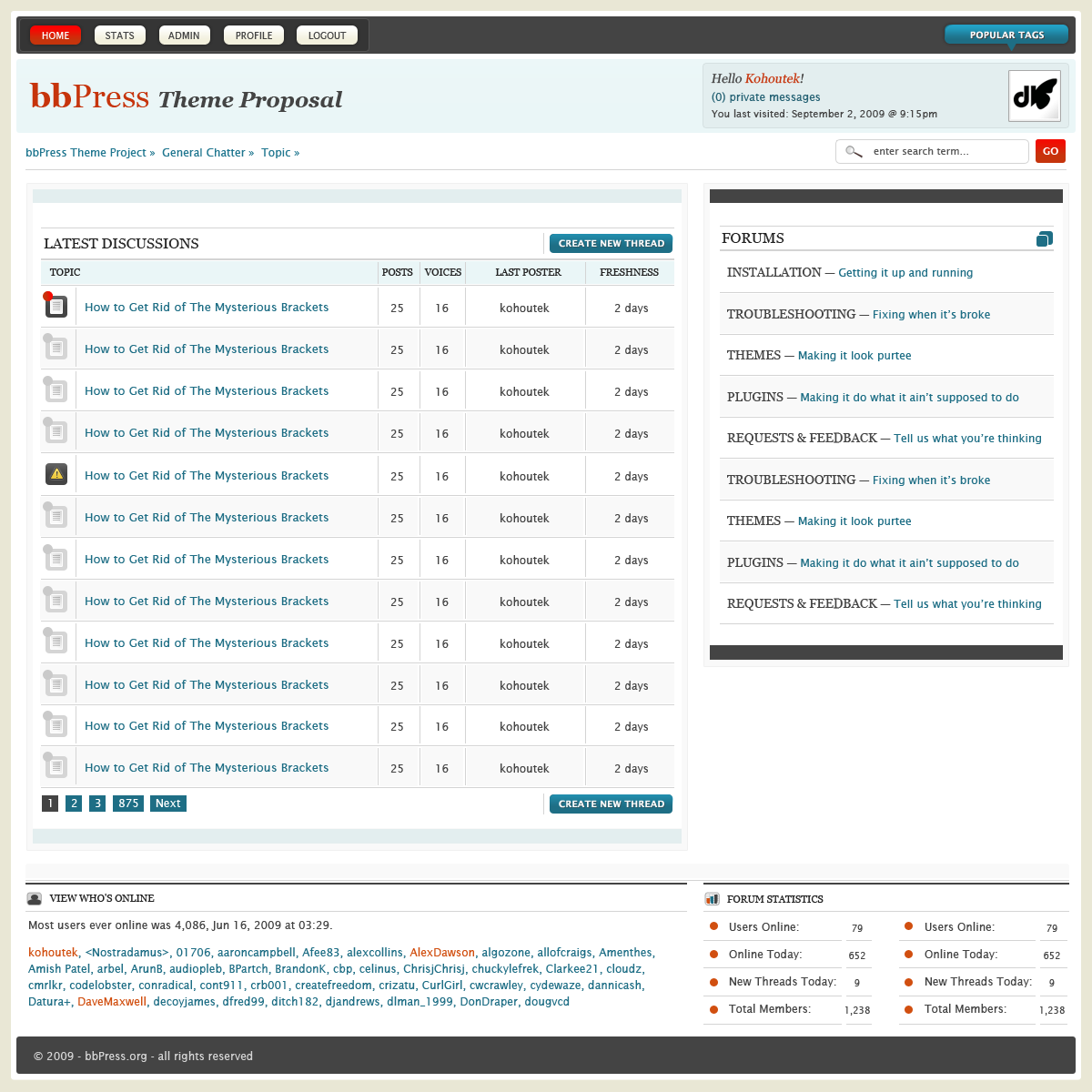
Can anyone of you tell me how can we do the same? Thanks in advance!
I’m not sure how this works with BuddyPress, but you may be able to try this plugin which typically shows what templates are in use.
https://wordpress.org/extend/plugins/debug-bar-bbpress/
@JJJ
Yep, it’s brute force, but at the moment is the only way, for non admin accounts, to see the forums if the wordpress installation is using also WPML plugin.
If i deactivate WPML, also non admin users can see the forums, if i activate, admins can see the forums, but non admins get a 404 error page.
Sorry bbPress wasn’t the right fit, good luck!
Hi I’m having a problem with my buddypress forums.
I’m able to create forum topics and view the topics I’ve created. But no one else who’s on the site can view the topics.
How do I make my topics visible?
We are using BP version 1.6.4
BbPress is version 2.2.4
Wordpress is version 3.5.1
Forum settings are allowed for groups and standalone. This issue is happening on all topics as far as I can tell.
See screenshots below to see what I’m talking about.
Here you can see the topics.

Here’s what shows up once I click on one of the topics.
Topic View

The post is hidden and all it shows is the option to reply.
Any thoughts on what’s causing this?
Hi there, I used to be using phpbb message boards, and found that many spammers would get round captcha. The best solution for me was an option to have a simple question for people registering like about the sport the forum was based on.
I am now starting out with bbpress, and being totally hailed with spam even using the captcha plugin for posters. Is there a simple question plugin, or one that has worked for others? Am sure this must be a common problem as registration is so simple!
Thanks
Hello ! WHERE I CAN FIND THE TEMPLAE FILE WHO GENERATES TJE FORUM PAGE OF A GROUP IN BUDDYPRESS SECTION ?? I have installed bbpress separated by Buddypress. i have 2 indipendent installation and i use bbpress for Buddypress group !
I relly need to know how to do!
Thank you so much.
Thanks Jared,
I will give that a try, the site will be going live next week tho, so lets hope a) it works and b) it’s stable enough 🙂
In the interim I did copy the bbPress CSS content into the main style.CSS style sheet and it helped (marginally)….
Will let you know how I go.
Thanks
Chris
Tell me about it!
No customization at all…… The following are the bbpress plugins I have:
1. bbpress admin bar adition
2. bbpress ignore user
3. bbpress like button
4. bbpress search widget
Do you think one of these is the troublemaker?
Something is acting weird.
Did you install any bbPress add-on plugins or do any bbPress customizations?
Since this is a development site and not live, you may try upgrading to bbPress 2.3 RC1 (see https://bbpress.org/blog/2013/03/bbpress-2-3-release-candidate-1/). It contains an update that resets some of the basic CSS elements for the forums in order to try and avoid problems like what you’re having.
This would be a great test to see if that particular update in 2.3 helps!
You can’t really.
You’ll either want to tweak your theme’s CSS so it doesn’t conflict or (and probably the way I would go) create a copy of the bbPress CSS and tweak it as needed.
Copy: `wp-content/plugins/bbpress/templates/default/css/bbpress.css` to: `wp-content/themes/[YOUR-THEME]/css/bbpress.css` and make changes as needed.
So I have to apologize. That’s actually my plugin and I had an “oops” in the readme.txt.
What you did was close, except the CSS file needs to be placed in `yourtheme/css/bbpress.css`.
Once you move it bbPress should auto detect it. I’ve updated my plugin to reflect the correct path, thanks for pointing that out.
If memory is correct due to certain functionality with BuddyPress, it does not allow usernames with spaces in it. I don’t think this is specifically with bbPress.
When i didn’t have buddypress and bbpress installed i could register usernames with spaces (ie “james white”) now that they are installed, it adds a hyphenate. Is there anyway to let the spaces stay?
Hi all,
Running WordPress version 3.5.1 and bbPress version 2.2.4 My them is Everest by Elegant Themes.
All works well with the whole site, and wanted to add Forum functionality with bbPress. The CSS doesn’t appear to be showing at all for the forum. It really is horribly dull and small fonts.
Although this is on a staging / testing server, you will see what I mean:
http://letstrav.cpanel1prelive.ireckonhosting.com/interaction/forum/
Can someone help please? I have copied the original bbPress css file into the /themes/everest/css/ folder but still get the same issue.
Thnks in advance.
Chris
Recently i have started bbpress forum for my blog But i want to know how i can enable custom bbpress avatars for user profiles. Thanks in advance.


