the wordpress forums run on bbpress, for instance
https://wordpress.org/support/forum/how-to-and-troubleshooting/
this one has 39,000 pages of 15 topics per page, so maybe give it a speed test !
No reason why you shouldn’t just run a forum on a site – up to you
Hi There.
I am brand new to bbpress. I am starting a site that has functionality similar to a question/answer site (like stackoverflow). Is bbpress still the best option for that?
Details: It seems like bbpress is a great plugin, but I have concerns because:
(i) it looks like some people have had issues with bbpress’s speed as the bbpress-created forum grows, and
(ii) bbpress generally seems meant for inserting a forum onto a wordpress site as just one feature, not as the entire site itself. For example, bbpress.org (this site) has a number of different types of pages, and the forum is just one type. What if, instead, the whole site was the forum? Like on stackoverflow, where the entire site is geared toward the question/answer forum. In that case, the forum might be getting more traffic and forum performance would be more important, because it represents the entire site experience.
Is bbpress the best choice for creating this type of question/answer site, or should performance concerns lead me elsewhere? The main alternative I see is to build the site not based on a forum plugin, but based on other more targeted plugins geared toward allowing users to create posts, and then linking those posts together in a forum-like way.
Any info on this is much appreciated.
ok, if I understand the issue this should fix
install and activate
bbp style pack
then go to
dashboard>settings>bbp style pack>breadcrumbs
and you will see options to specify where the home and forum root breadcrumbs go to
ok, I’ve also added breadcrumb navigation to my style pack plugin
bbp style pack
go to
dashboard>settings>bbp style pack>breadcrumbs and you can select where the home and forum breadcrumbs take you to.
install
bbp style pack
and go to
dashboard>settings>bbp style pack>topic/reply form item 9
and you can select which to show
Can’t say I’d ever looked for them
what do you want to use them for, and would this help
Advanced Custom Fields
WordPress 4.9.4 running Idyllic Plus theme.
bbPress is Version 2.5.14
My site is… https://insideouthope.org/forums/
Forum Creation Editor has stopped “publishing” … I can build Forums, and keep drafts. But publishing has failed.


Hello,
on the register page, the “Complete Registration” button is completely white.
http://streetpass-germany.de/forum-registrieren/
How can I change the colour?
WordPress 4.9.4, Theme Little Sparkle, bbpress 2.5.14
I have installed a plugin called “MENU SWAPPER”. This allows for each page/post on the site to choose any menu that has been created to be displayed on that page/post.
Originally, the functionality of this plugin did not include ANY of the forum pages. I figured out what to add to the menu swapper code to get the individual forums and the topics to have the functionality to swap menus. See the code below, I added “forum” and “topic” to make that happen.
function mswp_add_swap_meta_box() {
$post_types = array(
‘post’,
‘page’,
‘forum’,
‘topic’
);
The only pages on the site where there is no MENU SWAPPER functionality are the forums archive page here: https://scoutfantasysports.com/forums/
I am assuming this is because there isn’t really a “PAGE” in wordpress for this.
The menu on that page needs to be the same as on the individual forum pages here: https://scoutfantasysports.com/forum/fantasy-talk/
I need to know how to make this happen because it looks like I will need to edit a bbPress plugin file to do it.
Thanks.
Wordpress doesn’t have memebers.
ok, I repeat can you post an image or describe where you are seeing members ?
I have mailed the Theme creator and he said that it is a wordpress thing, not from a plugin. So i have to google it why its not working correctly.
you would think that was easy – but placeholder is a concept for <input> and <textarea> tags, and wordpress doesn’t use that for then visual editor.
I found several bits of code that do this for posts and pages, but couldn’t get them to work on topics/replies – I haven’t yet worked out why.
I’ll have a further play later to see if I can work it out
Robin
1. are you using code from above or my plugin https://wordpress.org/plugins/bbp-last-post/
2. so you want some as a date and some as ‘since’ ?
3. if so, which ones are which
you may also need to use this
bbPress Genesis Extend
When I change to any default wordpress theme the issue seems fixed. I thought It is something related with the theme
Minimal Coming Soon & Maintenance Mode
Inline Image Upload for BBPress
WP User Avatar
Yoast SEO
This will also help with styling
bbp style pack
HI,
There is a “double” space in Notice and “By Author” info. I changed my wordpress theme to one of default wordpress theme and the error is fixed. I seems a CSS error.
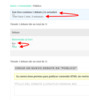
I using a theme called “Hitchcock”.
How can I fixed?
Thanks
with bbpress you subscribe to forums, so unless you bhave subscribed, then you won’t get notified.
You can and control and auto-subscribe users to forums using
bbP Toolkit
or instaed/in addition use
bbPress Notify (No Spam)
which some admins use to see what is being posted
Not directly – there are plugins that do that eg
bbPress Capabilities
Thanks Robin.
I am using the free version of the plugin (which is available here https://wordpress.org/plugins/membership/, but yes, now that I have narrowed the problem down to a conflict with this plugin I will follow up with them.
Was just hoping someone here might be using the Membership2, had the same issue and had already worked out how to resolve it.
ok, are you using my style pack
bbp style pack
if so the topic/reply form tab has options to do this.
If not, consider installing it !
I add:
The theme is twenty twelve
WordPress version: 4.9.4
bbPress version: 2.5.14
If I go to one of the forums from the main forum page and I click on the breadcrumbs to take me back a page, it doesn’t take me to the correct page.
For example, if the breadcrumbs show
Home › Forums › Forum 1
and I click on “Forums” it doesn’t take me back to the main forum page as it should.
WordPress version: 4.9.4
bbPress version: 2.5.14
I’m using Genesis theme
Hi,
I allow anybody to reply to a topic, but I ask for their name and Email address, all replied are moderated, when I look at the reply under replies I can see the name but not the Email. I am sure somewhere I put “(will not be published)” after the Mail (required) label: but I cannot remember where I did that.
I have the latest wordpress, bbpress, bbp toolkit, bbpress moderation and bbp style pack installed.
Can someone help where to find the Email given please, I have spent two days looking.
Clive


