wordpress version: 4.2.3
bbPress version: 2.5.8
site url: http://simplecerts.co/forums/
I’ve create a few forums on the back-end but only my first forum created displays on the page. What additional information would you need to potential identify the issue?
send the details to my email, but only for subscriber/participant role for now.
Contact
Are you running any special bbPress set up?
– I’m just running the default bbPress fresh from install
Does this happen to all user roles?
– Yes, it happens to all roles
I am going to assume on your fresh install you just have the latest stable version of bbPress and WordPress and no other plugins activated while using a default theme?
– Yes. I am using Twenty Fifteen theme. Up to date. No other plugins activated. The moment I activate bbPress users can no longer log out.
Thanks
Go to Appearance > Widgets in the WordPress backend.
whichever sidebar you placed the bbPress login widget, go to it, edit the widget settings and change the links in the widget.
Hello. I use bbPress on the latest wordpress version and running into trouble. I spent half of hour exploring bbPress source code but i couldn’t find the file which generates “Forgot password” and “Register” links in bbPress Login Widget. I really need to changed, for my site, to do not use wp-login page. I want to use my own configured pages /login and /register.
How can i do that?
Thank you very much!
Hi All,
Hoping someone out there can help me. I am converting my old website into wordpress and am trying to import my forum into bbpress but have run into a problem. I can’t seem to get the import to start.
I fill in the database details on the import page using the details from my config.php file and then click start, the page displays the “Starting Conversion” status and the loading circle is spinning but that is as far as it gets.
I had read all the pages and guides and forum posts I can find for a week but cannot figure out where I am going wrong.
The forum I am importing is a very small forum compared to other websites and I have tried leaving the page on this status for 4 hours without any change.
Is there somewhere I can find an error log that would tell me what is going on or would anywhere have any ideas would could be the cause of this
Im running phpbb 3.0.14
Thanks in advance
Richard
Alright I might report this as a bug, but I need steps to duplicate the issue. And could you answer these questions to help me, know where you are at?
Are you running any special bbPress set up?
Does this happen to all user roles?
I am going to assume on your fresh install you just have the latest stable version of bbPress and WordPress and no other plugins activated while using a default theme?
Yes, I did.
I created a fresh install of wordpress here: test.webshrimp.uk
The only plugin activated is bbpress and the logout doesn’t work. As soon as it is deactivated the logout link works. It is 100% bbpress causing the issue. I don’t know why it is appending redirect links to the logout button either.
Thanks
Its not a plugin specific error. Your server just can’t handle too much memory usage. WordPress may need more memory to use for your site. It has increased the minimum requirements before.
https://core.trac.wordpress.org/ticket/21646
You can follow the link I placed above then follow another link to show you some code to add to your wp-config.php file and see if that fixes your issue, in most cases it likely will. In some situations your server will cap the allowed memory so you may need to contact them about increasing it more.
If you want you can also google your issue and you will see countless posts on the wordpress.org forums about this, and they have the same exact answer.
Yeah this issue is not because of the bbPress plugin but your site does not have enough memory.
https://codex.wordpress.org/Common_WordPress_Errors#Allowed_memory_size_exhausted
Hello,
Is there a final version of the script? I tried the one linked by @netweb on github, but it freezes after 2100 answers.
And if I try to import the users also, I get the following error:
WordPress database error: [Unknown column ‘forum.boardType’ in ‘field list’]
SELECT convert(wbb1_1_board.boardID USING “utf8mb4”) AS boardID,convert(wbb1_1_board.parentID USING “utf8mb4”) AS parentID,convert(wbb1_1_board.threads USING “utf8mb4”) AS threads,convert(wbb1_1_board.posts USING “utf8mb4”) AS posts,convert(wbb1_1_board.title USING “utf8mb4”) AS title,convert(wbb1_1_board.description USING “utf8mb4”) AS description,convert(wbb1_1_board.sortOrder USING “utf8mb4”) AS sortOrder,convert(forum.boardType USING “utf8mb4”) AS boardType,convert(forum.isClosed USING “utf8mb4”) AS isClosed FROM wbb1_1_board AS wbb1_1_board LIMIT 0, 100</blockquote
With bbPress activated and logging out from the backend using the WordPress toolbar.
http://localhost/mysite/wp-login.php?loggedout=true
Without bbPress activated and logging out from the backend using the WordPress toolbar.
http://localhost/mysite/wp-login.php?loggedout=true
With bbPress activated and logging out from the bbPress login widget on my front page.
localhost/mysite/?loggedout=true
Did you already go through some troubleshooting to see if it was an issue in your plugins or theme??
What is the error??
I have my localhost server running the latest WordPress and bbPress and I do not see an issue.
I also tested one of my live test sites, and still do not see an issue.
My server auto updated my website to the new WordPress 4.2.3 and now when bbPress is active my site breaks. I’ve since change the setting on my server so that it does not auto update but I still have the problem of my bbPress plugin wont work. When activated a Fatal Error occurs. Has anyone else had this problem?
In Settings > Forums in the WordPress backend.
Set Forum Root should show Topics by Freshness.
I created a fresh install of WordPress and bbpress here:
test.webshrimp.uk
BBpress is currently activated, note how the logout links are not working. As soon as I deactivate Bbpress it works fine
Hi there,
When I insert a picture from WordPress in topic, there is “a blank” between the “top” of the topic and the picture. I get the same issue with “blockquote”.
Here is an example.
How can I solve it?
I thank you in advance
Regards
Mei Ling
Forgot about this and that I did it without buddyPress. Took code from this plugin and adapted it to my needs. But I see you already found it and adapted it self. Added some additional thing, Non logged User doesnt see online/offline icons, logged in User see them. Good to force curious people to log in.
https://wordpress.org/support/topic/show-a-red-green-circle?replies=16
https://wordpress.org/plugins/bbp-user-online-status/screenshots/
the first kuena link the forums look too busy.
Second link is what I was talking about but for bbPress, make it look cleaner. I have made something kind of similar, not exact but some parts are similar. (I know the icons are off a bit, idk what I did to mess them up, but they were fine before.)
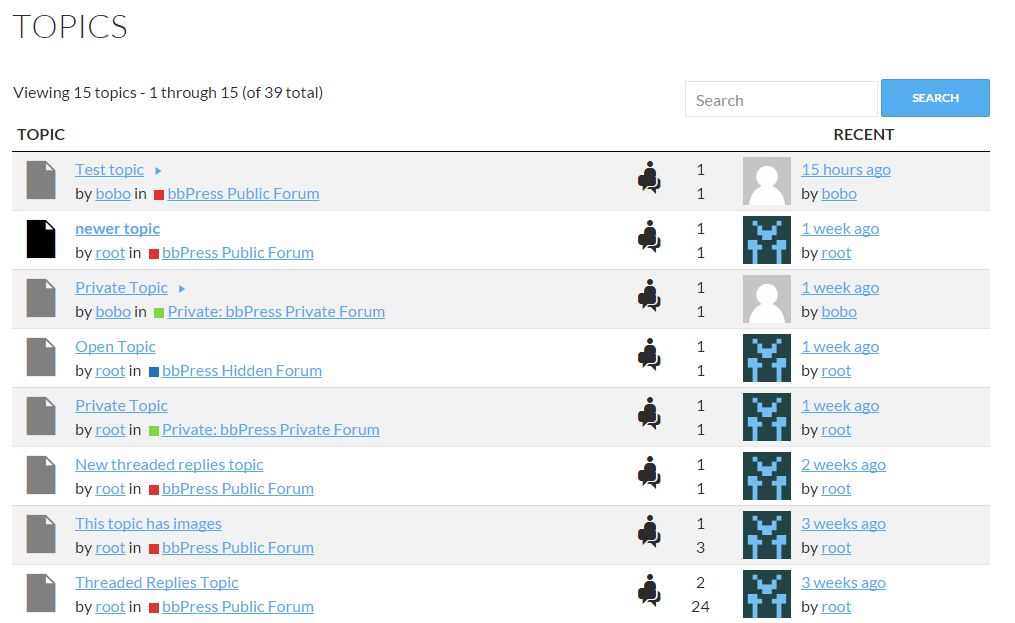
the third and fourth link remind me of old bb boards, some phpbb inspiration I can see though.
Almost all of those Github plugins have almost non discussions, issues, requests. It doesnt mean they are perfect, it means they will be abandoned very soon. As much you here would abandon bbPress if nobody used it and nobody come to this forum. As much Drupal core and other Drupal developers abandoned Drupal forum because nobody used it. So simple.
I get what you are saying but what about plugin forks or just plugins with similarities.
Here are the other github plugins and their alternatives and why I might and might not fork them.
- VIP support -> bbpress-VIP-Support-Plugin-for-Latest-WordPress (will think about pushing to WP.org)
- Simple Support -> bbResolutions
- EDD bbPress Support Dashboard (this is a fork of VIP support too and was specific to the EDD site)
- bbPress Spam Cleaner -> This is the plugin that was made for a job for a specific user
- bbPress Report Abuse (needs paid plugin gravity forms) -> bbPress Report Content
- bbPress Avatar -> Basic User Avatars
- bbP Quote -> bbPress Direct Quotes(I said I might add this into a different plugin, and users can also install GD bbPress tools)
- bbPress Ajax Replies (not touching, do not know much about ajax)
- djb bbPress last read plugin -> closest I think to this exact plugin is the one I said I might add to WP.org
- bbPress Live Preview -> Just enable TinyMCE(but I will think about forking it more)
Tell me one thing sincerely. if you so much trust all those plugins why you dont install them here and use it as showcase for newcommers ?
I told you some of the plugins in there could be some ideas for functionality and that is why it is there, which leads to me sprucing up the page again.
if you need to use the user nicename replace
$user = $current_user->user_login ;
with
$user = $current_user->user_nicename ;
How could I possibly find out the correct menu slug id? Right now the menu appears in every menu (sidebar as well) and regardless of an user’s login status.
I guess you can try doing what the top answer said here.
http://wordpress.stackexchange.com/questions/104301/get-menu-id-using-its-name
I think multisite would be the best option in my opinion. Let the specific language users go to their own specific language forums. No automatic translation for the forums, just let specific language users create their content like normal. I think that is how wordpress.org does it, but I am not entirely sure??
And see if they have time for some plugin.
What plugins exactly need help?? There are some alternatives to some old plugins that might be better, and there are solid plugins that are fine how they are now.
I have some ideas of making bbPress more acceptable to Pods or ACF. It would open many possibilities. Some of them could be, polls, attachments (very regulated and narrowed), SVG icons, reply title (it is just text input field), avatars, etc..
Most of these have some kind of plugin and could be accomplished.
Polls -> Pollka Polls
Attachments -> GD bbPress Attachments or BuddyPress with Forum editor plugin
SVG Icons -> Easy to add with CSS skills
Reply title -> bbPress Reply Titles
Avatars -> Basic user avatars or BuddyPress or bbp Avatar
And some of the github plugins on the feature plugin tracking page have alternatives.
—
Making bbPress more acceptable to Pods or ACF -> This might just be a separate compatibility plugin.
There is a lot of plugins for bbPress v1 that give me an idea where in some circumstances might be useful to carry over their functionality into a bundle if it is achievable in WordPress and bbPress v2.
Do you have anything unique to mention that is very important that it needs its own plugin??
Ugly as hell when installed, takes lot of time.
I want to talk about design so much, don’t be afraid to speak on any issues about it. I have some ideas that would be great for theme compatibility but not really fancy layout. A really fancy layout could be achieved with some nice themes, and hopefully later when I get the docs done for that theme developers would have no problem designing for bbPress.
Hi guys,
I am looking to have the same setup these guys https://ultimatemember.com/forums/
Page 1: A Page that shows all my forums
Page 2: A Page that shows the topics of each forum
Page 3: A Page that shows the replies of each topic.
Simple simple.
Here is my website: http://sincebeingsingle.com/forums/
Fyi: I am using the latest versions of WordPress, bbpress and Bridge theme (from themeforest).
Fyi: I am a bit of a newbie at this.
Issue 1:
The first issue I’ve got is when you click ‘Forum One’, it shows the message, ‘This forum contains 1 topic, and was last updated by…” but doesn’t actually show the topic.
Issue 2:
When I click on ‘Forum One’ I’d like it to go to a page where the yellow header banner replicates title of the forum. And that goes the same for, clicking on a topic and a reply.
The Ultimate Members forum above is the best example of this. You can see that each blue header banner has the title of the forum, topic and reply.
fyi:
I have got the forum working for the bbpress-forum index using [bbp-forum-index] shortcode. My header banner is showing perfectly as I have designed the page for the forum to sit on.
I’m struggling with getting the topics and replies sitting on a wordpress page that I’ve designed.
I am literally going around in circles trying to work out how to get my bbpress to sit within my own WordPress pages.
(I would like the same setup as UM, where the Forum page has the Forum title in the blue banner, Topic page has the Top title in the blue banner and Reply page has the Reply title in the blue banner).
Any guidance or step by step instructions would be massively appreciated from bbpress community.
Kam
Thank you. Dont mind my writing. I know developers dont like topics like this. Despite everything, even if you dont do anything about it I stay on bbPress because it is so fun. Much more fun than SMF or phpbb.
Talk to your friends from bbPress core circle on your private channels. And see if they have time for some plugin. Report just back to us results. It they are bussy with private projects nobody will be mad about it. Just to know.
Or announce on the WordPress Slack that you are underpowered and ask for some help from other core, other strong plugins developers. There is no shame in it.


