Thank you Pascal 🙂 !!
angelis, you’re welcome. I’ll put this into a plugin and link you to the Github repository shortly.
@kieranw7261 my best guess is you’re running an EOL PHP version which is less than the recommended (see https://wordpress.org/about/requirements/)
No worries just try this instead http://pastebin.com/XBeKjRFF and let me know if it worked.
Samuel
(RESOLVED)
There is a known bug in WP4.5 that’s been recently reported.
It affects the Twenty Eleven Theme only (well, so far …) and makes templates from this theme incorrectly styled when used in conjunction with sidebar widgets (overlapping).
The bug detection and working corrective action can be found HERE.
(RESOLVED)
Hey, everyone. I am looking for a solution to this and not sure if it exists. My search skills are coming up short so I apologize if it’s out there already.
I would like to have a link/button on each of my posts in WordPress that would allow the user to generate a new topic in a particular bbPress forum. Essentially, it would auto-fill the title of the topic with the title of the post and quote the contents of the post (perhaps to a certain limit). The user would then be able to add any additional comments before submitting the new topic to the forum.
Now, of course you are going to ask WHY I want to do this. Essentially, the site I’m building consists of two parts. One, a discussion forum, and two, an rss aggregator that creates a new post for each article brought in from the feed. I would like the user to have the option of bouncing any article/post they think is worthy of discussion to the forum. (I’m not looking to have a discussion on every single post, and I don’t want to use comments under the post, keeping it all to the bbPress forums.)
I’d appreciate any help that would point me in the right direction. Thanks.
provate forums visibility is my plugin and should do what you want – although I am not supporting it anymore as my private groups plugin has that functionality and much more.
https://wordpress.org/plugins/bbp-private-groups/
try that and if it doesn’t work come back
Hi,
bbPress is not dealing with passwords as it relaying on WordPress for that, so I cannot really help you here.
– If you have BuddyPress installed (as you refer to the profile) then you could try on their forum
– If you don’t have BuddyPress, try on the wordpress.org forums
Pascal.
Goede middag,
You seem to use the full editor to add topics/replies and not the bbPress standard, correct ?
Some known issues with WP 4.5 so far (nothing to see with bbPress)
– Clean all your cache (hosting side, server side, browser side, …)
– If something uses jQuery to display it, there are known issues (see my answer on one of the plugins here: https://wordpress.org/support/topic/it-does-not-work-on-wordpress-45?replies=13#post-8281904)
Mvg,
Pascal.
The image in the first post is visible when editing the post, as shown below:

The problem I am facing is that since the upgrade to WP4.5, no formatting is applied to the forums anymore. See the screenshot below:

The first post you see should contain an image and the second post should contain a link.
I am using WordPress 4.5 and bbPress 2.5.8.
I have tested the following on both Chrome and FireFox, in both normal and incognito modes.
The issue persists when using the Twenty … themes.
The issue also persists when turning off all extra bbPress plugins.
The issue is also present in bbPress 2.6-alpha.
The rest of my site works normally.
Hi,
In the bbpress profile edit page, one can change the password. The verbal explanation says that the password must be at least 10 characters long. But I find that this is not enforced at all: I could successfully change the password to any lenght, even single character passwords are accepted.
What would be the way to:
1) Enfoce that the password has a minimum length?
2) Customize the minimum length to a value different from 10?
Thanks,
//György
wordpress 4.4.2 , bbpress 2.5.8, site http://szuloiosszefogas.hu
@thebrandonallen You’re right. I made a mistake when doing these tests.
Here’s the results when I keep only the essential extensions, but without bbPress:
WordPress Plugin Profile Report
===========================================
Report date: 14 avril 2016
Theme name: FQSA
Pages browsed: 13
Avg. load time: 1.4570 sec
Number of plugins: 6
Plugin impact: 80.34% of load time
Avg. plugin time: 1.1705 sec
Avg. core time: 0.2184 sec
Avg. theme time: 0.0286 sec
Avg. mem usage: 142.06 MB
Avg. ticks: 189,088
Avg. db queries : 57.92
Margin of error : 0.0394 sec
Plugin list:
===========================================
P3 (Plugin Performance Profiler) – 0.0039 sec – 0.34%
Query Monitor – 0.0140 sec – 1.20%
Maintenance – 0.0040 sec – 0.35%
WooCommerce Memberships – 0.0311 sec – 2.66%
WooCommerce Subscriptions – 1.0300 sec – 87.99%
WooCommerce – 0.0874 sec – 7.47%
Here’s the results when bbpress is activated:
WordPress Plugin Profile Report
===========================================
Report date: 14 avril 2016
Theme name: FQSA
Pages browsed: 11
Avg. load time: 4.8047 sec
Number of plugins: 7
Plugin impact: 93.15% of load time
Avg. plugin time: 4.4756 sec
Avg. core time: 0.2278 sec
Avg. theme time: 0.0339 sec
Avg. mem usage: 210.25 MB
Avg. ticks: 289,193
Avg. db queries : 126.36
Margin of error : 0.0673 sec
Plugin list:
===========================================
P3 (Plugin Performance Profiler) – 0.0038 sec – 0.08%
Query Monitor – 0.0146 sec – 0.33%
bbPress – 0.0824 sec – 1.84%
Maintenance – 0.0040 sec – 0.09%
WooCommerce Memberships – 0.0421 sec – 0.94%
WooCommerce Subscriptions – 4.2424 sec – 94.79%
WooCommerce – 0.0864 sec – 1.93%
You can see, in fact, that Subscriptions seems to be the problem… I don’t really know because all these plugins seems to be connected a lot.
Yes, I understood, so you should find your answer in one of the 3 links I provided.
Most probably this ?
Dashboard>forums>all forums and edit each forum
put the banner in the description
then download my plugin
https://wordpress.org/plugins/bbp-style-pack/
and tick item 6 Add Forum Description on the forum display tab
But read the rest too.
Pascal.
Hi,
In the bbpress index page, the top row shows:
homepage-title > Forums > Forum-title
How could I change homepage-title here? bbpress seems to take this from the title of the site’s default page. Is there a way to put a different text there (or remove the homepage-title altogether)?
Thanks,
//György
wordpress 4.4.2 , bbpress 2.5.8, site http://szuloiosszefogas.hu
Hi,
I don’t think this is bbPress related, right ?
If not, then you’re better off on the wordpress.org support forum
If it IS related, then please explain how you see that in the bbPress context.
Thanks,
Pascal.
Hi all,
I am running wordpress 4.5 and bbpress 2.5.8
Recently, one thread on my forum has started redirecting to the first page (not the last page) in the thread. Therefore once posted the user needs to click on the last page to see their post.
All other posts are fine.
Here is the post.
I updated the permalinks, and ran all of the bbpress repair tools, but no change.
Any help would be appreciated!
After the todays (13/4) update to WordPress 4.5 link doesn´t funktion in the bbPress edit box.
Is a bbPress update coming to solve this problem?
/Gunilla
Hi Guys,
I got the problem, that bbPress is not splitting the posts in different pages when there are a few answers. For example: http://germansimracing.de/community/thema/dauerstartnummern/
Is there anything to setup or what could be the problem? I updated WordPress a few minutes ago to the newest version. bbPress and all other plugins are up to date, too.
Thanks in Advance for your help! 🙂
Hi,
You seem to have a memory issue, nothing to see with bbPress. Your limit is set to 64MB and you need more.
I will have to refer you to https://wordpress.org/support/ where somebody can help you increasing your memory limit.
Pascal.
Hello,
I am using this plugin.
https://wordpress.org/plugins/wp-smtp/
I am trying to change the sender name and sender email address for BBPress. I have successfully done this for BuddyPress, but all the code I have tried for BBPress or all the code I have seen in older topics, is not doing it for me.
Can you please recommend some code that I can change the sender name and sender email address?
Thanks.
Hello,
i am useing:
Wordpress latest
bbpress latest
using only 1 plugin GD bbPress Tools latest
when visit forum -> topic then i Subscribe
forum -> topic -> post reply
case i lose the subscibe
For WordPress, could you confirm it’s 4.4.2 ?
Try to switch to a standard theme. If that does not help, switch off all plugins (except bbPress), check that the error is gone and switch them on one after the other to see which one goes in conflict.
Pascal.
Thank you very much for your quick response!
I have the version 2.5.8 of BBPress , and version 4.4 of WordPress.
I Use the theme Bridge.
I have this plugins:
-GD BBPress Attachments
-Contact form 7
– WP usuario avatar
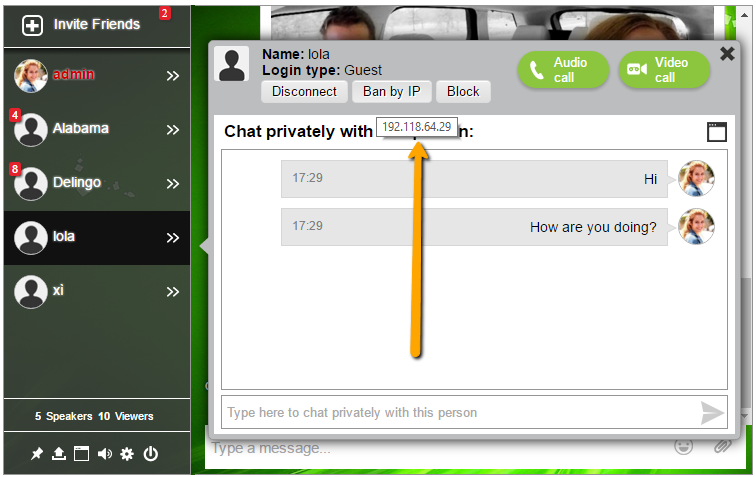
There are many type of chat rooms boxes. Some prefer it as you mentioned, a floating chat or embed in the chat. Once I added a chat GoDaddy forced me to remove it as they do not like chat rooms in a shared server. So I was forced to use a hosted service chat room.
What was important to me is that I could chat in a group as well as private using a video chat. Now there are not a lot of options with respect to video chat, but I used a chat room (a floating one on the right side on the lower part of the chat) that uses WebRTC technology that is basically means it will work good on PC (chrome & dd) but not in mobiles (tried it in my iPhone).
https://wordpress.org/plugins/rumbletalk-chat-a-chat-with-themes/
@sidebarissue
The bbPress sidebar that you see having the issue, is from your theme. bbPress does not have code in it for a bbPress specific sidebar.
You haven’t checked and made sure to see if it was in your theme by switching/testing a default theme.
I still haven’t tried switching to the twentytwelve theme because I don’t want to lose all of my settings for my current theme.
You can try your current theme and a WordPress default theme in a local installation on your cpu to see where the sidebar is coming from.
https://codex.bbpress.org/getting-started/testing-your-bbpress-installation/creating-a-test-site/#local-installation