Skip to:
Content
Pages
Categories
Search
Top
Bottom

Search Results for '+.+default+.+'

Viewing 25 results - 3,351 through 3,375 (of 6,813 total)
  • Author
    Search Results
  • #142498
    Robin W
    Moderator

    To edit what details the user can see/edit within the profile page then the template is

    wp-content/plugins/bbpress/templates/default/bbpress/form-user-edit.php
    and
    wp-content/plugins/bbpress/templates/default/bbpress/user-profile.php

    EDIT

    found the subscription/edit bit

    wp-content/plugins/bbpress/templates/default/bbpress/user-details.php

    #142467

    In reply to: Forum Index Scrunched

    hotmax oferty
    Participant

    In my opinion it Looks like bbpress is selecting the default page from installed theme, which have a tree columns. I had the same problem on forum on my site hotmax. Now its working great.

    #142462

    In reply to: Mobile Theme?

    Nathan Hawkes
    Participant

    I can definitely foresee a mobile theme would be required, as I can’t seem to get 2.5.3 to work properly on mobile, and I have no idea how to modify the default theme to work best on mobile. I have a custom theme installed on my WordPress site, so definitely a mobile “modification” at least would be applauded in my mind.

    Jerry
    Participant

    I am using WordPress MS (version 3.8.1) with bbpress and buddypress.

    I have the wp-admin folder on the host server password protected as a security measure.

    There are two things occurring that I cannot figure out:
    1) When a logged-in user tries to go to any forum, or a topic, the web browser is asking for a password to access wp-admin. Entering the password or clicking cancel does not appear to change anything. This does not happen when someone is not logged in.

    2) When logging out from the “edit profile” screen, the user again gets the password request, and after clicking cancel is taken to a registration/lost password default screen.

    These things occur on both Firefox and IE. Thanks in advance for any help I can get to solve this annoying issue. 🙂

    KostRev
    Participant

    Thanks. I sort of figured that out after removing my custom templates. Not sure where I got the code for form-topic.php because it was very different from the default and that made the difference.

    Thanks for the tip on the shortcode. That alone would have helped some of my troubleshooting.

    #142443

    In reply to: Translate to Swedish

    Stephen Edgar
    Keymaster

    You want to use the /dev branch of both projects:

    https://translate.wordpress.org/projects/bbpress/dev/sv/default
    https://translate.wordpress.org/projects/buddypress/dev/sv/default

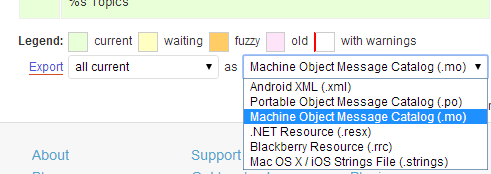
    On each of the above pages select ‘.mo’ from the dropdown at the bottom of the page and click export.

    Rename each file to buddypress-sv.mo & bbpress-sv.mo

    The extra instructions on the BuddyPress site might also help, I’ll try to get the bbPress updated soon also.

    https://codex.buddypress.org/developer/translations/

    #142441
    Robin W
    Moderator

    ok, suggest you start by running a forum repair – probably not the cause, but would eliminate

    dashboard>tools>forums>repair – run one at a time

    Then I’d be looking at a conflict in plugins. Disable all plugins except bbpress and see if you still have the issue. If it goes away, re-enable plugins one at a time to work out which is causing the conflict. If that doesn’t work, switch to a default theme (say tewentytwelve) and see if that fixes it.

    Robin W
    Moderator

    I thought that’s what it did in default mode.

    If you are using shortcodes, then you have options

    [bbp-topic-form] – Display the ‘New Topic’ form where you can choose from a drop down menu the forum that this topic is to be associated with.
    [bbp-topic-form forum_id=$forum_id] – Display the ‘New Topic Form’ for a specific forum ID.

    Otherwise come back with a url where this isn’t happening

    #142439

    In reply to: LABELS

    Robin W
    Moderator

    yes,

    Dashboard>settings>forums>forum root slug to change the urls and breadcrumbs – just change forums to what you want it to say

    Tp change the forum heading on the forums list, make a copy of

    wp-content/plugins/bbpress/templates/default/bbpress/loop-forums.php

    and place this in a folder

    /wp-content/themes/%your-theme%/bbpress/

    see https://codex.bbpress.org/step-by-step-guide-to-setting-up-a-bbpress-forum-part-3/ for a tutorial on this subject

    Then edit line line 19 which says

    <li class="bbp-forum-info"><?php _e( 'Forum', 'bbpress' ); ?></li>
    

    to

    <li class="bbp-forum-info"><?php _e( 'Elephant', 'bbpress' ); ?></li>
    

    and it will say elephant instead of forum.

    #142437

    In reply to: Forum Index Scrunched

    Robin W
    Moderator

    ‘Thats the odd part, they are both using the default…and switching between the various different templates doesn’t seem to modify it. The theme has an internal setting that allows you to dictate how many ‘columns’ are shown. I can get it to show full page if I switch that around, but then my article page is also shown full (one column) I’m looking at the code further to try and figure out how to isolate one from the other’

    Think that’s the route to go.

    bbPress looks at the root of your theme for “bbpress.php” as a page template. if it doesn’t find it, it’ll use your themes “page.php”.

    It sounds like your “page.php” page (whatever it’s called), has a parameter to set the columns, so within this they’ll be an “if” statement which is setting this.

    What I think you need to do is as suggested in my first post. Copt the page file and call it “bbpress.php”. You should be able to find in that file where it is using the setting to create the columns and take this out. Alternately look in the twentyfourteen theme for the full page template and compare this to your file. You should be able to cobble the two together to get it to work.

    If none of that works, (or alternately!) contact the theme developer to see if they have a solution.

    #142433

    In reply to: Translate to Swedish

    marknadsafeteam
    Participant

    @netweb Thank you! But I have found this https://translate.wordpress.org/projects/bbpress/2.3.x/sv/default but how do I get it in my .mo file? Sorry, but Im a newbie to this! =(

    #142431
    jslom
    Participant

    I am almost sure that is an issue with your themes css. Try switching themes to default, and see if it still exists.

    #142427

    In reply to: Forum Index Scrunched

    thefruitnation
    Participant

    Thats the odd part, they are both using the default…and switching between the various different templates doesn’t seem to modify it. The theme has an internal setting that allows you to dictate how many ‘columns’ are shown. I can get it to show full page if I switch that around, but then my article page is also shown full (one column) I’m looking at the code further to try and figure out how to isolate one from the other

    #142425
    ccwadsworth
    Participant

    hi there – new to bbPress
    followed you instructions on getting started; created my forums page and added a few forums & topics, yet the forums page layout is one continuous string of text.
    any advice on how to address this?
    WordPress 3.8.1
    bbPress Version 2.5.3
    http://cynergycrossfit.com/cynergisticlife/forums/
    appreciate your help!

    KostRev
    Participant

    Is there a way to programmatically assign the “Create New Topic” link to the Forum from where it was created? For example, on this website (bbpress.org) if you are in the “Troubleshooting” forum and choose “Create New Topic” it would seem best to default to the forum you are currently in (Troubleshooting) rather than, in this case, Installation.

    Is there a way to pass the forum id to the dropdown menu?

    Thanks for any input.

    #142411

    In reply to: Forum Index Scrunched

    Robin W
    Moderator

    Looks like it is bbpress selecting the default page from your theme, which looks like a tree columns one.

    Your “about” page is full screen, so if that’s what you want, suggest you make a copy of whatever .php that is using (eg fullwidth.php) from your theme file, and then rename the copy file to bbpress.php and put it in the same theme folder as the original. Then bbpress will use that as it’s page file.

    #142410
    barnabe
    Participant

    – How to hide the WP toolbar by default when a user registers?

    I found this code to add in functions.php theme file:

    add_filter('show_admin_bar', '__return_false');

    – I use the bbPress’ form register template, how to redirect users to a specific page after submit and not to the WP’s form login?

    I found this code to add in functions.php theme file:

    function bbp_form_register_custom_redirect()
    {
       return 'URL here'; // Ex : return get_permalink(73);
    }
    
    add_filter('bbp_user_register_redirect_to', 'bbp_form_register_custom_redirect');

    But with this code, when there is an error (like username already exists), the redirect is not effective.

    Any idea?

    #142401
    barnabe
    Participant

    Hello,

    I install a bbPress forum for a support website. Our customers should be able to register to the forum, but should not have access to the WP admin. So I have few questions about that:

    – How to separate customer users who have only access to the forum, and admin users who have access to WP admin panel?
    – How to hide the WP toolbar by default when a user registers?
    – I use the bbPress’ form register template, how to redirect users to a specific page after submit and not to the WP’s form login?
    – In the mail with password, how to change URL by a specific page and not to the WP’s form login?

    I think that’s all for now…

    Thanks!

    #142399

    In reply to: Can no longer post.

    Robin W
    Moderator

    Ok, I’d try deactivating all the plugins (except bbPress!) and see if it then works.

    If it doesn’t work with all the plugins disabled, switch to default theme such as twentyten and see if it then works.

    If it works with plugins disabled, add back the plugins one at a time and see which one is causing the conflict.

    #142386

    In reply to: Importing from Vanilla

    Stephen Edgar
    Keymaster

    There is a broad outline here: https://codex.bbpress.org/import-forums/

    Some more Vanilla specif info here: https://codex.bbpress.org/import-forums/vanilla/

    Essentially you should be able to open up your Vanilla Config file in a text editor:

    eg. /public_html/dev/vanilla/conf/config.php

    `
    // Database
    $Configuration[‘Database’][‘Name’] = ‘ntwb_vanilla2’;
    $Configuration[‘Database’][‘Host’] = ‘localhost’;
    $Configuration[‘Database’][‘User’] = ‘ntwb_wpdev’;
    $Configuration[‘Database’][‘Password’] = ‘abc123’;
    `

    Use the values you have in the bbPress importer screen.

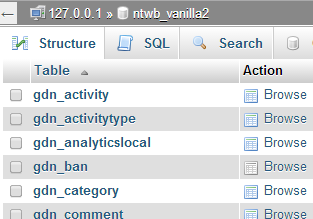
    To get the table prefix you might have to open phpMyAdmin on your hosting providers control panel (cPanel)

    In this image my table names have a gdn_ prefix, this is what you would use.

    I am pretty sure gdn_ is the default and used by most installs.

    #142371
    thajskyraj
    Participant

    Thanks Robin, I guess I understand you completely. I did exactly what you advised me to do and it actualy works, however I am not certain what exact code of bbpress theme should I put there.

    The code of page.php looks as follows:

    <?php get_header(); ?>
    <?php get_template_part(‘loop’, ‘page’); ?>
    <?php get_footer(); ?>

    The questions is what piece of bbpress template code should I put between the header and footer. Now I put there code copied from bbpress/templates/default/extras/page-front-forums.php, and its some improvement, however it is still not correct as it put the sidebare widgets under it instead of its correct location.

    If you can advise what code should I put there, then it will be perfect solution.

    Thanks a lot for your efforts and time.

    #142346
    Robin W
    Moderator

    it’s coming from bbpress stylesheet.

    there may be a quicker way to remove this, but one that should work is as follows.

    I don’t think you have a childtheme, and now may be the time to consider having one, see https://codex.bbpress.org/step-by-step-guide-to-setting-up-a-bbpress-forum-part-2/ for more details

    once done you need to navigate to

    wp-content/plugins/bbpress/templates/default/css/bbpress.css

    copy this file into a folder called css within your theme, so you end up with
    wp-content/themes/mychildtheme/css/bbpress.css

    where mychildtheme is the name of your childtheme

    Then edit every line that has

    background-color : xxxxxxx

    change to

    background: none repeat scroll 0 0 rgba(0, 0, 0, 0.4);

    NOTE it goes from background-color to background
    and it is only the background color that you’ll be changing, not lines which just have color: as that’ll be text!

    eg

    #bbpress-forums div.bbp-forum-header,
    #bbpress-forums div.bbp-topic-header,
    #bbpress-forums div.bbp-reply-header {
    	background-color: #f4f4f4;
    }
    

    becomes

    #bbpress-forums div.bbp-forum-header,
    #bbpress-forums div.bbp-topic-header,
    #bbpress-forums div.bbp-reply-header {
    	background: none repeat scroll 0 0 rgba(0, 0, 0, 0.4);
    }
    

    This will make the background transparent, but with a darker tint shading that you have in your sidebar (the amount of difference is on the 0.4 bit, 0.1 is the lightest, 1.0 the darkest).

    Come back if that doesn’t fix it, or for further help

    #142310
    Robin W
    Moderator

    hmmm…

    Should work !

    Are you changing it in wp-content/plugins/bbpress/templates/default/bbpress/loop-forums.php?

    or in your child theme?, and if the latter can you detail the path from wp-content/ onwards

    #142308
    Ilya
    Participant

    For participant user search results doesn’t not show topics from private forums.

    If I add to default capabilities in bbp_get_caps_for_role() at /wp-content/plugins/bbpress/includes/core/capabilities.php line 191 the follow line 'read_hidden_forums' => true, then it works, but forum has visibility “Private” not “Hidden”.

    How can I override bbp_get_caps_for_role() without modifying core files?

    #142287
    Stephen Edgar
    Keymaster

    @kris35 wrote… There are 68 replies to replies and 68 of them are locked this way

    This shouldn’t be an issue unless edit_lock has incorrect timestamps.

    @kris35 wrote… I had to go into the backend and edit the “Reply To” box to zero.

    We have just done some testing trying to reproduce “Incorrect Reply To’s” but couldn’t.

    Setting them to 0 will force the replies to be ‘Not Threaded’ and sorted by date (default)

    @shanebp wrote… …any edit to a reply pushes it to the bottom and destroys the threading. Any threaded replies become ‘flat’.

    I can’t reproduce this, any edit I make to a ‘threaded reply’ in the frontend or backend keeps the correct ‘replyto’ value and works as expected.

Viewing 25 results - 3,351 through 3,375 (of 6,813 total)
Skip to toolbar