Skip to:
Content
Pages
Categories
Search
Top
Bottom

Search Results for '+.+default+.+'

Viewing 25 results - 3,351 through 3,375 (of 6,794 total)
  • Author
    Search Results
  • Robin W
    Moderator

    I thought that’s what it did in default mode.

    If you are using shortcodes, then you have options

    [bbp-topic-form] – Display the ‘New Topic’ form where you can choose from a drop down menu the forum that this topic is to be associated with.
    [bbp-topic-form forum_id=$forum_id] – Display the ‘New Topic Form’ for a specific forum ID.

    Otherwise come back with a url where this isn’t happening

    #142439

    In reply to: LABELS

    Robin W
    Moderator

    yes,

    Dashboard>settings>forums>forum root slug to change the urls and breadcrumbs – just change forums to what you want it to say

    Tp change the forum heading on the forums list, make a copy of

    wp-content/plugins/bbpress/templates/default/bbpress/loop-forums.php

    and place this in a folder

    /wp-content/themes/%your-theme%/bbpress/

    see https://codex.bbpress.org/step-by-step-guide-to-setting-up-a-bbpress-forum-part-3/ for a tutorial on this subject

    Then edit line line 19 which says

    <li class="bbp-forum-info"><?php _e( 'Forum', 'bbpress' ); ?></li>
    

    to

    <li class="bbp-forum-info"><?php _e( 'Elephant', 'bbpress' ); ?></li>
    

    and it will say elephant instead of forum.

    #142437

    In reply to: Forum Index Scrunched

    Robin W
    Moderator

    ‘Thats the odd part, they are both using the default…and switching between the various different templates doesn’t seem to modify it. The theme has an internal setting that allows you to dictate how many ‘columns’ are shown. I can get it to show full page if I switch that around, but then my article page is also shown full (one column) I’m looking at the code further to try and figure out how to isolate one from the other’

    Think that’s the route to go.

    bbPress looks at the root of your theme for “bbpress.php” as a page template. if it doesn’t find it, it’ll use your themes “page.php”.

    It sounds like your “page.php” page (whatever it’s called), has a parameter to set the columns, so within this they’ll be an “if” statement which is setting this.

    What I think you need to do is as suggested in my first post. Copt the page file and call it “bbpress.php”. You should be able to find in that file where it is using the setting to create the columns and take this out. Alternately look in the twentyfourteen theme for the full page template and compare this to your file. You should be able to cobble the two together to get it to work.

    If none of that works, (or alternately!) contact the theme developer to see if they have a solution.

    #142433

    In reply to: Translate to Swedish

    marknadsafeteam
    Participant

    @netweb Thank you! But I have found this https://translate.wordpress.org/projects/bbpress/2.3.x/sv/default but how do I get it in my .mo file? Sorry, but Im a newbie to this! =(

    #142431
    jslom
    Participant

    I am almost sure that is an issue with your themes css. Try switching themes to default, and see if it still exists.

    #142427

    In reply to: Forum Index Scrunched

    thefruitnation
    Participant

    Thats the odd part, they are both using the default…and switching between the various different templates doesn’t seem to modify it. The theme has an internal setting that allows you to dictate how many ‘columns’ are shown. I can get it to show full page if I switch that around, but then my article page is also shown full (one column) I’m looking at the code further to try and figure out how to isolate one from the other

    #142425
    ccwadsworth
    Participant

    hi there – new to bbPress
    followed you instructions on getting started; created my forums page and added a few forums & topics, yet the forums page layout is one continuous string of text.
    any advice on how to address this?
    WordPress 3.8.1
    bbPress Version 2.5.3
    http://cynergycrossfit.com/cynergisticlife/forums/
    appreciate your help!

    KostRev
    Participant

    Is there a way to programmatically assign the “Create New Topic” link to the Forum from where it was created? For example, on this website (bbpress.org) if you are in the “Troubleshooting” forum and choose “Create New Topic” it would seem best to default to the forum you are currently in (Troubleshooting) rather than, in this case, Installation.

    Is there a way to pass the forum id to the dropdown menu?

    Thanks for any input.

    #142411

    In reply to: Forum Index Scrunched

    Robin W
    Moderator

    Looks like it is bbpress selecting the default page from your theme, which looks like a tree columns one.

    Your “about” page is full screen, so if that’s what you want, suggest you make a copy of whatever .php that is using (eg fullwidth.php) from your theme file, and then rename the copy file to bbpress.php and put it in the same theme folder as the original. Then bbpress will use that as it’s page file.

    #142410
    barnabe
    Participant

    – How to hide the WP toolbar by default when a user registers?

    I found this code to add in functions.php theme file:

    add_filter('show_admin_bar', '__return_false');

    – I use the bbPress’ form register template, how to redirect users to a specific page after submit and not to the WP’s form login?

    I found this code to add in functions.php theme file:

    function bbp_form_register_custom_redirect()
    {
       return 'URL here'; // Ex : return get_permalink(73);
    }
    
    add_filter('bbp_user_register_redirect_to', 'bbp_form_register_custom_redirect');

    But with this code, when there is an error (like username already exists), the redirect is not effective.

    Any idea?

    #142401
    barnabe
    Participant

    Hello,

    I install a bbPress forum for a support website. Our customers should be able to register to the forum, but should not have access to the WP admin. So I have few questions about that:

    – How to separate customer users who have only access to the forum, and admin users who have access to WP admin panel?
    – How to hide the WP toolbar by default when a user registers?
    – I use the bbPress’ form register template, how to redirect users to a specific page after submit and not to the WP’s form login?
    – In the mail with password, how to change URL by a specific page and not to the WP’s form login?

    I think that’s all for now…

    Thanks!

    #142399

    In reply to: Can no longer post.

    Robin W
    Moderator

    Ok, I’d try deactivating all the plugins (except bbPress!) and see if it then works.

    If it doesn’t work with all the plugins disabled, switch to default theme such as twentyten and see if it then works.

    If it works with plugins disabled, add back the plugins one at a time and see which one is causing the conflict.

    #142386

    In reply to: Importing from Vanilla

    Stephen Edgar
    Keymaster

    There is a broad outline here: https://codex.bbpress.org/import-forums/

    Some more Vanilla specif info here: https://codex.bbpress.org/import-forums/vanilla/

    Essentially you should be able to open up your Vanilla Config file in a text editor:

    eg. /public_html/dev/vanilla/conf/config.php

    `
    // Database
    $Configuration[‘Database’][‘Name’] = ‘ntwb_vanilla2’;
    $Configuration[‘Database’][‘Host’] = ‘localhost’;
    $Configuration[‘Database’][‘User’] = ‘ntwb_wpdev’;
    $Configuration[‘Database’][‘Password’] = ‘abc123’;
    `

    Use the values you have in the bbPress importer screen.

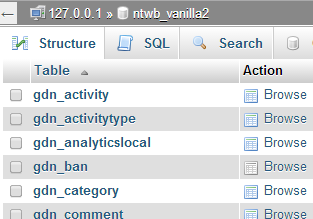
    To get the table prefix you might have to open phpMyAdmin on your hosting providers control panel (cPanel)

    In this image my table names have a gdn_ prefix, this is what you would use.

    I am pretty sure gdn_ is the default and used by most installs.

    #142371
    thajskyraj
    Participant

    Thanks Robin, I guess I understand you completely. I did exactly what you advised me to do and it actualy works, however I am not certain what exact code of bbpress theme should I put there.

    The code of page.php looks as follows:

    <?php get_header(); ?>
    <?php get_template_part(‘loop’, ‘page’); ?>
    <?php get_footer(); ?>

    The questions is what piece of bbpress template code should I put between the header and footer. Now I put there code copied from bbpress/templates/default/extras/page-front-forums.php, and its some improvement, however it is still not correct as it put the sidebare widgets under it instead of its correct location.

    If you can advise what code should I put there, then it will be perfect solution.

    Thanks a lot for your efforts and time.

    #142346
    Robin W
    Moderator

    it’s coming from bbpress stylesheet.

    there may be a quicker way to remove this, but one that should work is as follows.

    I don’t think you have a childtheme, and now may be the time to consider having one, see https://codex.bbpress.org/step-by-step-guide-to-setting-up-a-bbpress-forum-part-2/ for more details

    once done you need to navigate to

    wp-content/plugins/bbpress/templates/default/css/bbpress.css

    copy this file into a folder called css within your theme, so you end up with
    wp-content/themes/mychildtheme/css/bbpress.css

    where mychildtheme is the name of your childtheme

    Then edit every line that has

    background-color : xxxxxxx

    change to

    background: none repeat scroll 0 0 rgba(0, 0, 0, 0.4);

    NOTE it goes from background-color to background
    and it is only the background color that you’ll be changing, not lines which just have color: as that’ll be text!

    eg

    #bbpress-forums div.bbp-forum-header,
    #bbpress-forums div.bbp-topic-header,
    #bbpress-forums div.bbp-reply-header {
    	background-color: #f4f4f4;
    }
    

    becomes

    #bbpress-forums div.bbp-forum-header,
    #bbpress-forums div.bbp-topic-header,
    #bbpress-forums div.bbp-reply-header {
    	background: none repeat scroll 0 0 rgba(0, 0, 0, 0.4);
    }
    

    This will make the background transparent, but with a darker tint shading that you have in your sidebar (the amount of difference is on the 0.4 bit, 0.1 is the lightest, 1.0 the darkest).

    Come back if that doesn’t fix it, or for further help

    #142310
    Robin W
    Moderator

    hmmm…

    Should work !

    Are you changing it in wp-content/plugins/bbpress/templates/default/bbpress/loop-forums.php?

    or in your child theme?, and if the latter can you detail the path from wp-content/ onwards

    #142308
    Ilya
    Participant

    For participant user search results doesn’t not show topics from private forums.

    If I add to default capabilities in bbp_get_caps_for_role() at /wp-content/plugins/bbpress/includes/core/capabilities.php line 191 the follow line 'read_hidden_forums' => true, then it works, but forum has visibility “Private” not “Hidden”.

    How can I override bbp_get_caps_for_role() without modifying core files?

    #142287
    Stephen Edgar
    Keymaster

    @kris35 wrote… There are 68 replies to replies and 68 of them are locked this way

    This shouldn’t be an issue unless edit_lock has incorrect timestamps.

    @kris35 wrote… I had to go into the backend and edit the “Reply To” box to zero.

    We have just done some testing trying to reproduce “Incorrect Reply To’s” but couldn’t.

    Setting them to 0 will force the replies to be ‘Not Threaded’ and sorted by date (default)

    @shanebp wrote… …any edit to a reply pushes it to the bottom and destroys the threading. Any threaded replies become ‘flat’.

    I can’t reproduce this, any edit I make to a ‘threaded reply’ in the frontend or backend keeps the correct ‘replyto’ value and works as expected.

    #142251
    crzyhrse
    Participant

    Hi Robin,

    Adding the !important, I have placed the below into the theme’s child, and then just to see what would happen when that didn’t do anything, placed it at the bottom of the bbpress.css file, here- /wp-content/plugins/bbpress/templates/default/css/bbpress.css

    Neither attempt made the change I am looking for, to increase the font size of all the forum text in general, which is presently about the same size as this text is here… I’ll tweak the number once something I try is effecting a change… I am always clearing all caches when I ever do any changes, just to confirm that…

    bbpress-forums .bbp-topic-content p,
    bbpress-forums .bbp-reply-content p {
    font-size: 16px !important;
    }

    I am going to keep looking and playing with it but wanted to report this now… I am accepting your offer of help. Some feedback is that in a lot of searching in the past I hadn’t come across the pages your links above sent me to, and they are helpful, though still with some vagueness and gaps that can leave on a bit floundering… I you want to hear more let me know…

    Anonymous User 13302461
    Inactive

    I have noticed a few bugs.

    The freshness is displayed wrong sometimes, seeming to point to the time the thread was made and not the latest activity, or perhaps to recent activity on the wrong thread, because:

    Some topics I click on “recent post by” next to the freshness, it takes me to a completely different topic!

    The forum “subscribe” link is missing

    The topic “subscribe” or “unscubscribe” links make a popup box saying “Undefined”

    Shame because default bbpress layout for multiple forums, categories and sub categories is awful.

    #142233
    Robin W
    Moderator

    Apart from breadcrumbs, the rest seems to be working fine.

    Suspect breadcrumbs is related to the theme you are using. Try a default theme and see if they appear. If they do, then you will either need to send some time resolving, or just ignore that you don’t get them.

    Sorry, but I don’t quite understand your second questions “Also, is it possible to get all the topic pages, forum pages (basically all pages that are related to the forum) on a custom page?” as the link take you back to the same page as your first link, so I canlt see what you want differently. Come back with further info, and I’ll try to help you.

    #142217

    In reply to: Menu link to Profile

    lee990
    Participant

    hi I used a plug in called theme my log in by amending the code it only displays when the user is logged in. I don’t know if it works with other login modules or the same theory applies, but only took 10mins to do and I know nothing about php.

    Good luck

    and the added the code as suggested by Robin W on this thread

    <p>edit” >Amend Profile/Change password</p>

    I edited the file in theme my login, wp-content/plugins/theme-my-login/templates/user-panel.php
    and added the code in, so the whole file looks like;

    <?php

    /*

    If you would like to edit this file, copy it to your current theme’s directory and edit it there.

    Theme My Login will always look in your theme’s directory first, before using this default template.

    */

    ?>

    <div class=”login” id=”theme-my-login<?php $template->the_instance(); ?>”>

    <?php if ( $template->options[‘show_gravatar’] ) : ?>

    <div class=”tml-user-avatar”><?php $template->the_user_avatar(); ?></div>
    <p></BR>edit” >Amend Profile / Change password</p>

    <?php endif; ?>

    <?php $template->the_user_links(); ?>

    <?php do_action( ‘tml_user_panel’ ); ?>

    </div>

    it looks really good, well I think so.

    #142212
    Robin W
    Moderator

    There are probably much cleverer ways to do this but find the following file

    wp-content/plugins/bbpress/templates/default/bbpress/loop-forums.php

    On line 19 you’ll find the following

    <li class="bbp-forum-info"><?php _e( 'Forum', 'bbpress' ); ?></li>

    change the ‘Forum’ to whatever you want it to read.

    If you just change it in this location, it will be overwritten each time bbpress updates.

    What you really need to do is to put it into your theme – see

    Step by step guide to setting up a bbPress forum – part 3

    item 3 for how to do this, and part 2 of the guide (go to the codex home for this) discusses how to set up a child theme

    #142191
    Debayne
    Participant

    If anyone else has this problem

    This is an issue with bbPress, it loads the content-search.php template from the theme directory, which is wrong. An easy fix is to rename the content-search.php file in your theme directory to content-searchresults.php and then change this line in search.php:
    get_template_part(‘content’, ‘search’);
    to this:
    get_template_part(‘content’, ‘searchresults’);

    A big thanks to Trevor over on the Artisteer Forums

    #142187
    FlyFishersCorner
    Participant

    EDIT note: Running bbPress 2.5.3 on WordPress 3.8.1
    My theme does not support sidebar widgets, so I instead created a page to house my forums. Additionally, I like the idea of being able to add some content above the forum index. I am running everything through a child theme.

    EDIT note: The breadcrumbs display in the bottom right of the header, in case it’s not obvious when looking.

    As it stands, I’ve added a login box and some content to the page, then used the [bbp-forum-index] shortcode to add my forum index. See the page here.

    Clicking into the first forum, “General Fishing Discussion” (my site is a fly fishing related one), I have no issues. The breadcrumbs can get me perfectly back to the page where the index resides. See here.

    Finally, I have created a couple test topics. Once I click on one of those topics, this is where my problem arises. Instead of the breadcrumbs being Forum>General Fishing Discussion>Topic Title, they switch to Home>Topic>Topic Title. Clicking the Topic link takes me to a 404 page. See it here.

    I’ve been tinkering with this for days, trying several different solutions from this site that I thought might work. The most recent was a fix suggested about two weeks ago whereby I copy the page.php file from my theme folder and rename it to bbPress.php to force bbPress to use it. I have seen no change. I will note that I tried placing it in the theme-child folder as well as the theme-child\bbPress\default folder. Neither worked.

    The other fix I tried that I thought might get me there was one posted here about 4 months ago that offered a replacement code for the loop-forums.php. Unfortunately, that didn’t work either.

    Does anyone have any other ideas? I really appreciate any help you guys can offer! I love the look and integration of bbPress, I just can’t have users running into walls after reading a topic and trying to navigate back out to other forums.

    Thanks in advance!

Viewing 25 results - 3,351 through 3,375 (of 6,794 total)
Skip to toolbar