Search Results for '"wordpress'
-
Search Results
-
I am trying to integrate bbPress into my WP-operated website. My WordPress is 2.6. I installed bbPress “Brubeck” (version 0.9.0.3) in a subdirectory titled “forum”. I chose the integration option. I created a separate database for bbPress with separate users. Everything went well but at the end I got this message:
“>>> WordPress cookie secret key not set.
>>>>>> Your “bb-config.php” file was not writable.
>>>>>> You will need to manually define the “BB_SECRET_KEY” in your “bb-config.php” file.”
I was able to login at first but later I opened the “bb-config.php” file and entered a secret code there. Then I tried to login again but I got this message:
“Too many redirects occurred trying to open “http://thepublicsphere.com/forum/bb-login.php”. This might occur if you open a page that is redirected to open another page which then is redirected to open the original page.”
I tried to login to my WordPress admin but none of my user names and passwords worked. I tried to reset the passwords but the emails I receive do not contain any new password, neither the link they provide leads to any reset page.
What should I do?
Topic: installation help
I downloaded bbPress into my wordpress directory, as I am planning on integrating bbPress into my wordpress site, and I go to http://www.mysitename/bbpress and the installer comes up. I put in what should be my database “name, user, and password” and I get the errors:
Warning: mysql_connect() [function.mysql-connect]: Can’t connect to local MySQL server through socket ‘/usr/local/mysql-5.0/data/mysql.sock’ (2) in /home/content/m/y/g/mygreensprout/html/bbpress/bb-includes/backpress/class.bpdb.php on line 123
and
! There was a problem connecting to the database you specified.
Please check the settings, then try again.
Any suggestions?
I’m running WP 2.7 in my site (www.ins-ide.org) and because it, I choose BBpress Alpha and then I install the bbPress 1.0-alpha-4 into my /forum/ inside the ‘public_html’ (thought from I read, it supposed to be the easiest things to do for installing bbpress).
after I extract the ZIP file, I send all the content (via FTP) to the /forum/
Then, I opened the bb-config-sample.php & wp-config.php
I use ‘localhost’ and only matching the MySQL DB user & pass
After that went to http://api.wordpress.org/secret-key/1.1/bbpress/
and copy&paste the result into my bb-config-sample.php
and DONE!
i just save it as bb-config.php
then with the Force in my mind, I opened http://www.ins-ide.org/forum
*D’oh!
I got this:
Parse error: syntax error, unexpected $end, expecting ‘)’ in /home/insideor/public_html/forum/bb-includes/functions.bb-template.php on line 2124
with the curiosity I’m opened the functions.bb-template.php and seeing whats going on in line 2124,
well.. it is the last line and it says
Code:function bb_profile_password_form( $idcould anyone helps me to get my forum build?
many thanks!
Topic: Forums disappear
I’m really shocked by this problem. Today, when I’ve visited my forum several forums have disappeared. Then, I go to the admin area, add some other forum and they appear again, made some changes in order of forums and disappear again … but the forums are there: if you click in any post of the forums disappeared you can see that the forum exists 🙄
What can be happened?
I use bbPress 1.0.4, by the way, and the forum url is http://ayudawordpress.com/foro/
I followed the video tutorial posted in this forum and when I completed Step 3 it said everything had been created, but that the forum had failed to be installed. Then I deleted the config.php file and tried to install bbPress again, but this time it wouldn’t let me get past Step 1. When I tried to move on to Step 2 the page timed out and said Firefox could tell that some process would continue for forever. So I checked the database and realized all the files from before were there, so I deleted all the ones involving bbPress and then tried to run the installation again. I do Step 1 fine, and then I fill out all of Step 2 just fine, and when I click to move on to Step 3, it tells me that everything has been set up correctly and is linked (WordPress and bbPress sharing the same users). But then when I get to Step 3, at the top it says that I skipped Step 2.
I that point I thought that I might as well just go ahead and finish installing bbPress, even if the users aren’t linked, and it let me, and told me everything had been installed correctly. But the forum wasn’t set up and I checked the database and nothing had been added.
I’ve tried reinstalling bbPress on the server, but nothing seems to work. Any help would be greatly appreciated.
Topic: Calling to theme location
I am trying to embed some javascript on my BBpress forum using this code from my WordPressblog.
<script type=”text/javascript” src=”<?php bloginfo(‘template_url’); ?>/js/prototype.js”></script>
What is the equivalent of <?php bloginfo(‘template_url’); ?> in BBpress?
Hey,
I have a wordpress forum @ http://www.holysh1t.net for the quake live CTF community.
I recently installed a bbpress forum to go with that. Seems to work pretty fine besides some inital errors.
Yet now I face this problem where It does not automaticly link people’s account when they signed up via front end of the wordpress. All the registered users in wordpress had to be manually given in a role in bbpress. The same thing applies for new registrations in wordpress.
However, if I sign up via the forum stuff works great.
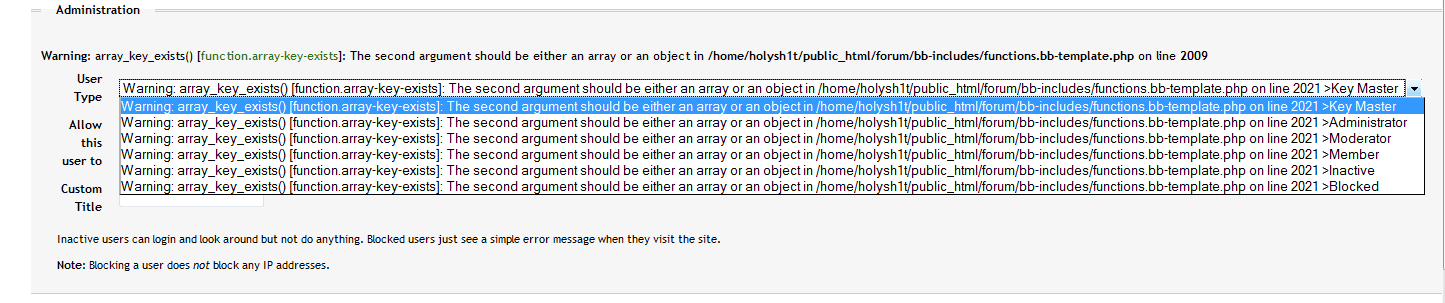
This is the menu I get when someone made an account via front end:
http://www.holysh1t.net/files/bridge_error.png
If I click any role and then save, it corrects itself and the user can post. The long error is replaced by whichever role I chose. (member/admin,etc…)
Now I have to manually assign a role each time someone signs up through wordpress instead of bbpress.
WordPress: 2.7
bbpress: 10 alpha 4
Any ideas?
Thanks for the support and I greatly appreciate the effort put into this great piece of code!
Greetings,
Nico
Just tried to integrate bbpress and wordpress, and now I can’t login to bbpress. I had two users set up in my forum — a key master and a normal user — and I’m getting responses that neither exist. I’m wondering if the problem may be related to the “Locked Out” thread of a couple of weeks back, but I’m not getting any error message when I try call the forum. But neither of my user names is recognized, and I donno how to get into admin to see if they’re still there. I’m using 0.9.0.3 bbpress and 2.7 wordpress. I installed both of them separately then later tried to effect the integration; they reside in separate databases on the server (ddigger1_final and ddigger1_bbpress); bbpress is in a subdirectory of public_html, as is wordpress.
Any suggestions on how to fix it would be appreciated. Thanks.
Topic: WP + bbPress integration
Hi,
I’ve been using wordpress for a while was looking for a good way to integrate a forum with my site tried out bbPress seems great so far.
I’ve made a template to match my main site you can find it at http://www.webguideuk.com/forum
My site is a tutorial site for web design with tutorials and forum to get further help/chat.
Let me know what you think.