Skip to:
Content
Pages
Categories
Search
Top
Bottom

Search Results for '"wordpress'

Viewing 25 results - 20,376 through 20,400 (of 26,865 total)
  • Author
    Search Results
  • #76873
    _ck_
    Participant

    I’ve discovered that several of my plugins that have admin menus will not be able to access the admin menu in bbPress 0.9.0.7 and 1.0.3 because of the new admin menu security lockdown that was merged from WordPress 2.8.3 (essentially I didn’t go through the API for bbPress 0.8 compatibility).

    I’ve now fixed what I can find but there will be other plugins with the same problem.

    #76872
    _ck_
    Participant

    I highly recommend people learn how to install bbPress (and wordpress) via SVN, it makes life incredibly easy. You can switch between bbPress versions in a heartbeat, test new betas or jump back to the previous version effortlessly.

    See this topic for more info:

    https://bbpress.org/forums/topic/svn-procedure-for-checking-out-bbpress

    and my note at the end on how to install SVN as a simple client instead of the whole darn thing.

    #77604
    gerikg
    Member

    Did you….

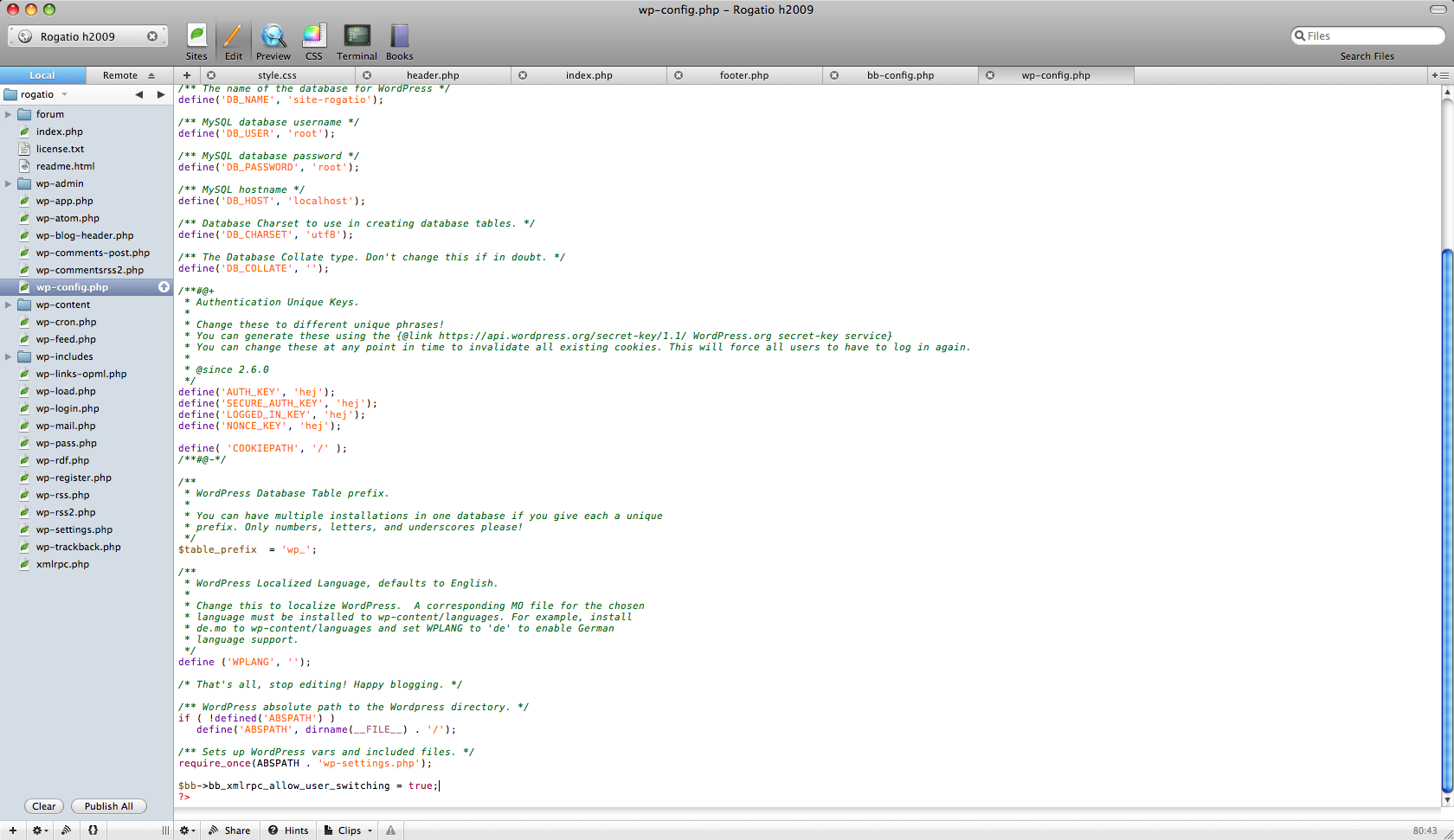
    -have the Cookies & Salt all the same? example BBpress side define('BB_AUTH_KEY', 'ABCDEF'); WordPress side define('AUTH_KEY', 'ABCDEF');

    -include $bb->bb_xmlrpc_allow_user_switching = true; in bb-config.php before the ?>

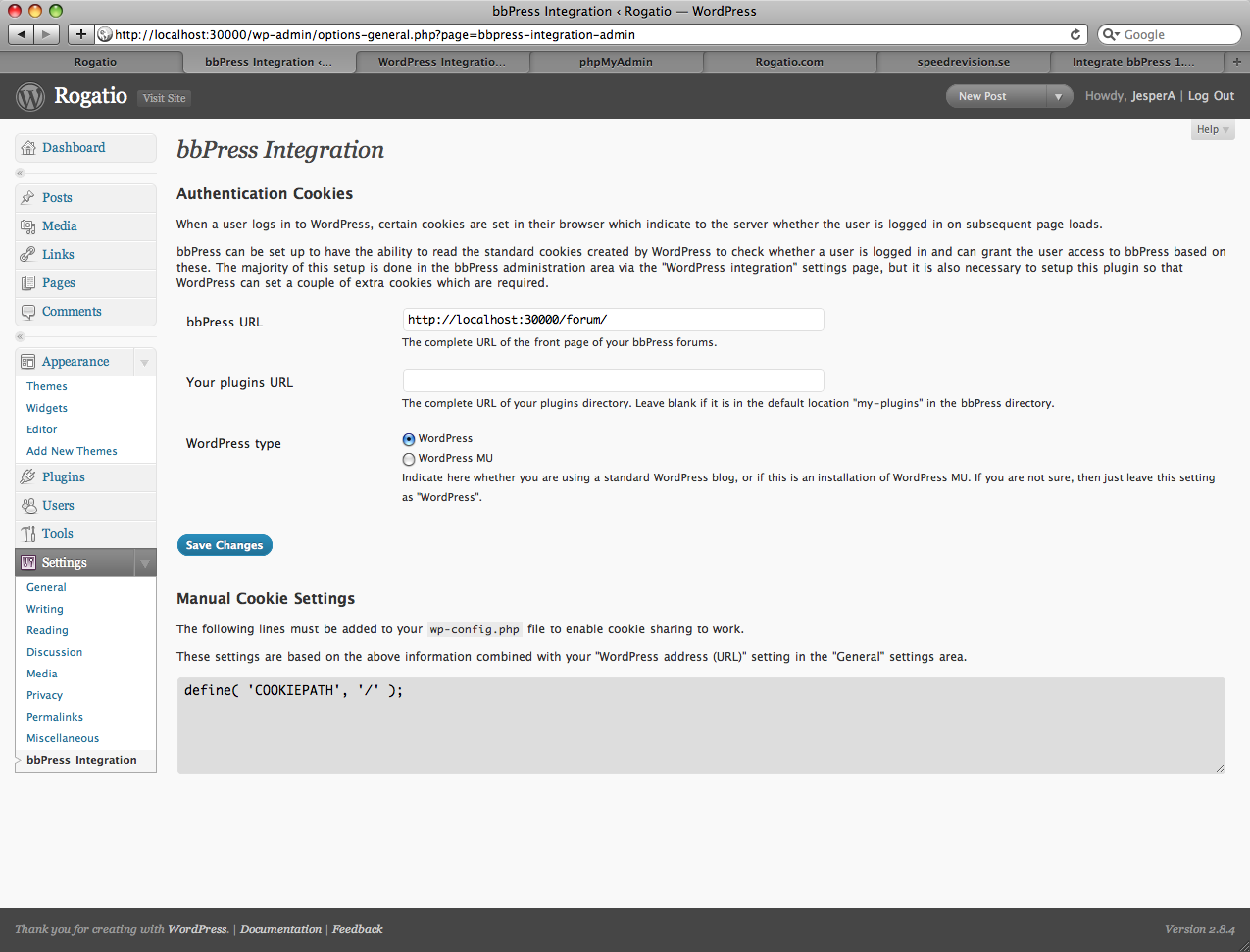
    -install BBpress intergration plugin to get the Hash and cookie information to paste in wp-config.php after the < ?php ?

    -Paste the same cookie information you did on the step before in bb-config.php (without the Hash line) after the < ?php ?

    -Enable Pinbacks, trackbacks, and XML-RPC on BOTH WPMU & BBpress?

    #78187
    johnhiler
    Member

    You definitely want to use the same users table for both installs. :-)

    I’ve had to eventually integrate bbPress and WordPress users after not integrating them upfront, and you definitely want to do it sooner rather than later. It wasn’t fun, but it’s definitely doable.

    There’s a good discussion on how to go about it here:

    https://bbpress.org/forums/topic/integration-of-established-wp-and-bbpress-installations

    #31526
    gardenfl
    Member

    I eventually wish to use BuddyPress on a site, but feel I need to do this is stages.

    At the moment this site consists of WordPress on one database and BBPress on a different database using the most recent versions of both scripts.

    I started integration but stopped because I saw a potential problem.

    I have about 70 registered users on BBPress

    I have about 10 users on WordPress, these are mostly Authors.

    I gave the users the same rank on both, making the WordPress Authors, Moderators on BBPress

    Still, I suspect that I could be making a huge mistake if I don’t merge the User tables before integrating, and of course I would want everything setup correctly for interrogation before playing around with MU and BuddyPress.

    Now if I understand this correctly the User table for an integrated site should be WordPress, not BBPress?

    Is there such a thing as a script that would allow me to make all BBPress users WordPress users?

    Or am I looking at this all wrong?

    Or is it possible to set up MU/BuddyPress and merge all users onto that?

    #77069

    In reply to: bbpress and memcache?

    usera
    Member

    I think you may be confused _ck_. memcache has it’s uses like php op_code. It does not take alot for it to have a benefit and the same applies to memcache. However I am not asking for a suggestion on avoiding memcache. I would like to see a better handling of objects in the same way you create a prefix for a database. If you set a large pool for memcache say 1gb. The idea of setting another instance and monitoring it with startup script gets a little bothersome especially when an array can be used to mitigate the possibility of one failed instance to drive your site down. In short I should say you don’t usually start another mysql to house a database nor would it be useful to do that with memcache.

    Thanks samhaurs again. I just want to be sure there weren’t objects that are generically named that can be seen across bbpress installations like administrative or personal details that should be separate that some are improperly written to cache much like wordpress mu does at the moment.

    #77067

    In reply to: bbpress and memcache?

    Sam Bauers
    Participant

    “[WordPress.com] uses several dozen queries per page load.”

    Thanks to memcache the average blog front page on WordPress.com uses only a handful of queries, sometimes as few as one.

    “It absolutely cannot just rely on the mysql cache, even with dedicated mysql servers.”

    From memory, WordPress.com doesn’t use MySQL query cache at all as it would need to be invalidated many times every second. We also would need to invalidate all slaves as well as the masters.

    I think it’s important to say that you should only setup and enable any caching if you actually need it. Most people don’t and shouldn’t, all you do is add another potential point of failure into your site.

    #77066

    In reply to: bbpress and memcache?

    _ck_
    Participant

    Let’s review this from scratch.

    WordPress and bbPress 1.0 has what we call an object cache. That is simply a pool of users, forums,topics, and posts and meta as they are passed between mysql and the application (wordpress/bbpress). It’s just another layer between mysql and bbpress.

    Typically these “objects” are lost after every page load because they are no longer in regular short-term computer memory and have to be fetched again from mysql.

    On a single computer system with a fast mysql server and fast disk cache, this typically is not a big problem. As a site has to scale this does become a problem because there is only one mysql source and everything has to be fetched from it.

    Using a poorly configured WordPress or bbPress system with badly written or improperly running plugins, if each page load requires 30-40 queries, and you have 1000 users connected simultaneously at once, that’s a huge problem.

    Memcache is a common pool of memory that doesn’t go away after each page load. It’s centralized on one server so multiple servers can all find it easily. It was invented by LiveJournal after they hit a growth limit with mysql.

    The Memcache to Object Cache interface plugin for WordPress/bbPress 1.0 allows the fetching from mysql to be skipped IF the user/forum/topic/posts happen to be in the previously accessed pool in that centralized memory. Every time a query is made, the resulting data is saved in the collective memory which is retained inbetween page loads. It’s a common, shared memory.

    However Memcache was written to talk over tcp/ip between MULTIPLE servers. For a single server setup it’s pointless and stupid and way too much overhead.

    Now, on a single server, you could still use a persistent object cache with one of the other lesser known plugins that mimic what the memcache interface does. There is one for Eaccelerator, one for APC and one for Xcache.

    However, all of these caches do almost the same thing as MySQL’s cache. They are all tied to the particular kind of query that is done and if it matches the previous set of data. The object cache still has to de-serialize data if it’s serialized.

    MySQL on a single server system does not use tcp/ip to communicate with bbPress if it’s properly configured (and most are unless your host is greedy and stupid and uses a central mysql server separate from your regular server). So MySQL with a properly configured cache is almost as fast on a single server setup than a persistent object cache (unless MySql is overloaded in the first place).

    So in conclusion, if you are on a shared host, object caching is not a viable solution for you because you can’t get any of the persistant memory options installed anyway. If you are on a single server setup but not dealing with a large number of connections, the mysql cache is probably going to be near the performance of a persistent object cache, and the real memcache would never be used in the first place.

    Memcache was meant for large, inefficient installs like WordPress.com

    WP.com serves many thousands of people simultaneously from many different servers. It uses several dozen queries per page load. It absolutely cannot just rely on the mysql cache, even with dedicated mysql servers. The average wordpress/bbpress user does not face these problems typically.

    If you have your own VPS or dedicated server you should be installing an opcode cache like Eaccelerator, APC or Xcache and turning on the shared memory pool option (typically during compile). Then you should make sure your mysql cache is ON and setup properly. Then you should make sure your pages are not using too many queries. If you’ve done all that and you have so many simultaneous visitors that your mysql is running too high a load and your pages are still too slow, then you can look at one of the persistent object cache modules for wordpress and port them to bbpress.

    None of the bbPress installs in the Top 10, are using memcache or any kind of object cache for that matter (including wp.org which is using bbPress 0.9). So I sincerely question the need of anyone else using an object cache just yet unless they have made their install extremely inefficient somehow or have a horrible host.

    #77065

    In reply to: bbpress and memcache?

    Ryan Hellyer
    Participant

    Hmm, showing my total ignorance of caching here …

    I assumed memcaching was the best way to improve the performance of bbPress and WordPress on a server even if it was only on a single server. So if I have a VPS, what specifications should I request to make sure it runs at maximum efficiency?

    I”ve been contemplating moving to a 512 MB VPS and requesting they install mem cache on it for me. But juding by _ck_’s comments above that would be a stupid thing to do.

    Any opinions?

    #77064

    In reply to: bbpress and memcache?

    Sam Bauers
    Participant

    @usera

    You can setup a new memcached instance to avoid clashes with wordpress, but if you are sharing user tables then it shouldn’t matter.

    If you add another memcached instance on a different port you can point bbPress to it by adding this to bb-config.php (default IP and port shown here)…

    $memcached_servers = array( 'default' => array( '127.0.0.1:11211' ) );

    #77063

    In reply to: bbpress and memcache?

    _ck_
    Participant

    Memcache is only useful for multi-server installations otherwise it has too much overhead.

    Eaccelerator, APC and Xcache have shared memory solutions that are significantly faster than memcache on a single server setup. But on a single server, it’s also been demonstrated a proper mysql cache can be faster than an object cache in some cases.

    Eaccelerator, APC and Xcache can already store server session data in shared memory, you just have to compile with the option and turn it on in PHP.

    There are plugins for wordpress that could be ported to bbPress 1.0 for the object cache but IMHO it’s a waste of time unless you have a very slow or overwhelmed mysql server.

    #77062

    In reply to: bbpress and memcache?

    usera
    Member

    you are a lifesaver sambauers. I am using object cache but it’s not deeply integrated . The only other question is do you happen to know if you have to set a key (if you can set a key) to prevent object sharing. I know this is a problem with wordpress mu. I wish this was documented somewhere.

    #31522
    usera
    Member

    I seem to have made a terrible booboo. I installed a clean wordpress mu 2.84a and than tried to install bbpress 1.0.2 with integration… I went to the last step and entered the same admin password for wordpress mu and I got Key Master could not be created! At this point it was completed but I went back to try to correct with a proper forum account and I get the “bbpress already installed ” message…

    Anyone know a simple fix besides reinstalling bbpress?

    #77480

    In reply to: Latest Comments?

    Sam Bauers
    Participant

    “bbPress Live” plugin used to do this before WordPress 2.8 broke it. It’s on my todo list to fix it.

    #31518
    nataliya1977
    Member

    Hello!

    I create e social network on WordPress MU+Buddypress+bbpress.

    I want to create a button “Home” in header of bbpress to unite my social network and forum. And in header of Buddypress create a button “Forums”. How can I do it?

    I’m not a programmer and I don’t know php-code veru well.

    Help me!

    #30616
    nataliya1977
    Member

    Hello!

    I need a plugin, which can change header and footer in bbpress.

    I create a social network. I use for it WordPress MU+Buddypress+bbpress.

    I want to create a button “Home” in header of bbpress to unite WordPress MU and bbpress. And vice-versa I want to create a button “Forums” in header of Buddy Press.

    I’m not a programmer and I don’t know php-code very well.

    How can I do these changes?

    Thanks

    #77207

    Yes, it’s an issue with bbPress. It’s an issue with WordPress too. It’s an issue that means you need more memory. The memory limit (see the WP Codex for more on WP_MEMORY_LIMIT) means you need to increase your blog’s PHP memory limit. Why they call it limit and not something that implies ‘adding’ I don’t know.

    Which usually means your webhost hasn’t allocated enough to run WP/BB. Which means it’s actually an issue with your webhost that MAY be work-aroundable with manual tweaking.

    While you’re welcome to try BB_MEMORY_LIMIT (which is the logical name for it), I don’t think it exists.

    If you actually read the links I gave you, you’d know that PerishablePress (a fantastic resource) mentions you may be able to increase memory limits by editing wp-config.php like so:

    <?php
    @ini_set("memory_limit","16M");

    Try that on bb-config.php and see how it works.

    You’re probably going to need to dig into your php settings to see how much memory you’ve got right now, and how much you have to play with. You’ll need to savvy up on your error logs too, to see where it’s barfing.

    #31197
    hedonplay
    Member

    Hello, everybody, I’ve searched around the forum but none of the mentioned solution works for me.

    I’ve integrated bbpress into my WordPress in a subdirectory called forum, so it looks like mysite.com/forum/

    I have created the .htaccess under this directory. Everything is working fine. All the forums, topics and tags could be viewed normally.

    But there is always a 404 error in the breadcrumb which I used in WordPress.

    Any help is warmly appreciated, thanks in advance.

    #77206
    antoniobon
    Member

    Dear friends,

    is not the fault of the webhost but bbpress. I want to know how to set its memory capacity. Usual procedure with WordPress (WP-MEMORY LIMIT).

    #77205

    No, it’s a known issue with WP and php memory, so I’m not surprised to see it crop up with bb as well.

    Read here:

    http://www.narfstuff.co.uk/2008/03/14/php-memory-and-wordpress/

    http://perishablepress.com/press/2008/02/19/improve-site-performance-by-increasing-php-memory-for-wordpress/

    But seeing as you don’t know how to do that now, I suspect you’ll need to talk to your webhost for help. If you have a good host, they’ll help you out :)

    #30876
    antoniobon
    Member

    I have a problem with memory bbPress 1.01 integrated with wordpress 2.84. I can install a limited number of plugin because the register.php bbpress’s become blank. How can I increase the ram in bb-setting?

    arba
    Member

    Go to your phpmyadmin. Select the name of the database which your wordpress mu is using. Go to Search.

    At the: Word(s) or value(s) to search for (wildcard: “%”) type: dashboard_blog

    Then on the Inside table(s): you have to scroll down and select wp_sitemeta to be inserted in the Search. OK, just click Go.

    You will have the search resources above like this:

    Search results for “dashboard_blog” at least one of the words:

    2 match(es) inside table wp_sitemeta | Browse | Delete

    Click Browse and you will see 2 table. Edit the table name dashboard_blog.

    Whatever you see the meta_value is. I don’t remember exactly (may be ERROR and something) but you don’t need to worry. Just delete all and type 1. Yes, just type the word “1” in the box ONLY.

    Finally, click Go. And log in to you WP. See the result.

    Have a nice day!

    #31499

    Topic: Error 500

    in forum Troubleshooting
    continuingproblems
    Participant

    Hey.

    When using forum, suddenly shows an error 500 and takes from a few to dozen minutes. In error log is only

    [error] [client *.*.*.*] File does not exist: /home/accounts_a/****/public_html/forum/gfx, referer: http://www.*******.net/. I try tu change chmod, upload forum again. .htaccess no exist – it does not work. Bbpress version 1.0.2. Is not integrated with WordPress.

    Do you have some ideas?

    #77788
    chandersbs
    Member

    I really love bbPress, but still wished some features existed by default. I know it’s doable via plugins, but default features are more cool, you can always turn it off. I really dislike the fact that some of the solutions I have seen on this forum, are related to “integrate your forum with WordPress, and use this plugin and it will work”, no, I don’t like that. bbPress should be able to do stuff on its own, without WordPress.

    I don’t want to install WordPress for the sake of making some things work. I have been a WordPress user for so many years already, but still I refuse to do that. I have managed to convert my forum, which was originally SMF into bbPress (SMF > phpBB > bbPress), that was a lot of work, but I’m really happy I did that.

    bbPress is by default very EMPTY, very very very empty. I was not used to a forum, with so less features and options. My users didn’t like it. I managed to add a lot of features via plugins. Now my users are a bit happy, I’m also very happy.

    The best part I love so far is, that making changes not always is so difficult compared to SMF or phpBB. phpBB is the last forum software on this planet I’d want to use, OMG so difficult to make changes. SMF is one of the best out there, but has some limits due to their copyright system.

    Some things I’d really love to see happening anytime very soon:

    1. A codex page, with detailed instruction about the codes, just like its big brother WordPress has, at least a start, so we, the webmasters, can do more cool stuff

    2. More features by default, such as:

    a. Private message

    b. Avatar upload

    c. Memberlist

    d. Quote option in topics

    e. Smilies

    These are some very basic options.

    I’m sure bbPress will be one of the most professional forum software out there one day, it’s not so far yet, but I see it happen.

    That’s why I’m a proud user of this software.

    #78125

    In reply to: Announcement Forum

    Sam Bauers
    Participant

    WordPress does this.

Viewing 25 results - 20,376 through 20,400 (of 26,865 total)
Skip to toolbar