1BadApple,
Did you ever get an answer on your first question? I got the same “you are not allowed to change your password” message at the reset link. If it helps, I finally found my old password in an email from wordpress.org. The term “bbpress” was not in the email, which is why I had trouble finding it.
Still a work in progress, we had to get it up ASAP, converted from phpBB.
http://www.herdhaven.com/forum/
Integrated with our WordPress blog
http://www.herdhaven.com
We’re playing with some stuff, trying to do some things with the forums, etc.
Has anyone seen this amazing commentform on http://css-tricks.com/snippets/css/flip-an-image/
That would be perfect for a BBpress theme.
So clean, sharp, easy to understand.
Yet it is original, in the form that the avatars are round float next to each other in block quotes and such. It breaks the tradtionally “square” internet-look and feels more alive.
They say nothing about either WordPress or BBpress there, but I sure wish someone could make that theme for BBpress. With working and easy to upload avatars! Which is absolutely essential to that design.
I have a Forum/Blog that I have been trying to get up and running. Right now I want to tackle the problem of having a huge amount of spam being generated by people — or bots — who are trying to register.
It is a payed web site (to keep out the riff-raff) and people have to buy a subscription to the site. But, suprisingly, this does not stop my inbox from being flooded by “requests for a username”.
Here is what my inbox looks like:
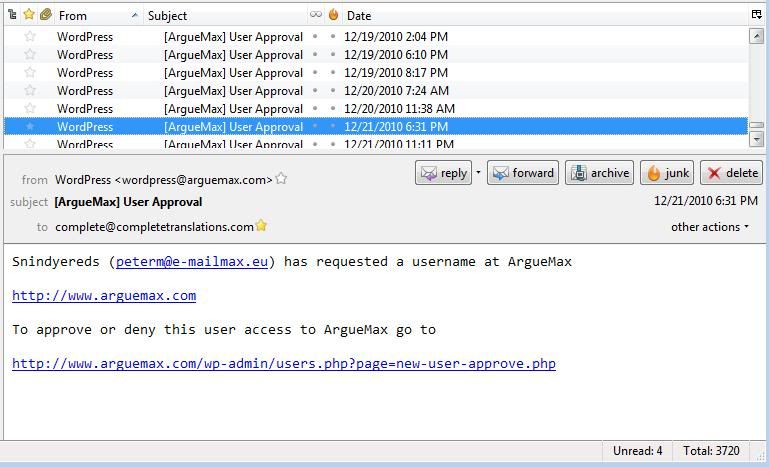
Most of the time, the email addresses in these messages are fake. But sometimes they are not but when I email these persons back, I am ignored. So they really are just spammers looking for a way of posting ad content on my web site for free.
The Registration page has a CAPTCHA Code required entry field:
http://www.arguemax.com/wp-login.php?action=register
But I wonder if the bots are sophisticated enough to get past that.
The user has to click on the “I accept the agreements” field but the agreements field clearly tells the user that they have to buy a subscription. If they do not click on that check box they get this:
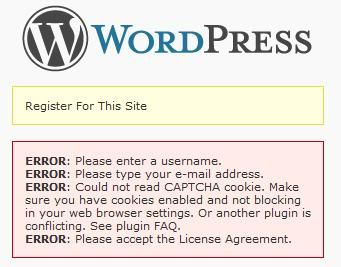
One way I want to try to keep from getting all this spam is to make it such that the registration button is inactive until they click on the subscribe button
https://www.paypal.com/en_US/i/btn/btn_subscribeCC_LG.gif
How do I go about making that happen?
My next problem was:
Registration worked with default themes but not once I got integration correct.
The form would not accept the email address, even when typed in plainly. Dismay!
The following plug fixed everything for me:
https://bbpress.org/plugins/topic/zaerl-wordpress-3-integration/
and I learned about it here:
https://bbpress.org/forums/topic/strange-registration-problems
My next problem was:
Registration worked with default themes but not once I got integration correct.
The form would not accept the email address, even when typed in plainly. Dismay!
The following plug fixed everything for me:
https://bbpress.org/plugins/topic/zaerl-wordpress-3-integration/
and I learned about it here:
https://bbpress.org/forums/topic/strange-registration-problems
Hi,
I’ve just integrated bloguismo.com and bloguismo.com/foro with BBPress but I’m doing something wrong with cookies.
First of all I’ve done deep integration but I have the logout/login problem…
Second: in the wordpress part (bloguismo.com) i use on the top nav bar this:
<?php $user_info = get_userdata(1);
echo($user_info->first_name . “n”);
?>
So it could shows the first name of the user registered, but shows my name (admin name)… could you register and test?
http://www.bloguismo.com/login/?action=register
http://www.bloguismo.com/foro/register.php (the same)
thanks!
So i’m trying to Deep Integrate my WordPress with BBpress, everything is fine until now I get:
Parse error: syntax error, unexpected $end in /hermes/web03/b619/moo.defendersofthefallen/KaoTech/Forum/bb-config.php on line 72
In my bb-config.php line 72 is ‘ ?> ‘
You can see it for yourself at http://www.kaotech.co.uk/Forum
I’m sure I entered the code correctly
/* Deep integration */
if ( !defined('ABSPATH') & !defined('XMLRPC_REQUEST')) {
define('WP_USE_THEMES', false);
include_once(dirname(__FILE__) . '/../wp-blog-header.php' );
header("HTTP/1.1 200 OK");
header("Status: 200 All rosy");
I had to start on line 2 instead of line 1 as ‘ <?php ‘ was the start of the file, and the same tags were closed on line 72.
Am I missing something obvious or? Anyhelp would be great!
Thanks!
Forum performance inside of BuddyPress is improved in 1.2.7 and will be further improved in 1.3 (which still includes the bbPress stand-alone version.)
Having BuddyPress load all of its code and process everything that it does is the bottleneck in your circumstance. You’d be better off loading bbPress standalone properly themed, then the bbPress plugin, and lastly inside of BuddyPress groups (regardless of standalone/plugin.)
But, I think it’s a horse a piece.
The more you need to load is the slower it’s going to be, and the more important caching becomes. The bbPress plugin will respond to W3TC much better than bbPress standalone and BuddyPress will, since it uses the existing WordPress object cache.
Forum performance inside of BuddyPress is improved in 1.2.7 and will be further improved in 1.3 (which still includes the bbPress stand-alone version.)
Having BuddyPress load all of its code and process everything that it does is the bottleneck in your circumstance. You’d be better off loading bbPress standalone properly themed, then the bbPress plugin, and lastly inside of BuddyPress groups (regardless of standalone/plugin.)
But, I think it’s a horse a piece.
The more you need to load is the slower it’s going to be, and the more important caching becomes. The bbPress plugin will respond to W3TC much better than bbPress standalone and BuddyPress will, since it uses the existing WordPress object cache.
well, i don’t know whether that is correct, but .htaccess in bbpress folder inherited the wordpress .htaccess data. removing that from .htaccess base in bbpress folder seemed to resolve the problem.
well, i don’t know whether that is correct, but .htaccess in bbpress folder inherited the wordpress .htaccess data. removing that from .htaccess base in bbpress folder seemed to resolve the problem.
@ Cashman
The bbpress plugin includes a standard theme which should work for most themes I suppose.
But if you want a perfect theme that fits you’ll have to make a child theme of the wordpress template your using atm.
Along the lines of what CK is talking about, the issue is one of DB structure. WordPress only gives us post_parent to help with post relationships, which leaves us with postmeta for everything else. That’s forces us to rely on the object cache and to try to predictively preload data that would otherwise be queried selectively and only as needed. A fully tricked out install with widgets and sidebar can fore the query count into the hundreds on pages like the user profile, with the object cache still missing quite a few.
Compared to bbPress 0.9, the current incarnation of the plugin will be abysmal query wise. Caching helps tons with this on the reads end of things. I’ve gotten it down to 1 cache miss on most pages, with auto cache refresh on writes. But this is one area where more eyes will be helpful. Like CK said, there probably isn’t a whole lot that can be optimized but I’d love to see it.
I’m just a little confused about how the themes work for this. Does there need to be a separate bbpress theme for each wordpress theme you want to use? Or can you use a default bbpress theme that will inherit the wordpress theme in use?
Try using WP3 these days on an active site where there are cache misses, the server will fall apart. You cannot rely on the miracle of caching and ultra-fast hardware to get around fundamental design problems.
Too true.
So fundamentally the problem is with WordPress’ design?
There is no need to minify PHP comments, they are dropped by opcode caches.
However reducing query count is not going to be easy.
I’ll do a 3rd party analysis on the queries (and file count) next week or so, I suspect there is going to be little that can be done to reduce the load because of how this is now being done. It is likely any bbPress plugin install is going to have to be heavily cached on any reasonably active site, just like WordPress now absolutely requires a complicated cache like W3 Total Cache.
But what people don’t realize is you cannot cache an active forum like a blog, they work very differently. Blogs are write-once, read many times and then the comments can be isolated with periodic updates. But on a forum it’s write-many-times and constantly changing. So there will always be many cache misses and the mysql engine will get a huge workout.
Try using WP3 these days on an active site where there are cache misses, the server will fall apart. You cannot rely on the miracle of caching and ultra-fast hardware to get around fundamental design problems.
The size of the codebase is largely due to the amount of phpDoc and inline documentation. I expected there to be a lot of eyes on this code from both bbPress and WordPress audiences, so almost everything is described in detail.
And I certainly appreciate it, but is there an easy way to minify it then?
The query count is high and needs and audit. We’re using internal WP functions for 99% of queries, so we thoroughly reap the benefit of the WP object cache.
The size of the codebase is largely due to the amount of phpDoc and inline documentation. I expected there to be a lot of eyes on this code from both bbPress and WordPress audiences, so almost everything is described in detail.
Okay, I told you that I would bring you in more info if I had it. I got it!
If you do not have any salts in your wp-config.php file, then you can create keys and salts at this link:
-WordPress.org secret-key service-
https://api.wordpress.org/secret-key/1.1/salt/
* You can change these at any point in time to invalidate all existing cookies. This will force all users to have to log in again.
To do a proper integration you will need keys and salts, so generate them all at this proper link.
Remember to add a ‘BB_’ prefix to each key and salt in the bb-config.php.(Example: ‘BB_AUTH_KEY’ or ‘BB_SECURE_AUTH_SALT’)
Miscellaneous info:
If you only need keys, then use this link:
https://api.wordpress.org/secret-key/1.1/
If you only need keys for bbpress then use this link:
https://api.wordpress.org/secret-key/1.1/bbpress/
For bbpress keys and salts use this link:
https://api.wordpress.org/secret-key/1.1/bbpress/salt
Okay, I told you that I would bring you in more info if I had it. I got it!
If you do not have any salts in your wp-config.php file, then you can create keys and salts at this link:
-WordPress.org secret-key service-
https://api.wordpress.org/secret-key/1.1/salt/
* You can change these at any point in time to invalidate all existing cookies. This will force all users to have to log in again.
To do a proper integration you will need keys and salts, so generate them all at this proper link.
Remember to add a ‘BB_’ prefix to each key and salt in the bb-config.php.(Example: ‘BB_AUTH_KEY’ or ‘BB_SECURE_AUTH_SALT’)
Miscellaneous info:
If you only need keys, then use this link:
https://api.wordpress.org/secret-key/1.1/
If you only need keys for bbpress then use this link:
https://api.wordpress.org/secret-key/1.1/bbpress/
For bbpress keys and salts use this link:
https://api.wordpress.org/secret-key/1.1/bbpress/salt
Okay, I see what was missed.
1. I had to copy/paste all of the keys and salts from wp-config.php and replace the keys in bb-config.php. (Though the bb-config.php has only keys, you still must copy the KEYS & SALTS from the wp-config.php and add ALL to the bb-config.php.)
2. Then I had to add ‘BB_’ before each key or salt in the bb-config.php file. (Should look like this… ‘BB_AUTH_KEY’ or ‘BB_SECURE_AUTH_SALT’)
This made my logins seamless. If I have anymore info, then I will add it to this topic later.
I did all the other stuff first such as:
a. adding the bbpress integration plugin to my wordpress
b. updating the wordpress integration ‘user rolemaps’ in the bbpress backoffice
c. adding the manual cookie setting [define( ‘COOKIEPATH’, ‘/’ );] from the wordpress bbpress integration plugin to the wp-config.php file
Other info to know:
My blog is http://gerlainetalk.com
I put the forum in the same folder and not under a different domain.
http://gerlainetalk.com/forum
My lessons:
I find that having the forum in a different domain, botches things up. Such as http://forum.gerlainetalk.com
http://gerlainetalk.com/forum works much better.
Okay, I see what was missed.
1. I had to copy/paste all of the keys and salts from wp-config.php and replace the keys in bb-config.php. (Though the bb-config.php has only keys, you still must copy the KEYS & SALTS from the wp-config.php and add ALL to the bb-config.php.)
2. Then I had to add ‘BB_’ before each key or salt in the bb-config.php file. (Should look like this… ‘BB_AUTH_KEY’ or ‘BB_SECURE_AUTH_SALT’)
This made my logins seamless. If I have anymore info, then I will add it to this topic later.
I did all the other stuff first such as:
a. adding the bbpress integration plugin to my wordpress
b. updating the wordpress integration ‘user rolemaps’ in the bbpress backoffice
c. adding the manual cookie setting [define( ‘COOKIEPATH’, ‘/’ );] from the wordpress bbpress integration plugin to the wp-config.php file
Other info to know:
My blog is http://gerlainetalk.com
I put the forum in the same folder and not under a different domain.
http://gerlainetalk.com/forum
My lessons:
I find that having the forum in a different domain, botches things up. Such as http://forum.gerlainetalk.com
http://gerlainetalk.com/forum works much better.
I have taken all of the integration and deep integration steps. I have even went to a few blogs and taken the extra steps.
I can only log into one of my sites at a time. If I log into wordpress, then I am logged out of bbpress and vice versa.
I have seen others post this forum, but there has been no answers to satisfy my problem.
I have made sure that all of the information in bb-config.php and wp-config.php were matching.
I’m so stumped.
I can’t seem to get users to login to both at all. I have tried several solutions on here and no matter what users will not login to both wordpress and bbpress.
I set all the cookie fields, and user database fields. Users are getting shared between the both just have to login twice.
I added the following to code to both wp-config and bb-config:
define( ‘COOKIE_DOMAIN’, ‘.domainname.com’ );
define( ‘COOKIEPATH’, ‘/’ );
I am not using wordpress MU, so none of those options are checked. I am running bbpress 1.02 and wordpress 3.0.4