Skip to:
Content
Pages
Categories
Search
Top
Bottom

Search Results for '"wordpress'

Viewing 25 results - 9,126 through 9,150 (of 26,874 total)
  • Author
    Search Results
  • #150087
    dice2dice
    Participant

    Thanks guys.
    I have W3 Total Cache and Super Cache but both are deactivated. Beofre I turned off all of my plugins Super Cache was activated.

    My hosting company 1and1 provides me with Cloudfare. Maybe this could be causing it. 1and1 have a new WordPress service that I’m using with dedicated WordPress support. I have contacted them to see if they can resolve.

    I’ll report back incase anyone else encounters this problem too.

    #150075
    Stephen Edgar
    Keymaster

    Make sure your users are triggering any ‘bad words’ in WordPress comment moderation.

    Moderation and BlackListing

    #150073
    Stephen Edgar
    Keymaster

    If you only want to have a forum on that site install WordPress and bbPress in the domain forums.example.com. If you want to have separate blog and forum you should look at WordPress Multisite using sub domains, your forums would be the 2nd site at forums.example.com and your WordPress blog would be at eaxample.com.

    A good starting point is https://codex.wordpress.org/Create_A_Network

    #150072
    Stephen Edgar
    Keymaster

    You can also post on http://jobs.wordpress.net/ if your looking for a WordPress/ bbPress developer.

    #150061
    Stephen Edgar
    Keymaster

    Should the admin get an email when a post goes into moderation if I have E-mail me whenever A comment is held for moderation selected in the Settings > Discussion.

    I have no idea πŸ˜‰

    bbPress is not currently doing this, nor have I got to the this bit in the recent code updates I have written. This is probably something we would want to iterate on further once the changes we have been making as linked above in #2589 and ‘Per forum moderation’ in #459 and how we handle notifications for not just keymasters but also specific forum moderators also.

    #150060

    In reply to: Random Topic Link

    Robkk
    Moderator

    what is the theme you are using??

    are you using wordpress seo or a cache plugin like w3 total cache??

    #150044
    tonydes
    Participant

    Thanks for the reply @robkk. Quick question though, if I use a child theme do I create a folder and copy the css file there or to the parent theme? Also once I copy it, do I add relevant code to the file itself or to the custom css editor on wordpress?

    Thanks again!

    #150040
    WackyRuben
    Participant

    Hi!

    I installed the BBpress plugin to my wordpress site http://www.wacky.no

    I added a new forum (unable to see categories..maybe thats the problem?)
    I added a new topic..

    But when i save – and visit forum its only a black screen http://www.wacky.no/forums/forum/wacky-forum/

    What do i do wrong?

    #150026
    tepatrick3
    Participant

    Im new to this, but my login, forgot password, and register widget doesn’t seem to be working correctly. My website is http://www.rocknrollasylum.com, TWENTY TEN theme

    Login: Has a 404 error
    Forgot Password: has a 404 error
    Register: Goes to wordpress login page.

    tepatrick3@gmail.com

    #150025
    tepatrick3
    Participant

    Im new to this, but my login, forgot password, and register widget doesn’t seem to be working correctly. My website is http://www.rocknrollasylum.com,

    Login: Has a 404 error
    Forgot Password: has a 404 error
    Register: Goes to wordpress login page.

    #150020
    dice2dice
    Participant

    Sorry @netweb, I discovered your reply only this evening.

    I followed the above instruction but it hasn’t resolved my issue.

    Until a couple of months back, as soon as a member posted in a forum on my site they could see their post. Now they can’t unless they go to their profile and click on ‘Activity’.

    The posts eventually appear but take so long that it completely stops the fluidity of conversations.

    Has anyone else come across this issue and does anyone have any suggestions for how it might be resolved?

    I have the latest version of both WordPress and bbPress. My website is http://www.whichinvest.com

    Thanks

    #150019
    dice2dice
    Participant

    Hi,

    The editing tools I have available to members of my site are the same on this forum, with ‘b-quote’, close tags etc.

    These are confusing for members who are not technically minded.

    Is there a better solution that perhaps looks more similar to Microsoft Word icons or something else that is easy to use?

    I have the latest version of both WordPress and bbPress. My website is http://www.whichinvest.com

    Thanks

    #149998
    Robin W
    Moderator

    This is probably a stupid question but How do I empty the trash to make sure that the old slug is removed?

    No stupid questions here !!

    Go into Dashboard>forums> all forums and look at the top for all | published | Trash
    Trash will only show if you have any. If you do click and you can permanently delete
    Repeat for topics and replies, and possibly for posts and pages as well.

    I’m concerned that this could permanently break the existing links.

    I don’t think it will but cannot guarantee, it should only affect anything being created at the time you are doing it, so anyone creating a page, post or forum topic or reply. Quite a lot of advice on wordpress for resetting permalinks is to simply go in and click save, as this still forces a rewrite to the database, so maybe try that first.

    #149993
    Robin W
    Moderator

    So 3 possibilities here

    1. you just want to have you forum pages needing a password, with no user registration. Probably not the best choice, so I’ll ignore for the moment

    2. You want to hide your forums, and have registered people being able to access with some being able to edit.

    Just set the forums to private Dashboard<forums>all forums and edit the forum you want. On the right hand side you’ll see visibility – just set to private

    Base users will have the participant role, with those editing having the moderator role.

    Then choose between manual or automatic registration. Manual gives you control, automatic means anyone can gain access. You can use a plugin such as ‘confirm user registration’ to provide a half way house. Used in conjunction with ‘SB Welcome Email Editor’ to warn your users that they will need to be approved, this provides a great way to let people register, you’re emailed and just click a link to confirm them onto the site, or block them.

    3. If you want your forums visible, but not accessible – so people know they are there, use my plugin

    https://wordpress.org/plugins/bbp-private-groups/

    Again user access as per 2 above

    Come back if any of that isn’t clear, or if you can describe your needs further

    #149989

    In reply to: Random Topic Link

    Robkk
    Moderator

    @robin-w, @joejozwowski

    i found the code to create a random post link that you can use as a reference , when creating a random topic link

    got it from http://cazue.com/articles/wordpress-create-a-random-post-button-2013

    add_action('init','random_post');
    function random_post() {
           global $wp;
           $wp->add_query_var('random');
           add_rewrite_rule('random/?$', 'index.php?random=1', 'top');
    }
     
    add_action('template_redirect','random_template');
    function random_template() {
           if (get_query_var('random') == 1) {
                   $posts = get_posts('post_type=post&orderby=rand&numberposts=1');
                   foreach($posts as $post) {
                           $link = get_permalink($post);
                   }
                   wp_redirect($link,307);
                   exit;
           }
    }

    link to show

    <a href="/?random=1">Random Post</a>

    creating a menu link , idk how to bring that link up in the menu

    Robin W
    Moderator

    Ok, I’ve recut this.

    you can find a buddypress version at :

    bbp buddypress profile information

    Basically you use the custom fields from buddypress.

    In Dashboard>settings>bbp buddypress profile information you set which up to 4 buddypress fields you wish to display. I don’t yet validate these, so make sure the names are exactly as set up in buddypress, or they won’t appear !

    Please come back with any feedback, and I’ll cut this to the wordpress plugins page in the next few days

    #149973
    Stephen Edgar
    Keymaster

    I have just had a quick look at this and with a fresh WordPress 3.9.1 install and bbPress 2.5.4 with define('FORCE_SSL_ADMIN', true); I cannot see an issue, everything works as expected using both WordPress’ ‘Lost Password’ (https://example.com/wp-login.php?action=lostpassword) or using the bbPress shortcode [bbp-lost-pass] on a page.

    I also went through using the bbPress login widget with custom pages for ‘lost-password’ and ‘register’ using both http:// and https:// as the URL’s in the Widget and again everything worked as expected.

    I’d any other plugins you may be using that change any of WordPress’ login/authentication to narrow down the issue.

    #149971
    Stephen Edgar
    Keymaster

    This is not a bbPress or even WordPress issue πŸ˜‰

    “Whatever” plugin you have to control access will be what it is, just start deactivating all your plugins one by one until you can access the site πŸ™‚

    #149967
    K-Path
    Participant

    WordPress 3.9.1 running a slightly modified Twenty Ten

    The EcoPsi Journal & Forums
    http://ecopsi.org/journal/

    I was up working at around 4am and saw a checkbox for locking the site down and now I can’t remember where that was. I don’t actually even remember if it was even in bbPress although I don’t remember WordPress having that feature but that may be because I’ve never thought of looking for that feature. Anyway, I would appreciate it if someone could tell me the most likely place to open my blog and form to the public. Right now you can only see the landing page and have to register if you want to see more of the site.

    #149965
    kopperwoman
    Participant

    I’m having a similar problem to dustinarmstrong. But its not exactly the same.

    I’m trying to fix a broken forum set up for a client. I did not do the forum installation (he did it himself) AND the forum is installed on a live site that gets lots of web traffic so I don’t want to do anything that might impact the website overall.

    Here’s my situation:
    1) BBPress was installed (I don’t have details about when and how),
    2) a page was created with the [bbp-forum-index] shortcode on it
    3) the forum didn’t work, so my client contacted me to fix it
    4) I went into settings > forums and changed the forum root slug from the default “forum” to “travel-forums” (the name of the page where the shortcode lives. The error message “Possible bbPress conflict: Forum slug” showed up next to the slug field after saving the settings.
    5) I also changed the single forum slug from the default “forum” to “travel-forums”. The error message “Possible bbPress conflict: Forums base” showed up next to the slug field after saving.

    In my case, the forum page DOES show up at http://foobar.com/travel-forums but it is empty except for the welcome text that I had entered into the forum main window. (So it just says “Welcome to our forum” without any of the discussion topics showing up.

    Also, I have the “Recent Topics” widget enabled on my sidebar and my three test discussion topics DO show up there. When I click on any of them they take me to the correct URL but the pages are blank. So, for example, when I click on “test topic” in the widget I land on http://foobar.com/travel-forums/topic/test-topic/ and the page displays the topic header “Test topic” and the topic question “what do you think about travel?” but it doesn’t display any of the posts.

    I’m not sure if this behavior is related to the slug conflict error messages or if something else is wrong.

    I’m trying to follow the advice that Stephen Edgar gave.

    First up, I think this is probably true in my case:

    most likely you have something else either titled or using the slug discuss and this includes any items in trash as even though they are in the trash they still reserve that slug and it is not released until the item is removed from the trash.

    This is probably a stupid question but How do I empty the trash to make sure that the old slug is removed?

    Second, I’d like to try this:

    To fix this try resetting your permalinks. In your WordPress Administration Screens navigate to Settings > Permalinks, select a different permalink structure and save. Then select your preferred permalink structure and save again.

    but since my website is live and has been for a long time (and has lots of blog posts using the custom structure already) I’m concerned that this could permanently break the existing links. Any thoughts on this?

    Stephen Edgar
    Keymaster

    There are the two cases:

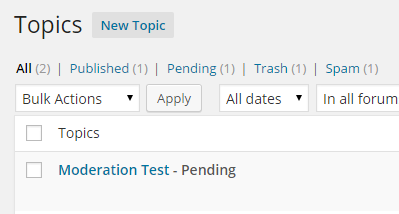
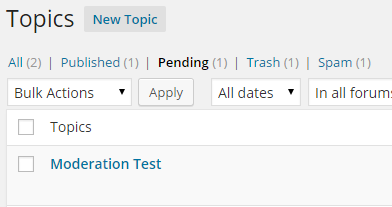
    1. If you enter a ‘moderated keyboard’ that is included in the ‘Comment Moderation’ section of WordPress’ Discussion settings then the topic or reply will be marked as pending (See screenshots below). Currently no notification template is displayed that will notify the user that there topic or reply is waiting in the moderation queue, this will be fixed in bbPress 2.6

    2. If you enter a ‘moderated keyboard’ that is included in the ‘Comment Blacklist’ the topic or reply will NOT be created and a generic message is displayed “Your topic cannot be created at this time.”


    #149962
    Stephen Edgar
    Keymaster

    Awesome…

    (The ———– issue is typically login credentials expiring in WordPress between WordPress and MySQL)

    #149961

    In reply to: Forum subscriptions

    rzelnik
    Participant

    @wplove3268, I know that this is out of scope of the bbPress project, but IMHO the sender address should be configurable within the WordPress core. The current impossibility to change the sender address doesn’t make sense to me.

    Anyway, maybe this article will help you:

    Changing the wp_mail from address in WordPress without a plugin
    http://www.butlerblog.com/2011/07/08/changing-the-wp_mail-from-address-in-wordpress-without-a-plugin/

    #149942
    Doug Smith
    Participant

    Thanks, Stephen. I was just about to update this conversation with the same thing now that I’ve had a chance to look through the code.

    I talked with @jjj about this at WordCamp Milwaukee and he suggested creating a Trac ticket for it, which I have done. https://bbpress.trac.wordpress.org/ticket/2668

    #149934

    In reply to: Forum subscriptions

    rzelnik
    Participant

    So I tried a different e-mail configuration plugin: WP SMTP. The forum post notification emails are now delivered well. It’s strange that in the e-mail header there is the right sender address, while in the captured log there is still the default wordpress noreply@domain address, see here:

    https://dl.dropboxusercontent.com/u/9349232/bbpress-email-testing/wp-mail-log-wp-smtp-forum-post.txt

    Anyway, it is working well for me now.

Viewing 25 results - 9,126 through 9,150 (of 26,874 total)
Skip to toolbar