Skip to:
Content
Pages
Categories
Search
Top
Bottom

Search Results for '"wordpress'

Viewing 25 results - 8,701 through 8,725 (of 26,874 total)
  • Author
    Search Results
  • #153063
    #153057
    Robkk
    Moderator

    maybe your wordpress upload size is 2mb , or a cdn/security solution is limiting the upload size of your site from other users ??

    dont know contact plugin author.

    Robkk
    Moderator

    if you really want the replies and topics to be on the products page.

    this would require custom development

    http://jobs.wordpress.net/

    #1 outsourcing service for WordPress

    if you want bbpress/woocommerce integration

    i think there is some plugins that would help, cant think of them right at the moment.

    #153055

    In reply to: Image click/resize

    Robkk
    Moderator

    search up wordpress oembed , maybe you have images that arent supported by oembed so you cant click them and go to the image source.

    also if you dont have auto-embed links checked in settings>forums oembed wont work at all.

    and im just going to say lightbox functionality would require custom development , if you want functionality like that.

    #153053
    Robin W
    Moderator

    probably several ways you could do this.

    Quickest I can think of is to alter the loop-single reply template

    You should really do this in a child theme, as otherwise theme upgrades will overwrite this – google wordpress child theme video for lots of useful videos on how to do this – it’s quick and simple.

    Create a bbPress folder in your theme :

    Wp-content/%yourthemename%/bbpress

    Where %yourthemename% is the name of your theme.

    Then go into

    Wp-content/plugins/templates/default/bbpress/loop-single-reply-php

    Copy this file into the bbPress folder in your theme. bbPress will now use this file instead of the default, and you can amend this file.

    line 61 does the content styling, so quickest to alter the background of this file.

    so you would put a check I their for keymaster, and if so, use a different class that has a different background.

    How up on coding and css are you, so that I don’t spend hours typing what you already know?

    #153052

    In reply to: Hi sorry i'm new here

    Robkk
    Moderator

    buddypress and bbpress are plugins for wordpress, so they need wordpress to work.

    bbpress does have an older standalone version of itself, it can work by itself.
    Using it with newer versions of wordpress might cause issues.

    About

    About bbPress

    bbPress is forum software, made the WordPress way.

    Have you ever been frustrated with forum or bulletin board software that was slow, bloated, and always got your server hacked? bbPress is focused on ease of integration, ease of use, web standards, and speed.

    We’re keeping things as small and light as possible while still allowing for great add-on features through WordPress’s extensive plugin system. What does all that mean? bbPress is lean, mean, and ready to take on any job you throw at it.

    Philosophy

    Now that bbPress is all grown up, we’re certain of a few things:

    Open Source, always and forever
    Less (code) is more
    Code is poetry
    Simplicity is a feature
    Speed & security are paramount to a great user experience
    Every line of code is written with these principles in mind, and if that sounds good to you get involved!

    About

    About buddyPress

    BuddyPress is a powerful plugin that takes your WordPress.org powered site beyond the blog with social-network features like user profiles, activity streams, user groups, and more. Some fantastic uses might be:

    A campus wide social network for your university, school or college.
    An internal communication tool for your company.
    A niche social network for your interest topic.
    A focused social network for your new product.
    If you’re using BuddyPress in a unique or interesting way, be sure to let people know on the forums; we’re always interested!

    BuddyPress is not “all or nothing”

    BuddyPress comes with several components that integrate directly with your site, with each other, and even with other plugins (check out bbPress for support forums.) If you only want to use a few features, BuddyPress will automatically adapt, showing only the menu items, pages and buttons for the features you have enabled.

    BuddyPress.org

    This site is built on WordPress and BuddyPress (we believe in the software we build!). Please consider registering and becoming part of the BuddyPress community. By doing this you’ll be able to contribute to the documentation, ask questions in the forum as well as build your BuddyPress profile so other BuddyPress developers and contributors can keep in touch with you.

    #153046

    In reply to: SMF Import to bbPress

    Bestru
    Participant

    in the attachment are two screenshots.
    one is from wordpress
    the other is from my mysql database.

    http://epvpimg.com/FQxTe
    http://epvpimg.com/s34Pg

    #153044

    In reply to: SMF Import to bbPress

    Bestru
    Participant

    Hello,

    i’ve the same problem as tehred.

    The database from the smf forum and from the wordpress / bbpress is on the same mysql server.

    What make i wrong?

    #153036

    In reply to: SMF Import to bbPress

    Stephen Edgar
    Keymaster

    @ tehredThe database needs to be exported from any existing MySQL install and imported into the same MySQL server you are using for WordPress, you should be able to find details on importing and exporting MySQL databases from your webhost support or knowledgebase help sections of their website.

    #153019
    Stephen Edgar
    Keymaster

    I haven’t taken a close look for a while at attachment importing has some limitations that we really can’t do at this stage until some improvments upstream in WordPress Core are added.

    For now the best solution I have seen would be to adapt the following for Vanilla 2.1

    https://github.com/CybMeta/kunena-attachments-to-bbpress

    Kunena converter for bbPress 2.4

    Kunena converter for bbPress 2.4

    Out of curiousity which attachment/file upload plugin are you using with Vanilla as I believe it doesn’t include one in the standard install.

    #153014
    Stephen Edgar
    Keymaster

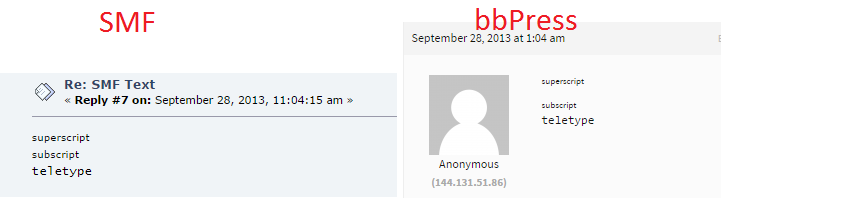
    The code /includes/admin/converters/SMF.php#L717 is replacing [tt] and [/tt] respectively with <tt> and </tt> and a quick lookup of the “teletype” HTML tag shows we should not really be using it all 😉

    http://www.w3.org/wiki/HTML/Elements/tt

    Can you post the HTML raw source of the post from SMF for me, this will allow me to see if it is currently doing it correctly, which I think it is per the details and screenshot below.

    SMF Source: [sup]superscript[/sup]<br />[sub]subscript[/sub]<br />[tt]teletype[/tt]
    bbPress Converted Source: <sup>superscript</sup><br><sub>subscript</sub><br><tt>teletype</tt>

    https://i.cloudup.com/jnMQwRKTXA.png

    We probably should rather than converting them <tt> / </tt> convert them to a span and/or p HTML elements:

    e.g.

    <span style="font-family: monospace;">
    This is a sample.
    </span>
    
    #153011
    Stephen Edgar
    Keymaster
    #153010
    Stephen Edgar
    Keymaster

    Thanks for the ticket in Trac, we will work on adding either of the plugins mentiooned in the Trac ticket to bbPress.

    https://bbpress.trac.wordpress.org/ticket/2698

    #152992

    Searching the internet, I found https://github.com/pippinsplugins/bbPress-Export-and-Import

    This plugin is designed to create an CSV export file per forum and allows you to import it to another forum.

    1. Download the zip from github and install it like a regular plugin on both sites.

    2. On the donor site, open a forum for editing and find the Export link on the right under Forum Attributes. Click it and you will receive the CSV file.

    3. Go to the recipient site and create a new forum. Now on the right side under Forum Attributes (again) you’ll find the Choose File and Run Import buttons.

    This does import topics and replies and on the front end, all seems to work well except for the number of posts per topic is too high. On the back end, Topics appear to be disassociated from the forum — it says (No Forum) — and the All Replies page turns up blank again.

    Happily, heading over to Tools > Forums and running the top two “Recalculate…” and the “Count replies in each topic” options fixed things this time instead of making it worse 🙂

    I really hope bbPress can be fixed to work with the normal WordPress Export/Import at some point but until then, the above steps should get you some good results.

    #152991

    Hi @treb0r23 – I just ran into the same issue. Wanting to move bbPress forums from one WordPress 4.0 to another 4.0 site, I tried WordPress’ own Tools > Export feature to create three export files, one with forums, one with topics and one with replies.

    After importing them in the same order, it looked like everything was fine. All forums, topics and replies where imported successfully and seemed to be correctly assigned to their ‘parents’.

    However, when visiting the front end, it turned out that only a two topics where visible in one forum. All other topics where missing and all other forums where empty. Replies where nowhere to be found either.

    Even though topics and replies are marked as correctly associated in the back end, it does not appear to be the case at all.

    I went to Tools > Forums to try to fix that. First, I tried “Recalculate the parent topic for each post” but even though it responds with “Recalculating the topic for each post … Complete!” after that, I can’t even open the All Replies list anymore. I get a blank page…

    Then I tried “Recalculate the parent forum for each post” but this simply removes all evidence of association between all topics and their forum 🙁

    This is just awful.

    #152990
    Omiya Games
    Participant

    Here’s a weird question: is it possible to create a new topic via a script run by a continuous integration server? To provide more context, I’m trying to create a private forum so selected playtesters (users I manually entered, as you can’t register to this forum) can test my games. Ideally, I’d like to configure my Jenkins server to upload a Unity webplayer to my server, then create a new topic with the first post being the webplayer and the change log to a specified forum. I’m wondering if there’s an automated way to make this happen. Preferably, I would not like to rely on WordPress posts, since again, I’d like to keep these work-in-progress private.

    Thanks for the help!

    Quick stats:
    Wordpress 4.0
    bbPress 2.5.4

    #152989
    Jamie
    Participant

    Hi there,

    I have been reading through the forums, and can’t find anything for more recent versions so was wondering if I could request some help.

    I am working on a project called GameDevelopers.ie, a 12 year old site. We recently ported over their old, bespoke CMS into WordPress, and the our forums which were on phpbb after paying cms2cms which did a great job.

    The forum has 60,000 posts among several thousand threads and two thousand users. Our server is woefully underresourced, and the site is crashing when bbpress is enabled. So we have it disabled, and are just organising to get a better server with more cpu’s, tons of ram and space.

    I was wondering what else we can do to help reduce the load? Is there some way that we can mass archive parts of the forum, or other tactics to help make things run a little better?

    Any help would be GREATLY appreciated.

    Cheers

    Jamie

    #152983
    cricketoutlook
    Participant

    Hi guys i want to know that what is bbpres i already have a site on wordpress CMS http://mazahub.com But i how i can make a site on buddypress.com what is this for and it’s closely looks like wordpress.org and signed in from there but what is the meaning of this CMS . Any reply will be appreciated
    Thanks

    #152981
    KostRev
    Participant

    Somewhat related… anyone else have an issue where no anchor is generated for bbp_topic_subscription_link?

    In the loop-replies.php template I have:


    <div class="reply-content">
    <button type="button" class="btn btn-default btn-sm" title="Set as Favorite"><?php bbp_user_favorites_link(); ?></button>
    <button type="button" class="btn btn-default btn-sm subscribe" title="Subscribe to Topic"><?php bbp_topic_subscription_link(); ?></button>
    </div>

    If you view source on the webpage there is no anchor present.
    Subscribing to Forums works as expected.

    Probably related to these:

    Subscribe to topic link is no longer displayed

    BBP: Topic Subscribe Not Working

    I think I found a bug in bbp_topic_subscription_link


    https://bbpress.trac.wordpress.org/ticket/2581
    https://bbpress.trac.wordpress.org/ticket/2480

    #152980
    delvebelow
    Participant

    I’m getting emails from some of our forum users reporting that the topic page refreshes while they are in the middle of writing a reply. It happens after about two minutes, so many people are finding it difficult to use the forum for lengthy replies/explanations. However, I can’t recreate this problem on any browser. At least one user experiencing this is using Chrome.

    Any thoughts?

    WordPress 3.9.2, bbPress 2.5.4
    http://ccinfo.unc.edu/forums/ (no anonymous posting allowed)

    Robin W
    Moderator

    If you want forums to be visible but not accessible to non-logged in users then you need my plugin

    https://wordpress.org/plugins/bbp-private-groups/

    which gives you loads of options on how your forums display

    The admin bar (called the toolbar) can be disabled apart from admins

    add

    //disable toolbar for non-admins
    if (!current_user_can('manage_options')) {
    show_admin_bar(false);
    }

    to you functions file

    Functions files and child themes – explained !

    #152967
    Ced
    Participant

    Hello everybody 🙂 !

    I have a few questions regarding to how bbPress handles the login/register side and the admin access too.

    I’ve just installed bbPress. Right now, There is a Sign Up page and a Sign In page. When people enter wrong credentials, they are redirected to wp-login. If they enter good credentials, they are redirected to the WordPress admin, or they can have access to the WordPress admin.

    Here is what I want / don’t want :
    – When users enter wrong informations on sign in / sign up page, I want them to stay on the same page. The errors have to be displayed on that page.
    – Users will edit their profile directly in the front end.
    – People who are not admin can’t access WP admin at all.

    How can I do all that things ?

    Thank you very much,
    Cédric

    #152949
    Robkk
    Moderator

    The information i gave you is if you wanted to change your theme to another but still keep the way bbpress is styled.

    IF you wanted to just be able to change themes while bbpress stays the same throughout all of them this is not possible right now.

    where are you lost ?? i basically said its copying the bbpress files from one theme to another.

    i mentioned that you might need to copy some functions from function.php.

    Stargazer Colloquium child theme uses get_theme_mod (which is added to the customizer area to your theme) to add certain color to your bbpress theme.

    You can either delete that function and just added the colors manually to your bbpress.css or hook it up to your new theme which might be a tad more difficult.

    the local development area that i mentioned more can be mentioned is great if you want to test things out like transferring files into another theme.

    here if you use Windows Pc
    http://www.wpbeginner.com/wp-tutorials/how-to-install-wordpress-on-your-windows-computer-using-wamp/

    and here if you use Apple Mac
    http://www.wpbeginner.com/wp-tutorials/how-to-install-wordpress-locally-on-mac-using-mamp/

    steps umm i guess this.

    1. set up local development area

    2. download the files you have edited from your current theme on your website to your computer , ftp like filezilla is recommended.

    3. transfer those files to your local development area , into the other theme you want to use.

    4. start seeing if there is any issues. (the most likely is the get_theme_mod areas that add color) but that’s just color and you can add it to your bbpress.css.

    #152940
    janfeng
    Participant

    How to Change Permalink Because It's a Localized Forum

    Use WordPress + bbpress , Permalink set to /%post_id% ,but still not work !!!

    Damn ,this BUG is two years ago >:-[


    @netweb
    @mercime

    pratik0007
    Participant

    Hi Everyone,

    I am using woocommerce and bbpress for my wordpress website.

    I want to display all the topic and replies under product page of woocommerce.

    I am getting trouble with topic and reply integration on the product page it’s not working fine may be due to not invoking bbpress hooks or what I am not sure anyone please guide me the steps how I can go for this one? this will be very helpful for me.

    Thanks

    [mode edit – moved to a new topic as it was entirely unrelated to the one you posted in]

Viewing 25 results - 8,701 through 8,725 (of 26,874 total)
Skip to toolbar