Search Results for '"wordpress'
-
AuthorSearch Results
-
August 6, 2015 at 4:41 pm #165121
In reply to: List subscribers of a forum
Robkk
ModeratorAnd the answer was … ?
How, as a wordpress admin, can I find a list of all the users that subscribed to new topics in a forum ? Any specific page ? Or even a SQL statement to the DB ?
Every user has a list of their subscriptions in their profile. You can show the user that if they want to unsubscribe, or you can switch to them and do it yourself.
I had thoughts that listing users subscribed to a forum in a widget or an alternative, may be resource intensive.
In phpMyAdmin, in the usermeta table normally called wp_usermeta with the meta-key wp__bbp_subscriptions.
if a user has an ID of 3, and was subscribed to topics 10, 12 and 15, and forums 1, 3 and 6, you would see
user_id 3
meta_key wp__bbp_subscriptions
meta_value 1,3,6,10,12,15
August 6, 2015 at 4:20 pm #165120In reply to: Moderating new subscribers
ModeratorI’m increasingly thinking about writing a custom plugin. I suppose one basic idea would be to create a new user role like “Untrusted Subscriber”, make it the default role for new subscriptions and mark all comments, topics and replies by such users as “pending” until the user is updated to regular “Subscriber” status. The system should also serve a page explaining this when these users post. Something like that.
If you make a plugin like that create a topic in the plugins forum on this site. This could also be useful in the core of bbPress too.
As much as I tried earlier, I couldn’t really get bbPress Moderation to work. It may have something to do with my theme, but I also see that I’m not the only one with problems.
If you are a plugin dev, you can always fork this plugin to make it work. If you want to share your forked version with other users for bbPress then you put your fork on the WordPress plugin repository.
I’m just not entirely sure if it’s more time and effort to write the above than it is to manually delete spam messages and users. So, I was wondering if someone else may already have found a solution.
You can bulk delete spam posts in the WordPress backend to make things go faster. There is also a plugin to autodelete spam replies on wordpress.org.
August 6, 2015 at 2:53 pm #165110ModeratorI think rtMedia might be what you are looking for. Some features you listed might be in a paid addon though.
August 6, 2015 at 2:23 pm #165106In reply to: Please Help – Forum order Problem
ModeratorIt probably got fixed in a new WordPress update. This happens sometimes.
August 6, 2015 at 8:50 am #165095Topic: List subscribers of a forum
in forum Requests & FeedbackPascal Casier
ModeratorHi,
I’m using bbpress 2.5.8 on wordpress 4.2.4.
My request seems so stupid, but I just don’t find it… How, as a wordpress admin, can I find a list of all the users that subscribed to new topics in a forum ? Any specific page ? Or even a SQL statement to the DB ?
Thanks, Pascal.August 6, 2015 at 8:30 am #165094In reply to: link admin bar change
cocolabombe0
ParticipantIt is these values but I tried to create a function to replace values but I do not know it at all.
I try to put code in my function.php not affect my wordpress (update)August 6, 2015 at 3:53 am #165088In reply to: bbp-header background doesn't change
ModeratorSorry for the super duper late reply, your post was marked as spam and had to be approved by a moderator.
You can run PHP in CSS unless you put your styles in a PHP function and added the code to the header using the wp_head hook.
https://codex.wordpress.org/Plugin_API/Action_Reference/wp_head
August 6, 2015 at 3:34 am #165077In reply to: I need to make a forum for my site
ModeratorSorry for the late reply to your post, it was marked as spam and had to be approved by a moderator.
I do not have a list of great themes to choose from but bbPress can work with any WordPress theme you install.
I explain it better here.
August 6, 2015 at 3:31 am #165076In reply to: Create a theme
ModeratorYou create any old regular WordPress theme.
This WordPress codex guide will get you started into theme development.
August 6, 2015 at 3:25 am #165074In reply to: guidance to change the theme of our company forum
ModeratorSorry for the late reply your post was marked as spam and was awaiting approval.
bbPress themes are basically just WordPress themes, you can use any WordPress theme and theme compatibility in the bbPress plugin will do the rest. You may need to edit some files though, because some themes may be tricky to work with.
I explain it better here.
August 6, 2015 at 2:59 am #165068In reply to: Help importing from phpbb3 forum not working
richard.wil
ParticipantI don’t think the current version of bbpress supports importing from phpbb 3.1
https://bbpress.trac.wordpress.org/ticket/2716Thats more information that I am getting, where are you seeing that output?
Mine just sits on ‘starting conversion’ and never progress any further than that no matter how long I leave it.August 6, 2015 at 2:30 am #165063In reply to: Help importing from phpbb3 forum not working
stryke23x
ParticipantI am also having issues. I have 3.1.5 of phpbb installed. I just get the following.
Repair any missing information: Continue
WordPress database error: [Unknown column ‘forums.forum_topics’ in ‘field list’]
SELECT convert(forums.forum_id USING “utf8mb4”) AS forum_id,convert(forums.parent_id USING “utf8mb4”) AS parent_id,convert(forums.forum_topics USING “utf8mb4”) AS forum_topics,convert(forums.forum_posts USING “utf8mb4”) AS forum_posts,convert(forums.forum_topics_real USING “utf8mb4”) AS forum_topics_real,convert(forums.forum_name USING “utf8mb4”) AS forum_name,convert(forums.forum_desc USING “utf8mb4”) AS forum_desc,convert(forums.left_id USING “utf8mb4”) AS left_id,convert(forums.forum_type USING “utf8mb4”) AS forum_type,convert(forums.forum_status USING “utf8mb4”) AS forum_status FROM phpbb_forums AS forums LIMIT 0, 100No forums to convert
No data to clean
Starting Conversion
August 6, 2015 at 2:28 am #165062In reply to: Import from SMF and strange tags in text.
Stephen Edgar
Keymaster@abcdiamond A good DB search and replace plugin is https://wordpress.org/plugins/better-search-replace/
The
class="bbcode_url"could most likely be ignored as it’s only a CSS styleStrange that you have
<tt>and not</tt>, I’ll take a another look at these.August 5, 2015 at 4:28 pm #165047In reply to: link admin bar change
Participantthe link?
I do not see how we can do to have a variable and divide it into two.
If not, i thought the easiest way to do not touch the core of WordPress is created a condition more about $profile_url will either go to /forums/membre/user or go to /forums/membre/user/editAugust 5, 2015 at 1:31 pm #165044In reply to: “Back to Discussions” link goes to Homepage
jules.maas
Participantok, I just discovered the solution on another forum. In your WordPress Appearance menu, go to Editor and find meta-single-topic.php and locate the following code:
<a href="<?php echo home_url() ?>">← Back to discussions</a>Change it to:
<a href="<?php echo home_url() ?>/forums">← Back to discussions</a>Or enter the forum URL manually.
August 5, 2015 at 1:27 pm #165043In reply to: ← Back to discussions link goes to home page
Participantok, I just discovered the solution on another forum. In your WordPress Appearance menu, go to Editor and find meta-single-topic.php and locate the following code:
<a href="<?php echo home_url() ?>">← Back to discussions</a>Change it to:
<a href="<?php echo home_url() ?>/forums">← Back to discussions</a>Or enter the forum URL manually.
August 5, 2015 at 7:30 am #165030In reply to: SMF Import to bbPress
Keymaster@donchulio Adding a topic titled
Ankündigungenwith the topic contentAnkündigungenand a reply with contentAnkündigungenworks as expected for me with bbPress 2.5.8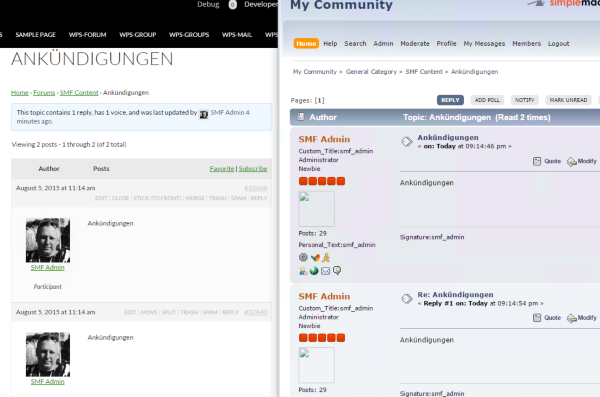
Can you check what character set and collation both your source SMF database is and also the same for your WordPress database?
August 5, 2015 at 3:51 am #165025In reply to: link admin bar change
ParticipantOK. I have to because it is the wordpress code that displays the name of the pseudo code and modify the profile.
August 4, 2015 at 10:34 pm #165024In reply to: Hi! Somebody could help me with some codes, please?
ModeratorSo basically you want to use bbPress for something other than forums?? I am leaning toward custom development and you might need to hire a developer right now, but I do not get what you mean by directory. Explain what you mean by directory, and if you really want to email me the pictures here.
August 4, 2015 at 10:15 pm #165022In reply to: link admin bar change
ModeratorIf you edited that file, then you edited a WordPress core file (which you should not do) and when WordPress updates again the file will be overwritten.
August 4, 2015 at 9:01 pm #165015In reply to: link admin bar change
ModeratorI think you using bbp-avatar plugin??
That checkbox for the edit profile link only modifies the edit profile link in the WordPress toolbar and nothing else.
August 4, 2015 at 5:52 pm #165008In reply to: Create Categories and Forums Quickly?
you4eea
ParticipantPinkishHue thanks!
It would work, but I don’t know the exact names for bbpress
i.e. below is for post (https://wordpress.org/plugins/csv-importer/other_notes/).
csv_post_title – title of the post
csv_post_post – body of the post
csv_post_type – post, page or a custom post typeDo you know what they would be for bbpress? or where I can find them.
This would be the way to go, I need add descriptions so that would save me a lot of time.August 4, 2015 at 5:45 pm #165007In reply to: add profile fields profile, topic
ModeratorYou may need to contact Robin in his plugin support forum. You may need to include pictures because it was hard for me to understand.
https://wordpress.org/support/plugin/bbp-profile-information
August 4, 2015 at 3:07 pm #164992In reply to: Change meta/page title for user pages
ModeratorAll of what is listed is here, only the German language you are using is the 100% finished translation.
https://translate.wordpress.org/projects/wp-plugins/bbpress/stable
Shouldn’t it be Dein Profil for a straight translation of Your Profile which is what bbPress has for profiles??
For custom plugin translations I have to look into it, there use to be a way to have custom plugin translations.
This old code is what I think you could use and test. Edit the existing German language files with something like Poedit. Save them. And Place them in a child theme for example, and put the url in the code below.
function load_bbpress_tr_mofile( $mofile, $domain )
{
    if ( 'bbpress' == $domain )
    {
        // replace this. :)
        return 'FULL_PATH_TO_YOUR_FILE';
    }
    return $mofile;
}
add_filter( 'load_textdomain_mofile', 'load_bbpress_tr_mofile', 10, 2 );
August 4, 2015 at 2:14 pm #164988In reply to: Create Categories and Forums Quickly?
ModeratorOkay well there might be a way to bulk create bbPress posts, there are already a bunch of WordPress plugins that do this for blog posts. I will test to see if I can find one that works with custom taxonomies and custom post types.
I don’t think you have to go through that trouble, it would be way easier if bbPress has its own tables but it doesn’t, the posts are in wp_posts and post meta in wp_postmeta.
-
AuthorSearch Results

