Folks I need a good Social plugin for the latest version of bbPress. If you one that is working for you, please recommend.
Thanks, Shep
I’m having some moderation issues on my site…
a) At least for some users, EVERYTHING they post is going to the moderation queue, despite settings both within WordPress (Settings–>Discussion) (which allows comments to be posted once there’s something approved by that author), within a plugin called “bbPress Moderation” (which allows topics and replies to be posted once there’s something approved by that author).
b) is there an easier way for an admin to publish topics and replies that go into moderation? Right now I have to manually “edit” each item and then click “publish”, which seems to take like 3 steps longer than WordPress’s default comment moderation system (where you can either bulk approve comments or where you can click “approve” instead of “edit” and “trash.”
I’ve tried turning off all plugins, toggling settings, and so forth, and nothing works. Please help! I’m running latest installations of WordPress, Buddypress, bbPress… GEnesis/Prose. Thank you.
-
This topic was modified 13 years, 8 months ago by
 katmmad.
Hey John, thanks for this. I was looking at those, particularly masonjames’ page here: https://codex.bbpress.org/theme-compatibility/
Do I need to do something to activate it to look for these things? I tried another test by moving the page-front-topics.php from the extras folder to the root of my theme, but no edits I do to that file seem to change the /topics/ page layout (which I’m assuming is that page… but perhaps I am wrong there).
Is there a list anywhere of what files control what layout’s? That might be helpful to make sure I am at least editing the right pages… 🙂
Thanks for your help!
Ideally, theme authors should update their themes for the latest version of bbPress. In bbPress 2.1, the $bbp global was replaced with a function call to bbpress(). The snippet of code above is recreating the global that 2.1 eliminated the need for.
I’m using bbpress 1.1. I want to get the author profile link in the front page inside the latest topics loop. I’m using topic_author(); but it returns only the author name, not the profile link.
Following returns the profile link in the single post, but it does not display in the frontpage. post_author_title_link();
Please help.
injua:
[as of bbp 2.1] the hookable test for Akismet — bbp_is_akismet_active()— is in bbp-core-options.php @341.
Have you tried attaching a filter to force a FALSE return when your user is signed in?
It follows best practice so I don’t see why it wouldn’t work?
okay, I’ll dig in this week on a test install and see if I can track down the conflict.
 Anonymous User 5853594
Inactive
There have been some changes in the repository to shift the “latest” to the plugin branche, so the links probably got broken there.
You can find the 1.1 branche here: https://bbpress.trac.wordpress.org/browser/branches/1.1.
Hi,
Ever since updating to the latest bbpress plugin when users or admins try to post a new topic or reply to a topic we get the error “Slow down; you move too fast.” I’ve looked at other posts on this forum having the same issue but did not find anything that helped me.
Also this problem happens any time anyone posts. It is not the result of someone trying to post too much too quickly. Throttle time is set for 10 seconds. And when I try to change the throttle time it reverts back to 10 seconds. Maybe that’s a clue as to what the problem is?
Just to sum up:
The issue exists for all users and admins.
The issue happens for all posts – a person cannot be throttled because they haven’t succeeded in making one post.
The problem happened only after updating bbpress but not before.
Thanks in advance for your help.
Rodney
@Erlend is chrome 21 a beta version? If it is then I won’t be testing on that until it is fully released.
@Jaredatch I did a lot of customization, but the big thing I did was setup my own function inside the bbpress_functions.php – It is basically the same as the bbp_list_forums but it has a flag for freshness_block which then calls my last_poster block function.
It is pretty awesome, I could put something up even more detailed if people would like.
This post is available for me, logged in as administrator but not as a non-registered user
http://tyrell-corporation.pp.se/forum/topic/this-is-just-a-test/
If you check out the subforum it tells you there is one post and also that there is no posts.
Shouldn’t the topic in te url be the sub-forum title btw?
Hi everyone
I used to have SMF installed (still does, closed it for “maintenance”). Installed the latest bbPress and WordPress 3.4.1
The forum seems to work fine, I cna post and see all posts when Im logged in as the administrator. I created a new common user and created a post but when not logged in or logged in as the new user (test) the post is gone (404. The requested page was not found).
I also have the stream as a widget and I can see the post and read it when Im logged in as admin but otherwise it’s gone.
I have been fiddling some with the slug names but I cannot see how that would mess things up (Forums base = forum and Forum slug = forums). I’d like to have the forum url to be mysite.pp.se/forum (tyrell-corporation.pp.se is my domain).
All help is appreciated
It has done this to my site also. After I upgraded from 2.0.3 to 2.1 I couldn’t update my activity streams, filter or find members. Rolled it back and it fixed the problem.
I am running Buddypress v1.5.6 and WP3.4.1 on a Genesis powered site with all the latest plugin versions.
Very strange!
It’s just the shortcode forum when I post it into a page: http://www.bookkus.com/test-forum/
If I use the other forum it looks like this: http://www.bookkus.com/forums-2/
To get the latest discussions on my forum I added it into the top of loop-forums.php this could be a good place along with loop-topics.php
good luck!
I am having some trouble with the layout of my forum. Once I add the shortcode to a new page the layout goes very strange. I have tried going to full-width with no result.
I am using custom community theme. My buddypress, wordpress, and bbpress are fully updated.
http://www.bookkus.com/test-forum/
Thanks in advance for your help.
Still won’t work.
I went back to the twentyten theme for further testing and found that after removing the entire bbpress-functions file the quoting feature still worked. So my problem from what I perceive isn’t in the functions? Now I’m confused.
I’m going to take a fresh GD BBpress tools plugin download again and see if that works.
I am owner/Admin, but I cannot post a topic. bbPress says I do not have permission to do so. I also signed in as a test user and still not able to post.
I have made sure I turned off all plugins to test. Then turned back on only a few. I have checked and made sure that “Member” is the default “registered user” and the the Member profile had post topic capabilities still no go..
I switched to default 2010 theme ands still a no go – I am in but forum says I am logged out. In each theme – the login does not show me as Admin or Owner.
My traffic has slowed way down because of this and I just found it! Still have lots of people signing up but it appears that no one can post. I suspect user roles issue, but I have changed everyone to “Member” and still a no go.
I am desperate! Any help is appreciated. Shep
Forum is at http://www.stratoliner.me
-
This topic was modified 13 years, 8 months ago by
 AAShepAA.
Thanks! I am going to search around for something interesting to put next to latest discussions.
Hi guys,
i have some problems with including a “user total posts count”to my loop-single-reply.php
http://bbpress.trac.wordpress.org/changeset/3632
http://bbpress.trac.wordpress.org/changeset/3633
i have included this into my bbpress 2.0.2
i’ve used
and some other scripts (e.g. without echo) to test it. but it displayed nothing.
Can anyone help me? Thanks.
http://www.dnbrawler.com/topic/new-class-kali/
here you go! thanks for the swift reply
User ID: test
Password: testing
-
This reply was modified 13 years, 8 months ago by
 DNBrawler.
HI,
My my name is E.J. and I’m enjoying your product!
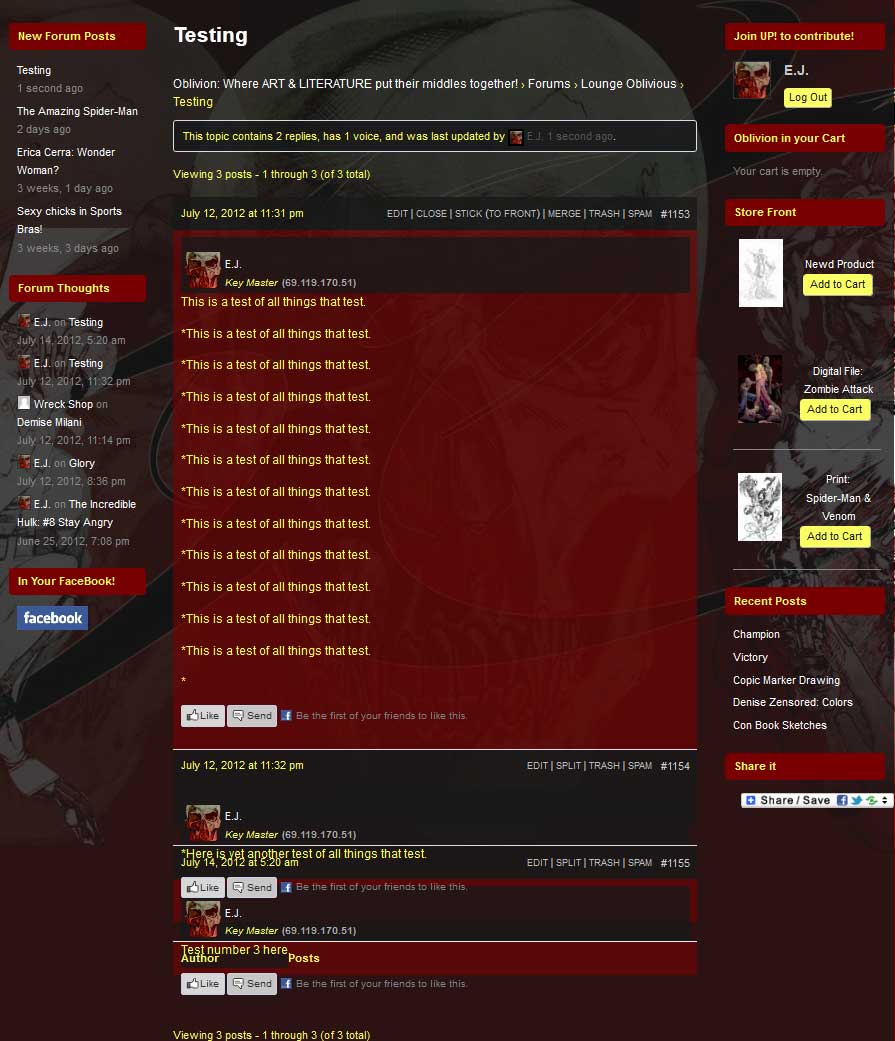
After updating to that latest version of WordPress and bbPress, I began to experience truncations in of replies to the topic threads in my forums. Everything was working well before the upgrades but now it appears that it’s not calling the proper CSS styles to the reply areas after the initial post, perhaps there’s a conflict with the theme styles. . . I’m not sure.
If there’s any advice you can offer I would greatly appreciate it.
…………………………….
Here are the stats to my site::
WordPress: 3.4.1
bbPress: 2.1 – bbPres Default -/plugins/bbpress/bbp-theme-compat
(Theme) Custom Community: 1.819.1 by Themekraft
…………………………….
You can see an example here:
http://www.pressoblivion.com/Boards/thread/testing/#post-1155
http://www.pressoblivion.com/wp-content/uploads/2012/07/Reply_Truncation.jpg
Thank you for your time!
Yesterday I offered to help write some copy for bbPress.org, so this is the first of many such posts in a series of sorts as I work my way through the pages and contents in question.
Today I’ve been looking at the examples page. This page is not linked to yet, but we’ll sort that out once we’re happy with the page itself.
Also, down the line bbPress should simply have its own “flavor” on the WordPress Showcase site, coupled with a custom page on bbpress.org that pulls information from there, much like how the BuddyPress showcase probably already works. But since that might take a while (all I know is it’s beyond my capabilities) I figured a static page would serve as a good substitute in the meantime.
Styling
I realized that a common question that’s going to be popping up as I work on these pages is “Changes to bbpress.org vs Changes to my article formatting“. So when I give this feedback, know that I probably have a reasonable workaround for it in mind already if you don’t agree with the proposed changes.
- Page headers – Either make them take charge of the page (more prominent than h1) or don’t show them at all. One of my favorite examples of a beautifully dominant page title is WooThemes’ Optimize.
- On my test site (also where my images are currently loaded from because I don’t have that privilege here yet) I used captions to achieve some simple compartmentalization. It seems the bbpress.org theme doesn’t have any styling for captions yet. Furthermore, on hover they expand slightly instead of highlighting in some other way (e.g. a shadow overlay), making the content below shift downwards slightly, which looks weird.
- The showcase codex page should be retired.
Your input is most welcome, including my choice of “featured” items.
-
This reply was modified 13 years, 8 months ago by
 Erlend.
-
This reply was modified 13 years, 8 months ago by Erlend.
-
This reply was modified 13 years, 8 months ago by Erlend.
I think the difficult part about sidebars is knowing what the sidebar is called or what ID it is.
You could probably add this into your functions file if you know the id of the sidebar you want to hide, I haven’t tested it though.
http://pastebin.com/pvbQ8nuK
Worth a shot!
-
This reply was modified 13 years, 8 months ago by
 Lynq.
Lynq.
It looks like this is my solo topic.:-) So I continue contributing. Here is my progress in resolving the isue described above.
I have created bbpress-extras directory in MYTHEME directory. All files from /wp-content/plugins/bbpress/bbp-theme-compat/extras were copied into this directory. Than I edited bbpress-functions.php (copied to MYTHEME directory). Following code looks to be promising
function bbpress_custom_template() {
if ( is_bbpress() ) {
require_once ( 'bbpress-extras/page-front-forums.php');
exit;
}
}
add_action('template_redirect', 'bbpress_custom_template');
This is the result: http://poradci-sobe.cz/forums/
This looks like this is the way how my custom template files can be stopped to be ignored by bbpress. At least the first file I am testing – page-front-forums.php. I will try to make the condition more precize and to create special condition for each template file I want to use.
Does anybody know, why this approach creates as many forum lists as the number of forum is?? Each forum lists is the same except forum name is different. I would expect there will be only one forum lists without any name.
I am looking for JJJs answer saying “this is a very poor solution”. I am trying my best. Sorry for that.:-)
-
This reply was modified 13 years, 8 months ago by
 viktora.