Search Results for 'test'
-
AuthorSearch Results
-
February 27, 2015 at 7:01 am #159017
Topic: 404 Page Not Found
in forum InstallationSpedwards
ParticipantSo I just installed bbPress (2.5.4) successfully after having buggy versions last week. Though I’m having a lot of issues this time. I’m using WordPress 4.1.1 and Twenty Fifteen as my theme.
I created a new forum which I called, “forum” and a topic called, “general”. When I go to view the forum, it takes me to
/forums/forum/forumwhich I believe should be/forums/forumbut I can’t go there without it redirecting me./forumsjust redirects me as well.Following the codex, I tried method two which involved using the shortcode. This works all fine until I clicked on the forum, which took me to
/forums/forum/forumMy site is:
How can I fix this issue? Please don’t say disable plugins because I know for a fact, that isn’t the reason.
February 27, 2015 at 12:26 am #159009In reply to: sidebar widget "forum List" not showing up
Robkk
Moderatortroubleshoot to find if you can pinpoint the problem.
It could be a theme or plugin issue
Plugins
Deactivate all but bbpress and see if this fixes. if it does, re-enable one at a time to see which is causing the error.
Themes
If plugins don’t pinpoint the problem, as a test switch to a default theme such as twentytwelve, and see if this fixes.
February 26, 2015 at 10:16 pm #158999In reply to: Reply cannot be empty
ModeratorIt could be a theme or plugin issue
Plugins
Deactivate all but bbpress and see if this fixes. if it does, re-enable one at a time to see which is causing the error.
Themes
If plugins don’t pinpoint the problem, as a test switch to a default theme such as twentytwelve, and see if this fixes.
February 26, 2015 at 9:43 pm #158992In reply to: installation langauge
Moderatori just tested it out and it seems to work fine.
you can find the files to install for wp-content/languages/bbPress here
http://danieljuhl.dk/wordpress/oversaettelse/
more information specifically for your language
https://codex.bbpress.org/bbpress-in-your-language/danish-dansk-da_dk/
February 26, 2015 at 8:37 pm #158987kiwi3685
ParticipantThanks. Nice to at least get a response, so your thoughts are appreciated.
However, the ticket you refer to is closed. The file in latest bbPress download matches the final version (smf3.php) available there, so I’m sure it’s reasonable to assume the code is the latest available.
But while waiting for some help I did some further digging in my smf database. I found one user with an invalidly formatted user_id. After removing that the import worked.
Regarding “Remap existing users to default forum roles”, the import instructions recommend running ALL repair functions after importing, which I did at every import attempt.
February 26, 2015 at 5:59 pm #158973Moderatorwhat importer did you use , the one listed in tools>forums Import??
because i see the bbPress one doesnt have much information in the codex and it is still in beta testing.
this could work or not , im only guessing to try to help
what you could try is go to tools>forums Repair forums and check
Remap existing users to default forum roles
and see if that fixes it.
there is also a ticket on the importer for SMF
February 26, 2015 at 2:18 pm #158961In reply to: Submitting post gives error page
ModeratorIt could be a theme or plugin issue
Plugins
Deactivate all but bbpress and see if this fixes. if it does, re-enable one at a time to see which is causing the error.
Themes
If plugins don’t pinpoint the problem, as a test switch to a default theme such as twentytwelve, and see if this fixes.
February 26, 2015 at 1:02 pm #158958imler.liz
Participant@robin-w thanks for your note — we’ve been using bbpress and buddypress with our forums for a while.
@robkk thanks for the tips. I’ve deactivated all plugins (which actually helped with another problem, so thank you!) but that didn’t seem to do the trick.since this site is active, I’ll make a test environment to switch themes and comment back with my findings.
thanks all!
February 26, 2015 at 11:33 am #158956Topic: List latest post for every forum on forum index page
in forum Troubleshootingcolinsp
ParticipantI am using the standard forum index template for the front page of my forum.
This template only shows the latest post day / time for each of the group of sub forums. What I want is to show the latest post post day / time for each of the sub-forums not just against the top level one. (see screenshot
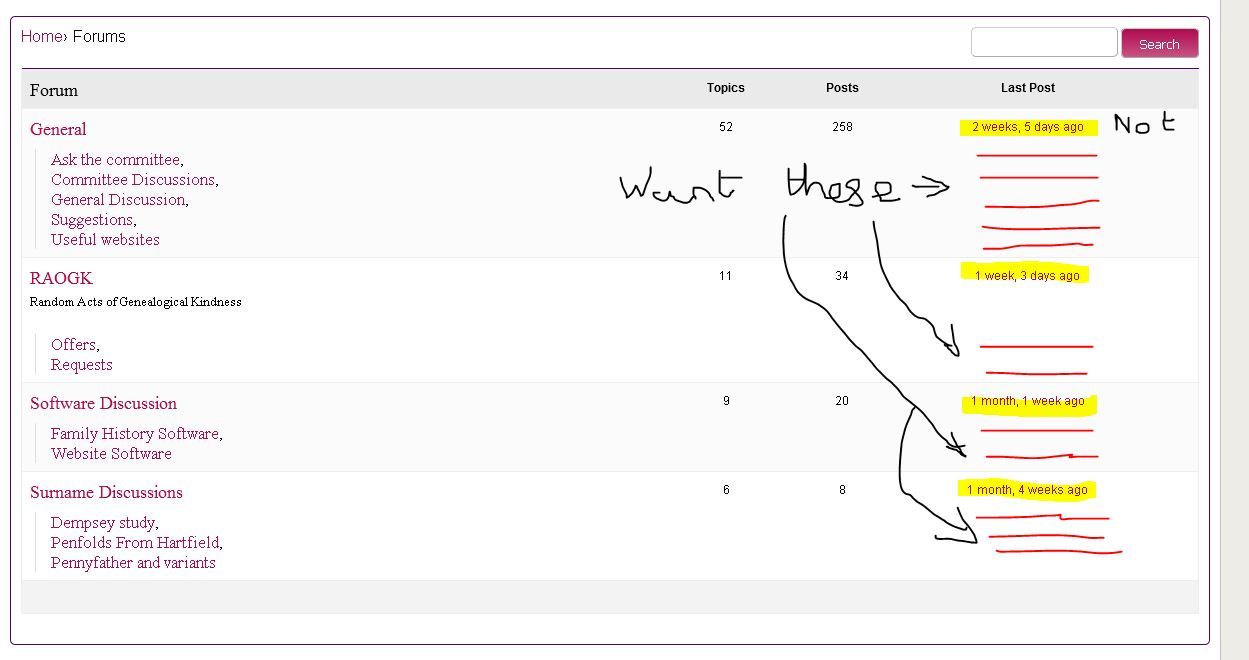 )
)
How do I do this?Wordpress v4.4.1, bbPress 2.5.4
February 26, 2015 at 12:08 am #158933Moderatorthe only thing i can think of is that you might be caching logged in users which you shouldn’t.
other than that you could see if its a plugin or theme issue.
It could be a theme or plugin issue
Plugins
Deactivate all but bbpress and see if this fixes. if it does, re-enable one at a time to see which is causing the error.
Themes
If plugins don’t pinpoint the problem, as a test switch to a default theme such as twentytwelve, and see if this fixes.
if its your theme contact your theme author.
February 25, 2015 at 11:20 pm #158931In reply to: Forum index is the only thing that show
Moderatorsee if the shortcode works in a default theme first
as a test switch to a default theme such as twentytwelve, and see if this fixes.
if it still doesnt see if its a plugin issue
Deactivate all but bbpress and see if this fixes. if it does, re-enable one at a time to see which is causing the issue
if its not a plugin issue and is working in a default theme then your right about it being your theme
do the other shortcodes work fine?? if so see if you only messed up this file below
did you do any customization to this file
content-archive-forum.phpFebruary 25, 2015 at 10:38 pm #158929In reply to: How to modify css in BBPress in general
Moderatortry this CSS code for a test to see if it works , if the background turns black it works.
input#bbp_search_submit.button {
	background: black;
}
February 24, 2015 at 5:53 pm #158860Robin W
Moderatordon’t know what else to suggest, bbpress is tested to work with the default themes, suggest you contact your host provider.
February 24, 2015 at 3:52 pm #158855In reply to: Assign moderator to be forum owner
ModeratorPer forum moderation is noted for a future release of bbPress, i think they are going to test it out on wordpress.org first.
February 24, 2015 at 1:47 pm #158850ModeratorIt could be a theme or plugin issue
Plugins
Deactivate all but bbpress and see if this fixes. if it does, re-enable one at a time to see which is causing the error.
Themes
If plugins don’t pinpoint the problem, as a test switch to a default theme such as twentytwelve, and see if this fixes.
Then come back
February 24, 2015 at 5:16 am #158829In reply to: Restrict Acces to Forum Topics
iop789
ParticipantFebruary 23, 2015 at 4:27 pm #158801In reply to: Create a forum of type link
Moderatoralright so basically it does what this plugin does
https://wordpress.org/plugins/page-links-to/
your forum title will show like any normal forum but if you click it , it will link to whatever you want.
works pretty good when i tested it out, it wont show in the status drop-down though it will show in another meta-box somewhere below the post content.
February 23, 2015 at 2:23 pm #158797In reply to: Post submission hooks
Moderatori tested it out on your site and see its working better
its not really a honeypot field though
how a honeypot field is supposed to be is invisible to the users on your site and is not required for input for the user.
its a hidden input field that if it has any type of dummy information from spam-bots injected , it should stop the next action that the spammer is trying to do.
the way your code is arranged its close to these two plugins
https://wordpress.org/plugins/growmap-anti-spambot-plugin/ ( probably no bbpress compatibility)
https://github.com/studiohyperset/bpress-no-captcha-recaptcha ( still in development)you might want to go to the bbpress nocatpcha plugin (when its done being developed) if you think it works better for what you need.
since you/robin found half the code im going to try to make a honeypot using these two plugins for the other half
wordpress.org/plugins/registration-honeypot/
wordpress.org/plugins/zero-spam/ (i dont know about bbpress compatibility yet)also @s1r0n what do you mean by custom meta tags, like explain exactly how you want it so i can see if a normal seo plugin cant do this already.
February 23, 2015 at 9:16 am #158792In reply to: Post submission hooks
s1r0n
ParticipantAh you’ll have to do that again. the code above has a line commented out that shouldn’t be. sorry for the hassle
add_action('bbp_theme_after_topic_form_content','lp_add_honeypot');
add_action('bbp_theme_after_reply_form_content','lp_add_honeypot');
function lp_add_honeypot() {

    if (is_user_logged_in())
        return;
    ?>
<p>
    <label for="lp_post_honey_pot">I am a robot (yes/no)</label><br />
    <input type="text" value="" tabindex="103" size="40" name="lp_post_honey_pot" id="lp_post_honey_pot"  />
</p>
<?php
}

//https://core.trac.wordpress.org/browser/tags/4.1.1/src/wp-includes/post.php#L0
add_filter('wp_insert_post_empty_content', 'lp_check_honeypot', 10, 2);
function lp_check_honeypot($is_empty, $postarr) {

     if (is_user_logged_in())
        return false;


    if ($postarr['post_type'] == 'topic' || $postarr['post_type'] == 'reply') {//only do this for bbspress
        if ($postarr['bbp_post_as_submitted']['POST_lp_post_honey_pot'] == 'no') {
            return false; //treat this post as good
        }

        return true;
    }
    return false;
}
I only need this to work for users who are not logged in, guests, so i’ve added a couple of lines to turn this off when users are logged in. if you want to test even registered users just leave those lines in.
When I have a bit of time I’ll look into bbpress errors and find a way to set an appropriate error message.
Have fun and let us know if you use it and it works for you or not
February 21, 2015 at 3:46 am #158705In reply to: WP 4.1.1 Forum not logging in
Moderatorwould definitely be worth you changing that back as a test and seeing if that fixes.
February 20, 2015 at 7:26 pm #158693In reply to: Multiple create topic forms
Moderatorwhy not just have one form, referenced by a button at the top.
function bsp_create_new_topica () {
	 $text='Create New Topic' ;
	if ( bbp_current_user_can_access_create_topic_form() && !bbp_is_forum_category() ) echo '<div style="text-align: center;">  <a href ="#topic">'.$text.'</div>' ;
	}

function bsp_create_new_topicb () {
	echo '<a name="topic"></a>' ;
	}


add_action ( 'bbp_template_before_single_forum', 'bsp_create_new_topica' ) ;
add_action( 'bbp_theme_before_topic_form', 'bsp_create_new_topicb' ) ;
(not tested as its cut down code from one of my plugins)
adds a link which lets you add a link to the top of the page which sends you to the bottom, which you can easily make a button.
add to your functions file https://codex.bbpress.org/functions-files-and-child-themes-explained/
or take the guts into the template you’re amending.
You could probably send it to a collapsing div at the bottom if you tinker
That way you only have one form
February 20, 2015 at 7:10 pm #158691In reply to: WP 4.1.1 Forum not logging in
Moderatorok, it’s working fine on my test site with bbpress and twentyten.
It could be a theme or plugin issue
Plugins
Deactivate all but bbpress and see if this fixes. if it does, re-enable one at a time to see which is causing the error.
Themes
If plugins don’t pinpoint the problem, as a test switch to a default theme such as twentytwelve, and see if this fixes.
Then come back
February 20, 2015 at 6:37 pm #158688In reply to: Show latest reply author name
Moderatorok, I’ve just finished coding a ‘latest activity’ widget that should do what you want.
I’ve added it to my bbp-style-pack
https://wordpress.org/plugins/bbp-style-pack/
which you can load to the site and just use (there’s lots of other stuff in there), or if you’re code savvy, you can fork it form includes/widgets.php into your functions file
Hope you enjoy it !
February 20, 2015 at 9:23 am #158676In reply to: Forum Setup
Alice Kaye
ParticipantThank you @Robkk! This is exactly what I was looking for. Love the styling pack too, that will definitely help get this going the way I want. Installed your loop-forum.php and it looks fantastic.
Only question I have is, how do I modify it to say ‘Latest Post’ rather than ‘Freshness’. Though I’m not sure you can help me with that. Going to do some digging and see if I can find an answer.
February 20, 2015 at 5:52 am #158668In reply to: Buddypress group forum not working.
monaafifi
ParticipantHello regarding you issue, I have downloaded a newer theme ALizee, and it kind of solved all the issues you addressed, the “create group” icon now appears also the latest topics posted appears.
Also by accident I have “un ticked” the below:
– Automatically add new top-level pages to this menu
– Primary Menu
– Social
in the menu setting and it worked well.If you still can’t view forum, you can create new page call it forums and in the html “txt” write [bbp-forum-index] and it will appear
-
AuthorSearch Results

