Search Results for 'forum css'
-
Search Results
-
Topic: CSS Style Issues
.post-entry ul li{ background:url(images/ul-dot.png) no-repeat; padding-left:28px; margin-bottom:10px; }This one little line of code is making my bbPress forums look like crap.
It’s difficult to explain, but you can look at my forums here and see how bullets are messing everything up. :/
The Theme I’m using is leetpress.
The Entire style.css is here.
I am trying to get set up with some theming and bbpress 2.1. I have added a bbpress folder to my theme and copied over the loop-forums.php file, but as soon as I do that I loose all the CSS. Is there some trick that I need to copy of css? I tried to move the bbpress.css file to the bbpress folder in my theme directory but that didn’t seem to help.
Thanks for any help you can provide. I’m just getting started with bbPress so this may be simple. Sorry if it is… The forums are pointing to old URL’s when I search…
Hey guys,
I am putting up a topic to show how I have created the layout on http://teamoverpowered.com/forums/
My aim when creating the theme was to try and create a last poster block that would work throughout the forums and sub forums list.
custom_bbp_list_forums – this function creates the sub forums under the main forum
public function custom_bbp_list_forums( $args = '' ) {

    // Define used variables
    $output = $sub_forums = $topic_count = $reply_count = $counts = '';
    $i = 0;
    $count = array();

    // Defaults and arguments
    $defaults = array (
        'before'            => '',
        'after'             => '',
        'link_before'       => '',
        'link_after'        => '',
        'count_before'      => ' (',
        'count_after'       => ')',
        'count_sep'         => ', ',
        'separator'         => ', ',
        'forum_id'          => '',
        'show_topic_count'  => true,
        'show_reply_count'  => true,
        'show_freshness_link'  => true,
    );
    $r = bbp_parse_args( $args, $defaults, 'list_forums' );
    extract( $r, EXTR_SKIP );

    // Bail if there are no subforums
    if ( !bbp_get_forum_subforum_count( $forum_id ) )
        return;

    // Loop through forums and create a list
    $sub_forums = bbp_forum_get_subforums( $forum_id );
    if ( !empty( $sub_forums ) ) {

        // Total count (for separator)
        $total_subs = count( $sub_forums );
        foreach ( $sub_forums as $sub_forum ) {
            $i++; // Separator count

            // Get forum details
            $count     = array();
            $show_sep  = $total_subs > $i ? $separator : '';
            $permalink = bbp_get_forum_permalink( $sub_forum->ID );
            $title     = bbp_get_forum_title( $sub_forum->ID );

            // Show topic count
            if ( !empty( $show_topic_count ) && !bbp_is_forum_category( $sub_forum->ID ) ) {
                $count['topic'] = bbp_get_forum_topic_count( $sub_forum->ID );
            }

            // Show reply count
            if ( !empty( $show_reply_count ) && !bbp_is_forum_category( $sub_forum->ID ) ) {
                $count['reply'] = bbp_get_forum_reply_count( $sub_forum->ID );
            }

            // Counts to show
            if ( !empty( $count ) ) {
                $counts = $count_before . implode( $count_sep, $count ) . $count_after;
            }

            if ( !empty( $show_freshness_link ) ) {
                $freshness_link = "" . BBP_Default::teamop_get_last_poster_block( $sub_forum->ID ) . "";
            }

            // Build this sub forums link
            if ($i % 2) { $class = "odd-forum-row"; } else { $class = "even-forum-row"; }
            $output .= "" . $link_before . '<a href="' . $permalink . '">' . $title . '</a>' . $counts . $freshness_link . $link_after . "";
        }

        // Output the list
        echo apply_filters( 'bbp_list_forums', $before . $output . $after, $args );
    }
}
I then call that function inside loop-single-forum.php like so:
BBP_Default::custom_bbp_list_forums( array (
        'before'            => '',
        'after'             => '',
        'link_before'       => '',
        'link_after'        => '',
        'count_before'      => 'Topics: ',
        'count_after'       => '',
        'count_sep'         => 'Posts: ',
        'separator'         => '',
        'forum_id'          => '',
        'show_topic_count'  => true,
        'show_reply_count'  => true,
        'show_freshness_link' => true,
        ));
Inside the first function I am also calling a second custom function called custom_get_last_poster_block
function custom_get_last_poster_block( $subforum_id = "" ) {

            if ( !empty( $subforum_id ) ) {
                $output = "";
                $output .= "<a href='". bbp_get_forum_last_topic_permalink( $subforum_id ) ."'>" . bbp_get_topic_last_reply_title( bbp_get_forum_last_active_id( $subforum_id ) ) . "</a>";
                $output .= "";
                $output .= "by ";
                $output .= bbp_get_author_link( array( "post_id" => $subforum_id, "size" => 14 ) );
                $output .= "";
                $output .= "";
                $output .= bbp_get_forum_last_active_time( $subforum_id );
                $output .= "";
            } else {
                $output = "";
                $output .= "<a href='". bbp_get_forum_last_topic_permalink() ."'>" . bbp_get_topic_last_reply_title( bbp_get_forum_last_active_id() ) . "</a>";
                $output .= "";
                $output .= "by ";
                $output .= bbp_get_author_link( array( "post_id" => bbp_get_forum_last_active_id(), "size" => 14 ) );
                $output .= "";
                $output .= "";
                $output .= bbp_get_forum_last_active_time( bbp_get_forum_last_active_id() );
                $output .= "";
            }

            return $output;

        }
This then creates my sub forum list, I added some extra classes in I can hook onto and display:none if need. I decided when creating me theme that I would get as much information showing as possible, then just use CSS to customise it.
The final functions is one I call inside loop-single-topic.php.
    public function custom_get_last_poster_block_topics() {

            $output .= "";
            $output .= bbp_get_author_link( array( "post_id" => bbp_get_forum_last_active_id(), "size" => 14 ) );
            $output .= "";
            $output .= "";
            $output .= bbp_get_topic_last_active_time( bbp_get_topic_last_active_id() );
            $output .= "";

        return $output;

    }
This is my final function and it just adds the last poster block inside the topics list.
If you need any more help then let me know.
UPDATE: Please see the following topic for updated code
I have created a bbPress starter theme with a phpBB look and feel
Topic: Forums Appear Below Sidebar
Hello all,
It’s been a while since I’ve used bbPress. I’m attempting to use v2.1 on a WordPress site with a custom template. However, when using bbp-theme-compat, the forum appears BELOW the sidebars. If I switch to twentyten, it appears ABOVE the sidebars.
http://www.wvko1580.com/forums/
Is this just a simple CSS tweak or do I need to try something else? Thanks!
Keith
Topic: Reply Truncation
HI,
My my name is E.J. and I’m enjoying your product!
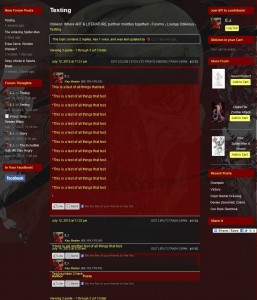
After updating to that latest version of WordPress and bbPress, I began to experience truncations in of replies to the topic threads in my forums. Everything was working well before the upgrades but now it appears that it’s not calling the proper CSS styles to the reply areas after the initial post, perhaps there’s a conflict with the theme styles. . . I’m not sure.
If there’s any advice you can offer I would greatly appreciate it.
…………………………….
Here are the stats to my site::
WordPress: 3.4.1
bbPress: 2.1 – bbPres Default -/plugins/bbpress/bbp-theme-compat
(Theme) Custom Community: 1.819.1 by Themekraft
…………………………….
You can see an example here:
http://www.pressoblivion.com/Boards/thread/testing/#post-1155
http://www.pressoblivion.com/wp-content/uploads/2012/07/Reply_Truncation.jpg
Thank you for your time!
Topic: Pesky sub forum formatting