Search Results for 'code'
-
Search Results
-
Topic: Admin – Posts dont appear
Hi all,
I am using BB Press here:
http://www.mobclan.co.uk/forum/
(Sorry if your offended by the site title.)
Basicly, I am Admin/Bravo81.
My posts, here:
http://mobclan.co.uk/forum/topic.php?id=2
Dont appear? But everyone elses comments do.
Then, If I edit my post. The text is in the textfield?
What have I done
 & how do I fix it? Haha.
Thanks,
Dean.
Do you know how to show the markup buttons like these when creating a new post
This is what i want:

This is actually what i’ve got:

And here are plugins I have:

Do you which plugin i need to make those buttons appear
Topic: White Screen on Step2
Hey,
I am trying to install bbpress for my WordPress 3.0.1 website.
1) I created a folder called forums on my webserver
2) I extracted the bbpress code and copied over the files
3) When visited http://mystite.com/forums and I was able to complete the first step in the installation process.
4) I provided the correct db information.
5) When I clicked on “Go to Step 2” I see a white screen.
I checked the error log and this is what I get.
PHP Fatal error: main() [function.require]: Failed opening required ‘/hermes/web05/b2075/moo.techsamuraiscom/demo/forums/bb-includes/backpress/functions.wp-scripts.php’ (include_path=’.:/usr/local/lib/php-4.4.9/lib/php’) in /hermes/web05/b2075/moo.techsamuraiscom/demo/forums/bb-settings.php on line 987
Please help
I’m starting a new forum for the niche industry i’m involved with. There is no online community for my industry so i’m planning on some of the big companies advertising on the site if it picks up like i’m hoping.
I saw this plugin:
http://bbpress.org/plugins/topic/bb-ads/
but it hasn’t been updated in years, and it seems to be giving lots of errors.
I’m not much (at all) of a coder/developer so i’m hoping to find an easy way of doing this. An automated system would be great, but is there even a manual workaround available? Maybe pasting html somewhere?
Any and all ideas are welcomed!
Topic: Why I Can't Choose bbPress
Don’t get me wrong, I want to. bbPress looks wonderful, I love the simplicity and ease of use, as well as it’s integration features which are a huge plus to me. And while I acknowledge that bbPress is going through some tough times (being semi-new and through my understanding, the project lead leaving), I cannot choose bbPress for my site. The worst part about my specific situation is that I’ll most likely end up using it in the future once it’s matured, and knowing that is even more of a kick in the pants.
A lot of times with software, the more simple it is to use, the less features it has to be used. However, bbPress lacks basic bulletin board features – like poll creation, simple appearance settings such as customizing visible forum structures, and even a pre-made registration EULA. Other bulletin boards include prepared terms and conditions to protect your site, bbPress simply asks for your e-mail which with the lack of spam prevention filters like Captchas, even with the right plugin becomes an open door towards floods of spam. Other bulletin boards also give you the ability to, for instance, change the number of how many subforums are visible: Say you have a video game forum, organized as follows: Games (Category), Console/PC (Forums), Microsoft/Sony/Nintendo (Subforums), Xbox/Xbox 360 (Sub-subforums), Hardware/Accessories (etc.). On most forum software, the appearance settings default to showing one set of subforums per-page – e.g. when you click, ‘Console Games’, the next page displays only, ‘Microsoft/Sony/ Nintendo’, and you go from there. bbPress however, defaults to listing them all at once, resulting in enormously long forum pages that can only be changed by editing code. This may not be a problem for a lot of people as it should only require changing one or two lines to fix, but as a basic feature found in most other bulletin boards, to expect people to know how bbPress’ code works would just be wrong, and as such becomes a huge turn off.
In my opinion, one of the biggest bottlenecks and double-edged swords of open source software such as WordPress, bbPress, and even other open source forums, are the plugins. I remember reading a blog discussing the state of bbPress where the poster used the phrase, ‘there’s a plugin for that’. Plugins can be great, but they should also be considered an added bonus and not relied on for basic features. Most plugins are created by a third party, or even people like us. Just for talk sake, lets use wp-united for example. Wp-united is a plugin that links accounts between WordPress and phpbb so people can use their account from one, with the other. Say I used WordPress with phpbb, and then used wp-united to link the two. One day the wp-united team ceases support, and their latest version is incompatible with the new phpbb/WordPress. Now what happens to the huge install base I’ve developed? Do new users now have to register twice? Is my database going to be completely screwed up? bbPress eliminates this problem by having seemless integration with WordPress, but it just shows an example of how plugins can be both a good and bad thing, and how some features (like poll creation) need to be made a part of the main software despite, ‘less code being more’.
And lastly, arguably the number one issue preventing me from using bbPress, is the state of bbPress itself; the development of this software is up in the air with there being two completely different places to discuss it’s progress (this being one of them), and the other claiming talks of turning bbPress into a BuddyPress plugin. So the people new to bbPress, such as myself, don’t know what to do. Should we install the software now? Or wait until it’s a plugin? If we install now and they change it to a plugin, what happens to the standalone installations? Do they get screwed? Are they forced to install BuddyPress and switch everything over? Now I’m only human. I have no problem admitting when I’m wrong, I make mistakes. But even if not all my facts are straight, the fact that doing the research lead to this whole scenario makes for quite the first impression.
I didn’t post this to bash bbPress, I just hoped it would clear some of the confusion and thought it might in some way shape or form help bbPress and it’s users by getting these issues out in the open.
Topic: Need help
I have installed a fresh copy of bbpress onto my server. Everything works except 1 thing.
On the start page there is a spot that says “Topic — Add New »”
When clicked this is the message I always get.
403 Forbidden
Access to this resource on the server is denied!
Powered By LiteSpeed Web Server
LiteSpeed Technologies is not responsible for administration and contents of this web site!
How do I make it so it takes the user to a login or register an account screen.
I can provide my url if requested but I am not sure of the rules so I didn’t include url.
Also don’t want my url cached hehe!
Any help is appreciated.
Thank you,
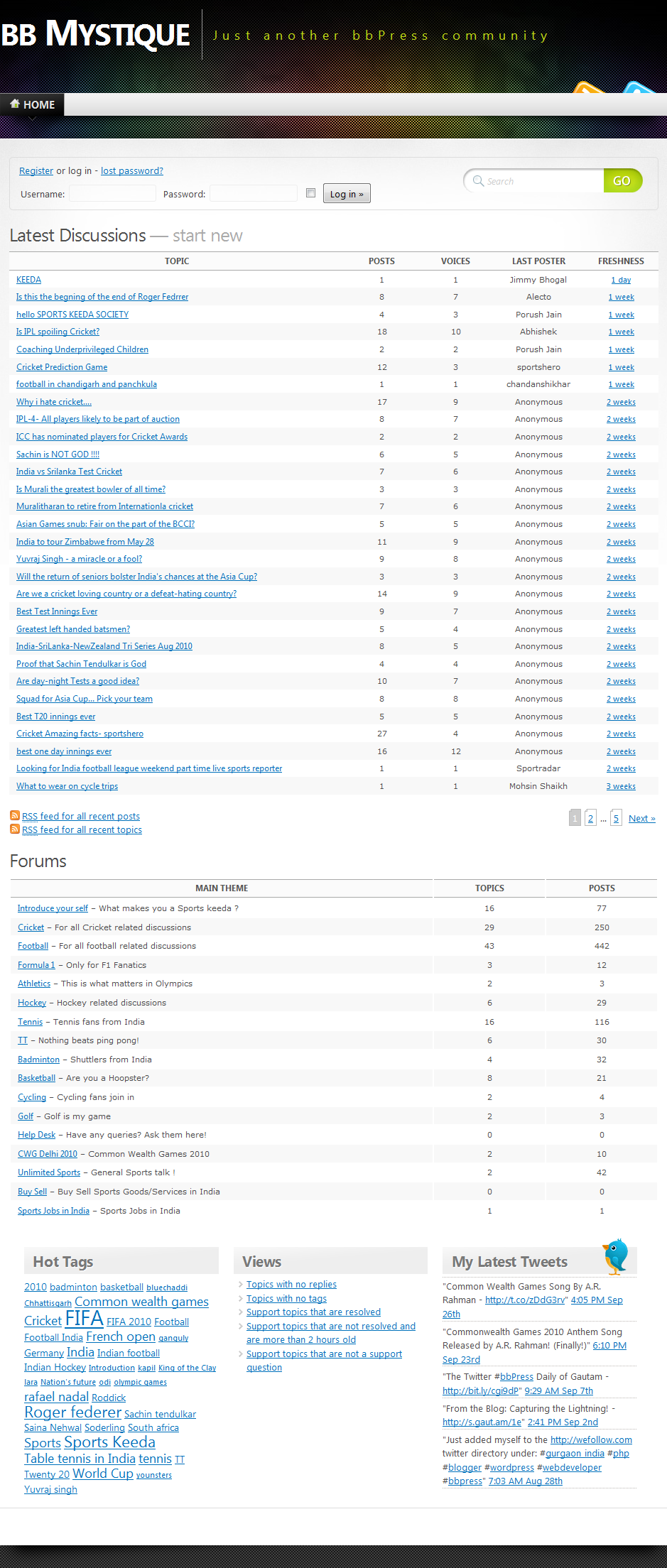
Topic: bb Mystique Theme v1.0
Hello folks,
I’ve ported the famous Mystique theme for WordPress over to bbPress and it can be downloaded from here.
For the time being, there is no settings page – I’ll add one soon. Till then, you can edit the file
settings.phplocated in thelibfolder of the theme (from lines11to20) for some basic settings.Requirements:
bbPress 1.0+(works best withbbPress 1.1+– it hasn’t been released yet)Screenshot: http://gaut.am/wp-content/uploads/2010/10/bb-mystique-full.png
Announcement on my blog: http://s.gaut.am/1f