Embed Media means you don’t have to copy all of that HTML to post an image. It should be enough to just paste the link the the relevant image or video. See https://codex.wordpress.org/Embeds.
My original setup was based on WordPress 3.4.2 and BuddyPress 1.6.1
I added a BP Group Forum which we realized will not be sufficient and if anything just confusing to members. So I completely deleted the Forums page and added a new page called Group Discussions. I then went to BP settings and pointed forums option to use this page. No problem there.
Next, I installed bbPress 2.2 / activated / added couple of test forums / check the slug making sure that it worked by going to: http://ch.lifewithababy.com/forums and it did.
Next step was to add a new Forums page which I did. Right after http://ch.lifewithababy.com/forums became blank??? Why???
I then deleted the Forums page and http://ch.lifewithababy.com/forums worked again… hmmm…
At this point I am confused…
So I ended up adding the page and then adding a shortcode to show the forum and it works, kind of.
It works for public but if I login as a member (one of my test buddypress members) the page no longer available??? As a logged in member I get “We’re sorry, but we can’t find the page that you’re looking for. Perhaps searching will help.” which makes no sense at all.
Could someone please help? I have no idea what is causing this mysterious behaviour and how to resolve it.
Thanks.
Hello,
My users are not able to publish photographs in the forum by embeeding their flickr html code into new threads ( it looks like bbpress deletes the html code ). Example of the code :
<a href=”http://www.flickr.com/photos/josue_arzate/7982828578/” title=”Milpa Alta por Josué Arzate Ontiveros, en Flickr”><img src=”http://farm9.staticflickr.com/8036/7982828578_9b9bd93c21.jpg” width=”500″ height=”332″ alt=”Milpa Alta”></a>
I have “Embed media (YouTube, Twitter, Flickr, etc…) directly into topics and replies.” checked.
The code embeeds perfectly when I do it (administrator) but is not working with my users.
Does anyone knows how can I fix this?
Thank you for your help,
Luciano
wp 3.4.2
bbpress 2.1.2
buddypress 1.6.1
my site: http://www.luchotv.com
I’m trying to display the latest replies from the forum, but while the widget is perfectly running, each time i use i get “no topics”
I upgraded to Version 2.2 just now and when click submit to create topic or click edit for the existing topic, it shows the blank page and the page title says the fatal error: Call to undefined function bb_get_id_from_slug()…
<br />

<b>Fatal error</b>:  Call to undefined function  bb_get_id_from_slug() in <b>/home/omijin/public_html/wp-content/plugins/buddypress/bp-forums/bp-forums-functions.php</b> on line <b>178</b><br />
I am using WordPress 3.4.2 and I would like to display the latest questions (last 5 or 10 Qs) in my static homepage. There is a way to add some code to my template and display bbpress questions?
Thanks,
Hello bbpress,
I updated to version 2.2 and I am getting the error. The line is
948   endif; // class_exists check

949   exists check
Is it missing something…like the comment tag or semicolon?
Thanks for the good works you guys do
CK
Sorry, my bad, try resetting your permalinks.
https://codex.bbpress.org/faq/#404
Ok, sorry for that… Still, im am new to all this. I am not afraid to get my hands dirty. But what exactly should i be looking for in the css code? I tried testing the default bbpress theme and the problem is not there… So yes, this is a theme problem… :/
@hypnoscribe – Please don’t post big code dumps; it’s not easy to read and easily accessible by linking to your site, a pastebin, or any other place.
@netweb – If you’re going to answer questions, make sure they’re the correct answers. 🙂
Looking just a bit deeper in Inspector, you’ll notice the CSS isn’t part of WordPress or bbPress. Like @nguyenkinh said, this is a problem with the CSS in your theme.
This is the content of my themes css. Cant see the code you are refering ton in there… 🙁
{snip}
Was offline for a week and finally found some time to give it a try. I used the coding below to use HTTP_X_FORWARDED_HOST if it’s provided for function bhp_verify_nonce_request, so I do not skip any checks this way.
function bbp_verify_nonce_request( $action = '', $query_arg = '_wpnonce' ) {
// Get the home URL
$home_url = strtolower( home_url() );
// Build the currently requested URL
$scheme = is_ssl() ? 'https://' : 'http://';
$request_host = $_SERVER["HTTP_X_FORWARDED_HOST"]? $_SERVER["HTTP_X_FORWARDED_HOST"] : $_SERVER["HTTP_HOST"];
$requested_url = strtolower( $scheme . $request_host . $_SERVER['REQUEST_URI'] );
// Check the nonce
$result = isset( $_REQUEST[$query_arg] ) ? wp_verify_nonce( $_REQUEST[$query_arg], $action ) : false;
// Nonce check failed
if ( empty( $result ) || empty( $action ) || ( strpos( $requested_url, $home_url ) !== 0 ) )
$result = false;
// Do extra things
do_action( 'bbp_verify_nonce_request', $action, $result );
return $result;
}
Hi guy! I FIXED IT, be in heaven again.
Here’s my solution, as I said before, it’s about your theme. You should browse to your WordPress theme folder, open the style.css and if your problem are the same as mine you should find some code like this:
.reply {

	margin: 10px 20px 0 0;

	text-align: left;

	text-transform: none;

	font-size: 12px;

        position: relative;

	height: 25px

	overflow: hidden;

	position: relative;

	right: -20px;

}
Now you just simply put 2 lines
	height: 25px

	overflow: hidden;
in the comment or just delete it, cause I found in bbpress.css there is the id name reply, it was overide by WordPress.
If you need more details, email me.
 SK
SKParticipant
In spite of that BBLANG configuration, it seems the forum page is still using English.
<html xmlns:fb="http://ogp.me/ns/fb#" xmlns:og="http://ogp.me/ns#" dir="ltr" lang="en-US">
SKParticipant
Rookie question. Wrong question. My apologies.
My wp-config actually says
define('WPLANG', '');

define('BBLANG', 'hu_HU');
I was thrown off simply by the fact that bbPress doesn’t seem to be picking up Hungarian strings from the language file.
Looks perfect. As I only want to give Editors the forum-moderation, I think, I only have to add the first part of the code.
A small hint: as I understand the code, there the code-comment in the 2nd part i incorrect:s
$role = get_role( ‘author’ ); // gets the editor role
It gets the author-role, isnt it?
-
This reply was modified 13 years, 11 months ago by
 nyks-barton.
-
This reply was modified 13 years, 11 months ago by nyks-barton.
hi thank you for the quick response, helps a lot when you are trying to work your way through a problem. I must first say though I am new to this wordpress php bbpress thing.
SO you mentioned I use bbpress-functions.php? Can you be more specific I know you already are but I would like to know the exact steps to take if you will.
I know changing the following code in bbpress.php for the plugins>bbpress file. but if I change this than the updates will delete the changes I make so therefore I need to make a child theme. So where do I paste the following code in bbpress-functions.php?
public static function register_post_types() {
// Define local variable(s)
$post_type = array();
/** Forums ************************************************************/
// Forum labels
$post_type[‘labels’] = array(
‘name’ => __( ‘Enchanted’, ‘bbpress’ ),
‘menu_name’ => __( ‘Enchanted’, ‘bbpress’ ),
‘singular_name’ => __( ‘Forum’, ‘bbpress’ ),
‘all_items’ => __( ‘All Forums’, ‘bbpress’ ),
‘add_new’ => __( ‘New Forum’, ‘bbpress’ ),
‘add_new_item’ => __( ‘Create New Forum’, ‘bbpress’ ),
‘edit’ => __( ‘Edit’, ‘bbpress’ ),
‘edit_item’ => __( ‘Edit Forum’, ‘bbpress’ ),
‘new_item’ => __( ‘New Forum’, ‘bbpress’ ),
‘view’ => __( ‘View Forum’, ‘bbpress’ ),
‘view_item’ => __( ‘View Forum’, ‘bbpress’ ),
‘search_items’ => __( ‘Search Forums’, ‘bbpress’ ),
‘not_found’ => __( ‘No forums found’, ‘bbpress’ ),
‘not_found_in_trash’ => __( ‘No forums found in Trash’, ‘bbpress’ ),
‘parent_item_colon’ => __( ‘Parent Forum:’, ‘bbpress’ )
);
@robotcake Try running the ‘Repair Forums’ tool https://codex.bbpress.org/repair-forums/
add_filter('bbp_user_register_redirect_to', 'my_custom_redirect_function');

function my_custom_redirect_function($redirect_url) {

    $forums_url = bbp_get_forums_url();

    return $forums_url;

}
A filter is basically what it sounds: it passes the callback function a parameter, then you filter that parameter. Often, you do processing on the parameter and then return it, but in the code I posted, I’m ignoring the URL sent to the filter callback and returning the forums url.
Hi, funny thing is I currently want to add sidebar for my bbpress forum plugin. It alway shows the wordpress sidebar!
Anyway, to remove sidebar use the fullwidth forum like this: http://www.ytecongcong.com/forums/
Just follow
1. Clone page.php of your WP themes and rename it to forum.php
2. use BP Tweaks WP plugins to choose forum instead of page as default
3. Open forum.php, remove the php code content php get_sidebar()
-
This reply was modified 13 years, 11 months ago by
 Verra.
-
This reply was modified 13 years, 11 months ago by Verra. Reason: SOLVE
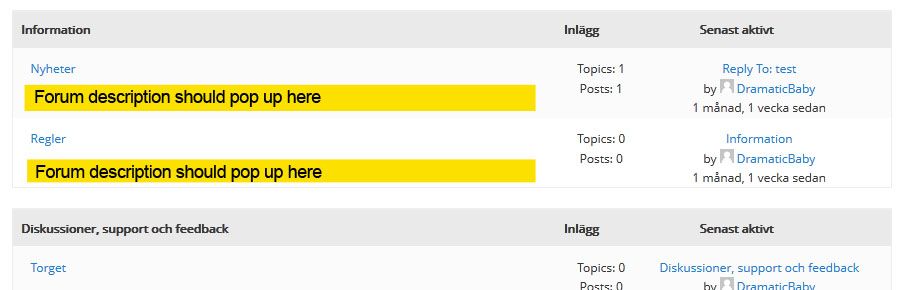
Hi! My layout is like this:
[Category 1]
[Forum 1]
[Forum 2]
[Category 2]
[Forum 3]
.
.
As you know, bbPress’ default layout is to fetch the Category description, not the Forum descriptions. I’ve tweaked the bbp_list_forums function, so now I want to show the forum descriptions instead. But when I add the_content() to my loop-single-forum.php it fetches the category description.
I think I must add the_content() in my_bbp_list_forums, but don’t know where or how.
The code can be found here (Kudos to Lynq): http://pastebin.com/GLhCHYze
And what I’m after graphically: http://i649.photobucket.com/albums/uu216/DramaticBaby/forum_description.jpg
How can I make the_content() fetch the forum descriptions? Or is there a bbp_get_sub_forum_description() function somewhere? 🙂
Put this code somewhere in your theme functions.php
https://gist.github.com/4086011
Otherwise you can change the roles editing the bbPress gettext file. Check ‘\wp-content\plugins\bbpress\bbp-languages\bbpress.pot’, create a .po for your language (if you already hasn’t one) and change the string “Key Master” at line 3311. If you don’t know what I’m talking about I can generate the file for you.
After some hours I got the solution (which I didnt foudn in the codex, @netweb.
To use the Visibility-options, its is nessesary, to assign the forums to a category.
Hang of for a day or two, the ‘default’ theme in bbPress 2.2 uses lists and will be released very soon.
https://codex.bbpress.org/theme-compatibility/