I am using WordPress 3.4.2 and I would like to display the latest questions (last 5 or 10 Qs) in my static homepage. There is a way to add some code to my template and display bbpress questions?
Thanks,
Hello bbpress,
I updated to version 2.2 and I am getting the error. The line is
948   endif; // class_exists check

949   exists check
Is it missing something…like the comment tag or semicolon?
Thanks for the good works you guys do
CK
Sorry, my bad, try resetting your permalinks.
https://codex.bbpress.org/faq/#404
Ok, sorry for that… Still, im am new to all this. I am not afraid to get my hands dirty. But what exactly should i be looking for in the css code? I tried testing the default bbpress theme and the problem is not there… So yes, this is a theme problem… :/
@hypnoscribe – Please don’t post big code dumps; it’s not easy to read and easily accessible by linking to your site, a pastebin, or any other place.
@netweb – If you’re going to answer questions, make sure they’re the correct answers. 🙂
Looking just a bit deeper in Inspector, you’ll notice the CSS isn’t part of WordPress or bbPress. Like @nguyenkinh said, this is a problem with the CSS in your theme.
This is the content of my themes css. Cant see the code you are refering ton in there… 🙁
{snip}
Was offline for a week and finally found some time to give it a try. I used the coding below to use HTTP_X_FORWARDED_HOST if it’s provided for function bhp_verify_nonce_request, so I do not skip any checks this way.
function bbp_verify_nonce_request( $action = '', $query_arg = '_wpnonce' ) {
// Get the home URL
$home_url = strtolower( home_url() );
// Build the currently requested URL
$scheme = is_ssl() ? 'https://' : 'http://';
$request_host = $_SERVER["HTTP_X_FORWARDED_HOST"]? $_SERVER["HTTP_X_FORWARDED_HOST"] : $_SERVER["HTTP_HOST"];
$requested_url = strtolower( $scheme . $request_host . $_SERVER['REQUEST_URI'] );
// Check the nonce
$result = isset( $_REQUEST[$query_arg] ) ? wp_verify_nonce( $_REQUEST[$query_arg], $action ) : false;
// Nonce check failed
if ( empty( $result ) || empty( $action ) || ( strpos( $requested_url, $home_url ) !== 0 ) )
$result = false;
// Do extra things
do_action( 'bbp_verify_nonce_request', $action, $result );
return $result;
}
Hi guy! I FIXED IT, be in heaven again.
Here’s my solution, as I said before, it’s about your theme. You should browse to your WordPress theme folder, open the style.css and if your problem are the same as mine you should find some code like this:
.reply {

	margin: 10px 20px 0 0;

	text-align: left;

	text-transform: none;

	font-size: 12px;

        position: relative;

	height: 25px

	overflow: hidden;

	position: relative;

	right: -20px;

}
Now you just simply put 2 lines
	height: 25px

	overflow: hidden;
in the comment or just delete it, cause I found in bbpress.css there is the id name reply, it was overide by WordPress.
If you need more details, email me.
 SK
SKParticipant
In spite of that BBLANG configuration, it seems the forum page is still using English.
<html xmlns:fb="http://ogp.me/ns/fb#" xmlns:og="http://ogp.me/ns#" dir="ltr" lang="en-US">
SKParticipant
Rookie question. Wrong question. My apologies.
My wp-config actually says
define('WPLANG', '');

define('BBLANG', 'hu_HU');
I was thrown off simply by the fact that bbPress doesn’t seem to be picking up Hungarian strings from the language file.
Looks perfect. As I only want to give Editors the forum-moderation, I think, I only have to add the first part of the code.
A small hint: as I understand the code, there the code-comment in the 2nd part i incorrect:s
$role = get_role( ‘author’ ); // gets the editor role
It gets the author-role, isnt it?
-
This reply was modified 13 years, 4 months ago by
 nyks-barton.
-
This reply was modified 13 years, 4 months ago by nyks-barton.
hi thank you for the quick response, helps a lot when you are trying to work your way through a problem. I must first say though I am new to this wordpress php bbpress thing.
SO you mentioned I use bbpress-functions.php? Can you be more specific I know you already are but I would like to know the exact steps to take if you will.
I know changing the following code in bbpress.php for the plugins>bbpress file. but if I change this than the updates will delete the changes I make so therefore I need to make a child theme. So where do I paste the following code in bbpress-functions.php?
public static function register_post_types() {
// Define local variable(s)
$post_type = array();
/** Forums ************************************************************/
// Forum labels
$post_type[‘labels’] = array(
‘name’ => __( ‘Enchanted’, ‘bbpress’ ),
‘menu_name’ => __( ‘Enchanted’, ‘bbpress’ ),
‘singular_name’ => __( ‘Forum’, ‘bbpress’ ),
‘all_items’ => __( ‘All Forums’, ‘bbpress’ ),
‘add_new’ => __( ‘New Forum’, ‘bbpress’ ),
‘add_new_item’ => __( ‘Create New Forum’, ‘bbpress’ ),
‘edit’ => __( ‘Edit’, ‘bbpress’ ),
‘edit_item’ => __( ‘Edit Forum’, ‘bbpress’ ),
‘new_item’ => __( ‘New Forum’, ‘bbpress’ ),
‘view’ => __( ‘View Forum’, ‘bbpress’ ),
‘view_item’ => __( ‘View Forum’, ‘bbpress’ ),
‘search_items’ => __( ‘Search Forums’, ‘bbpress’ ),
‘not_found’ => __( ‘No forums found’, ‘bbpress’ ),
‘not_found_in_trash’ => __( ‘No forums found in Trash’, ‘bbpress’ ),
‘parent_item_colon’ => __( ‘Parent Forum:’, ‘bbpress’ )
);
@robotcake Try running the ‘Repair Forums’ tool https://codex.bbpress.org/repair-forums/
add_filter('bbp_user_register_redirect_to', 'my_custom_redirect_function');

function my_custom_redirect_function($redirect_url) {

    $forums_url = bbp_get_forums_url();

    return $forums_url;

}
A filter is basically what it sounds: it passes the callback function a parameter, then you filter that parameter. Often, you do processing on the parameter and then return it, but in the code I posted, I’m ignoring the URL sent to the filter callback and returning the forums url.
Hi, funny thing is I currently want to add sidebar for my bbpress forum plugin. It alway shows the wordpress sidebar!
Anyway, to remove sidebar use the fullwidth forum like this: http://www.ytecongcong.com/forums/
Just follow
1. Clone page.php of your WP themes and rename it to forum.php
2. use BP Tweaks WP plugins to choose forum instead of page as default
3. Open forum.php, remove the php code content php get_sidebar()
-
This reply was modified 13 years, 4 months ago by
 Verra.
-
This reply was modified 13 years, 4 months ago by Verra. Reason: SOLVE
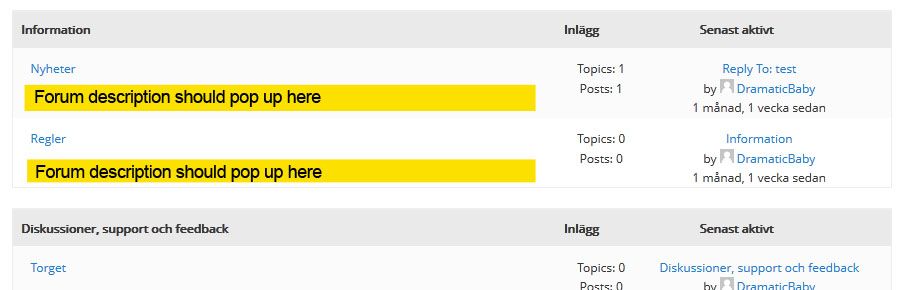
Hi! My layout is like this:
[Category 1]
[Forum 1]
[Forum 2]
[Category 2]
[Forum 3]
.
.
As you know, bbPress’ default layout is to fetch the Category description, not the Forum descriptions. I’ve tweaked the bbp_list_forums function, so now I want to show the forum descriptions instead. But when I add the_content() to my loop-single-forum.php it fetches the category description.
I think I must add the_content() in my_bbp_list_forums, but don’t know where or how.
The code can be found here (Kudos to Lynq): http://pastebin.com/GLhCHYze
And what I’m after graphically: http://i649.photobucket.com/albums/uu216/DramaticBaby/forum_description.jpg
How can I make the_content() fetch the forum descriptions? Or is there a bbp_get_sub_forum_description() function somewhere? 🙂
Put this code somewhere in your theme functions.php
https://gist.github.com/4086011
Otherwise you can change the roles editing the bbPress gettext file. Check ‘\wp-content\plugins\bbpress\bbp-languages\bbpress.pot’, create a .po for your language (if you already hasn’t one) and change the string “Key Master” at line 3311. If you don’t know what I’m talking about I can generate the file for you.
After some hours I got the solution (which I didnt foudn in the codex, @netweb.
To use the Visibility-options, its is nessesary, to assign the forums to a category.
Hang of for a day or two, the ‘default’ theme in bbPress 2.2 uses lists and will be released very soon.
https://codex.bbpress.org/theme-compatibility/
Instead of bbpress.php try bbpress-functions.php and see https://codex.bbpress.org/theme-compatibility/ for more info
Start by finding a WordPress theme and then you can customize bbPress to look the same as your WordPress theme https://codex.bbpress.org/theme-compatibility/
Okay. That does make some sense. I also really just wanted to get rid of the “ago” text. Found it in the core under /bbp-includes/bbp-common-functions.php
Pretty sure there’s a way around this without hacking the core code, but I have no idea. Suggestions welcome.
Some improvements to this bit of code were made in bbPress 2.2, which is due out any day now. Maybe give it a try and report back?
I’m using version 2.1.3.
If you don’t put check mark for “Yes. I want this group to have a forum.” when you create a group for the first time, you will get a error message says “ERROR: Your forum must have a parent.” when you create a new forum for the group.
I did the following procedure to create forum and link them together but this should be fixed.
How to fix manually
1. Create new forum from WP dashboard
2. Get group id from wp_bp_groups table
3. Get forum id from wp_posts
4. Run the following insert command for wp_bp_groups_groupmeta
INSERT INTO YOURDATABASE.wp_bp_groups_groupmeta (id, group_id, meta_key, meta_value) VALUES (’34′, ’8′, ‘forum_id’, ‘a:1:{i:0;i:52;}’);
Hi Everybody, Guys !! ^_^
Please, I have a question.
My Forums shows me this message:
The qTranslate Editor has disabled itself because it hasn't been tested with your WordPress version yet. This is done to prevent WordPress from malfunctioning. You can reenable it by clicking here (may cause data loss! Use at own risk!). To remove this message permanently, please update qTranslate to the corresponding version.
The point is that: Even if when I’ve installed the bbPress qTranslate was not updated, so this message was right … Now qTranslate it is updated, but by the way bbPress doesn’t seems to see the change and it doesn’t shows me forum-contents by language.
The 1.st link in the message (reenable qTranslate) doesn’t works …
What to do, please, if I want to build a multi-language Forum ??
Another deal:
Why bbPress shows me this ugly editor ??
If I click on Visual then it is good, but the 1-st one is the defaul one …
THANK YOU !!
Pietro
-
This topic was modified 13 years, 4 months ago by
 Pietro.