Search Results for 'code'
-
AuthorSearch Results
-
February 13, 2014 at 4:48 am #142437
In reply to: Forum Index Scrunched
Robin W
Moderator‘Thats the odd part, they are both using the default…and switching between the various different templates doesn’t seem to modify it. The theme has an internal setting that allows you to dictate how many ‘columns’ are shown. I can get it to show full page if I switch that around, but then my article page is also shown full (one column) I’m looking at the code further to try and figure out how to isolate one from the other’
Think that’s the route to go.
bbPress looks at the root of your theme for “bbpress.php” as a page template. if it doesn’t find it, it’ll use your themes “page.php”.
It sounds like your “page.php” page (whatever it’s called), has a parameter to set the columns, so within this they’ll be an “if” statement which is setting this.
What I think you need to do is as suggested in my first post. Copt the page file and call it “bbpress.php”. You should be able to find in that file where it is using the setting to create the columns and take this out. Alternately look in the twentyfourteen theme for the full page template and compare this to your file. You should be able to cobble the two together to get it to work.
If none of that works, (or alternately!) contact the theme developer to see if they have a solution.
February 13, 2014 at 4:39 am #142436In reply to: Form To Forum Post
ModeratorSuspect that there are values in a “forum” post that you need to populate.
I suspect (but don’t know) that the forum will be a category, and the topics will be posts. Therefore you need to link your topic to it’s forum so need to link the post to it’s category.
Try searching round phrases such as “wordpress post category in database” which got me a bunch of articles eg
‘I guess the developers don’t visit their own forum anymore?’ – sounds critical, the developers are busy developing – remember this is all free stuff, and no-one pays their, or indeed my time to do this. They do regularly visit, but I would not expect to get a load of development advice for free to do something that is not in significant demand. Even writing this took ten minutes !
I hope you find a solution, and in the spirit of free open source, post the solution when you get it. I’ll add it to the codex, so that others can benefit.
Regards
Robin
February 13, 2014 at 3:58 am #142435In reply to: Integrating with Zendesk
Stephen Edgar
KeymasterI haven’t seen any integration with Zendesk but checkout this awesome tutorial by @mordauk (@pippinsplugins)
http://code.tutsplus.com/tutorials/using-bbpress-as-a-support-forum–wp-28877
February 13, 2014 at 3:56 am #142434In reply to: Replies under selected Posts in a Topic
KeymasterYou would need to make some custom templates
See https://codex.bbpress.org/theme-compatibility/
And there are a few other docs here https://codex.bbpress.org/
February 13, 2014 at 3:52 am #142432In reply to: Translate to Swedish
KeymasterSee this https://codex.bbpress.org/bbpress-in-your-language/
It’s the same process for both bbPress & BuddyPress
February 12, 2014 at 11:30 pm #142430Topic: shortcode change
in forum Troubleshootingjslom
ParticipantHello,
I am using the shortcode [bbp-topic-form forum_id=599] to display a form that will post to forum id 599.
I noticed the shortcode is using the form-topic.php template file to output.
What I want to do is have it use a modified version of the form-topic.php template file, but only for the shortcode.
How can I achieve this?
Thanks!
February 12, 2014 at 10:00 pm #142429In reply to: Forum Index Scrunched
thefruitnation
ParticipantSo I’ve found its specific to the url.. if its
http://www.thefruitnation.com/forums/It scrunches it up
Anything else like http://www.thefruitnation.com/forums1/ keeps it full width
I’m sure this has to do with the
Forum Root Slug
as it is set to ‘forums’ I just cant figure out how its correlated
I guess I can get around this by changing the page that I use the shortcode for index on to not share the same forums slug.. I thought this was needed, but perhaps thats my problem? Should it matter or any insight if this would effect url building/seo
February 12, 2014 at 9:43 pm #142427In reply to: Forum Index Scrunched
ParticipantThats the odd part, they are both using the default…and switching between the various different templates doesn’t seem to modify it. The theme has an internal setting that allows you to dictate how many ‘columns’ are shown. I can get it to show full page if I switch that around, but then my article page is also shown full (one column) I’m looking at the code further to try and figure out how to isolate one from the other
February 12, 2014 at 6:30 pm #142424In reply to: Form To Forum Post
Participant$sql="INSERT INTO wp_posts (post_type, post_parent, post_title, post_content, post_author) VALUES ('$_POST[forum]','$_POST[forumid]','$_POST[1]','$_POST[2]','$_POST[3]')";This is the code im using to get my form to post to the db, and it still does not create the topic even though it populates
February 12, 2014 at 10:55 am #142412In reply to: Distinct forum users and admin users
barnabe
ParticipantBut with this code, when there is an error (like username already exists), the redirect is not effective.
This excellent tutorial helped me to fix that : Redirect to custom page after login or register fails
February 12, 2014 at 9:25 am #142410In reply to: Distinct forum users and admin users
Participant– How to hide the WP toolbar by default when a user registers?
I found this code to add in functions.php theme file:
add_filter('show_admin_bar', '__return_false');– I use the bbPress’ form register template, how to redirect users to a specific page after submit and not to the WP’s form login?
I found this code to add in functions.php theme file:
function bbp_form_register_custom_redirect()
{
   return 'URL here'; // Ex : return get_permalink(73);
}

add_filter('bbp_user_register_redirect_to', 'bbp_form_register_custom_redirect');
But with this code, when there is an error (like username already exists), the redirect is not effective.
Any idea?
February 12, 2014 at 5:55 am #142404In reply to: Remove – Display the login screen.
ModeratorI think those words are in your page 322
You should just have the following in contents
[bbp-login]I think you have
[bbp-login] - Display the login screen.February 12, 2014 at 5:38 am #142400In reply to: White box covering Forum screen
Moderatorok, think the ones on the page link are around line 90 (my .css is different, so exact lines may vary) – look for
#bbpress-forums li.bbp-header,
#bbpress-forums li.bbp-footer {
	background: #f3f3f3;
	border-top: 1px solid #eee;
	font-weight: bold;
	padding: 8px;
	text-align: center;
}

#bbpress-forums li.bbp-header {
	background: #eaeaea;
}
and change background to the same as above.
They may be some others as you go through. Come back with any that are still niggling, and I’ll chase them down for you.
As you are making changes to bbPress templates, make a copy of the file onto your PC, and keep a list of what you changed, as any bbPress updates will override this file.
You should revisit child themes when you get some more time, as this is a better way to do it, but the way you’re doing will work fine (and was what I did in the early days!).
February 12, 2014 at 2:03 am #142391In reply to: WP_Query post type topic help
hitkid
Participant*edit*
I’ve tried all of the documentations functions*<?php $args = array( ‘post_type’ => ‘topic’, ‘posts_per_page’ => 10 ); $the_query = new WP_Query( $args );?> <?php if ( $the_query->have_posts() ) : ?> <!– pagination here –> <!– the loop –> <?php while ( $the_query->have_posts() ) : $the_query->the_post(); ?> <?php bbp_author_link( array( ‘post_id’ => bbp_get_forum_last_active_id(), ‘size’ => 32 ) ); ?> <a class=”bbp-topic-permalink” href=”<?php bbp_topic_permalink(); ?>” title=”<?php bbp_topic_title(); ?>”><?php bbp_topic_title(); ?></a> <?php endwhile; ?> <!– end of the loop –> <!– pagination here –> <?php wp_reset_postdata(); ?> <?php else: ?> <p><?php _e( ‘Sorry, no posts matched your criteria.’ ); ?></p> <?php endif; ?>February 12, 2014 at 2:01 am #142390In reply to: WP_Query post type topic help
ParticipantI don’t need their role or title. For some reason the avatars will just not come up in the loop outside of the mychild/bbpress/loop-single-forum.php files and mychild/bbpress/loop-single-topic.php. So it works fine on index pages.
I’ve tried all of the but nothing
Here’s what the code looks like right now:
<?php $args = array( 'post_type' => 'topic', 'posts_per_page' => 10 );
			$the_query = new WP_Query( $args );?>

<?php if ( $the_query->have_posts() ) : ?>

  <!-- pagination here -->

  <!-- the loop -->
  <?php while ( $the_query->have_posts() ) : $the_query->the_post(); ?>
   <?php bbp_author_link( array( 'post_id' => bbp_get_forum_last_active_id(), 'size' => 32 ) ); ?>

	<a class="bbp-topic-permalink" href="<?php bbp_topic_permalink(); ?>" title="<?php bbp_topic_title(); ?>"><?php bbp_topic_title(); ?></a>
  <?php endwhile; ?>
  <!-- end of the loop -->

  <!-- pagination here -->

  <?php wp_reset_postdata(); ?>

<?php else:  ?>
  <p><?php _e( 'Sorry, no posts matched your criteria.' ); ?></p>
<?php endif; ?>
This worked for getting the original post author, but I need the latest active poster to appear
<?php echo get_avatar( get_the_author_meta( 'ID' ), 32 ); ?>Is there a wordpress function equivalent for this function: bbp_get_forum_last_active_id() that I can use with get_avatar() ?
What file do these functions reside in? Maybe I could copy the functions out and make new ones in mychild/functions.php or see if something wrong and replace the file?
Thank you for the help!
February 12, 2014 at 12:25 am #142386In reply to: Importing from Vanilla
KeymasterThere is a broad outline here: https://codex.bbpress.org/import-forums/
Some more Vanilla specif info here: https://codex.bbpress.org/import-forums/vanilla/
Essentially you should be able to open up your Vanilla Config file in a text editor:
eg.
/public_html/dev/vanilla/conf/config.php`
// Database
$Configuration[‘Database’][‘Name’] = ‘ntwb_vanilla2’;
$Configuration[‘Database’][‘Host’] = ‘localhost’;
$Configuration[‘Database’][‘User’] = ‘ntwb_wpdev’;
$Configuration[‘Database’][‘Password’] = ‘abc123’;
`Use the values you have in the bbPress importer screen.
To get the table prefix you might have to open phpMyAdmin on your hosting providers control panel (cPanel)
In this image my table names have a
gdn_prefix, this is what you would use.I am pretty sure
gdn_is the default and used by most installs.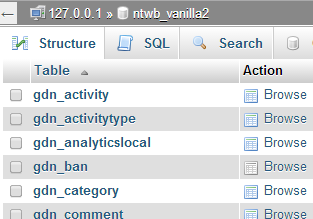 February 11, 2014 at 10:03 pm #142384
In reply to: White box covering Forum screen
domainhorizon
ParticipantThanks so much Robin,
I had problems setting up a child theme and have ended up ditching that for the moment and just edited your code directly into the bbpress.css file.
It half worked! http://www.luciddreamingland.com/dream-journal/
I’ve tried fiddling with the bbpress.css some more but without luck.
If you have any more suggestions that would be great.
Really appreciate your efforts.
Thanks.
February 11, 2014 at 6:42 pm #142380In reply to: Social media Share button missing
AITpro
ParticipantWe were looking for a plugin that already did this and did not find what we wanted so we created this simple solution here: http://forum.ait-pro.com/forums/topic/buddypress-bbpress-social-media-share-button-code/
This is lightweight HTML code outgoing Share links to keep website resource usage very low since the Social Media buttons are being loaded per Reply.
February 11, 2014 at 5:18 pm #142375In reply to: Forums list does not appear correctly on my site
thajskyraj
ParticipantProblem solved! I found the small error in code. Now its working. Thanks a lot for your advise and guide Robin!
February 11, 2014 at 4:22 pm #142373In reply to: Forums list does not appear correctly on my site
ParticipantNearly there 🙂 I found I made an error in code, so I corrected it and now sidebar widgets are corrected. The only last problem I have is that the forum is there twice.
February 11, 2014 at 4:20 pm #142372In reply to: Forums list does not appear correctly on my site
ParticipantNearly there :-), I made an error in code. I corrected it and side bar is now corrected. The only last problem I have now is that the forum is there twice :-).
February 11, 2014 at 4:07 pm #142371In reply to: Forums list does not appear correctly on my site
ParticipantThanks Robin, I guess I understand you completely. I did exactly what you advised me to do and it actualy works, however I am not certain what exact code of bbpress theme should I put there.
The code of page.php looks as follows:
<?php get_header(); ?>
<?php get_template_part(‘loop’, ‘page’); ?>
<?php get_footer(); ?>The questions is what piece of bbpress template code should I put between the header and footer. Now I put there code copied from bbpress/templates/default/extras/page-front-forums.php, and its some improvement, however it is still not correct as it put the sidebare widgets under it instead of its correct location.
If you can advise what code should I put there, then it will be perfect solution.
Thanks a lot for your efforts and time.
February 11, 2014 at 2:17 pm #142366ModeratorNo problem,
Several ways to do this, the easiest is to add the following to your theme’s style.css file:
.widget_display_topics .bbp-author-avatar { display: none ! important; }

.bbp-topic-freshness-author  .bbp-author-avatar { display: none ! important; }
or if you are using a child theme, put in in the bbpress.css in your css folder
If you need further help, just come back and ask, or visit
February 11, 2014 at 11:54 am #142361In reply to: bbpress sidebar
Moderatorpresume you are using the code is_bbpress() in your widget logic?
February 11, 2014 at 11:53 am #142360In reply to: bbpress Widget in Child Theme?
Moderatorunfortunately you are right. The widgets that bbpress comes with can only be changed by filters, and that may be your solution.
Alternately you can cut the widget code into a plugin. I do this to alter the wordpress login plugin, and once you get into it it’s quite easy, just google creating a plugin for lots fo resources.
You’ll need some plugin code, and then to copy the widget into the plugin. You’ll then need to change the widget name so it doesn’t conflict.
-
AuthorSearch Results

