Search Results for 'code'
-
AuthorSearch Results
-
February 15, 2014 at 7:10 pm #142516
Stephen Edgar
KeymasterWe also have a page with a few of the ideas we like that extent bbPress in different ways:
February 15, 2014 at 9:36 am #142512In reply to: Image upload
Frumph
Participant^ the user needs to have the correct rights for example
function add_theme_caps() {
    $role = get_role( 'contributor' );
    $role->add_cap( 'upload_files' );
}

add_action( 'admin_init', 'add_theme_caps');
If you want to add contributors and above to be able to upload_files, change that to subscriber if you want
February 15, 2014 at 8:25 am #142511John James Jacoby
KeymasterBoth
editor.jsandbbpress.cssare loaded similarly, as well as other scripts and styles in certain situations (single forums/topics, and when editing your password). Are any other SSL errors present, or is it just bbPress? What version of bbPress are you using?Without deeper investigation, I’m unsure how this is possible when using core functions and templates.
bbp_enqueue_style()callscontent_url()which usesset_url_scheme()which is the WordPress core function for correctly determining the http/https/relative scheme for every link on the site. This means it’s difficult for one to be wrong, and another to be right.February 15, 2014 at 6:44 am #142509koendb
ParticipantYou can add all sorts of changes to your theme or bbpress from the general wordpress functions.php file. You can find this file here:
/wp-content/themes/%theme name%/functions.phpBut if you update your theme your changes to this file will be overwritten, that’s why you should make a child theme with your own functions.php file. It’s not that hard and after you’ve made your child theme it’s easy to tweak other things as well.
February 15, 2014 at 5:21 am #142508In reply to: How do you put the "My Profile" link on the menu?
Robin W
ModeratorOK, so if we move outside the menu bar, you could have it after the breadcrumbs on the forum page
Add this to your functions file
//action to add "amend profile" to top of forums pages
function rw_edit_profile () {
	if (is_user_logged_in()) {
		$user      = get_userdata( $user_id );
		$name      = esc_attr( $user_name );
		$user_link = '<br><a href="http://gos.rewweb.co.uk/forums/users/' . $user . '/edit">My Profile/Edit Profile</a>';
		echo $user_link ; }
}
add_action('bbp_template_before_forums_loop','rw_edit_profile') ;
But if you want to go the admin bar route, then the admin bar doesn’t show to not logged in users,
just change each of your users to “show toolbar” in dashboard>user>editFebruary 15, 2014 at 3:51 am #142507In reply to: Few issues with BBpress installation
boriskamp1991
ParticipantThanks for that!
it gives an unexpected syntax error when I try to load my website.
here is my header.php code
any idea?<?php if ( ! isset( $_SESSION ) ) session_start(); ?> <!DOCTYPE html> <!--[if IE 6]> <html id="ie6" <?php language_attributes(); ?>> <![endif]--> <!--[if IE 7]> <html id="ie7" <?php language_attributes(); ?>> <![endif]--> <!--[if IE 8]> <html id="ie8" <?php language_attributes(); ?>> <![endif]--> <!--[if !(IE 6) | !(IE 7) | !(IE 8) ]><!--> <html <?php language_attributes(); ?>> <!--<![endif]--> <head> <meta charset="<?php bloginfo( 'charset' ); ?>" /> <title><?php elegant_titles(); ?></title> <?php elegant_description(); ?> <?php elegant_keywords(); ?> <?php elegant_canonical(); ?> <?php do_action( 'et_head_meta' ); ?> <link rel="pingback" href="<?php bloginfo('pingback_url'); ?>" /> <?php $template_directory_uri = get_template_directory_uri(); ?> <!--[if lt IE 9]> <script src="<?php echo esc_url( $template_directory_uri . '/js/html5.js"' ); ?>" type="text/javascript"></script> <![endif]--> <script type="text/javascript"> document.documentElement.className = 'js'; </script> <?php wp_head(); ?> </head> <body <?php body_class(); ?>> <header id="main-header"> <div class="container clearfix"> <?php $logo = ( $user_logo = et_get_option( 'divi_logo' ) ) && '' != $user_logo ? $user_logo : $template_directory_uri . '/images/logo.png'; ?> <a href="<?php echo esc_url( home_url( '/' ) ); ?>"> <img src="<?php echo esc_attr( $logo ); ?>" alt="<?php echo esc_attr( get_bloginfo( 'name' ) ); ?>" id="logo" /> </a> <div id="et-top-navigation"> <nav id="top-menu-nav"> <?php $menuClass = 'nav'; if ( 'on' == et_get_option( 'divi_disable_toptier' ) ) $menuClass .= ' et_disable_top_tier'; $primaryNav = ''; $primaryNav = wp_nav_menu( array( 'theme_location' => 'primary-menu', 'container' => '', 'fallback_cb' => '', 'menu_class' => $menuClass, 'menu_id' => 'top-menu', 'echo' => false ) ); if ( '' == $primaryNav ) : ?> <ul id="top-menu" class="<?php echo esc_attr( $menuClass ); ?>"> <?php if ( 'on' == et_get_option( 'divi_home_link' ) ) { ?> <li <?php if ( is_home() ) echo( 'class="current_page_item"' ); ?>><a href="<?php echo esc_url( home_url( '/' ) ); ?>"><?php esc_html_e( 'Home', 'Divi' ); ?></a></li> <?php }; ?> <?php show_page_menu( $menuClass, false, false ); ?> <?php show_categories_menu( $menuClass, false ); ?> </ul> <?php else : echo( $primaryNav ); endif; ?> </nav> <div id="et_top_search"> <span id="et_search_icon"></span> <form role="search" method="get" class="et-search-form et-hidden" action="<?php echo esc_url( home_url( '/' ) ); ?>"> <?php printf( '<input type="search" class="et-search-field" placeholder="%1$s" value="%2$s" name="s" title="%3$s" />', esc_attr_x( 'Search …', 'placeholder', 'Divi' ), get_search_query(), esc_attr_x( 'Search for:', 'label', 'Divi' ) ); ?> </form> </div> <?php do_action( 'et_header_top' ); ?> </div> <!-- #et-top-navigation --> </div> <!-- .container --> <?php if(! is_front_page()) { }?> </header> <!-- #main-header -->Thanks!
February 14, 2014 at 3:04 pm #142499Majijiboo
ParticipantI have multiple functions.php files in different folders of the bbpress plugin. Which of the below functions.php files should I add the code to?
• …/bbpress/includes/users/functions.php
• …/bbpress/includes/replies/functions.php
• …/bbpress/includes/extened/buddypress/functions.php
• …/bbpress/includes/forums/functions.php
• …/bbpress/includes/core/functions.php
• …/%theme name%/functions.phpThanks,
MajidFebruary 14, 2014 at 1:27 pm #142495In reply to: How do you put the "My Profile" link on the menu?
Moderatorahh..if you are saving in ‘text’ view, try changing to ‘visual’ or if you are in visual view try going to text. Sometimes the editor does funny things to stuff it sees as code. Once you have fixed it, try and not edit anything on the page, or if you do check whether it has changed the code, and change the code back as last thing.
It’s an annoying bug in the wordpress editor where it get’s over-keen to ensure that code doesn’t screw up how it stores, but I’d prefer it to do that than muck up the database !
February 14, 2014 at 12:29 pm #142494In reply to: How do you put the "My Profile" link on the menu?
aravindbachu
ParticipantI copied and pasted the stuff exactly as you said, and after updating the page, this piece of code :
echo $current_user->user_login . "";is turning into this :
echo $current_user-/>user_login . "";Its happening whenever i am updating the page by saving it.
February 14, 2014 at 10:01 am #142491In reply to: ERROR: Are you sure you wanted to do that?
February 14, 2014 at 9:52 am #142490In reply to: css problem..
Moderatortake out the word div !
.bbp-search-form {
display:none !important;
}
February 14, 2014 at 9:43 am #142488In reply to: Change of date for freshness
ModeratorGreat, glad to hear you’re fixed, and have just added the code to one of my forums. One of those moments when you see something and think “that looks better”!.
February 14, 2014 at 4:39 am #142480In reply to: Change of date for freshness
Moderatorso the answer is
function short_freshness_time( $output) {
$output = preg_replace( '/, .*[^ago]/', ' ', $output );
return $output;
}
add_filter( 'bbp_get_time_since', 'short_freshness_time' );
add_filter('bp_core_time_since', 'short_freshness_time');
Drop this into your functions file
February 14, 2014 at 4:31 am #142479In reply to: Few issues with BBpress installation
ModeratorThink it’s as simple as
is_bbpress()
so try
<div class="breadcrumbs">
    if(function_exists('bcn_display') && is_bbpress())
{
bcn_display();
}</div>
Haven’t checked the syntax, I’ll let you do that
February 14, 2014 at 12:41 am #142473In reply to: WP_Query post type topic help
hitkid
Participantthanks @robin-w !
I’ve tried to use all the avatar functions found in the documentation in the wp_query(), but none are working. I’ve tried it locally with newer updates of buddypress/bbpress and live with a fresh install and nothing.
This is the actual tag I want to use:
<?php bbp_author_link( array( 'post_id' => bbp_get_topic_last_active_id(), 'size' => 14 ) ); ?>They work perfectly in the mychild/bbpress/loop-single-topic.php , but I just can not get it to work in the query! Is there anything I am missing, or doing wrong?
Thanks for the help!
February 13, 2014 at 8:45 pm #142469In reply to: Few issues with BBpress installation
ParticipantOk,thanks for that!
I need to add this code somewhere:
<div class="breadcrumbs">
    <?php if(function_exists('bcn_display'))
    {
        bcn_display();
    }?>
</div>
It is for displaying the breadcrumbs.
When I add it to header.php in my theme, the breadcrumbs appear on allll my pages. I dont want that, I want them ONLY on forum related pages, how can I achieve this?February 13, 2014 at 8:19 pm #142468In reply to: ERROR: Are you sure you wanted to do that?
Peter J. Herrel
ParticipantBumped into this while developing locally, a solution is to filter the requested url in
bbp_verify_nonce_request:add_filter( 'bbp_verify_nonce_request_url', 'my_bbp_verify_nonce_request_url', 999, 1 ); function my_bbp_verify_nonce_request_url( $requested_url ) { return 'http://localhost:8888' . $_SERVER['REQUEST_URI']; }February 13, 2014 at 3:42 pm #142464In reply to: Change of date for freshness
virusek89
Participantbbp_get_time_sinceI found it in these files
bbpress\includes\topics\template-tags.php
bbpress\includes\replies\template-tags.php
bbpress\includes\forums\template-tags.php
bbpress\includes\common\widgets.php
bbpress\includes\common\functions.phpNow what I need to edit to remove the rest of the decimal?
I want to ask because I am a beginner in php
February 13, 2014 at 2:19 pm #142460In reply to: Change of date for freshness
KeymasterYou’ll want to filter the output of
bbp_get_time_since; it’s the function responsible for humanizing timestamps. You’ll probably want to perform a string replacement starting at the comma, and append your own ‘ago’ at the end.February 13, 2014 at 2:15 pm #142459Topic: css problem..
in forum TroubleshootingDavid2013
ParticipantHi i just dont know whats wrong…
when i work with firebug on css for forum page is ok but when i add to do css wont work…
#bbp-search-form div {
    display: none !important;
}
is format type wrong?
Thanks, David
February 13, 2014 at 12:05 pm #142450KostRev
ParticipantThanks. I sort of figured that out after removing my custom templates. Not sure where I got the code for form-topic.php because it was very different from the default and that made the difference.
Thanks for the tip on the shortcode. That alone would have helped some of my troubleshooting.
February 13, 2014 at 6:39 am #142443In reply to: Translate to Swedish
KeymasterYou want to use the
/devbranch of both projects:https://translate.wordpress.org/projects/bbpress/dev/sv/default
https://translate.wordpress.org/projects/buddypress/dev/sv/defaultOn each of the above pages select ‘.mo’ from the dropdown at the bottom of the page and click export.
Rename each file to
buddypress-sv.mo&bbpress-sv.mo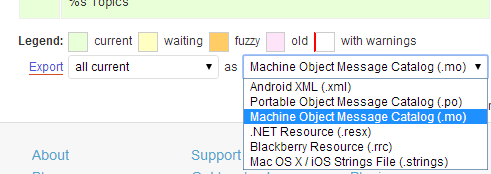
The extra instructions on the BuddyPress site might also help, I’ll try to get the bbPress updated soon also.
February 13, 2014 at 5:42 am #142440ModeratorI thought that’s what it did in default mode.
If you are using shortcodes, then you have options
[bbp-topic-form] – Display the ‘New Topic’ form where you can choose from a drop down menu the forum that this topic is to be associated with.
[bbp-topic-form forum_id=$forum_id] – Display the ‘New Topic Form’ for a specific forum ID.Otherwise come back with a url where this isn’t happening
Moderatoryes,
Dashboard>settings>forums>forum root slug to change the urls and breadcrumbs – just change forums to what you want it to say
Tp change the forum heading on the forums list, make a copy of
wp-content/plugins/bbpress/templates/default/bbpress/loop-forums.php
and place this in a folder
/wp-content/themes/%your-theme%/bbpress/
see https://codex.bbpress.org/step-by-step-guide-to-setting-up-a-bbpress-forum-part-3/ for a tutorial on this subject
Then edit line line 19 which says
<li class="bbp-forum-info"><?php _e( 'Forum', 'bbpress' ); ?></li>to
<li class="bbp-forum-info"><?php _e( 'Elephant', 'bbpress' ); ?></li>and it will say elephant instead of forum.
February 13, 2014 at 5:26 am #142438In reply to: "New Topic" form on separate page
Moderatoryou can use the following shortcodes in a page or post
[bbp-topic-form]
Display the ‘New Topic’ form where you can choose from a drop down menu the forum that this topic is to be associated with.[bbp-topic-form forum_id=$forum_id]
Display the ‘New Topic Form’ for a specific forum ID. -
AuthorSearch Results

