Yes I understand, I would prefer to use threaded replies with pagination too but just now we can’t… 500 replies on a single page is not possible…
but I continue to think it was done in purpose looking at the bbpress codex:
https://codex.bbpress.org/forum-settings/
Reply Threading
This will allow your users to reply to specific replies, providing context to the discussion in a ‘threaded’ view. This will also remove topic pagination so the topic and all replies will only be a single page.
Let’s just hope someone will see our post and help us… :/
do you have an actual forum page
viz
https://codex.bbpress.org/step-by-step-guide-to-setting-up-a-bbpress-forum/ section 3, and which way is I set up?
ok, just tested and this code seems to work
function add_custom_role( $bbp_roles ) {
 $bbp_roles['my_custom_role1'] = array(
'name' => 'name 1',
'capabilities' => bbp_get_caps_for_role( bbp_get_participant_role() ) // the same capabilities as participants

);
 $bbp_roles['my_custom_role2'] = array(
'name' => 'name 2',
'capabilities' => bbp_get_caps_for_role( bbp_get_participant_role() ) // the same capabilities as participants

);

 $bbp_roles['my_custom_role3'] = array(
'name' => 'name 3',
'capabilities' => bbp_get_caps_for_role( bbp_get_keymaster_role() ) // the same capabilities as keymaster

);

return $bbp_roles;
 }
 add_filter( 'bbp_get_dynamic_roles', 'add_custom_role', 1 );
So this adds 3 roles, you/your experts can duplicate the code and add more or remove unnecessary.
Basically you’ll just need to
1. tell the what to put as the names – currently the new roles are name 1, Name2 and name 3 (where it says ‘name’ => ‘name 1’ , so they’ll just overwrite that with what you want.
2. for each what capability. You’ll see the first two have the code bbp_get_participant_role() so that sets them to participant and the last sets to keymaster using bbp_get_keymaster_role() . You can guess that you just change the words for other roles such as spectator, or moderator.
They need to add this to your theme’s functions file.
please come back if any of this is not clear
I don’t like giving no answers so in between I have a little look, and found an answer from someone else on your second question ie adding roles with existing capabilities.
I just need to test it, and I’ll be back.
in the meantime if I said “add this code to your functions file” would you know what I mean?
‘So the pagination works fine on a standalone page, but if you embed it on your wordpress homepage, it’d fail. ‘
Is this a statement or a question?
What theme are you using?
and can you respond to previous questions
Where have you put the shortcode? on the homepage, on a page or on a post?
and where would you like the shortcode to go on the homepage, on a page or on a post?
I’ll then try to help you further.
Thanks for the replies, Robin W 🙂
So the pagination works fine on a standalone page, but if you embed it on your wordpress homepage, it’d fail.
It’s not that I have a page called “Topics,” the pagination simply uses the Topics Started slug. Even if I make a standalone page with bbp-topic-index, the pagination will still pick use Topics Started slug.
Because of this problem, I think a better solution would be to simply get rid of pagination for the shortcode, bbp-topic-index. Do you happen to know the temple file for that shortcode?
Not quite sure what you’re asking
Where have you put the shortcode? on the homepage, on a page or on a post?
and where would you like the shortcode to go on the homepage, on a page or on a post?
is there a way to insert a page as a shortcode in the homepage area? I think the problem is that I didn’t create a page for bbp-topic-index
I have been on your site 6 times, and seen the error twice. It comes and goes, so is unlikely to be pure code related, as that stuff either works or doesn’t.
There seems to be a bit of buz about at the moment about a similar error, in particular for go-daddy customers
eg
http://www.cryoutcreations.eu/forums/t/fatal-error-cannot-call-overloaded-function-fowp-includesuser-php-on-line-217
https://wordpress.org/support/topic/fatal-error-1002?replies=14
although both refer to a different line, and maybe entirely unrelated, but posted just in case.
Let us know if this is you also?
how can i show letest thred (only last one) on my home page template. http://codex.bbpress.org/shortcodes/ i tried all this short cods in this page but nothing worked.
Hi..
please help me to get bbpress latest post.’[bbp-single-view]‘ this shortcode are not working. how I get bbpress latest post to my home page.
the url reads
http://domain.com/whatever-your-shortcode-page-is-called/page/2/
So presume your page is called “topics”
The code works – I’ve just retested it on twentyten site and pagination and subsequent pages were fine, so suggest you try
Check other plugins
Check that no other plugins are affecting this.
Turn off all other plugins, and see if that fixes the problem. If the problem is resolved, add back one at a time to see which is causing the conflict.
Check themes
If plugins are not the cause, the it may be a theme issue. Switch to a default theme, such as twentytwelve, and test.
and then come back if you need further help.
Hi, I’m using a wordpress theme, Brooklyn, that includes a contact section on all the pages including the bbpress forum I added. The contact section I designed uses shortcode the theme came with, but on the bbpress forum page the shortcode does not work. Instead the text of the shortcode is written out. I tried changing this to html instead of shortcode in the theme, but then it stack the icons into one column.
Does anyone have suggestions on how bbpress can recognize the shortcode for the theme.
Thank you,
Matt
If anyone knows how to turn off pagination just for the shortcode, bbp-topic-index, that’d work too. Or maybe customize its URL
@stagger-lee I just tested the code from https://codex.bbpress.org/enable-visual-editor/ and it worked fine.
You could also try the following as a plugin, it has options to enable the full editor, though it sounds like you don’t want this so don’t enable it.
https://wordpress.org/plugins/bbpress-enable-tinymce-visual-tab/
Sorry, I don’t run buddypress.
You might do better on the buddypress support forum
https://buddypress.org/support/
Have you tried
Installing Group and Sitewide Forums
and there is also talk of
https://wordpress.org/plugins/private-bp-pages/
and what have you set visibility within bbp to be eg
https://codex.bbpress.org/step-by-step-guide-to-setting-up-a-bbpress-forum/ section 5
I guess the main question here is the [bbp-topic-form] not work if you place the shortcode on your main forum/forum archive. This is because the form uses bbp_current_user_can_access_create_topic_form function to check several condition and the most important you need to know is it ONLY allow the form displayed on single page/forum.
Here’s my simple solution, place it in your functions.php
add_filter( 'bbp_current_user_can_access_create_topic_form', 'custom_bbp_access_topic_form' );
function custom_bbp_access_topic_form( $retval ) {

	if ( bbp_is_forum_archive() ) {
		$retval = bbp_current_user_can_publish_topics();
	}

	return $retval;

}
ok, so if you’re not miles down the redesign, I’d copy across your current site and then mod from there
see
https://codex.bbpress.org/creating-a-test-site/
for a lot of detail on this.
This from codex is simply not working. Tried with several different modifications. Functions.php code for WP comments form works without problems with functions.php code.
I would use plugins for this, but dont want to give forum users all buttons Admin sees and use too.
That’s interesting because both topic and reply should both use the same class and styling to display (or not!) the avatar and name.
The code they are drawing from is around line 208 in bbpress.css
#bbpress-forums div.bbp-topic-author a.bbp-author-name, #bbpress-forums div.bbp-reply-author a.bbp-author-name {
clear: left;
display: block;
}
you could add
#bbpress-forums div.bbp-topic-author a.bbp-author-name, #bbpress-forums div.bbp-reply-author a.bbp-author-name {
background-color : none !important ;
}
in your style.css to this to see if it clears it.
Otherwise post a link to your url and I’ll take a closer look
Sorry for my late reply.
@robin-w
I have read the site you gave me but I can’t find a solution for my problem.
@lynqoid
I have deleted every JavaScript and tested it. Nothing!
I deleted the code of the function.php. Nothing!
I deactivated every plug-in. Nothing!
…and the CSS can’t be the fault because the toolbar is not disabled. It’s not there.
I don’t know what the problem could be. I hope someone can help me.
Hello, i’m tryng to show replies from one topic in a loop but something must be wrong because is showing all replies, you can view the website http://forocolombofilocadiz.com/forum/foro-de-colombofilia-en-cadiz/, this is the code:
	<li class="bbp-body">

		<?php while ( bbp_topics() ) : bbp_the_topic(); ?>

			<?php bbp_get_template_part( 'loop', 'single-topic' ); ?>
<div class="erespuestas">
<a href="#" onclick="document.getElementById('respuestas-<?php bbp_topic_id(); ?>').style.display='block';return false;">Mostrar respuestas</a> | <a href="#" onclick="document.getElementById('respuestas-<?php bbp_topic_id(); ?>').style.display='none';return false;">Esconder respuestas</a>
</div>
<div id="respuestas-<?php bbp_topic_id(); ?>" style="display:none;">

		<?php if ( bbp_has_replies() ) : ?>

//this is the problem because this function always is showing all replies
			<?php bbp_get_template_part( 'loop', 'replies' );

			 ?>

		<?php endif; ?>
<div class="erespuestas">
<a href="#" onclick="document.getElementById('respuestas-<?php bbp_topic_id(); ?>').style.display='none';return false;">Esconder respuestas</a>
</div>
</div>
<!--fin-->

		<?php endwhile; ?>

	</li>
i would like to show replies from each topic and not all every loop.
sorry for my english.
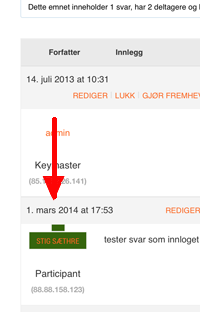
I have modified font-sizes and colors of my bbpress-installation, but I’m stuck with an ugly green “blob” in the answers linking to my profile. Where do I find the code to modify this? Looks like this: