Search Results for 'code'
-
AuthorSearch Results
-
May 15, 2014 at 3:42 am #146356
In reply to: Problems after Importing Vbulliten
Stephen Edgar
KeymasterI just checked the difference between the current version included with bbPress and that version you linked above. The version included with bbPress has quite a few enhancements, password support, forum categories, author IP, closed topics, sticky topics and topic tag slugs.
The difference that you need is the BBCodes:
// This is what is currently included with bbPress for YouTube:
$vbulletin_markup = preg_replace( '/\[video\=youtube;(.*?)\](.*?)\[\/video\]/', '$2', $vbulletin_markup );//And this is what we had in that custom linked version:
// Replace '[video=youtube;$1]$2[/video]' with '$2"
$vbulletin_markup = preg_replace( '/\[video\=youtube;(.*?)\](.*?)\[\/video\]/', '$2', $vbulletin_markup );

// Replace '[video=youtube_share;$1]$2[/video]' with '$2"
$vbulletin_markup = preg_replace( '/\[video\=youtube_share;(.*?)\](.*?)\[\/video\]/', '$2', $vbulletin_markup );
// Replace '[SOUNDCLOUD]$1[/SOUNDCLOUD]' with '$1"
$vbulletin_markup = preg_replace( '/\[SOUNDCLOUD\](.*?)\[\/SOUNDCLOUD\]/', '$1', $vbulletin_markup );
So the addition of these two BBCodes:
[video=youtube_share;$1]$2[/video]and[SOUNDCLOUD]$1[/SOUNDCLOUD]Do you know if both of these BBCodes are included with all vBulletin versions or are these custom BBCodes you manuallly created in your vBulletin install?
Either way I just updated that gist with the above BBCode that you should be able to download and test as you did 8 months ago, it has ‘all the things’ above included in it. 🙂
May 14, 2014 at 11:27 pm #146351In reply to: WP Symposium converter for bbPress
KeymasterFor reference the core SQL queries: (Don’t forget the table prefix e.g.
wp_)Forums:
SELECT
symposium_cats.cid AS cid,
symposium_cats.cat_parent AS cat_parent,
symposium_cats.title AS title,
symposium_cats.stub AS stub,
symposium_cats.cat_desc AS cat_desc,
symposium_cats.listorder AS listorder
FROM wp_symposium_cats AS symposium_cats
Topics
SELECT
symposium_topics.tid AS tid,
symposium_topics.topic_category AS topic_category,
symposium_topics.topic_owner AS topic_owner,
symposium_topics.topic_post AS topic_post,
symposium_topics.topic_subject AS topic_subject,
symposium_topics.stub AS stub,
symposium_topics.allow_replies AS allow_replies,
symposium_topics.topic_sticky AS topic_sticky,
symposium_topics.topic_started AS topic_started,
symposium_topics.topic_date AS topic_date
FROM wp_symposium_topics AS symposium_topics
WHERE symposium_topics.topic_parent = 0
Replies
SELECT
symposium_topics.tid AS tid,
symposium_topics.topic_category AS topic_category,
symposium_topics.topic_parent AS topic_parent,
symposium_topics.topic_owner AS topic_owner,
symposium_topics.topic_post AS topic_post,
symposium_topics.topic_started AS topic_started
FROM wp_symposium_topics AS symposium_topics
WHERE symposium_topics.topic_parent != 0
May 14, 2014 at 9:38 pm #146348In reply to: WP Symposium converter for bbPress
KeymasterTurns out when I said it was late, it was, I downloaded and installed the plugin 😉
Firstly for most forum importers I use a set of categories and forums based on the ‘Nested Set Model’, this gives a great hierarchy layout to test with.
https://en.wikipedia.org/wiki/Nested_set_model#ExampleFirst issue (question) is, why the converter doesn’t find forums. Or at least doesn’t convert them.
For the ‘Forum slug’ you have
slugit should bestubDoes WPS ‘pretty permalinks’ even work? I am guessing that’s what these are?
Once I changed that the forums imported fine with correct title, desc, parent, order, slug.
We don’t need to worry about counts as the bbPress repair tools will do this for us
Categories or Forums I am not sure of, to set a category in WPS I set the
Allow new topics?field tonowe can use this to decide if the bbPress forum will be aforumorcategoryif this is indeed the intended purpose of this field.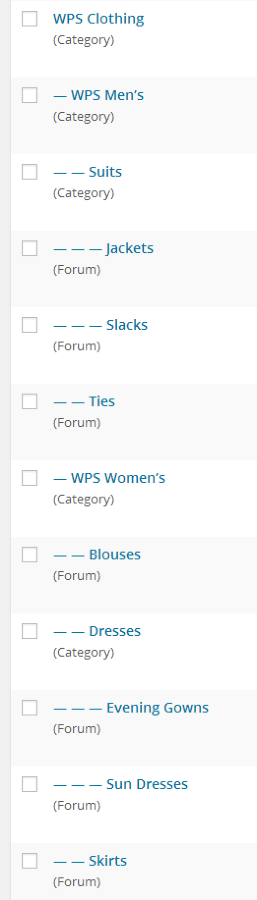
I’ll go take a look at the topics and replies now…
May 14, 2014 at 11:39 am #146327In reply to: Strange forum formatting
Robin W
ModeratorMay 14, 2014 at 10:56 am #146326In reply to: Strange forum formatting
Baker
ParticipantThanks ThemeTon. I was able to remove the FontAwesome icons with some override code.
Regarding the way my sub-forums are being displayed…side-by-side, is this the “out-of-the-box” format for bbPress? If bbPress requires lots of coding/formating I’ll probably scrap it and switch to something more streamlined.
May 14, 2014 at 7:41 am #146323In reply to: Layout-Problem (breadcrumbs and subscribe-link)
ModeratorMay 14, 2014 at 4:43 am #146312In reply to: WP Symposium converter for bbPress
lagrou
ParticipantI’ve added a WPS install to one of my test sites. By default WPS has 3 forum categories, and one topic with two replies. I’ve added two topics, to populate all categories, and made one category child of another. So it should look like what you expect.
I’ve also created a group. In WPS, groups can have a forum, with no category hierarchy, so they are not listed in the table symposium_cats. I wasn’t using groups myself, but my proposal is, if we can, to make the converter gather the content as a subforum in bbPress, then the admin may decide to delete or restrict its content ? So, I’ve also created a group on that test install, with a topic and a reply.
As I’m not sure what you call a MySQL export I’ve dumped it using a page template where I perform a succession of queries, then
var_dump( $wpdb->last_query, $result );and copy/pasted the page content as a text file, added to my repository above. I hope it’ll be fine.May 14, 2014 at 2:30 am #146306In reply to: Strange forum formatting
ThemeTon
ParticipantI saw there some styling from your theme (ShopAndBuy). That style adds fontawesome icon for every LI elements. But bbpress has so many ul/li structure for formatting forum section and that style makes this issue there. Please manage or remove that styles from line 350 of “ShopAndBuy/css/shortcodes.typography.css”
Thanks
May 14, 2014 at 1:47 am #146301Topic: Changing sticky colors
in forum Themesdhalkias
ParticipantI have copied the bbpress.css file to my child theme. However when I edit the sticky code to try and change the text color and background color nothing happens. My code is below.
.bbp-topics-front ul.super-sticky,
.bbp-topics ul.super-sticky,
.bbp-topics ul.sticky,
.bbp-forum-content ul.sticky {
	background-color: #ffffff !important;
	font-size: 1.1em;
	color: #black !important;
}
Can anyone help me to get the colours working?
May 13, 2014 at 5:20 pm #146287In reply to: I need to enlarge some font-sizes
Lerroy
ParticipantThis is what i used
.bbp-forum-title,
.bbp-topic-title {
   font-size: 16px !important;
   color: #008657;
}
May 13, 2014 at 2:54 pm #146279Topic: How to display time ago on post date??
in forum TroubleshootingRobkk
ModeratorIm trying to know how to change the format that is displayed in this function
<span class="bbp-reply-post-date"><?php bbp_reply_post_date(); ?></span>it displays like this (May 9, 2014 at 10:31 pm)
but I want it to display like this (4 days ago)
I want it all to display like this
(seconds ago)
(minutes ago)
(days ago)
(weeks ago)
(months ago)
(years ago)But not with them combined like this
(1 month 13 days ago)
(2 years 2 months ago)Any help??
May 13, 2014 at 8:06 am #146263In reply to: Per Forum Permissions by Group
ModeratorThanks, glad you are finding it useful. The unlimited groups version is on it’s way, I’ve coded it, but just need to tidy up the user interface.
bbPress have said that they intend to have groups in the core product at some stage, but I have no idea on timescales.
May 13, 2014 at 6:58 am #146259In reply to: Problems after Importing Vbulliten
KeymasterCool, I will take a closer look in the morning, it’s late here down under and the brain is to fuzzy to dive in right now 😉
Can you confirm which importer you used, did you import using the
vBulletin3orvBulletinimporter and what is the exact version of the vBulletin forum you are importing from. I’ll try to take a closer look at those BBCodes and also make any updates as needed.May 13, 2014 at 6:00 am #146254In reply to: Per Forum Permissions by Group
Pasquale Galasso
Participant@robin-w Your plugin is great, so great. I wonder if I will soon be inserted into the native code bbPress
May 13, 2014 at 3:56 am #146250In reply to: Kunena converter for bbPress 2.4
Juan
ParticipantI migrated the attachments succesfully. You must edit the script:
Change these lines (6 and 7) with the correct path:
require( '/home/user/public_html/wordpress/wp-load.php' );
require( '/home/user/public_html/wordpress/wp-admin/includes/image.php' );
Add the data of your site and database (lines 10 to 14):
$host="localhost";
$uname="db_username";
$pass="db_username_password";
$database = "";
$site_url = 'http://www.example.com';
In line 28 change
j25_kunena_attachmentsto the same name as your attachments table name.I’m sorry for the trouble but, as I said, the script is in very early stage but made the job for me.
May 12, 2014 at 2:51 pm #146237In reply to: bbpress should offer to login in forum
ModeratorActually
<p> <?php if (!is_user_logged_in()) echo do_shortcode ('[bbp-login]') ; ?>would be a better line of code, as then someone logged in with a spectator role would not see the login prompt
May 12, 2014 at 2:39 pm #146232In reply to: bbpress should offer to login in forum
ModeratorIf you want a quick solution to this
create a directory within your theme called bbpress
ie wp-content/your-theme-name/bbpress
And into this folder copy the following file
bbpress/templates/default/bbpress/form-reply.php
Then alter this file to have a new line 175 as follows
<p> <?php echo do_shortcode ('[bbp-login]') ; ?>so that
<div id="no-reply-<?php bbp_topic_id(); ?>" class="bbp-no-reply">
		<div class="bbp-template-notice">
			<p><?php is_user_logged_in() ? _e( 'You cannot reply to this topic.', 'bbpress' ) : _e( 'You must be logged in to reply to this topic.', 'bbpress' ); ?></p>
	</div>
	</div>
becomes
<div id="no-reply-<?php bbp_topic_id(); ?>" class="bbp-no-reply">
		<div class="bbp-template-notice">
			<p><?php is_user_logged_in() ? _e( 'You cannot reply to this topic.', 'bbpress' ) : _e( 'You must be logged in to reply to this topic.', 'bbpress' ); ?></p>
		<p> <?php echo do_shortcode ('[bbp-login]') ; ?>
		</div>
	</div>
Save this file, and bbpress will use this and a login panel will be displayed.
May 12, 2014 at 2:11 pm #146226Moderatorok, it could be coded, but is not available as far as I know.
May 12, 2014 at 11:08 am #146223Asynaptic
Participant@tieptoep thanks, I’ve taken a look at the trac and it seems to definitely have to do with permalinks but I’m not sure if the creator of the ticket (alexvorn2) is referring to the same solution as I and others are asking for (see above examples).
for example, alexvorn2 has this as an example:
1) pretty url: http://example.com/forum/subforum/custom_topic_title
structure will be: http://example.com/%forumparentsnames%/%topicname%But the second line doesn’t seem to correspond to the permalink structure shown in the first line. Specifically, he seems to have left out the slug for the subforum! Or maybe I’m missing something.
It is very disappointing to see JJJ throw this in ‘future releases’ which is basically where trac tickets go to die. And to change the priority: “Priority changed from normal to low” and “Severity changed from normal to minor” and ” Type changed from defect to enhancement” when in fact I and many others would argue there is nothing that is, has been and will continue to be the highest priority ticket (until it is fixed) and there is nothing more severe and this is most definitely a defect, *not* an enhancement.
These changes sadly tells us, the users, just how much we have failed to communicate to the devs (or how much they have failed to actually listen to us – or a combination of both).
As for attempts to solve this, @dbungard shares some code in the previous page of this very thread. As well, I linked earlier to several other past attempts at the solution. I think user @mr_pelle was the developer of the bbPress nicer permalinks plugin but that was many years ago (3+?) and he doesn’t seem to be active on the forum. As well, the plugin is nowhere to be found.
There has been no feedback or response from devs on any of this code, even when another user specifically asks for that in the past page.
This issue is so fundamental to the very core of bbPress functioning that I question whether it is something that can be hacked together with a plugin, bailing wire and a convoluted .htaccess file.
May 12, 2014 at 10:16 am #146220In reply to: WP Symposium converter for bbPress
ParticipantI’ve created a Github account so I can share my code so far.
https://github.com/Lagrou/wps_extends_bbp_converterFirst issue (question) is, why the converter doesn’t find forums. Or at least doesn’t convert them.
Second, WP Symposium stores topics and replies in the same table, and they belong to a category stored in another table. How do I mimick, using the converter, the selection of topics of a given category:
$sql = "SELECT * FROM ".$wpdb->prefix."symposium_topics WHERE topic_parent = 0 AND topic_category = %d";
$wps_topics = $wpdb->get_results( $wpdb->prepare( $sql, $cid ), ARRAY_A );
Where $cid is the category/subforum id.
Third and likewise, topics don’t have parents, while replies (obviously) do. So how to get, for a given topics, the list of replies WHERE topic_parent = %d.
And fourth, WP Symposium does not store the number of topics / replies. How do I get
count($wps_topics)Thanks…
May 12, 2014 at 9:43 am #146219Topic: Wierd CSS – please advise
in forum Troubleshootingsicky_brazz
ParticipantHi, I am using the following code to hide my menu/navbar and search form from my site.
‘/* Remove nav bar and search form */
.page #nav-bar {
display: none;
}.page #s {
display: none;
}’It seems to work wonders on all pages except BBPress pages.
Now when I set my permalinks to “Default” the navbar and search form are removed on bbpress pages, but when I have them to anything else, the navbar shows up again (but only on bbpress pages).
Does anyone have an explanation for this?
Or can someone point me in the direction of how to remove it without having to have “Default” permalinks set (which I can’t due to buddypress)May 12, 2014 at 6:49 am #146214In reply to: Personalize bbPress Recent Topics
Moderatorsorry it was the weekend, and all the helpers on here are volunteers on have jobs and a social life to lead as well 🙂 please be patient.
The coding for this is quite complicated, but I’d suggest you start by looking at the bbp_has_topics function in
bbpress/includes/topics/template
this will give you a lot of the code for pagination
May 12, 2014 at 4:29 am #146205ModeratorThis is what i used
<div class="bbp-usr-location"><?php
$bpProfileField = bp_get_profile_field_data( 'field=Location &user_id=' . get_the_author_meta( 'ID' ) );
if ( empty ( $bpProfileField) ):
?>
<p></p>
<?php else: ?>
<p><?php echo 'Location: ' . $bpProfileField; ?></p>
<?php endif; ?></div>
May 12, 2014 at 4:28 am #146204ModeratorNevermind i got it to work , plus that code i just posted is all out of wack , just some copy and pasting from other functions that worked
May 12, 2014 at 4:10 am #146203In reply to: Problems after Importing Vbulliten
KeymasterExcept for the default BBCode
[b],[i],[u],[img],[url]etc the vBulletin importer only has[quote],[mention],[youtube]BBCodes added at this time. You would need to manually edit your topics and replies for any SoundCloud embeds.To test this any further I will need your vBulletin version you importing from so I can take a closer look, firstly to see if I have a copy of a vBulletin ‘version xyz’ to test against and then to see if I can see any reason why it would not be importing everything correctly.
-
AuthorSearch Results

