Hi Guys
I have TinyMCE loading in my forum for when people post to it and I’m using a plugin ( https://en-au.wordpress.org/plugins/visual-editor-custom-buttons/faq/) that allows me to add custom buttons to TinyMCE. These buttons appear just fine in the backend when creating posts/pages but the new buttons do not appear in the forum post area.
I have this function in my functions.php for adding TinyMCE in forum.
function bbp_enable_visual_editor( $args = array() ) {

    $args['tinymce'] = array('toolbar1' => 'bold, italic, underline, strikethrough, blockquote, alignleft, aligncenter, alignright, alignjustify, bullist, numlist, outdent, indent, cut, copy, paste, undo, redo, link, unlink, image, removeformat, pastetext',);
    $args['quicktags'] = false;
    $args['teeny'] = true;

    return $args;
}
add_filter( 'bbp_after_get_the_content_parse_args', 'bbp_enable_visual_editor' );
How do I get the buttons created in this plugin to appear in the front end forum area?
So anyway as far as the DB is concerned I have all the necessary caps, which I expected. Still poking around in stuff.
    [switch_themes] => 1
    [edit_themes] => 1
    [activate_plugins] => 1
    [edit_plugins] => 1
    [edit_users] => 1
    [edit_files] => 1
    [manage_options] => 1
    [moderate_comments] => 1
    [manage_categories] => 1
    [manage_links] => 1
    [upload_files] => 1
    [import] => 1
    [unfiltered_html] => 1
    [edit_posts] => 1
    [edit_others_posts] => 1
    [edit_published_posts] => 1
    [publish_posts] => 1
    [edit_pages] => 1
    [read] => 1
    [level_10] => 1
    [level_9] => 1
    [level_8] => 1
    [level_7] => 1
    [level_6] => 1
    [level_5] => 1
    [level_4] => 1
    [level_3] => 1
    [level_2] => 1
    [level_1] => 1
    [level_0] => 1
    [edit_others_pages] => 1
    [edit_published_pages] => 1
    [publish_pages] => 1
    [delete_pages] => 1
    [delete_others_pages] => 1
    [delete_published_pages] => 1
    [delete_posts] => 1
    [delete_others_posts] => 1
    [delete_published_posts] => 1
    [delete_private_posts] => 1
    [edit_private_posts] => 1
    [read_private_posts] => 1
    [delete_private_pages] => 1
    [edit_private_pages] => 1
    [read_private_pages] => 1
    [delete_users] => 1
    [create_users] => 1
    [unfiltered_upload] => 1
    [edit_dashboard] => 1
    [update_plugins] => 1
    [delete_plugins] => 1
    [install_plugins] => 1
    [update_themes] => 1
    [install_themes] => 1
    [update_core] => 1
    [list_users] => 1
    [remove_users] => 1
    [promote_users] => 1
    [edit_theme_options] => 1
    [delete_themes] => 1
    [export] => 1
    [keep_gate] => 1
    [spectate] => 1
    [participate] => 1
    [moderate] => 1
    [throttle] => 1
    [view_trash] => 1
    [publish_forums] => 1
    [edit_forums] => 1
    [edit_others_forums] => 1
    [delete_forums] => 1
    [delete_others_forums] => 1
    [read_private_forums] => 1
    [read_hidden_forums] => 1
    [publish_topics] => 1
    [edit_topics] => 1
    [edit_others_topics] => 1
    [delete_topics] => 1
    [delete_others_topics] => 1
    [read_private_topics] => 1
    [publish_replies] => 1
    [edit_replies] => 1
    [edit_others_replies] => 1
    [delete_replies] => 1
    [delete_others_replies] => 1
    [read_private_replies] => 1
    [manage_topic_tags] => 1
    [edit_topic_tags] => 1
    [delete_topic_tags] => 1
    [assign_topic_tags] => 1
    [administrator] => 1
    [bbp_keymaster] => 1
Hi! We have bbpress installed on a relatively large wpengine-hosted wordpress site. Suddenly, about a week ago, all pages started redirecting back to the homepage. Annoyingly, changing the permalink settings back to “Plain” fixes the issue, but that kills our SEO and breaks all hardcoded links back to our forum. We’ve set it to Plain on our production site temporarily, but need Postname permalinks to work again. On our staging site, you can see how any page does a 301 redirect back to the homepage (example: http://fiverrforum.staging.wpengine.com/categories/welcome/community-rules-guidelines). Wpengine support says that our htaccess files look good and are standard, and insist the problem lies with bbpress. They’re adamant the problem relates to a setting within bbpress or with how bbpress is handling permalinks. I’ve tried disabling plugins to see if it’s a conflict of some sort, and the issue persists. Any advice or assistance would be greatly appreciated!
theme and bbpress both displaying
you can turn off the bbpress breadcrumbs using
Layout and functionality – Examples you can use
or by using the style pack plugin
https://wordpress.org/plugins/bbp-style-pack/
I’ve only thought about it briefly, you’d need to write a set of custom templates so that everything passed the AMP specs https://www.ampproject.org/docs/guides/responsive_amp
I know bbPress uses CSS’ !important in a few places so that we can force a few things for our “template compatibility” in supporting as many themes as we do, you can't use!important` with AMP: https://www.ampproject.org/docs/guides/responsive/style_pages
Apart from that issue of the top of my head, I don’t see why it couldn’t be done 🙂
Don’t know if anyone else has (or will have) this same problem, but I have a Category that has probably 60-70 forums, and I anticipate adding more in the future.
Like the OP, I was also only showing the first 50 forums on the category index page.
I used @casiepa ‘s filter but I had to fix the typography (I think that’s the right word?) Not sure because I’m still new to all this and completely self-taught, so there’s lots I don’t know but what I do know is the following code WORKS! (On bbPress 2.5.11-6121.)
// filter to show more than 50 forums on the index page
function casiepa_increase_forum_per_page( $args = array() ) {
   $args['posts_per_page'] = get_option( '_bbp_forums_per_page', 100 );
return $args;
}
add_filter( 'bbp_before_has_forums_parse_args', 'casiepa_increase_forum_per_page' );
@netweb thanks a lot
I contacted my theme support team and they fix the problem adding this custom css code.
.bbp-topics ul.sticky, .bbp-body .sticky {
    position: initial;
}
I wouldn’t have contacted them without your support and orientation. Once again thanks a lot!
P.S. can you edit your answer and delete the image? thanks.
Im wanting to add a forum to my wordpress site, I dont know how much it will grow but i want it to be flexible, i’m not a coder or designer, I only know the basics,
I know in the past bbpress had a lot of issue and was lacking in features but i’m assuming this must be possible now.
Im wanting a good looking full featured forum as good as any stand alone forum(xenforo, phpbb, mybb).
can this be done ?
if so how ?
How can I add the extra feature without bloating the site ?
Can i download any pre made bbpress.css ?
any good example
ok, untested but try
wp-content/plugins/bbpress\templates\default\bbpress\form-search.php
copy to your PC and
line 17
<input tabindex="<?php bbp_tab_index(); ?>" class="button" type="submit" id="bbp_search_submit" value="<?php esc_attr_e( 'Search', 'bbpress' ); ?>" />
change to
<input tabindex="<?php bbp_tab_index(); ?>" class="button" type="submit" id="search_submit" value" />
save this file to
ie wp-content/themes/%your-theme-name%/bbpress/form-search.php
where %your-theme-name% is the name of your theme
@Robin W — Thank you for sending me the CCS code. It worked. Yes, I know how to move files by FTP to edit on a PC. You’re help would be greatly appreciated.
in the file
bbpress\includes\common\shortcodes.php and amend the ‘bbp-single-forum’ shortcode
1. you have two css declarations that are affecting
#main-col .elements-box ul li, #main-col .post ul li {
  list-style: inside none square;
  padding-left: 0;
}
and
#main-col .elements-box ul ul li, #main-col .post ul ul li {
  list-style: inside none circle;
}
if you are not interested in having circles or squares anywhere on your site out this in your css.
#main-col .elements-box ul li, #main-col .post ul li {
  list-style: none !important ;
 }
#main-col .elements-box ul ul li, #main-col .post ul ul li {
 list-style: none !important ;
}
2. whilst some styling can be done, it would take an change to a template to achieve what you want for search. If you are familiar with moving files using FTP and editing files on your PC, come back and I’ll help further
3. Can’t see that as it only shows to those logged in.
So the regex we use #([\s>])@([0-9a-zA-Z-_]+)#i in bbp_make_mentions_clickable()
The ([\s>]) is checking for a whitespace character before the @ symbol
The code here below is from using TinyMCE and as you noted @atmojones there’s some non-breaking spaces html entities for the instances when an an even number of spaces preceede the @ symbol:
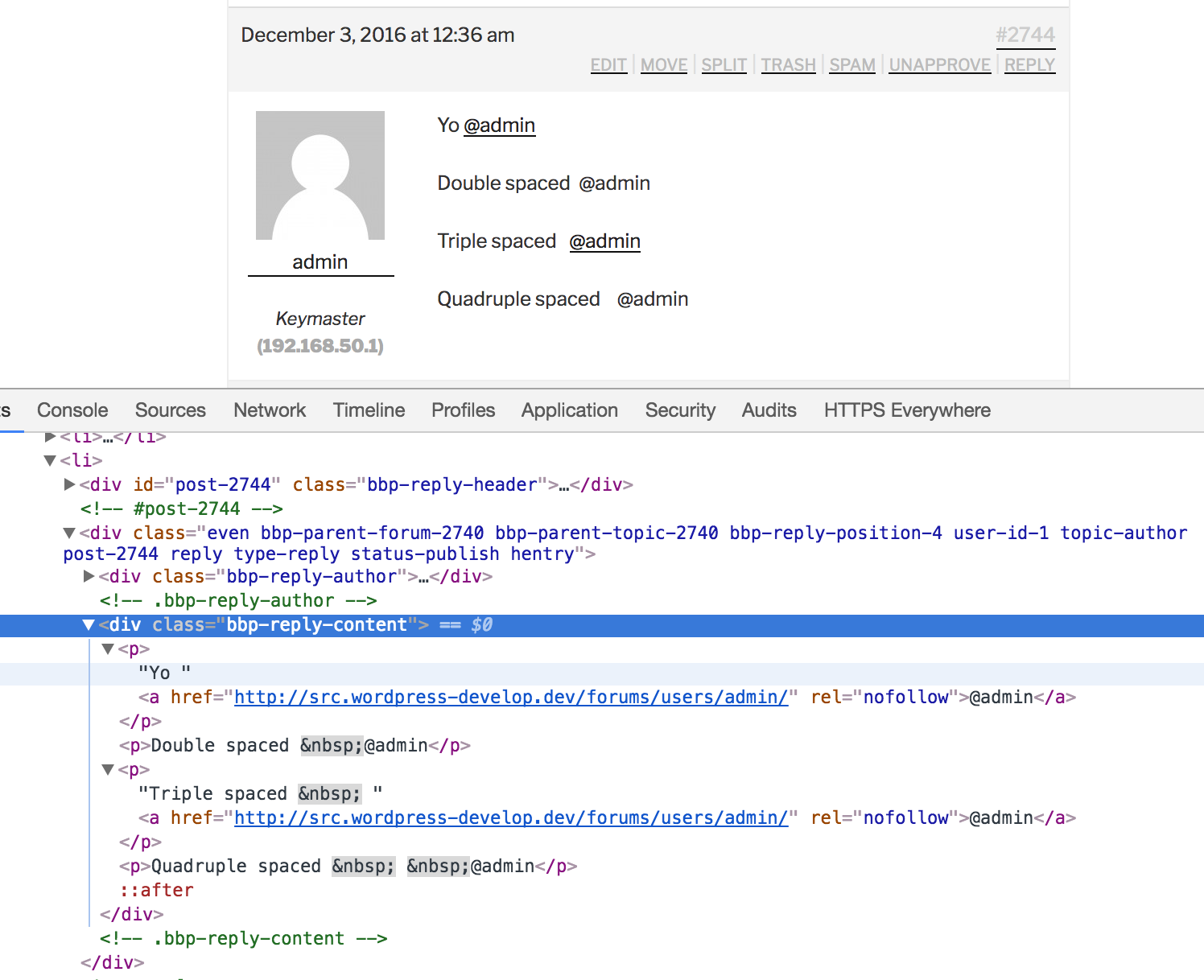
The root cause is every second space is swapped out with nbsp; which makes sense from a HTML perspective, where this takes place I’m not so sure of, it’s either in TinyMCE directly, or WordPress via wp_spaces_regexp() in wptexturize() (I think it’s the former)
The workaround for bbPress and I suspect BuddyPress also, would be to check for both ([\s>]) and nbsp; preceding the @ symbol
Here’s the results of swapping ([\s>]) for ([\s>;]) (Adding a check for just the semi-colon):
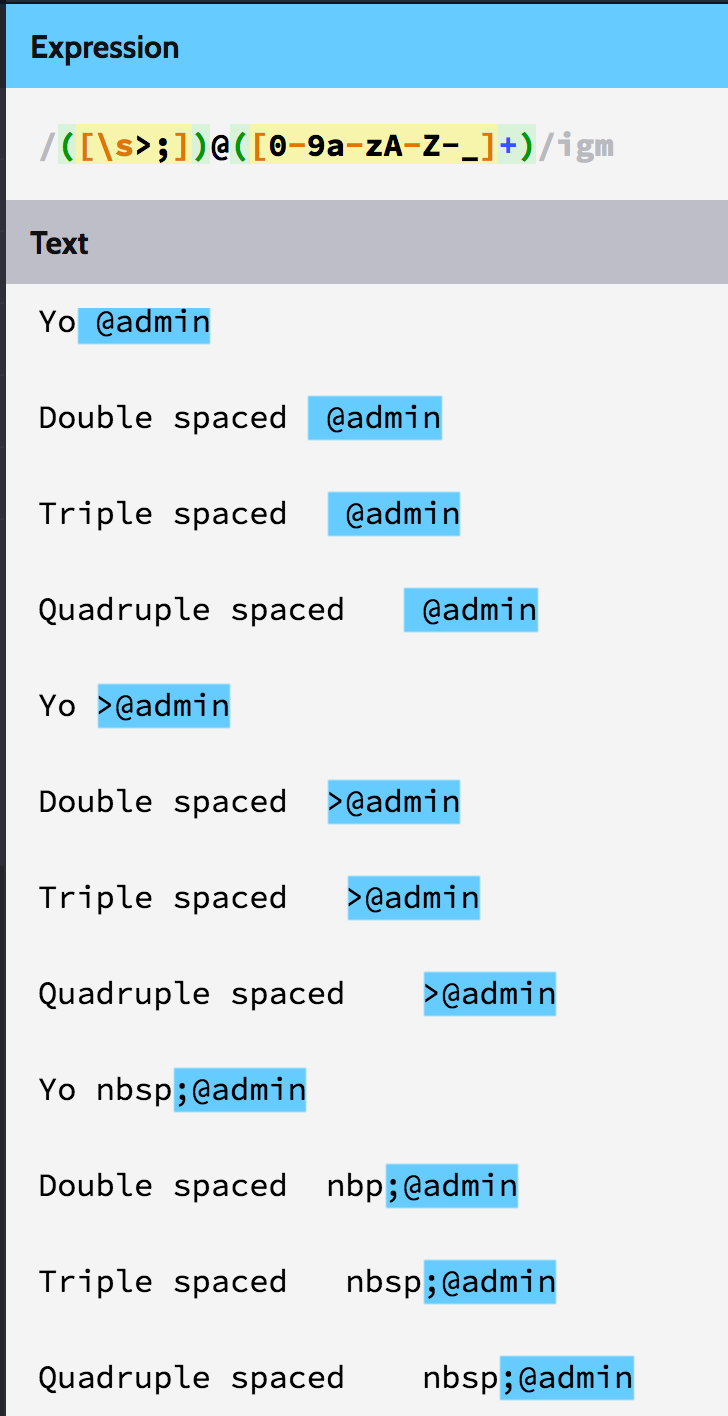
Testing one space @atmojones
Testing two spaces @atmojones
Testing three spaces @atmojones
Testing four spaces @atmojones
Testing five spaces @atmojones
Testing six spaces @atmojones
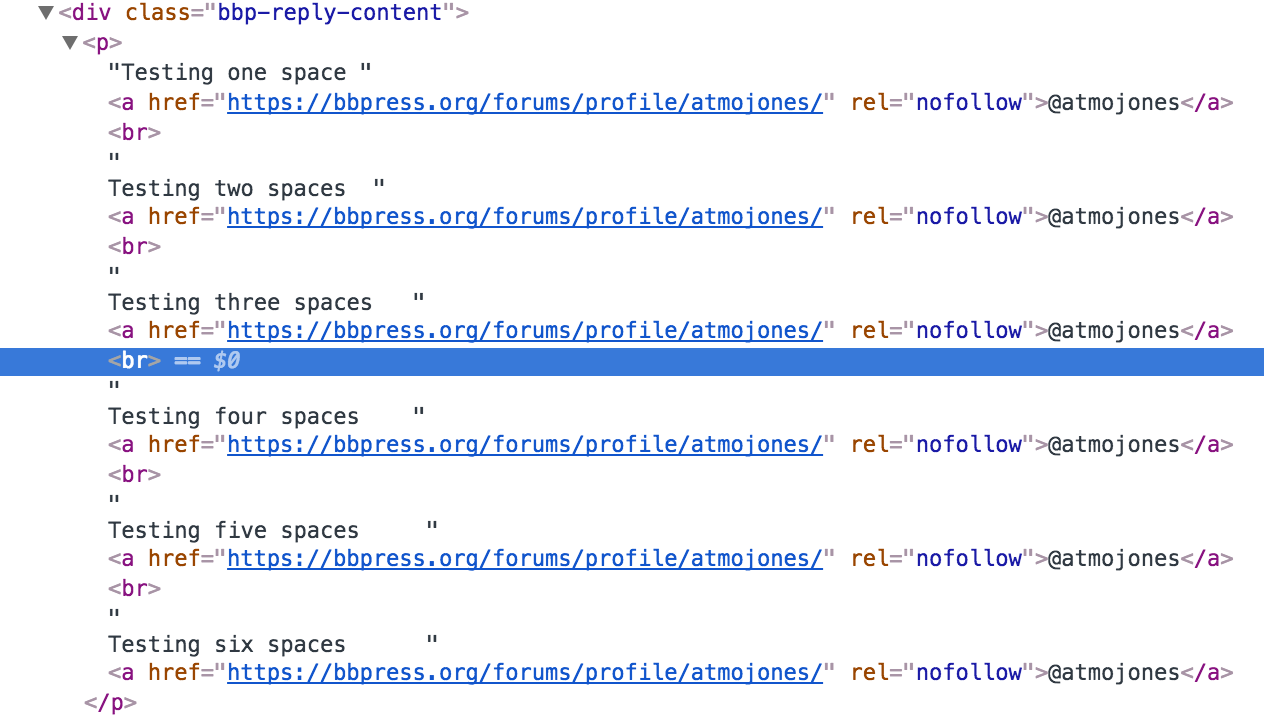
The resulting code from the above:
<p>Testing one space <a href="https://bbpress.org/forums/profile/atmojones/" rel="nofollow">@atmojones</a>
    <br> Testing two spaces <a href="https://bbpress.org/forums/profile/atmojones/" rel="nofollow">@atmojones</a>
    <br> Testing three spaces <a href="https://bbpress.org/forums/profile/atmojones/" rel="nofollow">@atmojones</a>
    <br> Testing four spaces <a href="https://bbpress.org/forums/profile/atmojones/" rel="nofollow">@atmojones</a>
    <br> Testing five spaces <a href="https://bbpress.org/forums/profile/atmojones/" rel="nofollow">@atmojones</a>
    <br> Testing six spaces <a href="https://bbpress.org/forums/profile/atmojones/" rel="nofollow">@atmojones</a>
 </p>
The above doesn’t really show the code, multiple spaces are stripped:
I suggest you post this on https://buddypress.org/support as the function bp_send_email() is a BuddyPress function 🙂
@robin-W,
Hi Robin,
First, thanks for the useful BBP Style Pack plugin. Everything works fine but when i enable the Alternate Template 1 it doesn’t change the layout. What am i doing wrong? Do i need to add code to a template or something?
Thomas
Hi,
I have a membership side with different forums and I show the forums with the “(bbPress) Forums List” widget and the answers with [bbp-topic-index].
I want to show a forum and its ansers only for a some users. Where in the code I have to do the difference?
Thanks in advance!
I dealt with some of these issues about a year ago. I was migrating from SMF 2* to bbPress and I had tons of issues with formatting in posts and missing data. I ended up hiring Michael Z Noble (http://wwww.michaelznoble.com/ – The 4 w’s is intentional 😉 ) to write a custom migration script to help me through all of these issues (as well as transfer a bunch of data like signatures, up/down votes, thread view counts, avatars, etc, into various bbPress/BuddyPress plugins/functions). The utf8mb4/utf8mb4_unicode_ci/character set issues were particularly tough for me to get through. I ended up switching to a new host that had a newer version of MySQL in order to successfully complete the migration. In short, if you aren’t a senior dev, hire a dev. 😉
Best of luck my friend! 🙂
If you uncheck the tick next to position: fixed; it will display correctly.
The file source is from /wp-content/themes/DT/framework/css/css.core.css?ver=4.6.1:
.sticky {
    position: fixed;
    top: 0;
    z-index: 1000;
    width: 100%;
    border-bottom: 1px solid #ddd;
}
Changing position: fixed; to position: inherit; will fix it for you.
I suggest you read your themes documentation or contact the theme author for the best way to apply the CSS fix for the DT Framework theme you are using 🙂
Yes @netweb that is the correct post.
i just made it sticky again.
the thing is that normal and super sticky work fine.
i dont understand anything about the codes thats why i cant find the problem by myself 🙁
Thanks.
Not so much what I need, it is what you need to help work out what the issue is 😉
At a quick glance it looks like the bootstrap.css is overwriting the bbPress CSS styles.
Can you make the topic a “sticky” again please:
This is the forum correct? EDIT: Removed URL
Thank you for your response.
Solved the problem by changing the code in plugins/bbpress/includes/common/widgets.php
made a small change around the line no: 586
-
<div class=”user-avatar”><?php bbp_author_link($widget_query->post->ID ); ?></div>
<div class=”forum-title”>
post->ID ); ?>”><?php bbp_forum_title( $widget_query->post->ID ); ?>
<div class=”user-name”><?php bbp_author_link($widget_query->post->ID ); ?></div>
<div class=”date-time”><?php bbp_topic_last_active_time( $topic_id ); ?></div>
</div>
Thank You..


