Search Results for 'code'
-
AuthorSearch Results
-
December 3, 2016 at 6:44 pm #179560
Topic: How to make bbpress equivalent to phpbb
in forum Themesakgt
ParticipantIm wanting to add a forum to my wordpress site, I dont know how much it will grow but i want it to be flexible, i’m not a coder or designer, I only know the basics,
I know in the past bbpress had a lot of issue and was lacking in features but i’m assuming this must be possible now.
Im wanting a good looking full featured forum as good as any stand alone forum(xenforo, phpbb, mybb).
can this be done ?
if so how ?
How can I add the extra feature without bloating the site ?
Can i download any pre made bbpress.css ?any good example
December 3, 2016 at 5:28 pm #179556In reply to: FORUM PAGE & BUTTONS DON’T DISPLAY PROPERLY
Robin W
Moderatorok, untested but try
wp-content/plugins/bbpress\templates\default\bbpress\form-search.php
copy to your PC and
line 17
<input tabindex="<?php bbp_tab_index(); ?>" class="button" type="submit" id="bbp_search_submit" value="<?php esc_attr_e( 'Search', 'bbpress' ); ?>" />change to
<input tabindex="<?php bbp_tab_index(); ?>" class="button" type="submit" id="search_submit" value" />save this file to
ie wp-content/themes/%your-theme-name%/bbpress/form-search.php
where %your-theme-name% is the name of your theme
December 3, 2016 at 3:36 pm #179554In reply to: FORUM PAGE & BUTTONS DON’T DISPLAY PROPERLY
hopecenter
Participant@Robin W — Thank you for sending me the CCS code. It worked. Yes, I know how to move files by FTP to edit on a PC. You’re help would be greatly appreciated.
December 3, 2016 at 2:06 pm #179545In reply to: Membership: Hide forum and answers
Moderatorin the file
bbpress\includes\common\shortcodes.php and amend the ‘bbp-single-forum’ shortcode
December 3, 2016 at 1:58 pm #179543In reply to: FORUM PAGE & BUTTONS DON’T DISPLAY PROPERLY
Moderator1. you have two css declarations that are affecting
#main-col .elements-box ul li, #main-col .post ul li {
  list-style: inside none square;
  padding-left: 0;
}
and
#main-col .elements-box ul ul li, #main-col .post ul ul li {
  list-style: inside none circle;
}
if you are not interested in having circles or squares anywhere on your site out this in your css.
#main-col .elements-box ul li, #main-col .post ul li {
  list-style: none !important ;
 }
#main-col .elements-box ul ul li, #main-col .post ul ul li { list-style: none !important ; }2. whilst some styling can be done, it would take an change to a template to achieve what you want for search. If you are familiar with moving files using FTP and editing files on your PC, come back and I’ll help further
3. Can’t see that as it only shows to those logged in.
December 2, 2016 at 9:07 pm #179531In reply to: mentions not becoming links some times
Stephen Edgar
KeymasterSo the regex we use
#([\s>])@([0-9a-zA-Z-_]+)#iinbbp_make_mentions_clickable()The
([\s>])is checking for a whitespace character before the@symbolThe code here below is from using TinyMCE and as you noted @atmojones there’s some non-breaking spaces html entities for the instances when an an even number of spaces preceede the
@symbol:
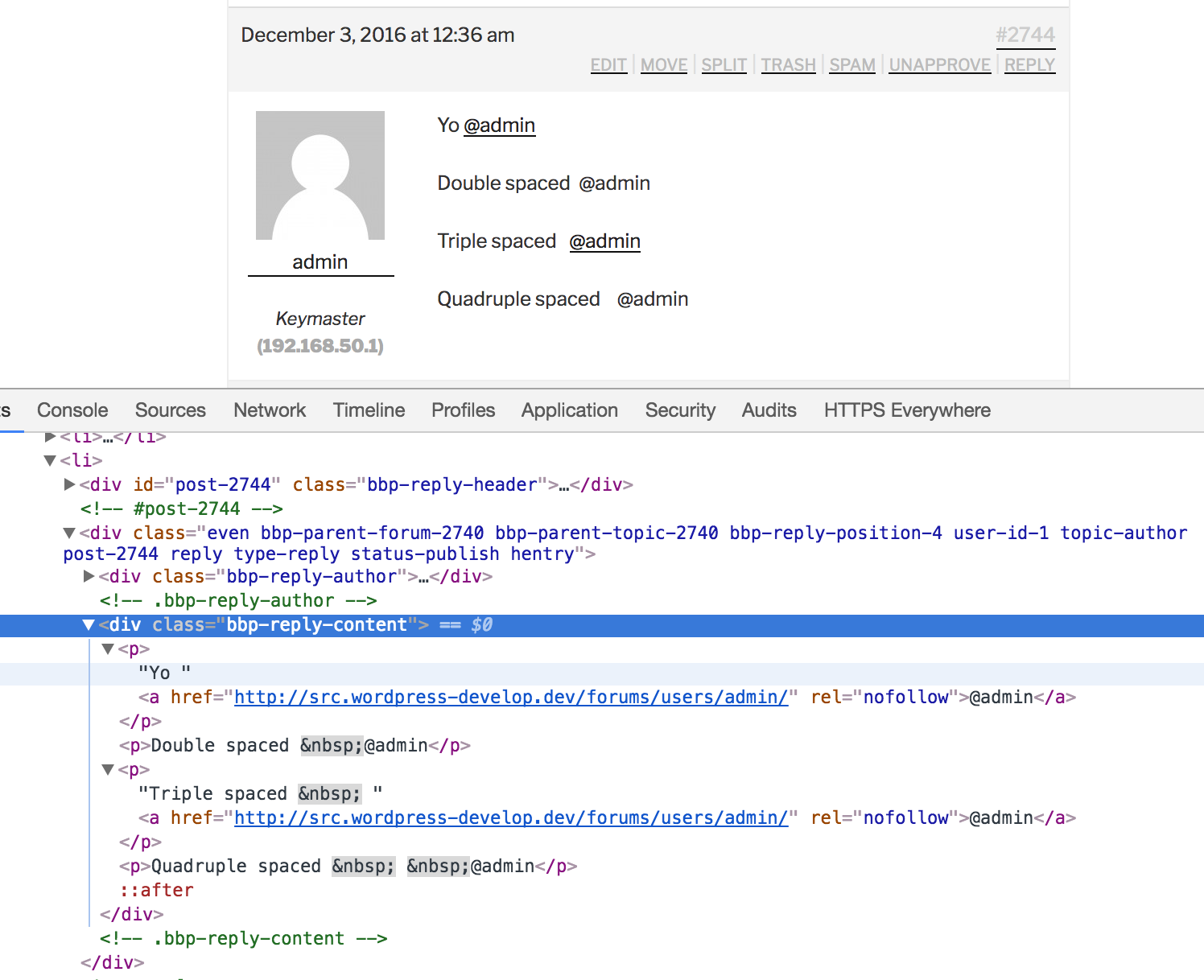
The root cause is every second space is swapped out with
nbsp;which makes sense from a HTML perspective, where this takes place I’m not so sure of, it’s either in TinyMCE directly, or WordPress viawp_spaces_regexp()inwptexturize()(I think it’s the former)The workaround for bbPress and I suspect BuddyPress also, would be to check for both
([\s>])andnbsp;preceding the@symbolHere’s the results of swapping
([\s>])for([\s>;])(Adding a check for just the semi-colon):
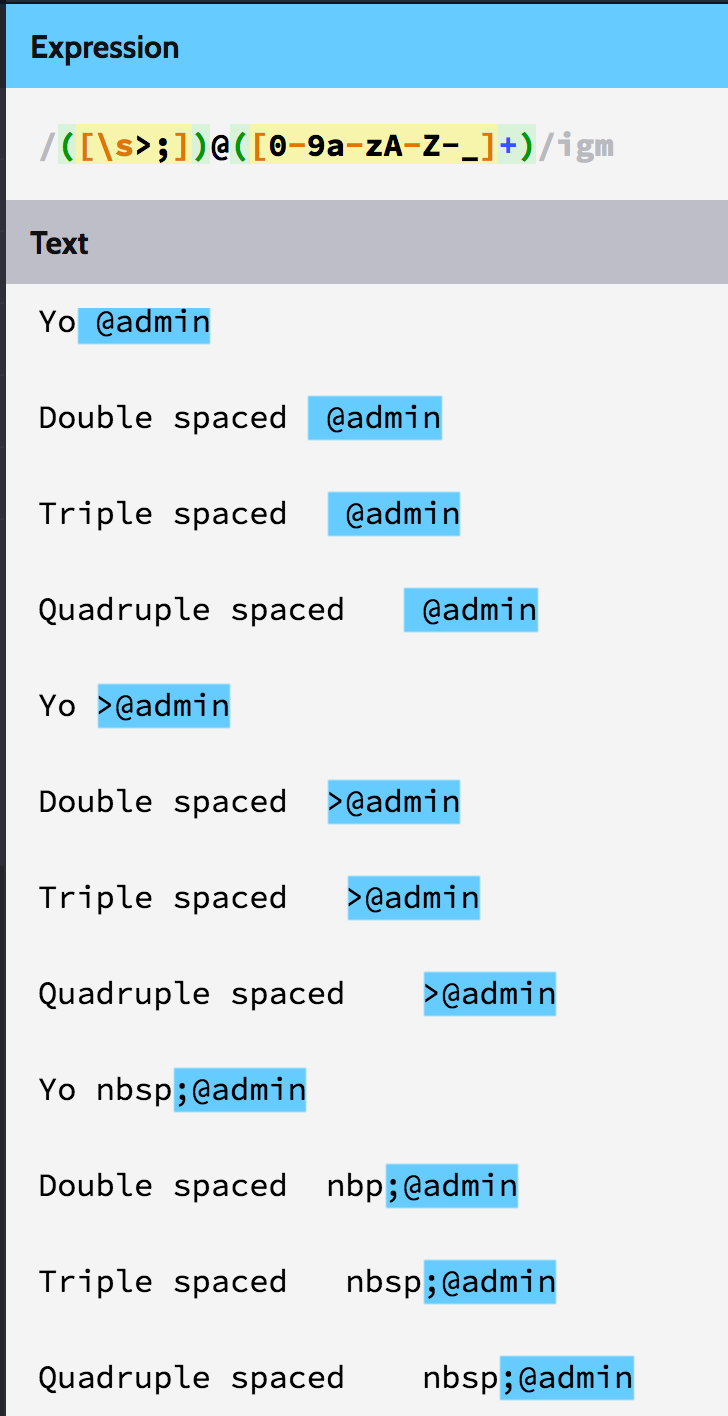 December 2, 2016 at 8:08 pm #179530
In reply to: mentions not becoming links some times
KeymasterTesting one space @atmojones
Testing two spaces @atmojones
Testing three spaces @atmojones
Testing four spaces @atmojones
Testing five spaces @atmojones
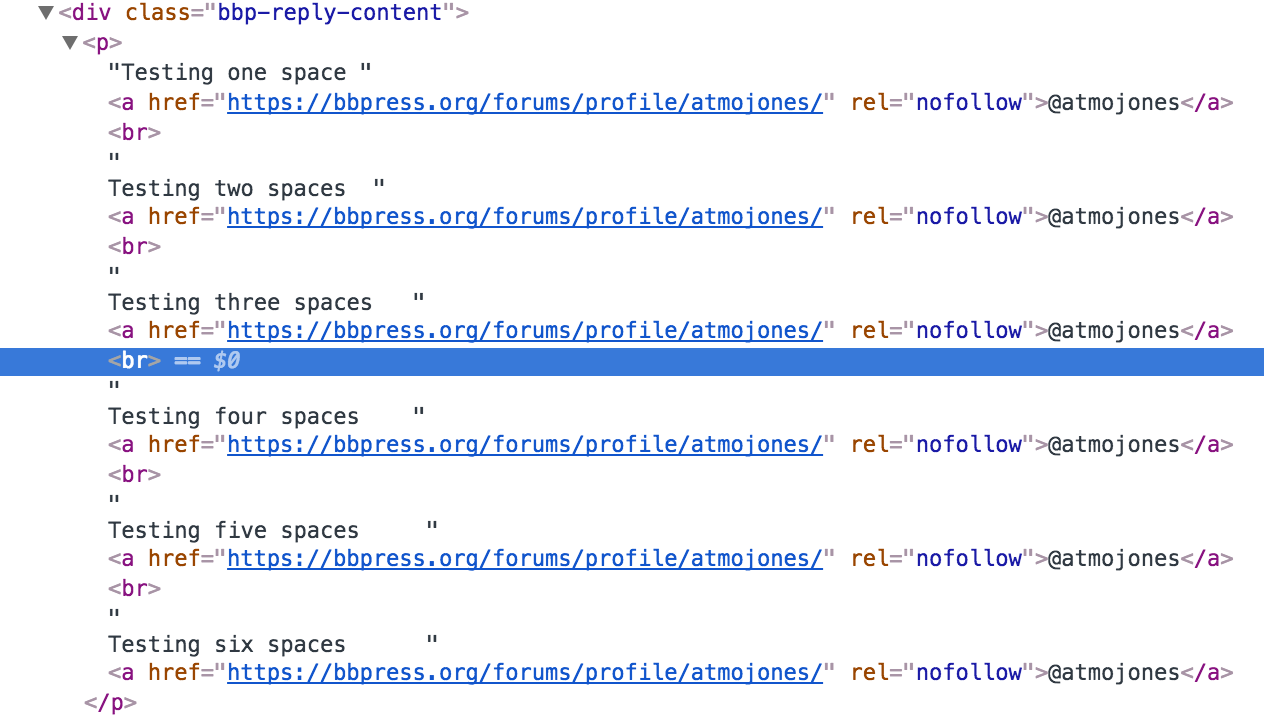
Testing six spaces @atmojonesThe resulting code from the above:
<p>Testing one space <a href="https://bbpress.org/forums/profile/atmojones/" rel="nofollow">@atmojones</a>
    <br> Testing two spaces <a href="https://bbpress.org/forums/profile/atmojones/" rel="nofollow">@atmojones</a>
    <br> Testing three spaces <a href="https://bbpress.org/forums/profile/atmojones/" rel="nofollow">@atmojones</a>
    <br> Testing four spaces <a href="https://bbpress.org/forums/profile/atmojones/" rel="nofollow">@atmojones</a>
    <br> Testing five spaces <a href="https://bbpress.org/forums/profile/atmojones/" rel="nofollow">@atmojones</a>
    <br> Testing six spaces <a href="https://bbpress.org/forums/profile/atmojones/" rel="nofollow">@atmojones</a>
 </p>
The above doesn’t really show the code, multiple spaces are stripped:
 December 2, 2016 at 8:05 pm #179529
In reply to: bp_send_email help
KeymasterI suggest you post this on https://buddypress.org/support as the function
bp_send_email()is a BuddyPress function 🙂December 2, 2016 at 1:19 pm #179523In reply to: Forum style / setup
Thomas_k
ParticipantHi Robin,
First, thanks for the useful BBP Style Pack plugin. Everything works fine but when i enable the Alternate Template 1 it doesn’t change the layout. What am i doing wrong? Do i need to add code to a template or something?
Thomas
December 2, 2016 at 4:45 am #179514Topic: Membership: Hide forum and answers
in forum Troubleshootingverenar
ParticipantHi,
I have a membership side with different forums and I show the forums with the “(bbPress) Forums List” widget and the answers with [bbp-topic-index].I want to show a forum and its ansers only for a some users. Where in the code I have to do the difference?
Thanks in advance!
December 2, 2016 at 12:02 am #179512In reply to: SMF to BBPress – error utf8mb4
timsilva_
ParticipantI dealt with some of these issues about a year ago. I was migrating from SMF 2* to bbPress and I had tons of issues with formatting in posts and missing data. I ended up hiring Michael Z Noble (http://wwww.michaelznoble.com/ – The 4 w’s is intentional 😉 ) to write a custom migration script to help me through all of these issues (as well as transfer a bunch of data like signatures, up/down votes, thread view counts, avatars, etc, into various bbPress/BuddyPress plugins/functions). The utf8mb4/utf8mb4_unicode_ci/character set issues were particularly tough for me to get through. I ended up switching to a new host that had a newer version of MySQL in order to successfully complete the migration. In short, if you aren’t a senior dev, hire a dev. 😉
Best of luck my friend! 🙂
December 1, 2016 at 9:36 pm #179511In reply to: help wrong display of topic
KeymasterIf you uncheck the tick next to
position: fixed;it will display correctly.The file source is from
/wp-content/themes/DT/framework/css/css.core.css?ver=4.6.1:.sticky { position: fixed; top: 0; z-index: 1000; width: 100%; border-bottom: 1px solid #ddd; }Changing
position: fixed;toposition: inherit;will fix it for you.I suggest you read your themes documentation or contact the theme author for the best way to apply the CSS fix for the DT Framework theme you are using 🙂
December 1, 2016 at 9:19 pm #179510In reply to: help wrong display of topic
vizcano
ParticipantYes @netweb that is the correct post.
i just made it sticky again.the thing is that normal and super sticky work fine.
i dont understand anything about the codes thats why i cant find the problem by myself 🙁
Thanks.
December 1, 2016 at 7:43 pm #179505In reply to: help wrong display of topic
KeymasterNot so much what I need, it is what you need to help work out what the issue is 😉
At a quick glance it looks like the
bootstrap.cssis overwriting the bbPress CSS styles.Can you make the topic a “sticky” again please:
This is the forum correct? EDIT: Removed URL
December 1, 2016 at 5:02 am #179497Moderator@netweb Thanks for the update
Having followed the links, then code is here
https://meta.trac.wordpress.org/browser/sites/trunk/buddypress.org/public_html/wp-content/themes
December 1, 2016 at 3:02 am #179496In reply to: Forum List
deepthyxavier
ParticipantThank you for your response.
Solved the problem by changing the code in plugins/bbpress/includes/common/widgets.php
made a small change around the line no: 586- <div class=”user-avatar”><?php bbp_author_link($widget_query->post->ID ); ?></div>
<div class=”forum-title”>
post->ID ); ?>”><?php bbp_forum_title( $widget_query->post->ID ); ?>
<div class=”user-name”><?php bbp_author_link($widget_query->post->ID ); ?></div>
<div class=”date-time”><?php bbp_topic_last_active_time( $topic_id ); ?></div>
</div>Thank You..
November 30, 2016 at 11:00 pm #179493KeymasterThe theme used here on bbpress.org is called
bbpress-org, the theme used on buddypress.org is calledbuddypress-org, I see a pattern emerging, the theme used on codex.bbpress.org is calledcodex-bbpress-org, the theme used on codex.buddypress.org is calledcodex-buddypress-org, there is a pattern here :shakes fist: ;PAlong with the above, each of those themes is a WordPress child theme, the parent theme is named
bb-base, as you can see below per the announcement blog posts all the above parent and child themes and plugins used on all the sites were “open sourced” back in March 2014The above posts also link to the source repos, there is also a new child theme that is now used on the bbPress 2.x powered https://wordpress.org/support/ forums and an even newer evolution of this theme is being worked on for the updated redesign of the WordPress forums, you can even sneak a peak at the new design by visiting this URL: https://wordpress.org/support/?new-theme=1
The updates to all of the above and the migration of the WordPress Support Forums to bbPress 2.x, rather 2.6-alpha is one of the reasons bbPress 2.6 isn’t out yet, it’s because we’re making sure bbPress 2.6 will be the best it possibly can be, and by deploying it on wordpress.org and the ensued battle testing of it that has been taking place we’ve got a few things to do before we can say bbPress 2.6 is ready to be released.
November 30, 2016 at 7:30 pm #179490In reply to: SMF to BBPress – error utf8mb4
Keymaster@mikehaceman, thanks for testing this, I’ll update the and test the patch in a few hours
And FWIW an import should also work albeit slower without the
wp_bbp_converter_translatortable, some hosts don’t allow users to create new tables, so I’ll see if I can figure out why this isn’t working either for you 🙂November 30, 2016 at 2:24 pm #179489In reply to: SMF to BBPress – error utf8mb4
mikehaceman
ParticipantOk it was hanging for too long so here what i found out:
on the patch page (https://bbpress.trac.wordpress.org/attachment/ticket/3026/3026.patch) you made few mistakes:
1. Line 663 KEY meta_join (meta_key, meta_value) ) {$charset_collate};”;
should finish with ” , ” not ” ;”; ” otherwise it will crash error2. Line 660 PRIMARY KEY (meta_id),
is duplicated so i guess 660 or 661 can be removed3. when running import after those changes in wordpress, converter is giving error message:
WordPress database error: [Key column ‘meta_id’ doesn’t exist in table]
CREATE TABLE wp_bbp_converter_translator ( value_id bigint(20) unsigned not null default ‘0’, meta_key varchar(255) null, meta_value varchar(255) null, PRIMARY KEY (meta_id), KEY value_id (value_id), KEY meta_join (meta_key, meta_value) ) DEFAULT CHARACTER SET utf8mb4 COLLATE utf8mb4_unicode_ciBtw… im not a coder. No clue about php im just applying some logic to what i see 😉
November 30, 2016 at 11:37 am #179485In reply to: SMF to BBPress – error utf8mb4
ParticipantThanks for the update. I have downloaded again the alpha and installed it fresh on my website. Unfortunately still the same error message:
Repair any missing information: Continue
WordPress database error: [Specified key was too long; max key length is 1000 bytes]
CREATE TABLE wp_bbp_converter_translator ( meta_id mediumint(8) unsigned not null auto_increment, value_type varchar(25) null, value_id bigint(20) unsigned not null default ‘0’, meta_key varchar(255) null, meta_value varchar(255) null, PRIMARY KEY (meta_id), KEY value_id (value_id), KEY meta_join (meta_key, meta_value) ) DEFAULT CHARACTER SET utf8mb4 COLLATE utf8mb4_unicode_ci
No data to cleanStarting ConversionNovember 30, 2016 at 10:05 am #179483In reply to: SMF to BBPress – error utf8mb4
John James Jacoby
KeymasterHey @mikehaceman, sorry you are having trouble.
This isn’t usually necessary, but something between your two installations isn’t cooperating, and in these rare cases it unfortunately requires a bit of scrutiny.
WordPress installations since 4.4 and beyond will try to use
utf8mb4for their character set, andutf8mb4_unicode_cifor their collation. Traditionally these are InnoDB tables, but you’re usually free to decide this for yourself.utf8mb4tables have reduced maximum key lengths due to the additional bytes required for each character, so the safe maximum length is reduced to191. It’s possible we haven’t updated our special converter table to handle this, so I’ll check, and update it if that’s the case.If you wanted, it may be worth going through all databases, all tables, and all columns, and ensure that your encoding & collations are what you expect them to be. (This means in your old forums, and your new ones.)
[Edit: Updated this post to reflect what we’ve updated in bbPress’s converter]
November 30, 2016 at 9:16 am #179480In reply to: SMF to BBPress – error utf8mb4
ParticipantThank you for the reply. I have downloaded and installed alpha.
When running import im getting error:Repair any missing information: Continue
WordPress database error: [Specified key was too long; max key length is 1000 bytes]
CREATE TABLE wp_bbp_converter_translator ( meta_id mediumint(8) unsigned not null auto_increment, value_type varchar(25) null, value_id bigint(20) unsigned not null default ‘0’, meta_key varchar(255) null, meta_value varchar(255) null, PRIMARY KEY (meta_id), KEY value_id (value_id), KEY meta_join (meta_key, meta_value) ) DEFAULT CHARACTER SET utf8mb4 COLLATE utf8mb4_unicode_ciI tried to find this error and potential solution. I found someone recommending bbpress toolkit. I have installed it and system info is as follow:
WP version 4.6.1
Theme Twenty Sixteen 1.3
PHP version 5.4.19
bbPress version 2.6-alpha-6091
Active Plugins Name and Version
– p1 bbP Toolkit 1.0.6
– p2 bbPress 2.6-alphaAny idea ?
November 30, 2016 at 4:24 am #179476rajwantsingh27
ParticipantTurns out that the shortcode has dodgy apostrophes. Once I edited those the shortcode worked:
[bbp-single-view id='popular']
That was a good find. And yes it works now.
Thanks
November 29, 2016 at 12:46 pm #179461In reply to: Capabilities and Roles
Chad R. Schulz
ParticipantYeah, the role of moderator would allow this user to edit topics/replies. Check out the prebuilt roles/caps here.
Also, by giving them the role of author they’d gain access to the back-end of your site for other content (create posts, etc.), as well.
These are two separate roles that do two different things.
November 29, 2016 at 12:12 pm #179460In reply to: Create Forum “Category” Heading
xmatter
ParticipantAfter I renamed the standard “forums root” under Settings > Forums to “forums-old” and added the shortcode to the Forums page, I was able to accomplish a non-sidebar style page.
- <div class=”user-avatar”><?php bbp_author_link($widget_query->post->ID ); ?></div>
-
AuthorSearch Results

