Thanks a lot! Worked for me. I couldn’t find the code in bbpress to change the forum headings but your code worked right away.
deactivate plugins one at a time, and see if that helps.
else then deactivate and reactivate bbpress
else then uninstall and reinstall bbpress
Hi guys.
I has an issue about which does not appear in the bbPress admin page after install?
Initially, everything went well but after I reset in the settings bbPress, bbPress does not appear in the admin page?
I’ve tried to unistall and try to reinstall but same result. the following picture:

bbPress settings because the display does not appear, then I think to make index pages and managed through the forum but can not seem to make a topic?
the following picture:

Please help. Thanks
My custom dropdown profile menu
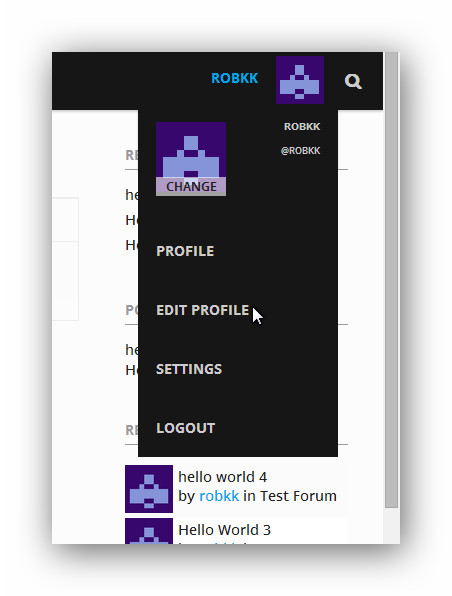
inspiration to this are
wordpress profile dropdown in the admin bar
bbpress support admin bar
https://youtube.com
Homepage
Home
http://tamrielfoundry.com/
you just cant see forums, topics, and replies in the dashboard ??
and also settings>forum??
because i can see it on the frontend.
i suggest deactivating one plugin at a time to find a plugin issue.
if that doesnt work , deactivate then reactivate bbpress.
if that doesnt work , reinstall bbpress.
I downloaded and activated the plugin but I don’t see it anywhere – nothing new under the dashboard, settings, etc.
BBpress version: 2.5.4
Wordpress version: 3.9.2
theme: Parallex by Cyberchimps.
link to site: http://dragoninquisition.com/
Hey people,
I am running WP: 3.9.2
And
bbpress: 2.5.4
The forum option on the left in my WP Admin page Dashboard is not showing up meaning i cannot create new forums or edit my current ones?
Does anybody know of anything i can do to sort out this issue?
Hello everyone,
I would like to know if and how I can assign a default role in bbpress for users who registered. I have my forums set up that people who are not registered at all cant see or access some forums, while registered users can see and access those forums. Right now I have to manually assign every new registered user to that specific group. Is there a option I can link the wordpress role of participant to a group in bbpress?
To add – Ive just installed APC and enabled object cache which has made my Vbulletin forum even quicker but hasn’t helped bbPress. Browsing is slow and posting new threads / replies even slower.
Have optimized the DB with phpMyadmin also.
Hi Luisc9,
I dont have an anwer for you as I have taken BBPress down for the moment. All I can say is, I have a coder who charges me $15 an hour to fix this kind of stuff. Got him from Elance and he is good and trustworthy. For people who aren’t all that good at fixing this type of stuff, its worth it – well for me it is anyway. Hope someone replies to you soon.
Hi,
I have finally converted a large forum over to bbPress from Vbulletin,
The bbPress forum page and threads etc are quite slow – Im just using bbPress + BuddyPress with Twenty Twelve theme at the moment while I code my forum theme.
The bbPress section of the site is slow – there is a few seconds delay when clicking a thread or onto the forum page itself so guessing this is due to the size – 850k replies, 61k topics and 21k users.
I wondered if there were any tweaks or recommendations for speeding up the site, Im on my own dedicated server and Vbulletin is blazing fast on it.
I saw this thread – http://bbpress.org/forums/topic/slow-to-post-forum-topics-and-replies-on-large-forum/ where it mentioned a speed increase in 2.6 for larger forums, any news on that ? Or anything I can try now to test it out ?
I read that hidden forums might make a difference so I unhid the forum but no speed increase.
Good night everyone!
I am new to bbpress, but not new to WordPress.
Could you please be so kind and explain clearly (for a newbie like me 🙂 ), what are the steps to fix this issue?
We have a website with wordpress and bbpress with responses whose order get’s altered… And this has direct impact in our visitors experience.
Thanks in advance for your patience.
Regards
Luis
Just to be sure, example:
Level 2 form -only level 2 member can access.
But all level members can SEE forum title
But they they tried to enter to see topics, they can NOT access buecase they have no permission.
Is this correct?
thank you so very much for your help!
Jasmin
PS. one more question, if we want to modify (side bar) is there developer that I can hire from bbpress.org? or is there particular place that I can look to find a developer?
1- You would need a ‘membership’ plugin that supports bbPress, there are a few in the WordPress plugin https://wordpress.org/plugins/
2- You can fully customize bbPress to match any theme or custom design you want, see the docs for more info. https://codex.bbpress.org/
 Anonymous User
Inactive
thank you so much Gautam it worked for me .
bbpress/includes/core/filters.php : added :
add_filter( 'bbp_get_reply_content',   'bbp_rel_nofollow'              );
add_filter( 'bbp_get_topic_content',   'bbp_rel_nofollow' 	       );
Upgrade your WordPress install from v3.5 to v3.9.2
bbPress minimum requirements are WordPress v3.6 (this will also be bumped very shortly to v3.7)
https://wordpress.org/plugins/bbpress/
bbPress does not have pingbacks enabled for it’s post types, they are explicitly disabled.
Could you be more specific and post a link to some examples and I’ll take a look.
* Is it happening on all three bbPress custom post types?
* forum, topic and reply are the tree post types and a link to one of each that this is happening with will allow me to investigate why.
* I can’t think of a plugin for bbPress that changes the ping status of the custom post types but just in case can you disable all your plugins except bbPress and create a new forum, a topic in that forum and a reply to that topic and then create a WordPress post with a link to each of the three and see if you see any pingbacks.
I’ve just tested this with bbPress 2.5.4 and Twenty Fourteen with no other active plugins:
* Created a page /123 and added the [bbp-forum-form] shortcode
* Opened that page /123
* Entered 123 as the forum title and description
* Selected forum for the forum type
* Selected open for the forum status
* Selected Public for forum visibility
* Selected root for parent forum (Root is another forum I already had setup)
* Clicked submit and the forum is created and I am redirected to create a new topic in that forum e.g. /forums/forum/root/123/
I’ve disabled pingbacks on my blog (Discussion > Disable pingbacks)… but I’m still getting pingback (trackback?) spam on my website. So far it’s all happening on forum posts. Is there a separate way to disable pingbacks on bbpress?
Hello,
I operate a WordPress Network on WordPress version 3.5
I have installed bbPress 2.5.4
When an user that is “admin” for the specific site goes to the dashboard, the forums, topics, and replies buttons in the leftcolum appear.
The forums, topics, and replies buttons in the leftcolum dashboard disappear if you double click on the top left dashboard icon unless I make the user a “Super Admin” for the entire WordPress network.
What do you suggest to fix this?
Thanks,
these 3 plugins are very effective in eliminating spambots and other spammers on wordpress/bbpress site
i use all 3 with no apparent problems, but read the notes for each plugin, all need to be properly configured and stop spammer reg can be very aggressive, stop spam reg and bad behavior will both check visitors against a blacklist of known spammers and will deny them access to reg and posting forms etc
https://wordpress.org/plugins/bad-behavior/
https://wordpress.org/plugins/stop-spammer-registrations-plugin/
https://wordpress.org/plugins/wangguard/
Hi
im trying to import my XenForo to my BBPress and im having trouble as this is coming up:
WordPress database error: [Table 'db502829828.user' doesn't exist]
SELECT convert(user.user_id USING "utf8") AS user_id,convert(user.username USING "utf8") AS username,convert(user.email USING "utf8") AS email,convert(user_profile.homepage USING "utf8") AS homepage,convert(user.register_date USING "utf8") AS register_date,convert(user.custom_title USING "utf8") AS custom_title,convert(user_profile.status USING "utf8") AS status,convert(user_profile.signature USING "utf8") AS signature,convert(user_profile.location USING "utf8") AS location,convert(user_profile.occupation USING "utf8") AS occupation,convert(user_profile.about USING "utf8") AS about FROM user AS user LEFT JOIN user_profile AS user_profile USING (user_id) LIMIT 0, 100
No users to convert
Starting Conversion
My forum link: community.gamingordinance.com
Hi,
I want to change this Link ” site_url/wp-login.php ” in the email that is sent , after registration in bbpress plugin ,
How can i do this , Please Guide me for this,
Many Thanks
John
HI Stephen,
yes i am already created forums under category and my forum structure like below and also same manner i am listing on page. but i am not able to set pagination. i am new to bbpress so please give me some suggestion.
category A
-forum A1
-forum A2
category B
-forum B1
-forum B2.
A massive copy and paste of your code is not helpful, no one wants to read a wall of code with no formatting, next time use the “code” button in the toolbar to wrap your code so it’s a little easier to read, also only post the specific parts of the code that is relevant.
Either way, I’m closing this as a duplicate of your other post as that was readable and I’ve answered it. https://bbpress.org/forums/topic/pagination-on-forum-listing-page/


