Search Results for 'bbpress'
-
AuthorSearch Results
-
November 8, 2009 at 12:37 am #32257
Topic: bbRating FF issue
in forum PluginsDoobus
MemberPosted this in the bbRating plugin section, but figured my issue would have more exposure if I posted here.
I have bbPress 1.0.2 on a test server with bbRating 0.8.5.
bb_rating() and bb_rating_dingus() work correctly on IE8 and Safari, and oddly does not work in FireFox. Firefox simply doesn’t show anything, looking at the source code it shows the same thing as IE8 and Safari, with my limited coding knowledge I’m not sure what the issue could be.
Also bb_top_topics, which I assume lists the highest rated threads doesn’t do anything on any of the browsers.
Thanks.
November 7, 2009 at 11:28 pm #81223honestscott
ParticipantHi,
I actually just found out it wasn’t a plug-in problem…but a Gmail problem.
It seems they have now decided that users do not have unlimited space like they used to offer (practically begged you not to delete your mail), and that was why I wasn’t get my post notification emails.
I use different Gmail accounts for different things on my forum, and some of my emails were coming so that confused me into believing a plug-in was screwed up maybe because of a DB problem.
I had this happen on my WP Blog before.
Anyways thanks for your response, and beware Gmail users go clean your accounts (sent mail) out regularly.
You can set Gmail to delete your mail after it’s downloaded, but you have to manually delete your sent mail folder.
They (Gmail) don’t notify you when it’s full (you just stop getting any mail), you have to log in to see the notice, and I use Thunderbird so I hardly ever log into Gmail.
What a way to start the day…friggen Google.
Case closed.
Scott
November 7, 2009 at 10:31 pm #81221In reply to: Error on the installation of BBPress.
jurasiks
ParticipantDelete all bp_ tables and remove bb-config.php, try again
November 7, 2009 at 8:23 pm #81222johnhiler
MemberWhich plugin is it? And have any other plugins or changes been made in the past four days?
November 7, 2009 at 6:16 pm #32254Topic: More than Email notification
in forum Pluginstronic2001
MemberGood evening,
I’ve just installed BBPRESS but I need to have a particular functionality I’ve not found up to now.
I’d like to allow every user to send a copy of the message to an email address chosen during the editing of the message.
The email address should be insered in a form placed below che Post form.
Could you help me to find out this kind of plugin?
Tnx!!
November 7, 2009 at 4:32 pm #32253honestscott
ParticipantHi,
Is there some way to reload an older database backup in my BBpress forum without losing new posts and new users between the the last back up and to date?
I am having problems with a plugin that suddenly stopped working and I was thinking it might be a DB problem.
I don’t want to lose 4 days worth of posts and new user registrations by reloading an older DB back up.
Can I just not drop certain tables and save that information while updating everything else?
If so, could someone explain how to do that to preserve this information?
I am using BBpress version 1.0.2
Thanks!
Scott
November 7, 2009 at 1:45 pm #81205In reply to: Help with css layout
chrishajer
ParticipantIn Safari and Chrome on Windows XP it looks like this with the whole table pushed over, in line with the heading.
http://chrishajer.com/bbpress/sset-chrome.png
In IE8 and FF3.5, it looks like mdolf’s screenshot.
I think that might help someone figure out why it’s all aligned like that. It didn’t make sense to me for just the heading to be over there and the table look fine.
November 7, 2009 at 11:12 am #81194In reply to: Question about Integration
buddha-trance
Member@ fifthhouse – Yes, chrishajer and I were talking about the same file! Great that you got that to work.
Regarding integration, yes, by “normal” I mean just sharing the users tables in the database and cookies. Deep integration loads WP into bbPress. It is better explained here, under “Functions” https://bbpress.org/documentation/integration-with-wordpress/
The plugin seems to work even if there is no integration, though. From the description page:
“Even if your bbpress is not integrated with your wordpress. U still can use this plugin with a little change on the option page.”
November 7, 2009 at 10:21 am #80683In reply to: Godaddy installation issues
DarkriftX
Memberjeffreyw4, I have installed bbpress on a couple of godaddy hosting accounts and might be able to help you out. I am off work tomorrow but doing it on here will be a major pain in the rear. If you know how to use irc you can find me on freenode.net (msg me, same nickname on there) or email me jadams2259 (atgmaildotcom) and when I get up/get a chance I will walk you through it.
November 7, 2009 at 6:38 am #81219In reply to: Error on the installation of BBPress.
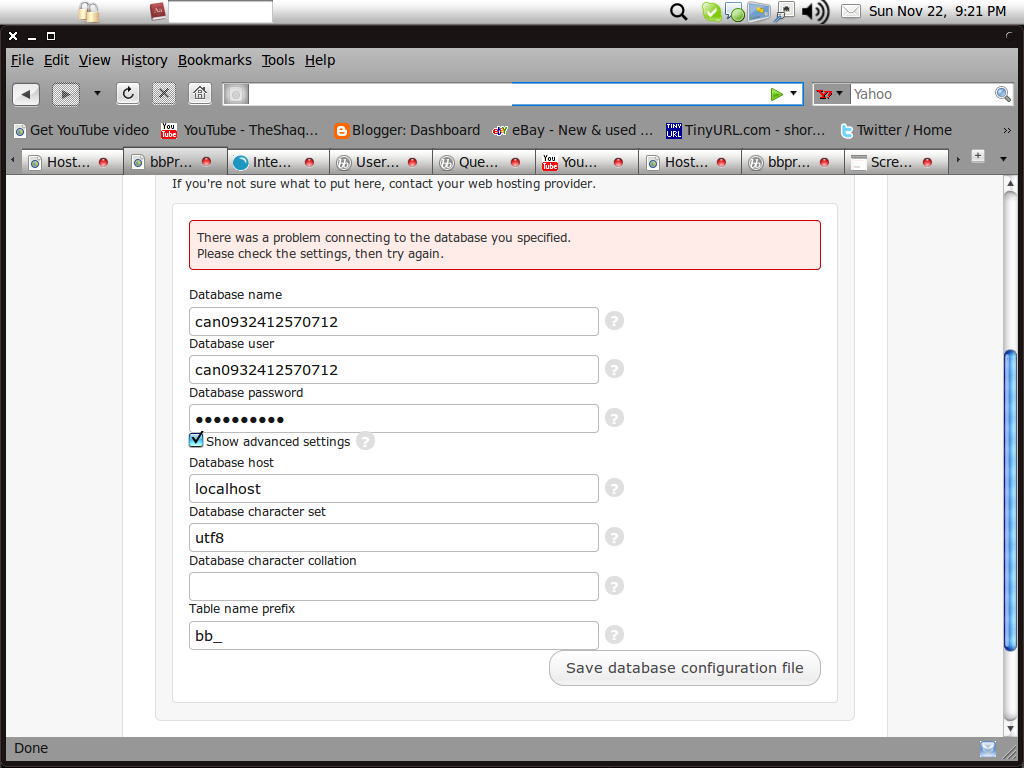
jackie911hk
Memberbb-config.php.
<?php
/**
* The base configurations of bbPress.
*
* This file has the following configurations: MySQL settings, Table Prefix,
* Secret Keys and bbPress Language. You can get the MySQL settings from your
* web host.
*
* This file is used by the installer during installation.
*
* @package bbPress
*/
// ** MySQL settings – You can get this info from your web host ** //
/** The name of the database for bbPress */
define( ‘BBDB_NAME’, ‘blah’ );
/** MySQL database username */
define( ‘BBDB_USER’, ‘blah’ );
/** MySQL database password */
define( ‘BBDB_PASSWORD’, ‘blah’ );
/** MySQL hostname */
define( ‘BBDB_HOST’, ‘localhost’ );
/** Database Charset to use in creating database tables. */
define( ‘BBDB_CHARSET’, ‘utf8’ );
/** The Database Collate type. Don’t change this if in doubt. */
define( ‘BBDB_COLLATE’, ” );
/**#@+
* Authentication Unique Keys.
*
* Change these to different unique phrases!
* You can generate these using the {@link https://api.wordpress.org/secret-key/1.1/bbpress/ WordPress.org secret-key service}
*
* @since 1.0
*/
define( ‘BB_AUTH_KEY’, ‘put your unique phrase here’ );
define( ‘BB_SECURE_AUTH_KEY’, ‘put your unique phrase here’ );
define( ‘BB_LOGGED_IN_KEY’, ‘put your unique phrase here’ );
define( ‘BB_NONCE_KEY’, ‘put your unique phrase here’ );
/**#@-*/
/**
* bbPress Database Table prefix.
*
* You can have multiple installations in one database if you give each a unique
* prefix. Only numbers, letters, and underscores please!
*/
$bb_table_prefix = ‘bb_’;
/**
* bbPress Localized Language, defaults to English.
*
* Change this to localize bbPress. A corresponding MO file for the chosen
* language must be installed to a directory called “my-languages” in the root
* directory of bbPress. For example, install de.mo to “my-languages” and set
* BB_LANG to ‘de’ to enable German language support.
*/
define( ‘BB_LANG’, ” );
?>
mySQL
http://www.jackie.net/mySQL-1.jpg
http://www.jackie.net/mySQL-2.jpg
Thanks.
November 7, 2009 at 5:13 am #80678In reply to: Godaddy installation issues
chrishajer
ParticipantNo, it’s a function of the operating system of the web server and the files. In your FTP program it should be available with a right click on the file, or maybe it’s a column that is displayed by the date and filesize.
It should look like this:
0644orrw-r--r--, on the same line in your FTP program as your bb-config.php. Here’s a sample screenshot of what I’m talking about.http://www.chrishajer.com/bbpress/permissions.png
They’re called “rights” in this program.
Basically, bbPress needs to be able to read the file.
November 7, 2009 at 4:57 am #80674In reply to: Godaddy installation issues
chrishajer
ParticipantYes, but only if you want your site at http://www.example.com/bbpress – if you want it at http://www.example.com, then just take everything from inside the bbpress folder on your desktop, and upload those files (and sub-folders) no bbpress folder to hold everything. Then, access http://www.example.com and your bbPress installer should come up, assuming index.php is one of the files the web server looks for the server (normally it is, so you should be OK there.)
November 7, 2009 at 4:55 am #80673In reply to: Godaddy installation issues
jeffreyw4
Member1.Yes, it is called bb-config.php
2. No, I’m not 100% positive I moved everything. 95% positive. But frustration was creeping in so an error was certainly possible.
I’ll probably try reupping everything after a thorough deletion on the server.
But before doing so I want to be sure I understand:
Upload the unzipped folder as is, then access the installer by going to http://www.example.com/bbpress
Correct?
November 7, 2009 at 4:53 am #61983In reply to: how to disable registration ?
chrishajer
ParticipantHow about just sending all request for the bbPress registration over to WordPress:
https://bbpress.org/forums/topic/wordpress-bbpress-register-plusgtgtgtgt#post-18352
November 7, 2009 at 4:48 am #80672In reply to: Godaddy installation issues
chrishajer
ParticipantI doubt that. Right now, bbPress gets so far as making sure there is a bb_table_prefix and fails because it cannot see that. It hasn’t gotten so far as doing anything with the database since it has no table prefix to work with.
How about the permissions on the bb-config.php file. Should be 0644, readable by all, writable by owner only, executable by no one. 0644 is safe for all the php files in bbPress.
Do you know what PHP version and MySQL version you’re using?
November 7, 2009 at 4:42 am #80670In reply to: Godaddy installation issues
chrishajer
ParticipantThe bb-config-sample.php won’t be a problem. bbPress uses that when there is no bb-config.php as a template to create a bb-config.php for you. I’ve always edited the sample by hand and just renamed it. In either case, gone or not is fine.
November 7, 2009 at 4:41 am #80669In reply to: Godaddy installation issues
chrishajer
ParticipantReceived the config file. I am guessing that is is actually named bb-config.php. It appears to be correct to me. I’m not certain what is causing your error.
The only time that error should show up is when that variable is not defined. Here’s the code that checks for bb_table_prefix being set:
// Die if there is no database table prefix
if ( !$bb_table_prefix ) {
die( 'You must specify a table prefix in your <code>bb-config.php</code> file.' );
}So, for some reason it’s not set or not recognized as being set. Are you certain when you moved the files out of the folder that you moved everything? Since you haven’t installed yet, can you save a copy of your bb-config.php, in case you need it, then just upload everything from the bbpress folder that is unzipped from the download onto the html root of your server (probably right where it is now.)
November 7, 2009 at 4:23 am #80664In reply to: Godaddy installation issues
chrishajer
ParticipantSounds like it can connect fine. But it sounds like the variable name is wrong or something. bbPress doesn’t care what your table prefix is, just that you have one.
Can you email me your bb-config.php and I will look at it first hand? Please don’t edit it first since you might destroy some evidence or something important that was edited. You’ll just have to trust me. I’m not going to do anything evil with your config.
If you don’t want to do that, find someone local who can look at this and see what’s up. It’s probably going to be something very simple that another set of eyes will see.
chrishajer [at] gmail.com
November 7, 2009 at 4:00 am #80659In reply to: Godaddy installation issues
jeffreyw4
MemberYes, bbPress (or other message board software) will be the basis of the site.
November 7, 2009 at 3:54 am #80658In reply to: Godaddy installation issues
jeffreyw4
MemberI admit I read instructions very literally. The instructions say:
# Visit the intended URL of the bbPress site
# You will be greeted with the bbPress installer
If the instructions had said: visit http://www.example.com/bbPress/ then I would have done so. I don’t know, perhaps this is what “Visit the intended URL of the bbPress site” means. This is difficult to decipher since, having never used bbPress before, I don’t know precisely what the final (“intended?”) URL will be. I assumed it would just be the URL of the website.
So should I uninstall, reupload with containing folder intact, and access with “http://www. example.com/bbPress/”
November 7, 2009 at 3:41 am #81191In reply to: Question about Integration
chrishajer
Participantbuddha trance explained it pretty clearly, for adding the links to your header.php:
https://bbpress.org/forums/topic/question-about-integration#post-60365
Did that not work for you?
November 7, 2009 at 3:40 am #80657In reply to: Godaddy installation issues
chrishajer
ParticipantThe only reason you might want to not have the files in a folder of some sort is if bbPress if going to be the basis of the site, the only thing accessible. Otherwise, you want bbPress files in a folder, called bbpress, or forum, or forums, or discussion, or community, or something else.
November 7, 2009 at 3:38 am #80656In reply to: Godaddy installation issues
chrishajer
ParticipantIf you uploaded the files in the folder that was called “bbpress” by default, and it was in your website html root, then it would be accessible at http://www.example.com/bbpress/ and your site, if you have a site, will be at http://www.example.com. Was that not your experience?
November 7, 2009 at 3:34 am #80655In reply to: Godaddy installation issues
jeffreyw4
MemberThanks for your reply.
Well, as I said, I originally uploaded it with the containing folder included. So the server didn’t “see” any of the files. It just read the default page which is a “this site is coming soon” html file.
Once I uploaded without the containing folder the server saw the files and a screen querying for database info appeared.
I’m not sure what you mean by “the” file structure. There isn’t much on the server before the bbPress files are uploaded. I left only the bare bones before uploading bbPress to avoid confusion.
J
November 7, 2009 at 3:24 am #81189In reply to: Question about Integration
chrishajer
ParticipantHeh, completely misread that one. It’s even easier to put a link to the WordPress site in your bbPress header. Just modify the template file to put the link where you want it.
-
AuthorSearch Results