Search Results for '\"wordpress\"'
-
AuthorSearch Results
-
July 30, 2014 at 9:41 pm #149967
Topic: Locked up and lost the keys . . .
in forum TroubleshootingK-Path
ParticipantWordPress 3.9.1 running a slightly modified Twenty Ten
The EcoPsi Journal & Forums
http://ecopsi.org/journal/I was up working at around 4am and saw a checkbox for locking the site down and now I can’t remember where that was. I don’t actually even remember if it was even in bbPress although I don’t remember WordPress having that feature but that may be because I’ve never thought of looking for that feature. Anyway, I would appreciate it if someone could tell me the most likely place to open my blog and form to the public. Right now you can only see the landing page and have to register if you want to see more of the site.
July 30, 2014 at 8:47 pm #149965In reply to: Forums index vs custom page shorturl
kopperwoman
ParticipantI’m having a similar problem to dustinarmstrong. But its not exactly the same.
I’m trying to fix a broken forum set up for a client. I did not do the forum installation (he did it himself) AND the forum is installed on a live site that gets lots of web traffic so I don’t want to do anything that might impact the website overall.
Here’s my situation:
1) BBPress was installed (I don’t have details about when and how),
2) a page was created with the[bbp-forum-index]shortcode on it
3) the forum didn’t work, so my client contacted me to fix it
4) I went into settings > forums and changed the forum root slug from the default “forum” to “travel-forums” (the name of the page where the shortcode lives. The error message “Possible bbPress conflict: Forum slug” showed up next to the slug field after saving the settings.
5) I also changed the single forum slug from the default “forum” to “travel-forums”. The error message “Possible bbPress conflict: Forums base” showed up next to the slug field after saving.In my case, the forum page DOES show up at http://foobar.com/travel-forums but it is empty except for the welcome text that I had entered into the forum main window. (So it just says “Welcome to our forum” without any of the discussion topics showing up.
Also, I have the “Recent Topics” widget enabled on my sidebar and my three test discussion topics DO show up there. When I click on any of them they take me to the correct URL but the pages are blank. So, for example, when I click on “test topic” in the widget I land on http://foobar.com/travel-forums/topic/test-topic/ and the page displays the topic header “Test topic” and the topic question “what do you think about travel?” but it doesn’t display any of the posts.
I’m not sure if this behavior is related to the slug conflict error messages or if something else is wrong.
I’m trying to follow the advice that Stephen Edgar gave.
First up, I think this is probably true in my case:
most likely you have something else either titled or using the slug discuss and this includes any items in trash as even though they are in the trash they still reserve that slug and it is not released until the item is removed from the trash.
This is probably a stupid question but How do I empty the trash to make sure that the old slug is removed?
Second, I’d like to try this:
To fix this try resetting your permalinks. In your WordPress Administration Screens navigate to Settings > Permalinks, select a different permalink structure and save. Then select your preferred permalink structure and save again.
but since my website is live and has been for a long time (and has lots of blog posts using the custom structure already) I’m concerned that this could permanently break the existing links. Any thoughts on this?
July 30, 2014 at 8:32 pm #149963Stephen Edgar
KeymasterThere are the two cases:
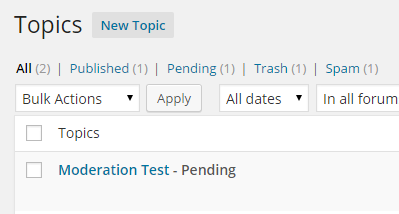
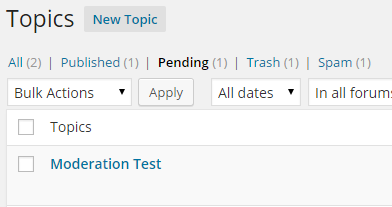
1. If you enter a ‘moderated keyboard’ that is included in the ‘Comment Moderation’ section of WordPress’ Discussion settings then the topic or reply will be marked as pending (See screenshots below). Currently no notification template is displayed that will notify the user that there topic or reply is waiting in the moderation queue, this will be fixed in bbPress 2.6
2. If you enter a ‘moderated keyboard’ that is included in the ‘Comment Blacklist’ the topic or reply will NOT be created and a generic message is displayed “Your topic cannot be created at this time.”
 July 30, 2014 at 8:09 pm #149962
In reply to: Import to bbPress from custom forum
KeymasterAwesome…
(The
———–issue is typically login credentials expiring in WordPress between WordPress and MySQL)July 30, 2014 at 7:33 pm #149961In reply to: Forum subscriptions
rzelnik
Participant@wplove3268, I know that this is out of scope of the bbPress project, but IMHO the sender address should be configurable within the WordPress core. The current impossibility to change the sender address doesn’t make sense to me.
Anyway, maybe this article will help you:
Changing the wp_mail from address in WordPress without a plugin
http://www.butlerblog.com/2011/07/08/changing-the-wp_mail-from-address-in-wordpress-without-a-plugin/July 30, 2014 at 12:26 pm #149942In reply to: Importing favorites from bbPress 1.x
Doug Smith
ParticipantThanks, Stephen. I was just about to update this conversation with the same thing now that I’ve had a chance to look through the code.
I talked with @jjj about this at WordCamp Milwaukee and he suggested creating a Trac ticket for it, which I have done. https://bbpress.trac.wordpress.org/ticket/2668
July 30, 2014 at 9:37 am #149934In reply to: Forum subscriptions
ParticipantSo I tried a different e-mail configuration plugin: WP SMTP. The forum post notification emails are now delivered well. It’s strange that in the e-mail header there is the right sender address, while in the captured log there is still the default wordpress noreply@domain address, see here:
https://dl.dropboxusercontent.com/u/9349232/bbpress-email-testing/wp-mail-log-wp-smtp-forum-post.txt
Anyway, it is working well for me now.
July 30, 2014 at 8:45 am #149929KeymasterThe topic or reply you will only see via WordPress’ topic or reply admin sections, you’ll see them with a status of ‘pending’, you won’t see them in any form of moderation queue in the front end.
July 30, 2014 at 7:20 am #149927In reply to: Show enhanced info in user's profile
KeymasterYou can also use WordPress’ custom profile fields:
https://codex.wordpress.org/Plugin_API/Filter_Reference/user_contactmethods
And an example plugin here using the above method:
July 30, 2014 at 6:51 am #149918KeymasterMuch of what happens when the ‘moderation’ is triggered from comment moderation has not been added to bbPress until the code I’ve added recently.
If your comfortable with PHP you could take a look at what I have thus far in the following tickets:
This first one handles post of what is coming for moderation:
https://bbpress.trac.wordpress.org/ticket/2645This second one is for the template to notify the user that there topic/reply is pending moderation, I haven’t started on this due to needing to implement everything in the above #2645 first, now that I got most of the code finished for that yesterday I plan on looking at this in the next few days.
https://bbpress.trac.wordpress.org/ticket/2589
Keep an eye on those tickets and that should give some hints of what is happening.
July 30, 2014 at 6:44 am #149917In reply to: Forum slug troubleshooting
KeymasterYou cannot have both the ‘forum root’ and ‘forum slug’ the same as you have seen in that you get a ‘slug conflict’ warning, I’d suggest you leave the ‘forum root’ slug as
travel-forumsbut change yourforum slugback toforum.To check the ‘trash’ visit your ‘posts’, ‘pages’, and ‘forums’ sections in WordPress and you should see if you have any posts, pages, or forums in the ‘trash’ (or bin if your using English UK WordPress language packs).
Have a look at those and let me know how it goes.
July 30, 2014 at 6:38 am #149915In reply to: Forum subscriptions
KeymasterEmails previous to bbPress 2.5.4 were sent out out to each recipient email individually (one email per user), since bbPress 2.5.4 we now only send a single email with all the recipients as BCC (Blind Carbon Copy) and all emails are sent using as you state a default email address of
noreply@domain.tld.bbPress also works fine to send emails with many of the WordPress mail plugins and should work as we are using WordPress’
wpmailfunction to send them.July 30, 2014 at 6:28 am #149911In reply to: bbPress Codex
KeymasterAs to the details of a project for what UI/UX changes are install for bbPress we will continue to flesh these out and post something when we think we have both the goals of these projects and resource and requirements to help contribute ready to go at the same time.
Much of all this is core to the feedback we received from the survey and just a bit more time for us to get our ducks in a row is in order to get these up and running, but they are important to get up and running 🙂
I haven’t looked at HipChat except for a quick glance now and maybe this is something WordPress may look at in the future.
It’s been a while since one of ‘these’ conversations has occurred here on bbPress.org so it’s been fun and I do look forward to hoping we can find an area that you’d be willing to donate some of your time to help out the project. 🙂
July 30, 2014 at 5:46 am #149904In reply to: My impressions so far
KeymasterThat ‘warning system’ will remain plugin territory for a while even though I have a specific use case that this is important for it, it will still remain that way for a while, just because the functionality CAN be performed does not explicitly mean that it should be included with bbPress core.
As I mentioned above ‘Featured Plugins’ will most likely evolve to become a more refined list and the power and flexibility of bbPress allows us to do this without forcing/giving every user the ‘kitchen sink’ just because we can.
“bbPress is forum software, made the WordPress way.” and just like WordPress’ philosophy we are making “Decisions, Not Options”. And for example this decision extends to user profile custom fields, if you want these for post authors in WordPress, you look to a custom function or plugin, bbPress is the same, a custom function or a plugin.
bbPress utilizes WordPress Template Hierarchy to allow sites, theme authors and plugin developers to make amazing forum sites powered by bbPress and simply creating a set of pages that work with all the themes out there is not a one size fits all, some themes use tables, some divs, some unordered lists, responsive, non responsive, the combinations are endless and as said we try our best to ensure template compatability but removing the flexability just to limit designers and developers to no longer have these options available to them is something I doubt we will change for quite a while. We would like to include an additional set of default templates in bbPress, but that’s another project we just have not got to yet, bbPress already fully supports numerous templates though currently it only ships with one set.
I come from a phpBB background and have spend many weeks in ‘other’ forums databases whilst supporting the ~25 importers included with bbPress, the current way the WordPress database schema is structured is partially a limitation on what options we have available to us and still keep bbPress light and compact without adding new tables to the database.
July 30, 2014 at 5:33 am #149903In reply to: bbPress Codex
Jimi Wikman
Participant@robin-w I will happily assist with graphic design, UX and frontend code when time permits. Not sure what you need though, but I could start with making some design suggestion for BBPress itself and something about the documentation to make it more accessible?
I also have some suggestions for the website itself if that would be of interest, but I need to understand more about the BG’s you have first and also familiarize myself better with both the websites structure and the WordPress “way” before I want to attempt that. No need to make a flashy design if it does not improve anything or goes against the standard process. Worse yet if it does not focus on your business goals and make a mess of things 🙂
@netweb I look forward to your arrival on Github. I think it’s a nice move 🙂I am all for communication between developers, in fact I would say its a requirement for managing a development project like this with developers all over the world. I would not use IRC though, I would use something like HipChat (especially integrated in Jira and confluence so I get SVN information, ticket escalation and new documentation notices among other things). HipChat is free and it’s extendable with WordPress, Twitter, Github and more.
July 30, 2014 at 4:36 am #149898In reply to: bbPress Codex
ParticipantOf what I have seen BBPress is a tight ship when it comes to code quality and extensibility, so I have no doubt that the code is outstanding in every way. That is also one of the reasons I think it’s a shame not more people are using BBPress.
I understand the reasons behind using Trac and trust me I have been in the same situation many times 🙂 I do think it’s important not to accept a standard because its a standard, especially not one that could be improved upon. I know that it’s difficult to push for a change in WordPress, but if the tools don’t improve the workflow and encourage participation, then it should be replaced in my opinion.
Still, it’s not my call but I know some very skilled people that are discouraged from helping out with WordPress because of the lacking tools and the feeling of being back on early 2000 when they see meetings taking place on IRC 🙂
July 30, 2014 at 4:21 am #149896Topic: Profanity filter or notification with Comment Moderation
in forum Installationttmt
ParticipantHi all
Can anyone recommend a profanity filter plugin for bbPress.
I DON’T want to moderated every post
I was thinking if the post contained a profanity (pre determined in a list for example)
then the post would be held for moderation or the word would just be removed and the post posted.The wordpress built in Comment Moderation would be fine but there is no message when I word is used and the post isn’t posted.
How does a user know the post is being moderated if there is no message.
July 30, 2014 at 4:20 am #149895In reply to: bbPress Codex
KeymasterBreadcrumbs are now implemented in the docs, both breadcrumbs and in page navigation, this will be added to all the docs as each is updated 😉
e.g. https://codex.bbpress.org/participate-and-contribute/
From a technical perspective bbPress is highly admired and often receives kudo’s for the actual code documentation so we are part way there. 🙂
I haven’t used many systems but Trac did indeed take a while to wrap my head around.
One of the benefits of being a ‘sister project’ of WordPress is we follow and adhere to many of the same principles as WordPress in both code and the tools we use so much of what is listed in the WordPress Core handbook is identical to bbPress so resources such as there handbook are also relevant to bbPress, we just need to link and/or copy/paste this content for our own purposes.
https://make.wordpress.org/core/handbook/July 30, 2014 at 3:40 am #149893In reply to: My impressions so far
KeymasterThere’s some nice feedback up there, thanks 🙂
.WYSIWYG for input field. I know there is a plugin for it, but it should be in core and you should have the option to turn on and off in admin.
With the new TinyMCE added in WordPress 3.9 and further improvements coming in WordPress 4.0 I am keeping an eye on this and due to several incompatibilities we had when we previously had this as a bbPress option there is a bit of work to be done here to not make it a crappy experience if we do add it back as a bbPress option.
.Organisation for forums. Forum grouping has been a standard since 1999.
Yes 😉
.Topic and forum indicators for new topics. Finding new topics should be at a glance.
There are a couple of plugins that do this, you can see the list here https://codex.bbpress.org/feature-plugins-tracking/. One of the issues with this feature is for larger sites is WordPress’ database performance and is one of the reasons we haven’t gone down this road yet, once a plugin can do this without crippling larger sites we would definately take a closer look.
.Moderation should be available for all forums individually and on a board basis.
This will be in bbPress 2.6 https://bbpress.trac.wordpress.org/ticket/459
.Permission masks per usergroup to control who can read, reply and post in different forums.
Once the previous ‘Forum Moderation’ is shipped as part of bbPress 2.6 we can look to extend that functionality further to encompass this.
.Content approval for new posts and to take individual posts offline for review.
This is also coming in bbPress 2.6, see https://bbpress.trac.wordpress.org/ticket/2645
.Warning system for handling member mayhem.
Not sure what this would entail, I get what your saying, I suppose the current way to do things is block/ban the user though you are suggesting there should be a way to handle/have some way/form of communicating with said user. (See private messages below)
.Report center where moderators and admins can handle reported threads/posts/members.
This is mostly also handled as part of https://bbpress.trac.wordpress.org/ticket/2645
.Private messages should not require Buddypress. It should be in BBPress.
I’m not 100% sold on this idea that bbPress should include this, with that said though, as per above a way to ‘communicate’ in some form either with the moderators (or in this use case other users) I have an idea for this, how exactly it would implemented I’m not sure of just yet but the idea is there, just need to get some time to give it a try and see what happens 😉
.Custom Profile Fields should not requires Buddypress…
Custom profile fields do not require BuddyPress, bbPress 100% fully supports custom profile fields as part of WordPress ‘Custom Profile Fields’.
https://codex.wordpress.org/Plugin_API/Filter_Reference/user_contactmethods
https://gist.github.com/ntwb/c70caf5a0aa9d3062a6d.Notifications should not require Buddypress…
I think I am with you here…
.Buttons to take actions at the top of the thread and post is also standard since 2003.
The following ticket covers half of this, firstly for accessibility issue, most likely this will extend to include links.
.Out of the box functionality so there is no need to create additional pages like bbpress.php to actually make things look the way you are.
This is near impossible, with the ~2,000+ themes in WordPress’ theme repo we cannot support this many themes yet alone when we start counting the number of commercial themes available. We do our best to have template compatibility with as many themes as we can and think we work ‘out of the box’ on more themes than we don’t.
July 30, 2014 at 3:12 am #149891In reply to: My impressions so far
ParticipantIt’s the same issue with all forum software, and blogging software for that matter.
In my experience most people do not want a minimalistic forum and that is why you will find thousands upon thousands of people asking which forum can integrate with WordPress. Check any forum and you will find hundreds of people looking for ways to integrate that forum software into their wordpress.
The ones that use BBPress are the ones that are content with what comes out of the box and I would say we are a very large minority!
With the decline in forum usage in the last 5-10 years I would say that functionality is what makes forums stay alive. If you look at IPB and VBulletin they are still the most used forum software despite the fact that they cost money.
The reason for that is the features that can satisfy every need a user could possibly have. Its constantly being developed and has many large modifications from a core group of dedicated developers.
I think that with some modifications to the core so that the basic functionality can easily be added, perhaps by adding a plugin storage with key plugins that can be added or removed as the user need it. I don’t think regular users will spend time looking for a BBPress plugin to give new post indicators and go through the hassle of installing Buddypress for more functionality. Instead I believe in the setup that Buddypress have with core modules you can turn on or off as you need them.
I DO believe that BBPress have a great potential to be one of the largest and most used forum software in the world. It has a great integration with WordPress. It has lots of features and a strong community of plugin developers. And it’s very fast.
I just think it need a lower learning curve and a more approachable attitude 🙂
July 30, 2014 at 2:58 am #149890In reply to: My impressions so far
Robin W
ModeratorJimi,
Nice to have you aboard, and I hope that you’ll help in improving bbpress. More UX help is welcome.
I think bbpress users split into two groups.
1. The users that just want a simple forum as part of their web.
Those that visit the support forum usually only need a couple of changes. this is the vast majority of bbPress users
Biggest issues for these are
getting it working with their theme – usually because the theme has a highly complex page.php, and these users are not code savvy, and many don’t know FTP
registration and logging on – really a wordpress issue, but it’s the first time they come across needing to do this, as before they were the only user
Adding simple features – since each one varies these can only ever be bespoke, and again since these people are not code savvy you need to show them child themes and functions files first2. Users who typically want bbpress to look like someone else’s feature rich forum
They want all the features, look and functionality of another bb, but on wordpress. Some then complain on the forum that they don’t like the software, and why doesn’t it look exactly like xx, which is much better, much easier and has better documentation. Which kinda grates, and surely it would be better to complain to xx’s forum as to why they don’t make a version of their fantastic software to work on wordpress, rather than complain that bbpress’s software doesn’t look like theirs. This to me is a bit like complaining to Ford that their cars don’t look like Nissan.
The issue here is that bbpress is just a plugin, written by some guys to do forumy stuff. Like all software it could be better, the docs can always be better, but the philosophy of the somewhere is to keep it light.
So I s’pose the challenge is to help improve it so that it can work for both camps. So I really do hope you stay and add expertise, maybe go into the codex and improve the documentation – anyone can, but most don’t !
July 30, 2014 at 2:54 am #149887In reply to: bbPress Codex
KeymasterI agree with and echo Robin’s sentiments above.
The plan is to update, including breaking up many of the current docs to separate sections based more along the lines of a “Table of Contents” similar to how BuddyPress have done in recent months.
You can see BuddyPress’ planned “Table of Contents” linked from https://codex.buddypress.org/ on Google Docs here.
So the plan will be for bbPress to go down a similar road as BuddyPress and WordPress with their upcoming handbooks (e.g. plugins, themes).
Again this is all a time thing and as always, contributions are always most welcome 🙂
July 29, 2014 at 7:14 pm #149875In reply to: Show enhanced info in user's profile
Robkk
Moderatori know this is possible there is some function to display usermeta
webpage: there is a website field in contact details in bbpress profile , that i think it gets that from wordpress profile information and just displays it frontend.
about me: there is Biographical Info under About Yourself so its possible to call it using a display usermeta function i think.
send me an email: you can make a link with php inside of it so it would end up with mailto:(user-email), i dont know for sure if thats a safe way to do it though.
and you just put all that code and display on the frontend where the forum role and user stats are.
July 29, 2014 at 6:22 pm #149873In reply to: User functions.
Moderatoruse a certain plugin that sends notifications to certain user roles, like moderators
July 29, 2014 at 1:28 pm #149862In reply to: Forum subscriptions
ParticipantUpdate to my previous post: I have tried to debug the wp_mail input via WP Mail Log plugin. It seems that the bbPress doesn’t respect the e-mail settings. I have set outgoing (from) email address via WP-Mail-SMTP plugin. The rest of the WordPress email functions respect this setting, but the forum/topic notifications send the mails with default outgoing/from address (<noreply@domain.tld>). In addition, the recipient/to address of the sent emails is also noreply@domain.tld, despite the fact, that the recipients have their own email addresses set in their user profiles.
-
AuthorSearch Results

