Search Results for '\"wordpress\"'
-
Search Results
-
I am using the standard forum index template for the front page of my forum.
This template only shows the latest post day / time for each of the group of sub forums. What I want is to show the latest post post day / time for each of the sub-forums not just against the top level one. (see screenshot
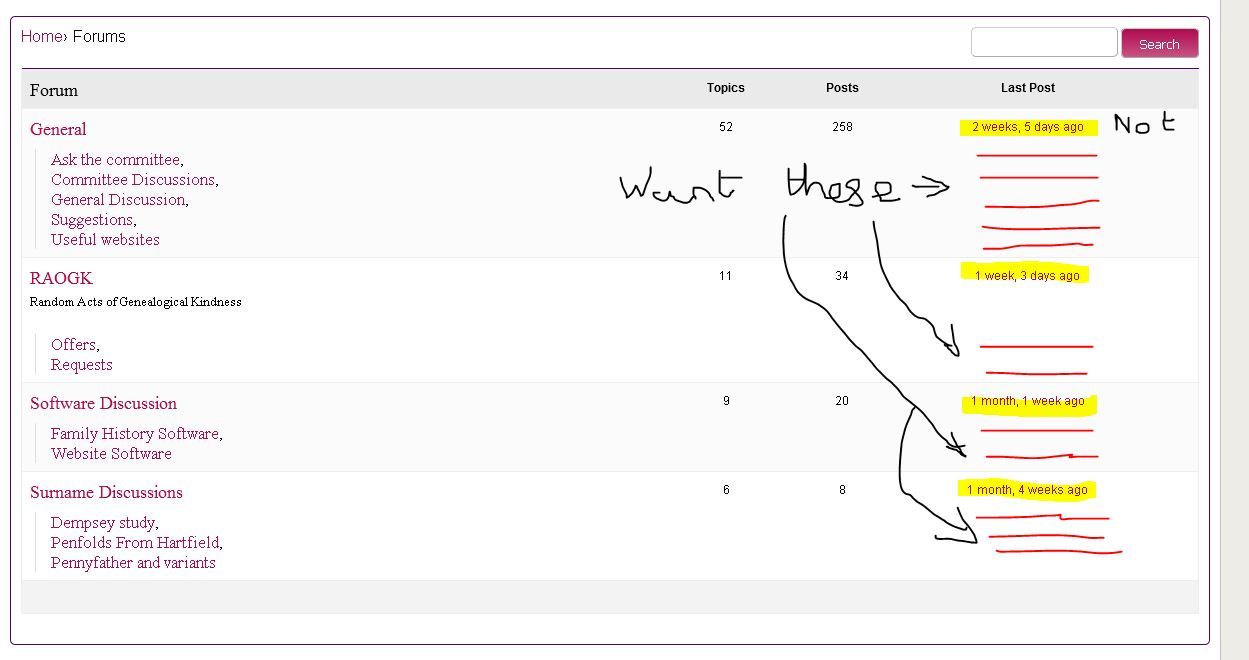 )
)
How do I do this?Wordpress v4.4.1, bbPress 2.5.4
WordPress 4.1.1
Buddypress Version 2.2.1
bbpress Version 2.5.4the author under the Freshness column isn’t displaying the author of the most recent reply/activity.
any guidance or other tickets like this?
Hi,
I am using a WordPress child theme, Flatsome. I simply want to adjust minor things like button text sizes, different colored bars, text, etc.In Google Chrome, I am able to inspect a element and change it’s style in the inspector window, but where do I paste the modified css code? The modified code does not work in the child theme’s Appearance/Edit window when it is pasted there.
I also tried to copy (not move) the bbpress.css file into the Parent theme’s css folder, but the code still does not work. I also tried to place the bbpress.css in the Child theme.
My questions are:
1. Where do I place the bbpress.css file? In the Parent theme or Child Theme? What folder?
2. Where do I paste the modified css code within the BBpress.css file? Anywhere?Below is code that I adjusted to suit my needs. It is code for a “submit” button on the Forum page of BBpress in my theme:
.userwall_delete_post >button:hover, input[type=”submit”], input[type=”button”], input[type=”reset”] {
-webkit-border-radius: 0px 0px 0px 7px;
-moz-border-radius: 0px 0px 0px 7px;
border-radius: 3px 3px 3px 3px !important;
font-family: Arial;
font-size: 12px !important;
padding: 10px !important;
text-decoration: none;
}Thanks for any help!
Best,
JohnSomeday, somebody is going to get this 2x retina thing figured out so that it’s automatic across WordPress. Until that day, we have to do it ourselves.
The general approach is to serve a double-sized image to the browser. So, if you want an 80px avatar in your topic replies (the standard size), you need to serve up a 160px avatar in order for it to look sharp on a retina screen (i.e. iPad, Android tablet, retina MacBook Pro, or one of those delicious new 5K iMacs). And as Joe Jackson says, “You gotta look sharp!”
So, how is this accomplished? Well, in the template.php file of bbPress, there is a function called bbp_get_reply_author_link(). This is the function that gets the avatar, and it comes with the following arguments:
	function bbp_get_reply_author_link( $args = '' ) {

		// Parse arguments against default values
		$r = bbp_parse_args( $args, array(
			'post_id'    => 0,
			'link_title' => '',
			'type'       => 'both',
			'size'       => 80,
			'sep'        => ' ',
			'show_role'  => false
		), 'get_reply_author_link' );
The argument we want to change is the ‘size’ argument. As you see, the default setting is 80. We want it to be 160. We can change it by changing a single line in the loop-single-reply.php file, which you can locate in wp-content/plugins/bbpress/templates/default/bbpress/. In the stock theme, the line reads:
<?php bbp_reply_author_link( array( 'sep' => '<br />', 'show_role' => true ) ); ?>We want to change it to:
<?php bbp_reply_author_link( array( 'size' => 160, 'sep' => '<br />', 'show_role' => true ) ); ?>And that’s all there is to it. As long as your CSS specifies a width of 80 (or whatever you prefer), you won’t see any change in the size of the avatar in your browser, it will just look sharper on retina screens. You won’t notice any difference on standard resolution screens and, unfortunately, there is a price to be paid in the size of the image that is served to those screens. Ideally, WordPress/bbPress would know what resolution screen it is serving to and set the image size on the fly. There are some plugins that do this for site images — Jordy Meow’s WP Retina 2x is a good one — but they don’t work for avatars yet. See this support topic for more discussion.
There’s just one more thing you’ll want to do. If you haven’t already done so, create a directory in your theme folder titled “bbpress”. Then make a copy of the file you just changed and place it in this directory. This file will override any file with the same name in the bbPress plugin directory. So, when you next update the bbPress plugin, you’ll retain the functionality you just created, because even though the plugin files are all replaced by the new version, the file in your theme directory will still be there.
I hope this helps everyone look sharp!
Just curious if someone could help me here..
I would like to use bbPress but not mainly as forum/support software, what I like to do is use the Forums function as categories to create structure and navigation on my site and the Topics functions as kinda ‘posts’ – the Replies function will not be used. I will remove that part from the template files.
The main reason why I want to use bbPress for my site is the Subscribe and Favorite functions.
Default members of the site can subscribe and favorite topics ‘posts’ and receive email notifications when they change content. That’s the most important feature I would like to use out of bbPress everything else I will customize to my liking.The only thing that worries me is the performance of bbPress.
What if my site holds 15.000 members, 25.000 topcis ‘posts’ and let’s say 5.000 members subscribe to a single topic-ID. How will WordPress/bbPress handle the outgoing emails to 5.000 people will this increase the performance a lot?Thanks,


