Search Results for '\"wordpress\"'
-
AuthorSearch Results
-
August 15, 2015 at 10:50 am #165416
In reply to: widgets only on forum index / forum pages
gptxffa
ParticipantOk so I found and installed this https://wordpress.org/plugins/custom-sidebars/ and it seems to work on all the forum pages except for the index?
I figured i’d ask about in here because maybe someone already knows or its something particular to the index page?
Thanks Preston
August 15, 2015 at 10:18 am #165414In reply to: List subscribers of a forum
Pascal Casier
ModeratorHi,
Version 1.1.1 is publically available now on https://wordpress.org/plugins/bbp-manage-subscriptions/
It handles the first level of subforums already now !
Next first step is to check the warnings (like the ones you indicated).Any further input is welcome,
Pascal.August 15, 2015 at 4:05 am #165395In reply to: Get next and previous page in wp_header
Robkk
ModeratorNot entirely sure really but I have tested themes that add next and prev post nav links to bbPress on accident and it seems to work. You may need to add the php tag to the bbPress forum templates, maybe just output it in a bbpress.php file with a condtional to only show on single forums.
https://codex.wordpress.org/Function_Reference/posts_nav_link
August 15, 2015 at 4:00 am #165394In reply to: New to bbPress – Help on Page Theme
cmonache
ParticipantThanks. I took a look at this. I think I know more specifically what I want to do but I do not know how to do it.
The forum home ?post_type=forum uses page.php as does my page called “About Us.” With the “About Us” page I am able to use the editor and set an option called PageOption -> “Enable Sidebar” to Yes or No.
I have this set to No for my “About Us” page. How do I get the bbPress pages to also have this “Enable Sidebar” set to No? There is no ability to edit this menu setting like a standard WordPress page.
Thanks!
Chris
August 15, 2015 at 3:34 am #165392In reply to: Wrong Freshness for Scheduled Topics
ModeratorYeah I saw the Freshness time add up in the backend of WordPress. You might not be able to schedule topics without this happening for now. I do not know if this was really set as a feature for bbPress honestly, I think an update in WordPress adding this option and maybe bbPress hasn’t removed it on their end or fixed any issues.
August 15, 2015 at 1:00 am #165383richard.wil
ParticipantThanks for your reply.
Yes, definitely selecting phpBB from the drop-down at the top of the page.
Both the wordpress and phpbb3 databases are on the same web server. I enter in ‘localhost’ to connect to them bothAugust 14, 2015 at 11:38 pm #165381In reply to: several forum
ModeratorYou might need to look into using LearnPress and this plugin. I think it should do what you want, but you may need to leave a support topic on the plugin’s below support forum just to make sure.
https://wordpress.org/plugins/learnpress-bbpress/
Or this might be custom development for a plugin.
But what you can do is at the bottom of each post just insert one of the single forum shortcodes.
Like this.
[bbp-single-forum id=$forum_id]You can find the forum id by using a plugin like Reveal IDs to make life easier, and all you have to do is go to Forums > All Forums in the WordPress backend to see all of your forums ids.
Same thing with topics if you to assign topics for each post.
August 14, 2015 at 10:09 pm #165373In reply to: Topics and replys exists and dont at the same time!
haisdraxen
ParticipantHi there!
I have tried to troubleshoot, and I had a bbpress on that theme before.
I have also had bbpress before with all the plugins i have now.Both BBpress and WordPress is updatet to the newest.
August 14, 2015 at 6:59 pm #165369In reply to: Topics and replys exists and dont at the same time!
ModeratorTry some troubleshooting, and also link to your site to a forum where the error occurs. Also tell me your WordPress and bbPress versions are.
August 14, 2015 at 6:52 pm #165367In reply to: features like vbull
ModeratorWhat kind of features are you looking for? BuddyPress can handle most of the social network aspects that vBull does.
Since you said layout are you looking for something similar to this??
 August 14, 2015 at 6:41 pm #165365
In reply to: Tool bar missing Register?
ModeratorNot really a bbPress issue, but you can follow this if there is not a register link by default.
http://www.wpbeginner.com/wp-tutorials/how-to-add-custom-shortcut-links-to-wordpress-toolbar/
August 14, 2015 at 5:25 pm #165364Topic: Tool bar missing Register?
in forum TroubleshootingDarkHelmet1
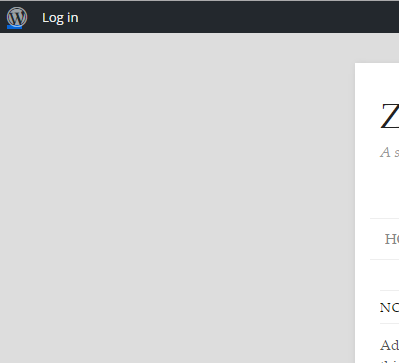
ParticipantHi, I’m new to WordPress and bbPress
I’ve just installed bbPress and BuddyPress for the first time.
I was mucking about, looking around to work out how things work.
I thought I’d log out of Admin and try and see if I could see what it would be like to register as a new user. But there is no “register” link showing up anywhere?
Below is a screen capture of part of the screen of what I see, no register, just log in.
Any help appreciated.
 August 14, 2015 at 3:43 am #165354
In reply to: Complete noob, need help!
Robin W
ModeratorAugust 14, 2015 at 12:34 am #165350Topic: Complete noob, need help!
in forum InstallationKamorle
ParticipantHi all. I have a WordPress site with a fresh install of bbpress on it for my forums. That said, the default bbpress theme for my site looks absolutely awful, so I was wondering how to install another theme or even just change the colors just for my forums. This is what it’s looking like at the moment.
I recently discovered this theme here that looks alright. Is there some way I could import that onto my site for JUST the forums? Let me know, thank you!
August 13, 2015 at 6:46 pm #165348In reply to: Importing a large vBulletin forum – in stages?
peterdadams
ParticipantHi
This is an interesting thread.
I have a large vBulletin 5.1.7 forum and after reading this topic I am thinking about migrating to bbPress.
I have powerful dedicated server solely for the forum, the forum has topics: 129,286 Posts: 3,055,650 Members: 51,108
Is there a script to import my forum into bbPress?
Can the WordPress plugin W3 Total Cache be used with bbPress to boost perform dance?
Many thanks for your help.
August 13, 2015 at 4:57 am #165335Topic: No Admin Sections Available
in forum Troubleshootingtash-paul
ParticipantHi there, I am having a slightly strange issue in that I have just installed:
Wordpress 4.2.4
BuddyPress 2.3.2.1
bbPress 2.5.8Everything appears to be fine except for the little fact that I have no bbPress admin sections in the dashboard.
Any help would be most appreciated.
August 12, 2015 at 11:39 pm #165332Stephen Edgar
KeymasterThe database *must* be located on the same database server as your target WordPress installation, you can import from a remote database server.
Make sure you select “phpBB” from the dropdown at the top of the importer page.
August 12, 2015 at 9:41 pm #165326In reply to: List subscribers of a forum
Moderator@casiepa Thanks for creating a plugin to solve this problem for users. It is greatly appreciated. I have a few questions though.
How do I use it??
The setting are confusing me a little bit, and it doesn’t seem to show the subscriptions, but I do not really know where to manage them in the plugin. I just see a list of users with a button that says `[has role]’. I also do not think your plugin works for sub-forums/child forums of categories.
How does it work exactly??
I try to set it up, but I am still confused. Also there are a few errors while activating it with debug set to true in my wp-config.php file.
define('WP_DEBUG', true);August 12, 2015 at 9:15 pm #165325In reply to: Add “Agree to Terms” in Reply & Topic Creation Forms
ModeratorThis might be custom development since it is the reply/topic forms. You may need to hire a developer to create this kind of functionality for you.
If you basically using this as spam protection you can use this.
https://wordpress.org/plugins/bbpress-no-captcha-recaptcha/
You can also just link to your terms and condtions in the reply form too.
For registration/login forms you can use this plugin.
https://wordpress.org/plugins/agreeable/
You could possible hook the above plugin to work for reply/topic forms somehow though.
August 12, 2015 at 7:45 pm #165323In reply to: edit topic input displays full HTML
ModeratorThis kind of looks normal since when you edit the topic all you see is the Text editor which will show the html tags.
Also did you copy and paste the content of the whole topic page as an test, or was it just like that??
Are you using this plugin??
https://wordpress.org/plugins/bbpress-enable-tinymce-visual-tab/
August 11, 2015 at 10:11 pm #165304In reply to: Can’t modify a post forum (users nor admin)
ModeratorI tried the theme and plugins with bbPress and I didn’t come across any issues.
I am kind of thinking it could be the index.php in your url causing the issue, but I am not really sure.
https://codex.wordpress.org/Using_Permalinks#PATHINFO:_.22Almost_Pretty.22
Since I am not 100% sure, you can try some troubleshooting to see if you can find the solution to your problem.
August 11, 2015 at 9:25 pm #165302Leng7881
ParticipantI got the id from the Reveal ID’s thank you for that. I am trying to get this to work on my website which currently is on a localhost so can’t send you to it. I have put the code in the functions and changed the number to 72 (my forum id), however, when I post it does not create a new topic in that forum. I have been poking around trying to get it to work and have found that some places say the publish_post is deprecated and others that say to ignore that it still works. I’m currently using wordpress version 4.2.4 and here is the code I put in my functions.
function gh_post_published_create_topic( $ID, $post ) {
    $checkduplicate = get_post_meta( $ID, 'gh_topic_created',true);
    if ( empty( $checkduplicate ) ) {
        $author = $post->post_author;
        $name = get_the_author_meta( 'display_name', $author );
        $title = $post->post_title;
        $permalink = get_permalink( $ID );
        $excerpt = $post->post_excerpt;
        $subject = sprintf( '%s: %s', $name, $title );
        $message = sprintf ('[b]%s[/b]' . "\n" . 'By %s' . "\n\n" . '[i]%s[/i]' . "\n\n" . 'View: %s' . "\n\n", $title, $name, $excerpt, $permalink );
        $tags = wp_get_post_tags( $ID, array( 'fields' => 'names' ) );

        $new_post = array(
            'post_title'    => $subject,
            'post_content'  => $message,
            'post_parent' => 72,
            'post_status'   => 'publish',
            'post_type' => 'topic'
        );
        $topic_meta = array(
            'forum_id'       => $new_post['post_parent']
        );
        $topic_id = bbp_insert_topic($new_post, $topic_meta);
        if ( !empty( $topic_id ) ) {
            add_post_meta($ID, 'gh_topic_created', 'true', true);
            $term_taxonomy_ids = wp_set_object_terms( $topic_id, $tags, 'topic-tag' );
            bbp_update_forum(array('forum_id' => 72));
        }
    }
}
add_action( 'publish_post', 'post_published_create_topic', 10, 2 );
Any help on why this wouldn’t work for me would me much appreciated.
August 11, 2015 at 8:34 pm #165301ModeratorInstall a plugin like Reveal IDs, and when you go to Forums > All Forums in the WordPress backend you will see all the forum IDs next to each forum.
There are other ways of getting a posts ID, but this is the easiest way.
August 11, 2015 at 7:36 pm #165300In reply to: Integrate bbPress with Social builder
ModeratorLink to the plugin you are talking about. I am having a tough time finding the WordPress plugin.
August 11, 2015 at 5:53 pm #165293In reply to: Showing Profile Information
ModeratorIn BBpress each user has the ability to edit their profile users/USER/edit/
Here they can add their name, their website link and their bio by default. However, this information is never actually displayed on their profile. Why is this?The bio should show.
https://bbpress.org/forums/profile/robkk/
As for most of the other fields, not sure really. I know though they are just going off of WordPress’s profile fields, and whatever is added to that though. I don’t know why the devs haven’t put at least website there. Maybe it is easy for spammers to take advantage of that?? First Name and Last Name could make good choices to display on the users profile too.
I will probably make a suggestion to the devs later to add more profile data to the user’s profile.
You can of course display the data in the profile by editing a template or installing a plugin.
Copy
user-profile.phpfrom the bbPress templates in the plugin to your child theme in a folder called bbpress.Just surround the code with conditionals to only display the information when the user has inputted any information.
You have something like this for first name.
<?php if ( bbp_get_displayed_user_field( 'first_name' ) ) : ?>

	<p class="bbp-user-fname"><?php bbp_displayed_user_field( 'first_name' ); ?></p>

<?php endif; ?>
YOu can also use the plugin, to display the current fields and also custom fields.
-
AuthorSearch Results

