Im wanting to add a forum to my wordpress site, I dont know how much it will grow but i want it to be flexible, i’m not a coder or designer, I only know the basics,
I know in the past bbpress had a lot of issue and was lacking in features but i’m assuming this must be possible now.
Im wanting a good looking full featured forum as good as any stand alone forum(xenforo, phpbb, mybb).
can this be done ?
if so how ?
How can I add the extra feature without bloating the site ?
Can i download any pre made bbpress.css ?
any good example
@robin-w
I disabled all plugins except bbpress and still it looks like the standard version.
There are no other loop-forums.php files in my directory. What should i do? I’m really out of idea’s man.
Isn’t there a small chance you can take 10-15 minutes to look trough skype? I’ll give you access to my wordpress.
Thomas
@robin-w
Akismet
BBP Style Pack
BB Press
Coming Soon WP
Constant Contact forms for WordPress
Custom Sidebars
Jetpack
Theme my Login
TinyMCE Advanced
Ultimate Form Builder Lite
WP Fastest Cache
Yoast SEO
I’ll include the above in ticket #2963
Thanks for identifying the cause @atmojones, made tracking this down much quicker 🙂
So the regex we use #([\s>])@([0-9a-zA-Z-_]+)#i in bbp_make_mentions_clickable()
The ([\s>]) is checking for a whitespace character before the @ symbol
The code here below is from using TinyMCE and as you noted @atmojones there’s some non-breaking spaces html entities for the instances when an an even number of spaces preceede the @ symbol:
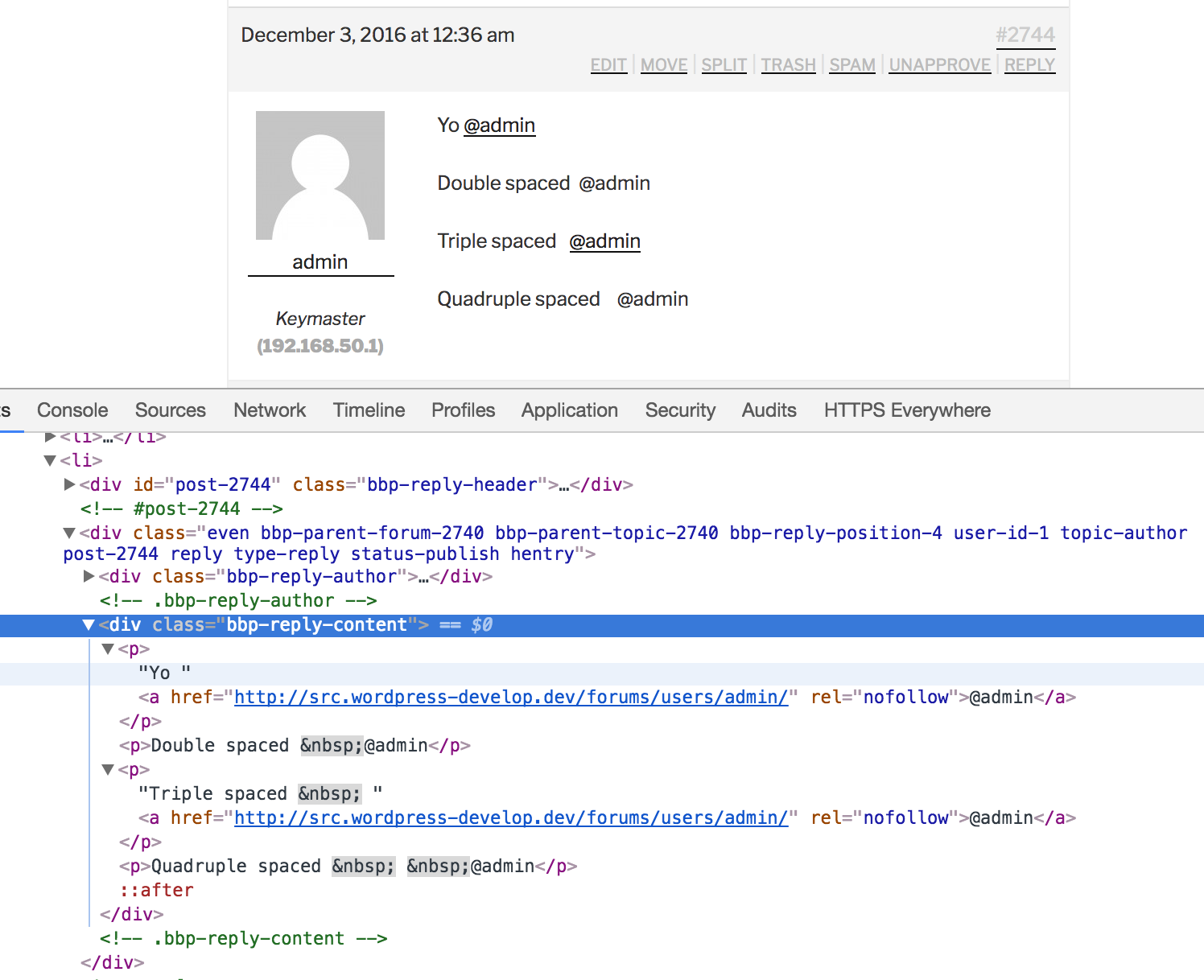
The root cause is every second space is swapped out with nbsp; which makes sense from a HTML perspective, where this takes place I’m not so sure of, it’s either in TinyMCE directly, or WordPress via wp_spaces_regexp() in wptexturize() (I think it’s the former)
The workaround for bbPress and I suspect BuddyPress also, would be to check for both ([\s>]) and nbsp; preceding the @ symbol
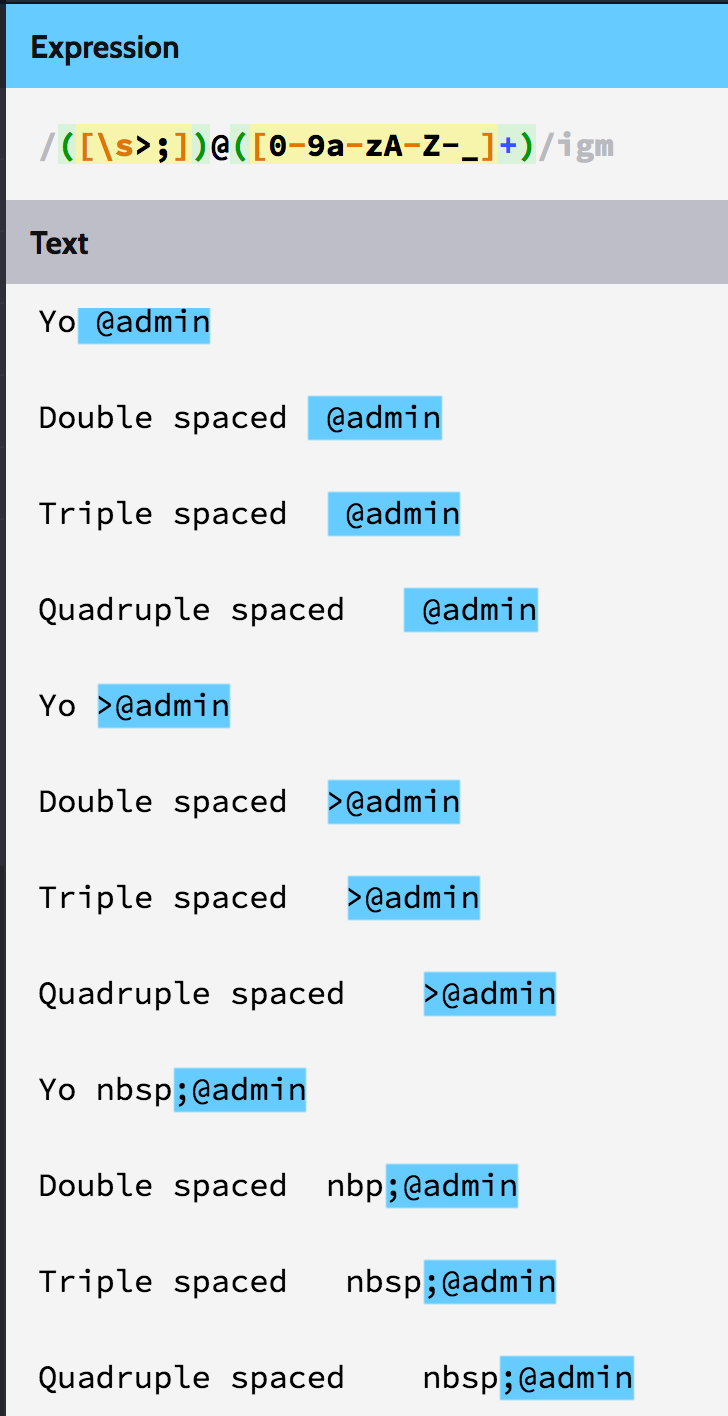
Here’s the results of swapping ([\s>]) for ([\s>;]) (Adding a check for just the semi-colon):
Hi Stephen. WordPress and other plugins update without any problems. I have spoken with my web host. They looked at it and said I needed to contact bbPress support. How does uninstalling bbPress modify the database?
Do you have any issues updating WordPRess itself? How about other plugins or themes?
I think you may need to contact your webhost for help with this issue.
Whenever I try to update bbPress I keep getting this error:
The update process is starting. This process may take a while on some hosts, so please be patient.
Enabling Maintenance mode…
Updating Plugin bbPress (1/1)
Downloading update from https://downloads.wordpress.org/plugin/bbpress.2.5.11.zip…
Unpacking the update…
Installing the latest version…
Removing the old version of the plugin…
Plugin update failed.
An error occurred while updating bbPress: The update cannot be installed because we will be unable to copy some files. This is usually due to inconsistent file permissions. templates/default/bbpress/bbpress-templates
Disabling Maintenance mode…
All updates have been completed.
Wordpress Version 4.6.1
bbPress Version 2.5.10
Website URL: https://sopearly.com
I have a WordPress site with inside a BBPRESS forum.
When in the forum (in a topic or reply) I put the link to a Post in my wordpress site, it shows in bbpress the Image, an exerpt, and at the bottom-left there is the name of my site. In the left corner it whows the WordPress logo. Can I remove that logo? How?
I would suggest trying it on a local setup using MAMP or XAMP
Then export the forum using WordPress’ “Export” tool, and then the “Import” tool on your site.
p.s I haven’t tested or seen anyone do a Vanilla install for quite a while and sugget you take a close look at the import o make sure it works. Also try bbPress 2.6-alpha, lots of importer improvements, you can get it from here https://bbpress.org/download
The theme used here on bbpress.org is called bbpress-org, the theme used on buddypress.org is called buddypress-org, I see a pattern emerging, the theme used on codex.bbpress.org is called codex-bbpress-org, the theme used on codex.buddypress.org is called codex-buddypress-org, there is a pattern here :shakes fist: ;P
Along with the above, each of those themes is a WordPress child theme, the parent theme is named bb-base, as you can see below per the announcement blog posts all the above parent and child themes and plugins used on all the sites were “open sourced” back in March 2014
Open Sourcing bbPress.org
Open Sourcing BuddyPress.org
The above posts also link to the source repos, there is also a new child theme that is now used on the bbPress 2.x powered https://wordpress.org/support/ forums and an even newer evolution of this theme is being worked on for the updated redesign of the WordPress forums, you can even sneak a peak at the new design by visiting this URL: https://wordpress.org/support/?new-theme=1
The updates to all of the above and the migration of the WordPress Support Forums to bbPress 2.x, rather 2.6-alpha is one of the reasons bbPress 2.6 isn’t out yet, it’s because we’re making sure bbPress 2.6 will be the best it possibly can be, and by deploying it on wordpress.org and the ensued battle testing of it that has been taking place we’ve got a few things to do before we can say bbPress 2.6 is ready to be released.
Ok it was hanging for too long so here what i found out:
on the patch page (https://bbpress.trac.wordpress.org/attachment/ticket/3026/3026.patch) you made few mistakes:
1. Line 663 KEY meta_join (meta_key, meta_value) ) {$charset_collate};”;
should finish with ” , ” not ” ;”; ” otherwise it will crash error
2. Line 660 PRIMARY KEY (meta_id),
is duplicated so i guess 660 or 661 can be removed
3. when running import after those changes in wordpress, converter is giving error message:
WordPress database error: [Key column ‘meta_id’ doesn’t exist in table]
CREATE TABLE wp_bbp_converter_translator ( value_id bigint(20) unsigned not null default ‘0’, meta_key varchar(255) null, meta_value varchar(255) null, PRIMARY KEY (meta_id), KEY value_id (value_id), KEY meta_join (meta_key, meta_value) ) DEFAULT CHARACTER SET utf8mb4 COLLATE utf8mb4_unicode_ci
Btw… im not a coder. No clue about php im just applying some logic to what i see 😉
Hi @johnjamesjacoby
Thanks for the update. I have downloaded again the alpha and installed it fresh on my website. Unfortunately still the same error message:
Repair any missing information: Continue
WordPress database error: [Specified key was too long; max key length is 1000 bytes]
CREATE TABLE wp_bbp_converter_translator ( meta_id mediumint(8) unsigned not null auto_increment, value_type varchar(25) null, value_id bigint(20) unsigned not null default ‘0’, meta_key varchar(255) null, meta_value varchar(255) null, PRIMARY KEY (meta_id), KEY value_id (value_id), KEY meta_join (meta_key, meta_value) ) DEFAULT CHARACTER SET utf8mb4 COLLATE utf8mb4_unicode_ci
No data to cleanStarting Conversion
@mikehaceman – that was it.
See: https://bbpress.trac.wordpress.org/ticket/3026
Can you try what Netweb suggested again, and see if it works now?
Hey @mikehaceman, sorry you are having trouble.
This isn’t usually necessary, but something between your two installations isn’t cooperating, and in these rare cases it unfortunately requires a bit of scrutiny.
WordPress installations since 4.4 and beyond will try to use utf8mb4 for their character set, and utf8mb4_unicode_ci for their collation. Traditionally these are InnoDB tables, but you’re usually free to decide this for yourself.
utf8mb4 tables have reduced maximum key lengths due to the additional bytes required for each character, so the safe maximum length is reduced to 191. It’s possible we haven’t updated our special converter table to handle this, so I’ll check, and update it if that’s the case.
If you wanted, it may be worth going through all databases, all tables, and all columns, and ensure that your encoding & collations are what you expect them to be. (This means in your old forums, and your new ones.)
[Edit: Updated this post to reflect what we’ve updated in bbPress’s converter]
Thank you for the reply. I have downloaded and installed alpha.
When running import im getting error:
Repair any missing information: Continue
WordPress database error: [Specified key was too long; max key length is 1000 bytes]
CREATE TABLE wp_bbp_converter_translator ( meta_id mediumint(8) unsigned not null auto_increment, value_type varchar(25) null, value_id bigint(20) unsigned not null default ‘0’, meta_key varchar(255) null, meta_value varchar(255) null, PRIMARY KEY (meta_id), KEY value_id (value_id), KEY meta_join (meta_key, meta_value) ) DEFAULT CHARACTER SET utf8mb4 COLLATE utf8mb4_unicode_ci
I tried to find this error and potential solution. I found someone recommending bbpress toolkit. I have installed it and system info is as follow:
WP version 4.6.1
Theme Twenty Sixteen 1.3
PHP version 5.4.19
bbPress version 2.6-alpha-6091
Active Plugins Name and Version
– p1 bbP Toolkit 1.0.6
– p2 bbPress 2.6-alpha
Any idea ?
There is a plugin
https://wordpress.org/plugins/bbpressmoderation/
It is a bit old, and I haven’t used it, but it may well work
Hi,
the content beneath Latest replies is aligned centered. Is it possible to align the text left? What custom-css I can use to achieve this?
I asked the support of the theme I use (Avada), but they tell me to turn you.
I’m using wordpress 4.6, bbPress-version 2.5.10-6063.
The link to my site is: http://psd2.nl/forum/
Thanks very much for your help!
Best regards,
Oeroes
I have a serious problem. Yesterday I installed bbPress, I tried it and after a few minutes I turned off.
After deactivating the plugin the entire site went offline. The wordpress admin panel works, so I reactivated bbPress and is back online.
The site is completely offline if I try to turn off bbPress, and back online when activate it. Why?
(Sorry for English, I am Italian)
my style pack does this
https://wordpress.org/plugins/bbp-style-pack/
If you want one ‘Private’ then add this to the title 🙂
Not totally sure exactly what you are after, but my style pack plugin includes a latest activity widget that sounds like it might do what you are after
https://wordpress.org/plugins/bbp-style-pack/
If you have WordPress set to use Hebrew you should be able to go to Dashboard -> Updates -> Update Translations and WordPress will download the bbPress Hebrew translations automatically
Try the bbp style pack plugin: https://da.wordpress.org/plugins/bbp-style-pack/
Under settings pick the tab ‘Forum Display’.
Cheers,
Lars


