‘Private’ is a wordpress/bbpress conflict – and it is annoying !!
either
Put this in your child theme’s function file –
ie wp-content/themes/%your-theme-name%/functions.php
where %your-theme-name% is the name of your theme
or use
Code Snippets
add_filter('private_title_format', 'ntwb_remove_private_title');
function ntwb_remove_private_title($title) {
	return '%s';
}
or use
bbp style pack
once activated go to
dashboard>settings>bbp style pack>Forum Display
Put this in your child theme’s function file –
ie wp-content/themes/%your-theme-name%/functions.php
where %your-theme-name% is the name of your theme
or use
Code Snippets
add_filter ('bbp_reply_admin_links', 'rew_remove_reply') ;
add_filter ('bbp_topic_admin_links', 'rew_remove_reply') ;

function rew_remove_reply ($links) {
	unset ($links['reply']) ;
return $links ;
}
hmmm.. this seems to be wordpress capability and looks difficult to remove.
The best I could find is
https://wordpress.stackexchange.com/questions/29000/disallow-user-from-editing-their-own-profile-information
but it would need some work to make it work for bbpress
not sure, but try this (untested)
add_filter ('bbp_get_user_edit_profile_url' , 'rew_remove_edit' ) ;

function rew_remove_edit () {
return ;
}
Put this in your child theme’s function file –
ie wp-content/themes/%your-theme-name%/functions.php
where %your-theme-name% is the name of your theme
or use
Code Snippets
bbpress just uses wordpress login, there is no ‘double security’ sorry, no idea what the above is trying to say, or what exactly the problem is.
Perhaps you could start by stating what you are trying to achieve?
bbPress version 2.6.6.
Wordpress version 5.7.1
website…79Exies.com
Wondering if it is necessary to have login/pw for bbPress forums on a site that already has WP Security login/pw coverage. It seems redundant, and especially so for a site with a maximum of 325 users, though we only have 93 right now.
I can share some email back and forth I have had with a classmate/colleague, which can better explain the shortcomings and non-syncing we faced.
Thanks,
Steve
I would like to edit the wording of some of the bbPress prompts and messages. As I understand this can be done using a language file as described here.
https://codex.bbpress.org/getting-started/bbpress-in-your-language/
I’m a little confused though since I am not actually changing from English to another language. Since I’m not changing languages what does the process look like? I went here to download the English version but there’s English (Canadian, UK, Australian, or South African versions) Which further ads to the confusion as to which language file I should download and edit 🙁
Any idea on how to go about editing the bbPress prompts and messages in the same language I am using?
https://translate.wordpress.org/projects/wp-plugins/bbpress/
Hi, the Username field on the bbPress login page is different from the Password field (the same width but not the same height). This causes the Username to be halfway “cut off” (visible) on smartphones.
I am using WordPress 5.7.1 and bbPress 2.6.6
Thanks
Basie martins
you either want
dashboard>settings>forums>anonymous if you want anyone to be able to post
or add registration – bbpress uses wordpress registration, so anyone of then methods here will work.
https://www.wpbeginner.com/beginners-guide/how-to-allow-user-registration-on-your-wordpress-site/
there is also a bbpress registration login which includes registration and bbpress shortcodes
[bbp-login] – Display the login screen.
[bbp-register] – Display the register screen.
[bbp-lost-pass] – Display the lost password screen.
it could be a theme or plugin issue
Themes
As a test switch to a default theme such as twentytwenty, and see if this fixes.
Plugins
If that doesn’t work, also deactivate all plugins apart from bbpress and see if this fixes. if it does, re-enable one at a time to see which is causing the error.
If you cannot do this to your site (say because it is live) then use the ‘troubleshooting’ features of this plugin to let you test without affecting other users
Health Check & Troubleshooting
Then come back
My wordpress version is: 5.7.1
Regards.
Adrià Calendario.
bbp style pack
once activated go to
dashboard>settings>bbp style pack>Forum Display item 4
Hello!
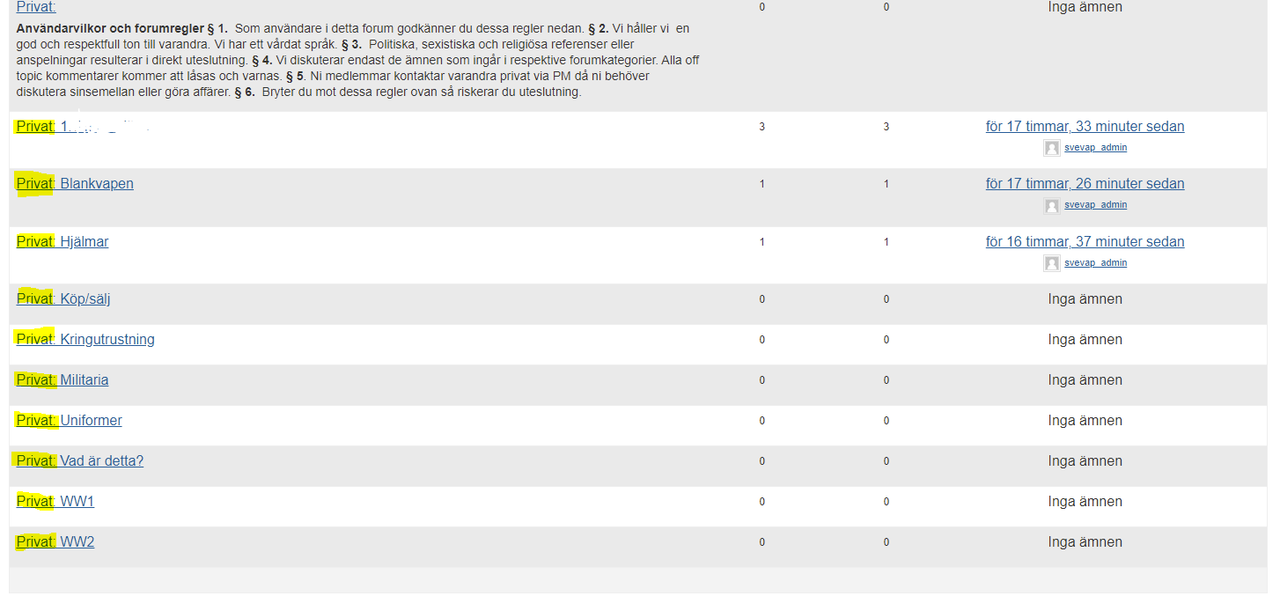
I need to remove the tag private that is shown before every forum i have created.
I can see after some googling that there is a fix in creating a functions.php and upload that somehow but I do not understand how I do that? Where in wordpress do I uppload that php file? And what do I put in the .php file? Or is there a plug in that can helt me?
I also need to change the order of the forums instead of alphabetic order.
PLease help! Thank you!
ok, I now understand what you want.
Put this in your child theme’s function file –
ie wp-content/themes/%your-theme-name%/functions.php
where %your-theme-name% is the name of your theme
or use
Code Snippets
add_action ('bbp_new_reply_post_extras' , 'rew_update_topic') ;
add_action ('bbp_edit_reply_post_extras' , 'rew_update_topic') ;

function rew_update_topic ($reply_id) {
	$topic_id = bbp_get_reply_topic_id( $reply_id );
	$topic_data = apply_filters( 'rew_update_topic', array(
		'ID'           => $topic_id,
	) );

$topic_id = wp_update_post( $topic_data );
}
you can use just that list or have it open as per the default.
to display a list
bbp style pack
once activated go to
dashboard>settings>bbp style pack>Topic/Reply Form and look at option 18
Thanks for your answers!
I do not have a lot of experience. I see the following notice for BBpress messages: This plugin hasn’t been tested with the latest 3 major releases of WordPress. It may no longer be maintained or supported and may have compatibility issues when used with more recent versions of WordPress.
Do you know if its safe to use?
Hi,
Is there a possibility to let forum members send eachother private messages? If so, is there a plugin (compitaible with latestversion of wordpress and total theme) that works good with bbpress or do you know any other possibilities?
Thanks in advance!
usual fault finding applies
Themes
As a test switch to a default theme such as twentytwenty, and see if this fixes.
Plugins
If that doesn’t work, also deactivate all plugins apart from bbpress and see if this fixes. if it does, re-enable one at a time to see which is causing the error.
If you cannot do this to your site (say because it is live) then use the ‘troubleshooting’ features of this plugin to let you test without affecting other users
Health Check & Troubleshooting
Then come back
It’s kinda weird that when I edit this php file you mention “content-single-topic.php”, it didn’t show those changes on the forum pages.
ok, question, does your theme have bbpress files associated with it? or is a plugin affecting this
it could be a theme or plugin issue
Themes
As a test switch to a default theme such as twentytwenty, and see if this fixes.
Plugins
If that doesn’t work, also deactivate all plugins apart from bbpress and see if this fixes. if it does, re-enable one at a time to see which is causing the error.
If you cannot do this to your site (say because it is live) then use the ‘troubleshooting’ features of this plugin to let you test without affecting other users
Health Check & Troubleshooting
Then come back
Hi,
I am not good at coding or custom css. My level of knowledge is: I just know how to install and activate stuff on wordpress more or less.
I am looking to get a clean, crisp and modern design on my forum and member site (located on a subdomain of my main homepage). However I cant really find a good theme. I am looking for a cheap solution – if possible free. I use BBpress and Buddypress and thats mostly the features I need. I will use a custom register plugin also and the main page should present news and some quick info for the members to be updates whats going on. Do you have any tips on themes that works well for this and looks good?
I googled and found these mentioned in a list and they where free (however not having a presentation on the main page as I want):
https://zakratheme.com/
https://wpastra.com/
Please help if you have any ideas 😊🙏
Having done a little digging in the CSS that “bbp style pack” creates, I THINK I have isolated the buttons to the class of
#bbpress-forums.button{
background-color:#9e9e9e
color: 000000
}
… which is the correct grey / black that the editor buttons SHOULD be. But it seems that something after that is picking up the theme colours, and setting it to those. (Unless there is some code earlier that is !IMPORTANT! that is setting it.
Also, “bbPress” seems to have a mind of it’s own, disregarding settings made within WordPress. For example, the editor has been set up with two rows of buttons … but “bbPress” will only display the default 12 or 13 buttons in one row, (and not even those match what’s been set up elsewhere in WordPress) The same plugin that sets up two rows of buttons has an option with “Don’t use visual editor in bbPress” Guess what … “bbPress” loaded the visual editor anyway.
Another plugin states “Switch this on to use the membership profile rather than the bbPress profile” Turn that on, and … rather than link to the profile, the link shows “#” so that it simply reloads the same page. And the big profile button (beside “Create Topic”) STILL jumps to the bbPress profile !!
OK, appreciate that some of those things are bbPress not accepting the settings of the other plugins … but it gets somewhat annoying when you bat your head against a brick wall all day!
I’m running 2.6.6 on 5.7 on my test sites, all I can suggest is
it could be a theme or plugin issue
Themes
As a test switch to a default theme such as twentytwenty, and see if this fixes.
Plugins
If that doesn’t work, also deactivate all plugins apart from bbpress and see if this fixes. if it does, re-enable one at a time to see which is causing the error.
If you cannot do this to your site (say because it is live) then use the ‘troubleshooting’ features of this plugin to let you test without affecting other users
Health Check & Troubleshooting
Then come back
Is bbPress 2.6.6 compatible with WordPress 5.7 ?


