Skip to:
Content
Pages
Categories
Search
Top
Bottom

Search Results for '"wordpress'

Viewing 25 results - 9,951 through 9,975 (of 26,874 total)
  • Author
    Search Results
  • #144379
    Stephen Edgar
    Keymaster

    “Version Control Software” is how I ‘got it fixed’, everything I do these days is done using ‘version control’ it lets me know what I’ve done and easily roll back any changes I made to site or bbPress. πŸ™‚

    bbPress & WordPress use SVN though a real popular one is Git and GitHub https://github.com/

    They have nice intro course for Git on GitHub here http://try.github.io and it does take a while to grasp all the concepts but once you do you would never go back to not using it πŸ™‚

    #144374
    Stephen Edgar
    Keymaster

    Hehehehe…. Developing WordPress themes, child themes, plugins can be like a rabbit warren, once you go down it it can me daunting to find your way back out ;;)

    Glad you found the issue and got it sorted πŸ™‚

    #144371

    In reply to: what theme/style

    Stephen Edgar
    Keymaster

    Check out this article and the links in it.

    It will look at a site and tell you what WordPress theme they are using πŸ™‚

    What Theme: A New Website Theme Detector Powered By WordPress

    #144369
    Stephen Edgar
    Keymaster

    This time, it converted the users, all of the topics, and about 220,00 replies, then started just outputting dashes again. What does it mean when it starts outputting dashes? What is the program doing?

    As I stated above it can be for many reasons and is a bug/error that we have not been able to isolate to fix, we have not found a way to trigger the bug allowing us to reproduce the bug and create the fix. It is a random thing as I outlined in my previous reply.

    I opened a new window and re-started the conversion from that window, but instead of picking up where it left off, it started converting topics again. Am I going to have two copies of each topic in the BBPress forums now? Should I reset the forums again?

    If you want the importer to resume from where it left off you need to make sure you don’t check the checkbox in the following screenshot, if you do check it then it will start again from the start and you will end up with two of everything.

    Instead of using β€œreset forums,” can I just empty some of the MySQL tables?

    This should be sufficient for most cases and because bbPress uses custom post types it shares the same wp_posts and wp_postmeta tables with WordPress and any other plugin or themes custom post types. It should be quite fast and behind the scenes it is actually doing direct MySQL queries to remove only the bbPress forums, topics, replies and topic tags from the posts, postmeta and taxonomy tables.

    I know it can be frustrating getting this to work as I have been were you are now and is the reason I started using bbPress. I went through the same problems trying to import from phpBB to bbPress, I eventually got it working and started learning PHP and now as a novice PHP programmer I try my best to help others migrate their forums to bbPress and improve bbPress as best I can and it’s not easy and for an old dog learning new tricks I reckon I’m doing alright.

    #144368
    Stephen Edgar
    Keymaster

    Finally I’ve written a small script to migrate kunena attachments to GD bbPress attachments


    @cybnet
    Awesome thanks for this, I added it to the (still sparse) Kunena docs here.

    I’ll take a closer look when I get the chance and see what ideas I can come up with. I was at a WordPress Meetup a couple of months ago that demoed a few different ways to move media from one install to another that once time permits I’d love to take a shot at including it in our importer.

    Now I’d like to write a script to convert kunena BBCode into bbPress HTML because there are some bbcodes not converted.

    This I can most definitely help out with now.

    The SMF and phpBB importers both have some good examples of converting BBCode to ‘native’ bbPress (WordPress) code. I am simply use regular expressions to convert them on the fly as each topic or reply is converted.

    eg. This Replaces [size=$1:XXXXXXXX] with <span style="font-size:$1%;">$3</span>

    $phpbb_uid = preg_replace( '/\[size=(.*?):(.*?)\]/', '<span style="font-size:$1%;">', $phpbb_uid );

    You can see the SMF regex here and the phpBB here. There are probably quite a few that we can repurpose and if not make up a list for me and I’ll work towards getting them added to the Kunena importers in a future release.

    #144344
    Nexnivis
    Participant

    Hi there πŸ™‚

    Please forgives my bad english, I hope I will be understandable.

    I’ve a bbpress forum here, and sometimes an error in post order occures. This bug is that the last post of a topic is showed before the previous post!

    In other words, if there is 5 posts in a topic and you publish the 6th post, this post will be showed at the 5th place and the previous post will be at the 6th place.

    Thanks a lot for you help, I have find nothing about this kind of issue :-\

    Edit : for information I’m running bbPress 2.5.3 and WordPress 3.8.1

    #144340

    In reply to: Freshness for Category

    Robin W
    Moderator

    No problems, if you’d like the last post date rather than freshness, use this plugin

    https://wordpress.org/plugins/bbp-last-post/

    #144329
    Stephen Edgar
    Keymaster

    This is weird, as you say there is only one copy of the forums in the backend yet two on the front :/

    I see http://elitegamingcomputers.com/forum/ & http://elitegamingcomputers.com/forum/page/2/

    Yet picking a forum via either page above eg http://elitegamingcomputers.com/forum/social/in-game-strategy/ is the same resulting URL from either page, the same for a topic from either forum page eg http://elitegamingcomputers.com/topic/dthpwns-pvp-keybinding-guides/

    If there were duplicates from an import you would see the duplicates in the back end and when viewing the forum or topic typically one of them would end with -2, for example you would have example.com/forum/my-topic and example.com/forum/my-topic-2 as each page. forum, topic must have a unique slug.

    What I do see that is weird though is your main forum page is:
    http://elitegamingcomputers.com/?post_type=page&p=4947 <- That is weird
    http://elitegamingcomputers.com/forum <- This is what I expect you should be using

    Do you have a custom page setup for your forums and by chance do have you used the bbPress shortcode [bbp-forum-list] twice?

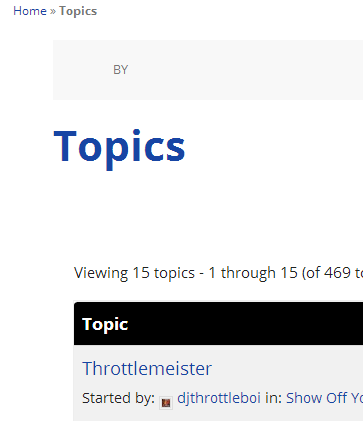
    The topics section of your site looks and appears ‘mostly’ to work as expected:
    http://elitegamingcomputers.com/topics/
    The ‘By’ section in the below screenshot should not be there though.

    Looking at the source of your site I know see your using a Genesis theme, do you have the Genesis bbPress Extend plugin installed and activated? https://wordpress.org/plugins/bbpress-genesis-extend/ as you will need this.

    One more thing is that this could be an issue with your rewrite rules. To fix this try resetting your permalinks. In your WordPress Administration Screens navigate to Settings > Permalinks, select a different permalink structure and save. Then select your preferred permalink structure and save again.

    #144326
    brent7
    Participant

    Hi, how’s it going? I just switched over to bbPress and I’m having a problem.

    The forums are showing that there are two pages to choose between, but both pages show the same exact list of forums:

    http://elitegamingcomputers.com/forum/

    I did go through the import process twice and I’m assuming that’s why there are two pages. However, only one set of forums show up in the “Forums” tab in the WordPress dashboard, so I can’t just go in and delete them (if that makes sense).

    Anyway that I can fix this so it just shows the one page?

    #144325
    EWilliamsAU
    Participant

    I am so very lost, frustrated and feeling like a failure at this point.

    I have tried my hardest all week to understand BuddyPress/bbPress and have dumped way over 60 hours (very late nights and early mornings) into trying to set this up and I have come up short handed with absolutely nothing to show for the time I’ve put into this.

    Today alone I have failed and retried 6 times. I have completely deleted sites, created newer ones, emptied the Trash, cleared caches and all of the above with no luck whatsoever.

    Could somebody….just anybody please help me out here? I am beyond lost and confused.

    I have been trying to achieve this with absolutely no results whatsoever: https://www.youtube.com/watch?v=M8mh3f6Vzbo

    I use the Social Buddy theme: http://themeforest.net/item/social-buddy-wordpress-buddypress-theme/3691122

    The site is project.arclightcomics.com

    I haven’t a clue what I am doing wrong and after 6 tries I am starting to think this was a ginormous mistake on my end and I really don’t want to think that.

    #144290
    Matoca
    Participant

    I run my bbPress forum so that users do not need to register. Moderators log in to post and are the only required registered users. So far Akismet has been fabulous catching spam.

    Today Akismet marked a legitimate reply as spam and I quickly unchecked that so it would post properly. No problem there.

    Later, a spam reply was missed by Akismet because it appears to have relatively normal text. But I recognized the text to be spam and the username confirmed that. I added the IP to a blacklist and checked it as spam. No problem there.

    The problem I have is that the topic the reply was posted under is now appearing at the top of the topic order in the forum indicating that I have just posted a reply recently. The spam is removed so the last date of a reply would have been mine, in December.

    Is there anyway to get this topic to appear where it should on the forum page, well below more recent topics?
    Thank you, Matoca

    WordPress 3.8.1
    bbPress 2.5.3-5249
    http://www.secondchanceaihadogs.com/forums/forum/aiha-dog/

    #144279
    adressler
    Participant

    That sounds like the way to do it. I’m rather new to WordPress but I have a decent knowledge of PHP / MySQL. If it’s not too much of a pain, I’d really appreciate looking at some code to use as a starting point.

    #144262

    In reply to: Shotcodes not working

    Robin W
    Moderator

    what shortcodes?
    what software versions of bbpress, buddypress and wordpress are you running?
    what theme?
    what plugins are you running?
    url of your site?
    when do you get 404 – logged in, not logged in?

    etc.

    We would love to help you, but give us a fighting chance of working out what is wrong by giving us some details πŸ™‚

    Come back and we’ll do our best to hep you !

    #144259
    Robin W
    Moderator

    this just posted in wordpress

    https://wordpress.org/support/topic/cant-edit-own-post-with-bbpress?replies=1

    is that the same website?

    #144255
    jslom
    Participant

    No problem @netweb & @maveas. I dealt with the same issue and it was driving me nuts. I submitted a ticket for it about a week ago to Nextgen gallery, and they are currently working on a fix. I am not sure when the next beta or fixed version will be released, but if you need it running use version 2.0.40. This was the last version that didn’t cause the redirection issues.

    https://wordpress.org/plugins/nextgen-gallery/download/

    The easy way I did it was by first FTP into your site, and rename the current /wp-content/plugins/nextgen-gallery folder to nextgen-gallery-latest

    Then download the 2.0.40 package from above and upload the nextgen-gallery folder to your plugins folder. Activate is as you would any other plugin, and disable the current one. They will have different version numbers. Don’t update the 2.0.40 version. Once you see an update for the latest version, or a change log that shows it fixed, you can reverse the steps above and not lose any settings.

    #144254
    stevpetersonn
    Participant

    Might be your sql database get bigger and it might taking long. You need good hosting or optimize you database or check some other techniques from here http://hqtips.com/how-to-speed-up-wordpress-site-344/

    #144247
    Robin W
    Moderator

    I imported from an access database (ditto conversion to sql) so know what you’re going through! see https://bbpress.org/forums/topic/documented-import-from-snitz-access-database/ for a blow by blow of how I did this and presume you’re already well into using custom importer https://codex.bbpress.org/import-forums/custom-import/

    Now given that you’re going to re-register users, then we only need the topics to be assigned to a user which exists, which then when they re-register you can set up properly.

    So for instance if you have a topic with the author name of “fred” – then you need a user fred to exist. This needs to be at ID level.

    So in essence you’ll need to import

    topic with author ID
    User with same ID

    Minimum info to create a user is (in theory – it may be less) ID, username, email and password.

    In my case they mapped from a snitz access forum (via sql) as follows

    MEMBER_ID _bbp_user_id
    M_NAME user_login
    M_PASSWORD _bbp_password
    M_EMAIL user_email

    So I would go about it this way.

    What we need to end up with is a topics/replies table that has a author ID (number) against each topic/reply.
    In a user table, we then need that same ID, together with name, password and email.

    So first I’d go back to my lotus notes and see if topics has an author ID. If not we’ll need to create one (we’ll do that in a minute).

    Then from the topics and replies lists create a set of autor names and (if it has them) ID’s

    Create a user table (in my case in excel, but presume you’re familiar with creating in lotus notes) with the following headings

    ID NAME PASSWORD EMAIL

    If your topics/replies doesn’t have user ID’s then you just need to populate this table with unique ones, I’m pretty sure that you can just start with 1 and increment them – wordpress will assign new ID numbers as they come across starting with the next number that wordpress is not using.

    For password, just put anything – and they can all be the same

    Emails must be unique in theory, but don’t need to exist so abc@def.com is fine (you’ll be fixing these as they register, so doesn’t matter). But as you’re importing directly into the database, I reckon you could get away with them all being a single fictitious one. But if you have the skills, I’d create them as increments eg abc1@def.com, abc2@def.com just in case

    so now you have a user table to import.

    If you topics and replies don’t have author ID’s, then now go back to the topics and replies tables and run macro to populate a new column using name against the user table you’ve just created to populate with id.

    Now we have topics with ID’s an da user table to import. Just check that column names match the importer, convert it all to sql, and off you go !

    #144243

    In reply to: Descending sort

    SandyRig
    Participant

    Here this plugin does exactly what you all looking for
    https://wordpress.org/plugins/bbpress-sort-topic-replies/

    #144217
    Robin W
    Moderator

    “I asked on another forum and had no luck.”

    If this wasn’t

    Support Forums

    then post it there, you’ll more likely get someone who knows

    #144214
    Robin W
    Moderator

    it means that someone has gained access to your site, and put some code into it.

    You really need to go through all of these to fully clean up the site and make sure any “backdoors” have been closed:
    https://wordpress.org/support/topic/268083#post-1065779

    How To Completely Clean Your Hacked WordPress Installation


    http://ottopress.com/2009/hacked-wordpress-backdoors/
    Additional Resources:
    http://sitecheck.sucuri.net/scanner/
    http://www.unmaskparasites.com/
    http://blog.sucuri.net/2012/03/wordpress-understanding-its-true-vulnerability.html

    or you can pay securi to fix it for you – see the link above !

    #144205
    savalina
    Participant

    @eduardosilva Thanks for the link. It worked for me too. This should be officially be added to bbPress plugin list, or someone should create an official plugin for this. It’s very useful when you have a support forum and need some automation when it comes to topic closing (and also don’t know any php to create it from scratch πŸ™‚ ).

    I’m using bbPress 2.5.3 on WordPress 3.8.1

    #144199
    jgrmstr
    Participant

    Hi,

    I’ve set up a bbPress forum on my WordPress installation. Thanks to Jetpack “widget visibility” feature, I’ve put the bbPress Login Widget on the Forum and Topic page types.

    But I found no answer on how to display the Login Widget on the forum root. It’s kind of confusing for users who land on the forum root and can not see any registration link…


    #144190

    In reply to: Bar users

    Stephen Edgar
    Keymaster

    Yes, bbPress uses the same system as WordPress, how to do that is explained here:

    https://codex.wordpress.org/Combating_Comment_Spam#Default_Comment_Spam_Tools

    You can and should also enable and use the Akismet plugin.

    #144186
    Stephen Edgar
    Keymaster

    It isn’t quite possible yet, comments are disabled by bbPress for bbPress pages.

    That said, we are working on a ‘feature’ that will enable comments for parts of bbPress.

    So it is possible, just a fair amount of work would be needed to integrate the comments in way you mention above.

    Rather than post a comment though why not post a reply instead?

    bbPress’ forums, topics and replies are WordPress custom post types so have a pretty good base to work with just like any WordPress custom post type.

    #144162
    Stephen Edgar
    Keymaster

    Sorry for the delay but it ‘should’ have finished easily under 36 hours.

    The conversion is still running and outputting dashes

    This is one of the hardest things for us to add debug/error info and can happen for numerous reasons such as:

    As stated previously things will stop if your PC goes to sleep, other reasons can also be that a timeout occurs in that you are no longer logged into WordPress and would have to login again.

    To get around that open a new tab to your WordPress dashboard and refresh that page every hour or when you next walk past πŸ˜‰

    If the import is stuck in a particular stage for an extended period simply click stop and click start again and it resumes from where it left off.

Viewing 25 results - 9,951 through 9,975 (of 26,874 total)
Skip to toolbar