Skip to:
Content
Pages
Categories
Search
Top
Bottom

Search Results for '"wordpress'

Viewing 25 results - 9,776 through 9,800 (of 26,874 total)
  • Author
    Search Results
  • #145450
    mlocke90
    Participant

    I’m trying to mark a topic as private via the wordpress visibility options so that only the topic author and admins can read it. After marking it as private the topic text (post content) is only visible to the author (not even admin / keymaster can see it).

    I found this post which seems to be semi-related.
    https://bbpress.trac.wordpress.org/ticket/2088

    #145449

    Topic: Theme Recommendation

    in forum Themes
    #145443

    In reply to: change forum sidebar

    Robin W
    Moderator

    Just spotted you post on the wordpress forum :

    ‘My theme (MH Magazine) has no bbPress template by default, so I copied my full-page-width template and renamed it plugin-bbpress.php. I’ve got the forums page set to this template’

    If this is how you have it currently, then it is a sidebar template from your theme that you need, not a full width page one. With a siderbar theme, then wp-tweaks will pick this up and add the forum one to the page.

    #145442
    Robin W
    Moderator

    Ok, I’ve just finished a new plugin called

    bbp Private Groups

    This plugin adds private groups to the forums, allocating users to up to 8 groups, and combinations of forums to those groups, creating multiple closed forums.

    download from

    bbp Private Groups

    Let me know what you think.

    I’ll add this to the wordpress plugin repository in the next few days

    #145441
    Robin W
    Moderator

    Ok, I’ve just finished a new plugin called

    bbp Private Groups

    This plugin adds private groups to the forums, allocating users to up to 8 groups, and combinations of forums to those groups, creating multiple closed forums.

    download from

    bbp Private Groups

    Let me know what you think.

    I’ll add this to the wordpress plugin repository in the next few days

    #145440
    Robin W
    Moderator

    Ok, I’ve just finished a plugin called ‘bbp Private Groups’

    This plugin adds private groups to the forums, allocating users to up to 8 groups, and combinations of forums to those groups, creating multiple closed forums.

    download from

    bbp Private Groups

    Let me know what you think.

    I’ll add this to the wordpress plugin repository in the next few days

    #145437
    WARTORIOUS
    Participant

    Theme: modified portfolio press:

    /*
    Theme Name: Portfolio Press
    Description: Portfolio Press is a responsive theme for showcasing your photography, art, web sites, or other projects. It also works nicely as a regular blog site. An options panel is included for uploading logos and and changing the layout. There’s also support for the image, gallery and quote post formats. Visit the demo site or watch the video screencast for set up instructions.
    Author: Devin Price
    Author URI: http://wptheming.com/
    Theme URI: http://wptheming.com/portfolio-theme/
    Version: 1.7
    License: GNU General Public License
    License URI: license.txt
    Tags: white, black, gray, two-columns, left-sidebar, right-sidebar, flexible-width, custom-menu, full-width-template, microformats, post-formats, rtl-language-support, theme-options, translation-ready

    Credits:

    Portfolio was built on the solid foundation of Toolbox:
    https://wordpress.org/extend/themes/toolbox

    Reset default browser CSS.
    Based on work by Eric Meyer: http://meyerweb.com/eric/tools/css/reset/

    MODERATOR EDIT: I removed the ~1200 lines of code here, use pastebin or a gist on GitHub for big code dumps.

    #145432
    Jatinder Dhiman
    Participant

    I have done a fresh installation of wordpress & bbpress and created new topics under forum but my users are unable to create a new topic. Please let me know if anybody knows.

    #145430

    Topic: Mark as read

    in forum Troubleshooting
    qlymax
    Participant

    Hello,

    I’m looking for a way to show which topics have some new replies. Also I want a button ‘Mark all as read’. I’ve downloaded some plugins but none of them worksfine.

    The plugins i’ve tried:
    BBpress pencil unread — http://wordpress.org/plugins/bbpress-pencil-unread/ (shows the mark all as read but don’t do anything when pressed)
    BBpress unread posts — http://wordpress.org/plugins/bbpress-unread-posts/ (shows a notice of new replies but all the topics are now ‘NEW’ and there is no ‘Mark all as read’ button)
    BBpress Mark as read — http://wordpress.org/plugins/bbpress-mark-as-read/ (doesn’t work at all)

    Please help me,

    My website is: http://www.friendsofgaming.nl

    Thanks!

    #145423
    palmdoc
    Participant

    I am also curious as there should be some fine tuning here otherwise I agree that updating the activity stream with forum posts and replies will result in too much duplication of updates
    I am trying this old plugin to see if it will help:

    https://wordpress.org/plugins/buddypress-block-activity-stream-types/

    #145421
    Stephen Edgar
    Keymaster

    I am not sure how Register Plus Redux registers the new profile fields though an alternate way would be to use user_contactmethods

    https://codex.wordpress.org/Plugin_API/Filter_Reference/user_contactmethods

    So here is an alternate method using that method as a single standalone plugin:

    I’m not saying there is anything wrong with the method you used, just an alternate method.

    You could add as many or few extra fields as you want 😉

    Source: https://gist.github.com/ntwb/11241301

    
    <?php
    /*
    Plugin Name: bbPress - CLB Add user school to reply author details
    Plugin URI: https://gist.github.com/ntwb/11241301
    Description: bbPress - CLB Add user school to reply author details
    Version: 0.1
    Author: Stephen Edgar - Netweb
    Author URI: http://netweb.com.au
    */
    
    function clb_user_contact_methods( $user_contact ){
    
    	/* Add user contact methods */
    	$user_contact['school'] = __('School Name');
    
    	return $user_contact;
    }
    add_filter('user_contactmethods', 'clb_user_contact_methods');
    
    function clb_school_replies_author() {
    
    	echo get_user_meta(bbp_get_reply_author_id(), 'school', true);
    
    }
    add_action( 'bbp_theme_after_reply_author_details', 'clb_school_replies_author' );


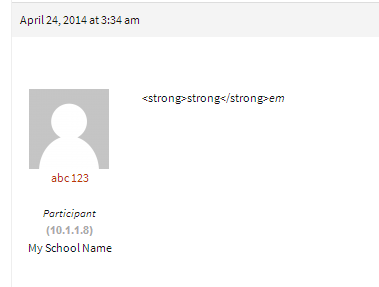
    As it displays in each reply under the author details

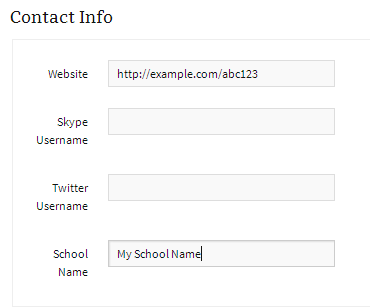
    As it displays on a users profile page

    #145420

    Thanks Stephen,

    I have raised the same issue in other post so We will have some updates there

    https://wordpress.org/support/topic/handling-session-load-capacity?replies=3#post-5494586

    #145411
    Stephen Edgar
    Keymaster

    or it is depending on the wordpress site?

    This, basically dependant upon what WordPress can handle.

    #145409
    Stephen Edgar
    Keymaster

    There appears to be quite a few though I have not used any take a look at the WordPress plugins:

    https://wordpress.org/plugins/search.php?q=facebook+login+bbpress

    #145403
    Stephen Edgar
    Keymaster

    Maybe use some other bbPress/BuddyPress conditional tags

    bbPress Conditional Tags

    Template Tag Reference

    Note: The BuddyPress codex page is undergoing some updates. There are a few that are now depreciated, you can find an accurate list here.

    I also wrote a plugin that makes it super easy to see what conditional tags are being used on a page 🙂

    https://wordpress.org/plugins/query-monitor-bbpress-buddypress-conditionals/
    (You first need to install https://wordpress.org/plugins/query-monitor/)

    #145402
    Stephen Edgar
    Keymaster

    You could write some custom code to do it in a child theme though it would probably be quicker to fork an existing plugin that will do it for you with bbPress.


    @imath
    ’s BuddyPress plugin comes close to what you want I think and would be a good starting point to convert it from BuddyPress to bbPress.

    https://wordpress.org/plugins/bp-avatar-suggestions/

    #145374
    Robin W
    Moderator
    #145373

    Hi All,

    I just wanted to know How many sessions can be handled in BBpress. I am just concern about the load it can handle. or it is depending on the wordpress site?

    Iam just confused. Any help would be appreciated.

    Thanks,
    Kailash

    #145369
    Stephen Edgar
    Keymaster

    I don’t know if any of the avatar plugins will do what you need it to do though with ~350 + avatar plugins via https://wordpress.org/plugins/search.php?q=avatar and/or 26 listed also with ‘bbPress’ at https://wordpress.org/plugins/search.php?q=avatar+bbpress maybe take a look at some of these other plugins and see if one of those will do what you want.

    #145366

    It sounds like this theme added bbPress specific templates to both the parent theme, and the child theme, both of which are overriding bbPress’s default template compatibility (because bbPress will yield to those overrides, which is how you can customize bbPress without needing to hack bbPress.)

    Can be a bit confusing at first, especially since there’s no real indication of what is being loaded from where.

    You could try installing the WordPress Debug Bar plugin, and then install the bbPress Debug Bar extension: https://wordpress.org/plugins/debug-bar-bbpress/

    This will give you some information about what bbPress template is loading from where, but it’s still only providing a small window into a somewhat hidden experience.

    #145364
    Matoca
    Participant

    Update. Monday I asked my iPad, iPhone moderator to see if she could get a keyboard to come up, see what she was typing and actually post to the forum. She reported that it was working perfectly! No kidding! So after the WordPress 3.9 upgrade, the tinyMCE 4 upgrade has improved interaction with iPads and iPhones.

    See: http://www.tinymce.com/index.php
    Also: tinyMCE 4 has a presentation that explains what is different.
    http://www.tinymce.com/presentation/index.html#/

    I did a little research about tinyMCE because honestly it sounds like the name of a toy. So once I found the name, Tiny Moxiecode Content Editor, it made more sense to me. Wikipedia describes it as “platform-independent web-based JavaScript/HTML WYSIWYG editor control.” So, in a sense, this is the core element of WordPress (and other CMS platforms), giving the user the ability to get content on the blog without having to necessarily understand anything about HTML.

    After browsing some forums I better understand that this upgrade of WP and tinyMCE has rendered many previous plugins dead in the water. It means that users need to do some serious spring cleaning and get rid of any plugins that have not been specifically updated for use with WP 3.9.

    A lot of plugins have necessarily cropped up over time to add back lost functionality in tinyMCE as functions were removed. So the bbPress plugin I was using in the past that added back the visual tab to the forum message field was just one of many. Luckily I did disable it prior to the release of 3.9 but it clearly was already unstable with 3.8.

    I made a mistake when I posted earlier, enabling the tools in the dashboard does give them to everyone who is not registered or logged in, not just those logged in as moderators. So I have rethought having the text editor tools on the open forum. I don’t like the ability of non-registered posters to add images directly nor do I like them adding links. These people don’t register so I have removed all editing tools from the forum in forum>settings. I have asked moderators to use the tools in the dashboard for adding images and links. Perhaps there will be a plugin in the future that will allow moderators with administrator rights to have these tools directly in the forum, but not have them accessible to the general public?

    So if you do want your moderators to have undo, redo, add link, remove link and insert/edit image in the forum then enable this in forum>settings, it standard with tinyMCE 4, and looks exactly as it does on this forum

    I became interested in more functionality and I installed TinyMCE Advanced plugin this afternoon to play with. I realized the many things I could do just with tables! So it’s a versatile plugin and they claim has been tested with 3.9.
    my best, matoca

    #145362
    jbdizzle
    Participant

    Man, I tried just about anything that I can think of other than installing a new wordpress theme and starting from scratch… I ran across this by the way:

    How to Use
    The plugin creates a new menu item, Appearance → Suffusion bbPress Pack. Once you click on that, you will see the capability to (Re)Build bbPress Files. If you click on this button, all your bbPress-specific templates will be regenerated. You can selectively pick specific folders that you want to overwrite.Note that this action is irreversible.

    So what are my options?

    #145346
    Matt
    Participant

    Hello,

    My sidebar is missing with my newly installed Striking MultiFlex theme. I’ve tried many of the solutions from this board, but none have worked.

    These did not work:
    http://codex.bbpress.org/theme-compatibility/

    http://bpsocialnetwork.wordpress.com/2013/06/02/twenty-eleven-theme-compatibility/
    I think Step 3 is missing a ‘)’, but I don’t know where to put it.

    Any ideas on how to make my sidebars appear on all of my bbpress pages? My site is in maintenance mode, so I can’t post a link.

    Thanks,
    Matt

    #145337
    batmanfan
    Participant

    Has anyone used this plugin and successfully set up? I tried with no success 🙁 Is it compatible with bbpress forum? Thanks

    #145336
    Stephen Edgar
    Keymaster

    This could be an issue with your rewrite rules. To fix this try resetting your permalinks. In your WordPress Administration Screens navigate to Settings > Permalinks, select a different permalink structure and save. Then select your preferred permalink structure and save again.

Viewing 25 results - 9,776 through 9,800 (of 26,874 total)
Skip to toolbar