Search Results for '"wordpress"'
-
Search Results
-
Topic: Forum is missing
Hello, I Installed wordpress correctly with an mySQL, installed a theme, then installed bbPress. When I click on Forums, I see they exist in the control panel, but when I visit the pages, they just don’t exist. My theme comes with a Basket because it comes with a market, and even the URL/Basket is missing. I’m not sure what is going on as I am new to WordPress. This site is keeping me afloat so any help i really appreciate.
Hi,
New to bbPress and finding it great to work with.
I have an issue though – on forum listings all topics get the wp-sticky class regardless of whether or not they’re sticky. This is the same whether or not there are any sticky topics in a forum.
Is this is a bug or am I missing something?
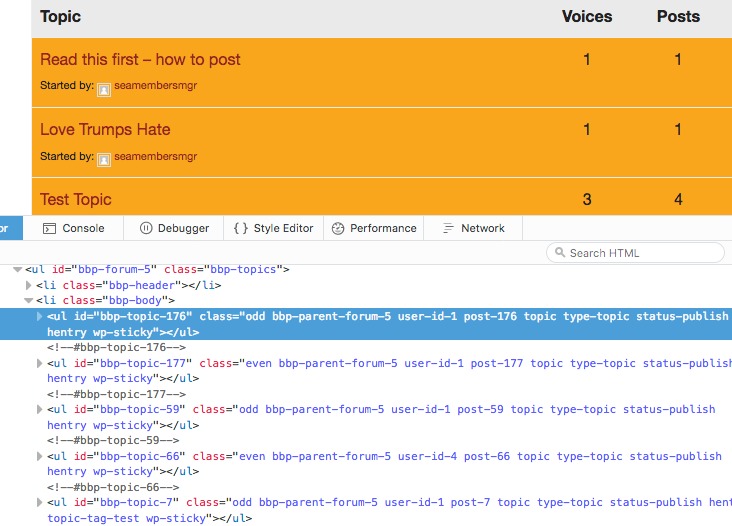
WordPress 4.6.1 / bbPress 2.5.11
Topic: Original post is now blank
Something has gone wonky and suddenly none of the original posts in my topics are visible. You can see all of the replies and make a reply.
bbPress 2.5.10-6063
I’m running the latest version of WordPress and Buddypress.
Hello everyone,
I have a lot BBpress related questions that i can’t find a good answer to. Is there someone that has some good experience in customizing and setting up BBpress who has Skype and is willing to help me trough Skype?
The answers i am looking for are related to these subjects.
*When user account is created, user logs in but when button log in is clicked, page refreshes and doesn’t show logged in account information. The same screen as when not logged in.
*When the user finally gets logged in there is a wordpress menu on top, how to delete this? (atleast on mobile we’ve seen it)
*We want a different page for the user that already has an account or for the new users that aren’t already logged in (forum page).
*BBpress sidebar is not showing up, tried many different things. Adding code manually, installed plugins etc. Only the main theme sidebar is showing.
*Breadcrumb path is displaying forums twice. We did some php code to hide the homepage but don’t know how to hide these double words.
Help would be really appreciated. If there is no way around i am willing to pay a small fee.
Thomas
Topic: bbpress with UserPro
WordPress 4.6.1 running Avada theme, bbPress 2.5.10, and Userpro plugin
Using bbPress forum with UserPro plugin to manage users. You need to be logged in to view forum so “Restricted Content / Members Only You cannot view this content because It is available to members only. Please Login or Register to view this area” message appears when you click on forum when not signed in. After clicking on Login, I sign in and the forum appears, but it still has the same Restricted Content message above the forum. The support team at UserPro said “Can you please try contacting to bbPress and ask them about how the private groups and forums are created in their plugin, as they will be the best to understand the structure and functionalities of the plugin.”
Site is http://www.numoa.com
Thanks for your help.Topic: Private Forums issue
by default, Private Forums and topics can be viewed by logged in users. Hidden Forums and topics are only for Admins.
but in my forum, Private Forums and topics can only be seen by admins. when a user enters a private forum, he/she can’t see the topics.
what’s with this behaviour? is this a bug? this is a very basic feature how come it’s not functioning properly?
i have the latest versions of wordpress and bbpress, and have tried it with the default themes.
site –> http://hoops.ph
Hello
My configuration is:
wordpress 4.6.1
bbpress 2.6 alphaphpbb 3.1.8 with:
146477 messages
3207 topics
860 usersServer configuration:
MySQL(i) 5.6.23-cll-lve
PHP 5.6.27When i do the migration from phpbb to wordpress, and i have done this several times, some users stay as anonymous, and are not the same users, is random, this after run the repair tolls one by one.
There is another problem with the repair tool “Recalculate the position of each reply”, it gives several errors like “Fatal error: Maximum execution time of 30 seconds exceeded in /home/aquaforu/public_html/wp/wp-includes/wp-db.php on line 2276” or “Fatal error: Maximum execution time of 30 seconds exceeded in /home/aquaforu/public_html/wp/wp-includes/wp-db.php on line 1832”
But if i run this tool several times at the end it says “Recalculating reply menu order … No reply positions to recalculate!”
Thanks
Topic: Lightbox Plugin
I’m not sure if this is the correct place to post this, but it seems that a lot of people have been looking for a lightbox plugin that works with bbPress, too. The only one I’ve found that does, is Huge IT Lightbox:
https://en-gb.wordpress.org/plugins/lightbox/Hi there,
I have “bbpress private groups” and “Paid Memberships Pro – bbPress Add On” installed on my WP site and have 4 memberships levels (Modul 1 – Modul 4) and 4 forums and 4 private groups — Modul 1 for group 1 with access to forum 1. I would like to show all forums to all logged in users and show the membership pro message for group forum restriction if applicable.
The problem is: it only works with user role “keymaster” or when I deactivate “bbpress private groups”. Deactivating “bbpress private groups” doesn’t seem to be a problem, except that I would also like to restrict who can post new topics (Admin only.)
Is there a way to achieve both?
Thanks so much!
Kat
PS. WordPress version is 4.6.1 and I have installed multisite
Topic: No topics were found here!
Hi,
I’m trying to re-do a site.
Now the new site is using the latest version of WordPress (4.6.1) and bbPress also the latest version (2.5.10)
The previous site is using WordPress 4.5 version with the latest version of bbPress.I exported my old forum, topics and replies and imported those data into the new site.
When I click on the forum, I got this messages, below:
This forum contains 6 topics and 55 replies, and was last updated by xxx 1 month, 2 weeks ago.
Oh bother! No topics were found here!I also tried to disable all the plugin, switched to default themes and used this little plugin – http://www.rewweb.co.uk/bbpress-wp4-fix/. But it doesn’t work at all.
Is this plugin compatible with the latest version of WordPress?
Does anyone have the same issue? Any solution for this issue?
Can share with me how to solve this issue?Regards,
CLHi there,
I recently found bbpress in hopes to create a forum, but after installing and activating the plugin, there are no changes in the dashboard ( forum button did not appear after activation ).
I also noticed that the 2.5.10 bbpress plugin is not tested with my version of WordPress, which is 4.6.1.
Is there anyway to fix this? I am really looking forward to use this plugin for my forum.
Thanks in advance.
With the
localization
plugin, text tranlation does not work: people still get the english text,
eg :
Hello!\n\nA new topic has been posted by [topic-author].\n\nTopic title: [topic-title]\nTopic url: [topic-url]\n\nTopic excerpt:\n[topic-excerpt]\n\nNotify message by bbPress Notificationsin addition, the Bbp extension (in that localization) says
Compatibility: Loading Issue: Author is using load_textdomain instead of load_plugin_textdomain function. This may break behavior of WordPress, because some filters and actions won’t be executed anymore. Please contact the Author about that.
Thanks for for helping me to find another way to get french texts
regards CharlesHi, I’m not sure if I should be asking for help here, or over at Buddypress, so just let me know if I need to approach someone else.
I have downloaded Buddypress and BBpress to my site which is using X theme. It seemed to be working well until yesterday when I noticed a glitch. When I am logged in, and visit the various menu items on my page, some show me as being logged in, while others (mainly Home and Chat) show me as being logged out (when I’m actually logged in). Have you any ideas as to what might be going on here?
I created a tester user profile to test the site out, and the problem only seems to be arising on Safari. Firefox and Chrome seem to be working fine, and consistently show me as being logged in throughout the site.
Any help you might be able to offer would be much appreciated!
Using bbPress Version 2.5.10 and WordPress 4.6.1.
My site can be found at http://mummytobe.co.uk
Many thanks,
Catherine
Topic: Forum post Templates
Hi,
I’m using latest version of the plugin and wordpress. I wanted to know that can i define post template for my bbpress forum?We use our forum for applications!
I may refer the link given below:
https://www.warzone.club/forums/topic/adminship-application/In this topic, I want the bold on in my predined template.
Thanks


