Search Results for '"wordpress"'
-
Search Results
-
I want to join WordPress forum. Recently i joined bbpress.org forum. Tell me another best forum plugins for wordpress? Help me.
Topic: Greetings!
I wanted to introduce myself to the forum. I just registered and I have been using bbpress for about a week now! I am running WordPress 4.6.1 and bbpress 2.5.11…. I created a website and forum page @ http://www.theintrovertspeaksblog.com I would like some honest input as to the integration of bbpress into the website. I also have a question, On the lost password page it displays a blank screen with simple text box only as well as the reset password button. I temp fixed it by adding text above the box to direct the user to insert username or password. Is there a better way to do this?
Topic: bbp-messages
Have produced new WP site on Wamp 2.5 on my PC. I have installed bbp-messages 0.2.3.1 and already have bbpress 2.5.8 forum. WordPress 4.6.1 Sport Theme by Theme Canon Win10
THE WHOLE SITE and forum IS WORKING FINE, but When I try to use bbp-messages Lite, it returns the following:
FORBIDDEN: you don’t have permission to access wordpress/members1/http:/localhost/wordpress/members1/ on this server. Apache/2.4.9 (Win64) PHP/5.5.12 Server at localhost Port 80.
Would be very grateful for any advice as I am ready to publish this web – this my first WP site!
Topic: Getting latest reply
I’m currently working on a project for a client who wants to have the latest reply from any topic in a forum show up on the main bbpress page under the forum name. Is there a way to get this reply from the database using either built in functions or a wp_query. I also need to show the persons avatar, name, and when it was posted. Any help would be greatly appreciated. Dev site is at http://realestateinvesting.how/topics/. I can’t tell you exactly what version of bbpress they are using as the client hired a developer before me who hid the plugins unless your at a user level higher than admin. WordPress version is 4.5
Topic: Forum is missing
Hello, I Installed wordpress correctly with an mySQL, installed a theme, then installed bbPress. When I click on Forums, I see they exist in the control panel, but when I visit the pages, they just don’t exist. My theme comes with a Basket because it comes with a market, and even the URL/Basket is missing. I’m not sure what is going on as I am new to WordPress. This site is keeping me afloat so any help i really appreciate.
Hi,
New to bbPress and finding it great to work with.
I have an issue though – on forum listings all topics get the wp-sticky class regardless of whether or not they’re sticky. This is the same whether or not there are any sticky topics in a forum.
Is this is a bug or am I missing something?
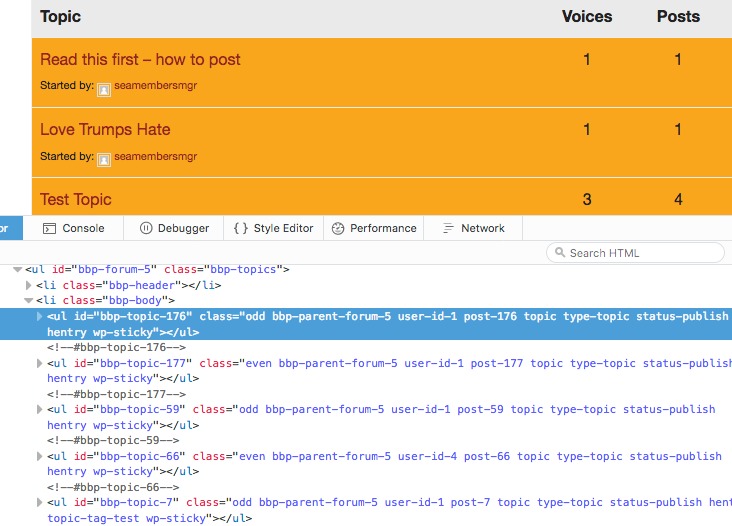
WordPress 4.6.1 / bbPress 2.5.11
Topic: bbPress 2.5.11 Released
bbPress 2.5.11 is out, and is a maintenance release for all previous 2.x versions. 2.5.11 includes support for the soon to be released WordPress 4.7. If you’re planning on updating to WordPress 4.7 right away, you’ll want to update to bbPress 2.5.11 immediately.
If you’re using any version of bbPress 2.x and have not yet updated, please take a moment to update your bbPress installations to 2.5.11. If you’re using WordPress’s built-in updater, it should only take a click or two. If you need help, please reach out in our support forums and someone will be happy to assist you.
These fixes have also been ported over to 2.6, which we continue to run here at bbPress.org and BuddyPress.org.
<hr>
Speaking of bbPress 2.6, per-forum moderators, favorites, and subscriptions are fully refactored and working pretty great. Our findings have also helped push performance improvements upstream to WordPress core, and are already employed across the forums on WordPress.org.
Topic: Original post is now blank
Something has gone wonky and suddenly none of the original posts in my topics are visible. You can see all of the replies and make a reply.
bbPress 2.5.10-6063
I’m running the latest version of WordPress and Buddypress.
Hello everyone,
I have a lot BBpress related questions that i can’t find a good answer to. Is there someone that has some good experience in customizing and setting up BBpress who has Skype and is willing to help me trough Skype?
The answers i am looking for are related to these subjects.
*When user account is created, user logs in but when button log in is clicked, page refreshes and doesn’t show logged in account information. The same screen as when not logged in.
*When the user finally gets logged in there is a wordpress menu on top, how to delete this? (atleast on mobile we’ve seen it)
*We want a different page for the user that already has an account or for the new users that aren’t already logged in (forum page).
*BBpress sidebar is not showing up, tried many different things. Adding code manually, installed plugins etc. Only the main theme sidebar is showing.
*Breadcrumb path is displaying forums twice. We did some php code to hide the homepage but don’t know how to hide these double words.
Help would be really appreciated. If there is no way around i am willing to pay a small fee.
Thomas
Topic: bbpress with UserPro
WordPress 4.6.1 running Avada theme, bbPress 2.5.10, and Userpro plugin
Using bbPress forum with UserPro plugin to manage users. You need to be logged in to view forum so “Restricted Content / Members Only You cannot view this content because It is available to members only. Please Login or Register to view this area” message appears when you click on forum when not signed in. After clicking on Login, I sign in and the forum appears, but it still has the same Restricted Content message above the forum. The support team at UserPro said “Can you please try contacting to bbPress and ask them about how the private groups and forums are created in their plugin, as they will be the best to understand the structure and functionalities of the plugin.”
Site is http://www.numoa.com
Thanks for your help.Topic: Private Forums issue
by default, Private Forums and topics can be viewed by logged in users. Hidden Forums and topics are only for Admins.
but in my forum, Private Forums and topics can only be seen by admins. when a user enters a private forum, he/she can’t see the topics.
what’s with this behaviour? is this a bug? this is a very basic feature how come it’s not functioning properly?
i have the latest versions of wordpress and bbpress, and have tried it with the default themes.
site –> http://hoops.ph


