Wordpress doesn’t have memebers.
ok, I repeat can you post an image or describe where you are seeing members ?
I have mailed the Theme creator and he said that it is a wordpress thing, not from a plugin. So i have to google it why its not working correctly.
you would think that was easy – but placeholder is a concept for <input> and <textarea> tags, and wordpress doesn’t use that for then visual editor.
I found several bits of code that do this for posts and pages, but couldn’t get them to work on topics/replies – I haven’t yet worked out why.
I’ll have a further play later to see if I can work it out
Robin
1. are you using code from above or my plugin https://wordpress.org/plugins/bbp-last-post/
2. so you want some as a date and some as ‘since’ ?
3. if so, which ones are which
you may also need to use this
bbPress Genesis Extend
When I change to any default wordpress theme the issue seems fixed. I thought It is something related with the theme
Minimal Coming Soon & Maintenance Mode
Inline Image Upload for BBPress
WP User Avatar
Yoast SEO
This will also help with styling
bbp style pack
HI,
There is a “double” space in Notice and “By Author” info. I changed my wordpress theme to one of default wordpress theme and the error is fixed. I seems a CSS error.
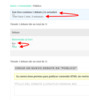
I using a theme called “Hitchcock”.
How can I fixed?
Thanks
with bbpress you subscribe to forums, so unless you bhave subscribed, then you won’t get notified.
You can and control and auto-subscribe users to forums using
bbP Toolkit
or instaed/in addition use
bbPress Notify (No Spam)
which some admins use to see what is being posted
Not directly – there are plugins that do that eg
bbPress Capabilities
Thanks Robin.
I am using the free version of the plugin (which is available here https://wordpress.org/plugins/membership/, but yes, now that I have narrowed the problem down to a conflict with this plugin I will follow up with them.
Was just hoping someone here might be using the Membership2, had the same issue and had already worked out how to resolve it.
ok, are you using my style pack
bbp style pack
if so the topic/reply form tab has options to do this.
If not, consider installing it !
I add:
The theme is twenty twelve
WordPress version: 4.9.4
bbPress version: 2.5.14
If I go to one of the forums from the main forum page and I click on the breadcrumbs to take me back a page, it doesn’t take me to the correct page.
For example, if the breadcrumbs show
Home › Forums › Forum 1
and I click on “Forums” it doesn’t take me back to the main forum page as it should.
WordPress version: 4.9.4
bbPress version: 2.5.14
I’m using Genesis theme
Hi,
I allow anybody to reply to a topic, but I ask for their name and Email address, all replied are moderated, when I look at the reply under replies I can see the name but not the Email. I am sure somewhere I put “(will not be published)” after the Mail (required) label: but I cannot remember where I did that.
I have the latest wordpress, bbpress, bbp toolkit, bbpress moderation and bbp style pack installed.
Can someone help where to find the Email given please, I have spent two days looking.
Clive
Hi there, I’m hoping someone might be able to give me some advice on a fix for the following:
bbPress is working fine for Administrators, however, users with any other Site Role can’t read the Topics (even if they are a Forum Moderator or Keymaster).
For non-Administrators, the Topics index works fine and when you select a Topic you can read any Replies that have been made, as well as having the ability to post a reply (as long as your Forum Role is sufficient), all that is missing is the original Topic itself.
If a previous reply has quoted the Topic, then you can read the quoted topic within the reply.
The Topic exists, the original just isn’t visible to non-Administrators.
I’ve deactivated all plugins and the problem persists.
I’ve tried it with the theme Twenty Twelve and the problem persists.
Changing the Forum Role doesn’t affect the problem.
Only users with the Site Role “Administrator” can read Topics.
Obviously I can’t make everyone an Administrator and have run out of ideas on how to go about fixing this.
Wordpress 4.9.4; bbPress 2.5.14
Forum Link: https://www.getleanfiji.com/forums/general/
NB: The forums are part of a private membership site that is still under development. I have made one of the forums (which contains some test Topics and Replies) publicly accessible via the above link. Access to the site is controlled using Membership 2 and the Groups plugins, although these don’t appear to affect the problem.
add_action( 'bbp_template_before_forums_index' , 'rew_shortcode' ) ;
add_action( 'bbp_template_before_topics_loop' , 'rew_shortcode' ) ;

function rew_shortcode() {
	echo '<div class="social_login" >' ;
	echo '<br>' ;
	echo 'Inicia sesión con su cuenta de redes sociales y participa en el foro' ;
	echo '</br><br>' ;
 	echo do_shortcode('[wordpress_social_login]');
	echo '</br>' ;
	echo '</div>' ;
 }
@crookie I’m having the same problem. The BBSpoiler button works if I’m editing a post or a page, but it doesn’t appear at all in tinyMCE in bbPress. I’ve tried using tinyMCE Advanced, and the standard WordPress tinyMCE, both with the same results.
I’m currently working on a bbPress tinyMCE plugin, to allow me to include specific buttons in the forum editor, and if I can figure out how to make that work with BBSpoiler I’ll post an update here.
I’ve tried to look through the code for BBSpoiler, and I’m guessing that it’s missing an action or a filter to hook into the bbPress tinyMCE (but I don’t honestly understand actions, filters or hooks, so I could be completely wrong.)
bbpress needs a full wordpress installation and wordpress theme.
so to the extent that you can run a separate site with just wordpress, a theme and bbpress, then yes, but in the sense of having a main site with wordpress and a theme and just the forums on a subdonmain then no.
bbpress ends notifications using a bulk email address of noreply@domain.com and bcc’s in the subscribers of that forum
so an email might be
to : noreply@domain.com
bcc : jon@abc.co, fred@defd.com, george@hhd.com
I suspect that you host provider/email account is forwarding this to you as admin.
Probably either talk to your host provider, use this plugin, or add the noreply@domain.com
address to your spam/blocked lust so that you don’t see them.
AsynCRONous bbPress Subscriptions
Pascals’ bbp toolkit has an option for you to do that.
bbP Toolkit
once installed and activated go to dashboard>forums>all forums and if you hover over a forum there is a subscription option, which includes a ‘tick all’ to let’s you subscribe current users.
an option in dashboard>tools>bbp toolkit>subscriptions allows you to auto subscribe new users as well.
Hi there,
With fun I am using BBpress in combination with WordPress. Also there is a huge activity on the forum.
However – every reply on the forum there is a reply coming in my mailbox from noreply@domain.com. But this email is being sent from noreply@domain.com (it’s the same).
I checked all files and WordPress settings. But this email address is nowhere to be used.
Any idea how to fix these emails?
add this to your theme’s functions file
add_action( 'bbp_template_before_forums_index' , 'rew_shortcode' ) ;
add_action( 'bbp_template_before_topics_loop' , 'rew_shortcode' ) ;

function rew_shortcode() {
	echo '<div class="social_login" >' ;
	echo '<br>' ;
 	echo do_shortcode('[wordpress_social_login]');
	echo '</br>' ;
	echo '</div>' ;
 }
It may not be perfect, but without seeing its effect on your theme, I can’t say, so come back when it is in if it needs tidying up
Im using WordPress Social Login plugin
Shortcode: [wordpress_social_login]
Thank you!


