Published on June 9th, 2015 by flippyr
Hi Guys/Gals
I am looking to only display pages if users are logged into BBPress. I am aware that i can set the visibility of a page to be password protected however this is an additional step that could be avoided.
I have noticed there is a function bb_is_user_logged_in() that i could utilise however i dont know where i should add the code and indeed if it needs to go in the theme or child theme.
Can anyone help?
Many thanks and have a nice day
Hi everyone,
Looking for some assistance here,Instead of using WordPress facing registration page/ login page i have made a page that has login, registration an d lost password shortcodes. However during the registration process, i cannot get the user to specify the password therefore there is a need for approving admins to go create a password then email the user. Any ideas?
I have looked at many forums, plugins but haven’t got very far. Many thanks
Please see
http://contracostabee.com/forums/
created per startup instruction.
The forums page with only the shortcode in it produces text instead of form showing forums. Then when if you click on the image it takes you to the most recently created Forum page.
I’ve posted this problem several times but it disappears.
—
Wordpresss: Latest version
bbPress: Latest version
design theme: Original building
—
I have one question.
In the page “Forum Replies Created”, can I show my replies data only?
If I can, which php file is, and how do I change code?
Or if I need to apply certain WordPress plugin, what is it?
The page “Forum Replies Created” shows all replies data which contains my relied data.
I’d like not to show other user’s replies data.
WordPress version: 4.2.2
bbpress version: 2.5.7
Hey all,
I’m wanting to achieve something fairly complex with bbpress, and I’m hoping you all can help me.
Right now my setup looks like this:
Two main forums, Forum A and Forum B. Forum B contains subforums X, Y and Z.
I want all of the users of my site to be able to view and fully participate in Forum A. That’s fine.
However, I want all of the users of my site to be able to fully view Forum B, but for only users with specific permissions to be able to post there.
For example, a user from User Group X will be able to view topics and threads in subforums X, Y and Z, but can only post in subforum X. A user from User Group Y can see subforums X, Y and Z but can only post to User Group Y, and so on.
Right now I’ve achieved part of what I need with Robin Wilson’s “Private groups” bbpress. Unfortunately, with this plugin, users who don’t have permission to access a forum can’t view it – the plugin pushes them to a 404 page or a redirect substitute. I want users to still be able to fully view the forums, just not to be able to post without permission.
Does anyone have any advice as to how to implement something like this?
(I have crossposted this to the Private groups plugin support board. I hope there are no issues with that.)
Hello. I just recently installed a bbpress forum and I cant figure out why on my topic index, it says “started by” then a line break and user avatar, another line break, and then username.
Forum
Also I would love to have my topics look more like this if possible. I know it would take some PHP work. Does anybody know how to accomplish this without a whole new theme?
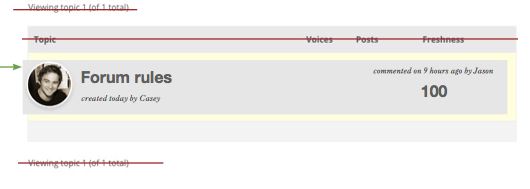
Maybe this is simple, and I’m just confused.
The site I’m working on will have a main community forum, but also a (user generated) huge directory of subforums. All I want to do is all ALL subforums to be viewable to anyone, but restrict POSTING privileges to approved individuals on each subforum. In other words, anyone can READ a generated subforum, but only approved IDs can POST on it. Right now all I can figure out how to do is restrict a user’s posting privileges in general.
So let’s say that an individual subforum is created called
Project Blahblah
I want anyone to be able to read it, but I only want Tom, Dick, and Harry to be able to post there. Roger decides he wants in on Project Blahblah, and he gets approved. Now he is allowed to post there, too. Meanwhile, Tom, Dick Harry, Roger, and anyone else should still be able to view and interact with the “General” forum, etc.
Hello,
I have a question about bbpress forum.
I would like to close one of my forums (that is to say users can not create new topics inside this forum) but I need that the topics previously created before are still open.
Exemple:
Forum (close: Impossible to create new topic)
— Topic (open: Possible to answer)
— Topic (open: Possible to answer)
PS: I would like to do this only for one forum (all my other forums should be open)
Thank you very much
Yoann
Hi All,
I’m having some strange issues since this weekend, a weekend without anything happening on the server or installation side.
BBPress version: 2.5.7
Wordpress: 4.2.2 Avada theme
Problem 1:
When i want to a edit a topic, as moderator or as superuser, and press save or submit, the form won’t save. Changes are not visible most of the times, after several atempts it works but most of the time it doesnt. When pressing save it returns me back to the topic as is should, but without the changes I made.
Problem 2:
Is a bit the same as editing. When I create a new topic and press submit, it doesnt show up in my topic list (not on the user site, nor on the admin back-end). After several atempts, it creates a topic.
The problem isnt there when i create or edit a topic in the back-end (the WP dashboard), as superuser or moderator.
I hope someone can help me out!
The website is kb.bee-connected.nl but it is behind a password.
I am running bbPress 2.5.7 with WP 4.2.2
WPengine support said this was a segmentation fault issue and not a time-out issue.
“A standard 502 is a timeout when waiting for a request, while a segmentation fault is a failure to execute properly. I’d recommend reaching out to bbpress to take a look or provide any common causes, as it may be as simple as a conflicting plugin/theme.”
I added the WANGguard plug-in the day before this happened, but when I deactivated it, the problem persisted.
Here is my forum site:
Private Survivors Forum

