Published on August 13th, 2019 by cathyskach
WP v. 5.2.2, bbpress v. 2.5.14. WP is bundled with Bluehost. Theme is OceanWP. Link is http://box5745.temp.domains/~cathyabl/rosecityyachtclub.com/forum/
No matter what I try, I can’t get the bb sidebar to display. I’ve tried bbtweaks, among other gyrations to no avail.
Thanks for any direction you can point me!
I am experiencing 404 errors on forum and topic views. It appears to be at random and not all the time.
Got error 'PHP message: PHP Notice: Undefined offset: 0 in /wp-content/plugins/bbpress/includes/topics/capabilities.php on line 80\nPHP message: PHP Notice: Undefined offset: 0 in /wp-content/plugins/bbpress/includes/replies/capabilities.php on line 62
I have re-saved permalinks, changed->saved then changed-back->saved and still have the 404 errors occasionally.
I googled this error and found:
https://wordpress.org/support/topic/capabilities-undefined-offset-error-with-bbpress/
I tried updating the capabilities.php file as discussed but still having issues.
Does anyone have any experience with this problem and have a fix?
I am having a problem with permalinks on livelikeaviking.com WordPress 5.2.2
Every couple days the forum stops working correctly – today when topic was clicked, user was sent to the home page.
Flushing permalinks resolves the issue, but the problem is happening often enough that the users are getting frustrated.
Any solution?
I am having a problem with permalinks on livelikeaviking.com WordPress 5.2.2
Every couple days the forum stops working correctly – today when topic was clicked, user was sent to the home page.
Flushing permalinks resolves the issue, but the problem is happening often enough that the users are getting frustrated.
Any solution?
Hello,
My site http://adm54forum.fr is on WordPress 5.2.2 and bbPress 2.5.14.
I use a theme called “Socialized”.
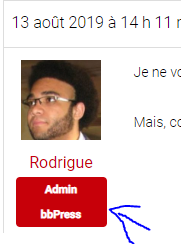
When I post a message on the forum as an administrator, under my profile picture is indicated my role. It says “Admin bbPress”, but how can I change that? I have no role with this name
Can I install BBPress so there are parent/child forums, and is it possible to have the child forums collapsed when not being used?
WordPress 5.2.2
bbPress 2.5.14
URL: forums are private, so URL won’t be helpful.
There’s no button or link to approve anything in my forums. Everything’s just pending. In the past, I replies showed up (when we first installed this; we haven’t used it in a long time, and just getting back into getting these set up). When I click to preview the replies/topics, they are just titles, nothing is written about the topic. We’re testing the forums with my team, so I know each team member wrote something and submitted it — they didn’t just write a title. Additionally, each of them are moderators, wouldn’t their posts just go through since they have the power to approve posts, too (or should, if this was working)?
What is happening? Why:
is nothing showing up for the content part of their replies and topics
why aren’t their posts going through automatically (since they are moderators)
why can I not — as the admin/keymaster, see the “approve” link?
Here’s a screenshot:
https://share.getcloudapp.com/Z4uZkZ2K 
Hello,
I’m working on a new website with a forum. I would like the link for the forum to be trregister.be/forum but the closest I’m getting is ” http://trregister.be/forums/forum/tr-register-belgium-forum/ “.
How can I change this?
Thanks in advance and greetings,
Jordi
I’m in bbPress 2.5.14
Wordpress 5.2.2
Avada theme 5.9.1 (and yes, I tried disabling it 🙂
I’m not sure how to get the breadcrumbs to show above subforums and topics so that users can navigate back to the main forum page as they go deeper into the threads. I tried the troubleshooting steps in the “Getting Started” section, but to no avail. The forums are private, so I’m not able to share a useful URL. Not sure what I can share to help get this solved. I tried Robin’s bbstyle pack, too, under the “breadcrumbs” section and no go for me.

If the img embed doesn’t work, the screenshot can be seen here: share.getcloudapp.com/E0uln5v2
I’m wondering if it is possible to automatically register a user. I have an online course that is delivered via a platform called “Teachable” and I use a bbPress Forum as part of that course. What I’d like to do is automatically generate an account for people that have bought my course, so that they do not need to create another log-in for the forum.
Any ideas on whether this is possible and how to do it? There’s usually a plugin for most things like this!
Thanks in advance.

