Hi,
Can someone help me with the Font and Text Color in the forums. I was looking for some plugin or something but unable to find one.
I was basically looking for if someone is posting in the forums and they need to have ifferent colors to highlight what they type…like I have seen in some forums and also if they can change the size of the fonts…..
WordPress Version: 3.9.1
BBPress Version: 2.5.4
Website: www.desi-american.com
Thank You
Nikhil
Despite recent topics widget is functioning on my website widget.php is considered “inactive” in wordpress and it doesn’t react to any changes. I would really appreciate your help.
I installed bbPress last night for the first time and WOW, this is a FANTASTIC plugin!! Very impressed!!
I have two questions so far:
Question #1. How do I edit the following text when someone comes to my forum and isn’t logged in:
“Sorry, this forum is for verified users only. Please Login or Register to continue”
The issue is that both Login and Register are links that lead to the default WordPress Login and Register pages. bbPress doesn’t offer an option in the settings to specify a custom page for both of these links (which needs to be added in a future update) and I’ve searched the .php files under Dashboard > Plugins > Editor > bbPress but can’t find the file to edit/remove the links? My site has been customized with front-end pages for Login/Register/Edit Profile so that no one is sent to the default Login/Register pages or the Dashboard. The default bbPress installation doesn’t work for my site simply bc I can’t edit these links…
Can anyone please point me in the right direction? Which .php file contains that text? Also, under Dashboard > Settings > Forums
// This path should be changed to:
Dashboard > Settings > bbPress
Not sure why the team chose to use the word “Forums” here but labeling that tab “bbPress” would make a lot more sense for your users. 🙂 Please add the ability to redirect both of those Login and Register links to whatever URL the user desires here: Dashboard > Settings > bbPress
Question #2. After creating topics, to the far left under the word topic there’s a red X and a clock next to the topic titles (I have two dummy topics so far). If I click on the red X, it won’t delete? Why is that delete icon there while the other is a pretty little clock? I didn’t do this, they were both posted a few minutes apart, and both have different icons?? Very confusing.
Cheers!
Hi – Sorry to drag up image uploading again, but I can’t seem to figure out my current issue.
I have added the TinyMCE editor for the media upload button, and I have added $role->add_cap( ‘upload_files’ ); to the bbp_participant and my own member’ custom role type. But when files are being saved, after the upload from computer button is clicked, when one might normally see the ‘crunching’ text, I get a generic error “An error occurred in the upload. Please try again later.”
I have checked the chmod on the uploads folder, the year, and month folders, even tried 777 on the wp-content folder. I have checked the current user roles and it does appear as a member and bbp_participate and upload_files is set to 1. But no luck.
If I upload an image from the Admin user, no problems. So I’m pretty sure it is a role issue, but I can’t seem to figure it out.
Any help or suggestions greatly welcome.
Thanks
Hi guys, on my site astronomertalk.com, I saw this fatal error:
Fatal error: Cannot call overloaded function for non-object in /home/vaghar123/public_html/wp-includes/class-wp.php on line 529
it first started just when I clicked one button, then over time (like one minute) it took over the entire site. Then it stopped again, then it came back etc etc
I put my site under maintenance mode while I had the chance…
can anyone tell me whats going on here?
Hi all,
I just installed bbpress using the shortcode to display the forums on my frontpage, but I don’t think the lists are displaying as intended. In the part2 instructions it says the default look is:
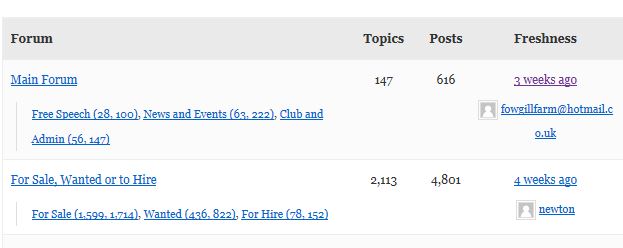
But, by default my forum is displaying as a list: http://pubs.hamlin.org/tech/
I’d be happy to use the default view if I could make it work. Does anyone have an idea of what’s going on here? I’m using the twentyeleven theme.
Thank you in advance for your help!
– Liz
Despite recent topics widget is functioning on my website widget.php is considered “inactive” in wordpress and it doesn’t react to any changes. I would really appreciate your help.
I’m trying to modify the default bbpress loop on a forum page (loop-topics.php) to include the sub-forum topics.
Here’s an explanation:
Forum A
Sub-forum A1
Sub-forum A2
Forum B
Sub-forum B1
Sub-forum B2
So when viewing Forum A’s page, I’d like to show sub-forum A1 and sub-forum A2. and below sub-forum A1 and sub-forum A2 like to show recents topics from sub-forum A1 and sub-forum A2.
I am getting some feedback from a client that the reply to area is hard to see where to start typing their comment. You can see here: http://livessoshort.com/forums/topic/barking-area/ there is no border for the comment area. I would like to either add a border to the text area for all forums/ topics and maybe change the background area for the reply to area. I have tried finding out how to do it, the only thing I could find was odd/even comments colors. Thanks!
how to show 5 recent topics on homepage like bbpress.org??
is it just the recent topics widget, or and edited version of the bbpress index shortcode??

