Search Results for 'code'
-
AuthorSearch Results
-
March 31, 2014 at 4:16 pm #144398
In reply to: How to remove certain breadcrumb separators
Robin W
Moderatorsee
From memory I think $args[‘sep’] = “>” would be what you are looking for
so for instance
function mycustom_breadcrumb_options() {
       $args['sep']    = '>>';

    return $args;
}

add_filter('bbp_before_get_breadcrumb_parse_args', 'mycustom_breadcrumb_options'
would give a double chevron.
If that doesn’t work, come back and I’ll look it up.
March 31, 2014 at 3:54 pm #144397Topic: Embed a Youtube Video
in forum Troubleshootingblastblast
ParticipantHello all,
I would like to embed a Youtube video in a normal forum post response. However, only the link show you.
For example, when you paste a Youtube link on Facebook, a player appears allowing the viewers to be able to watch the video on the page simply by pressing play.
Is there some shortcode I should use? Is there a way I can do this without changing the code?
Thank you
March 31, 2014 at 12:47 pm #144392Topic: How to remove certain breadcrumb separators
in forum TroubleshootingMajijiboo
ParticipantHello,
I used CSS to remove certain parts of my breadcrumb and now need to remove certain separators (ex: “>”) between the words. Unfortunately all the separators have the same class, so is there a way to code bbpress so some separators are shown and others are not? Please see image below for example. Thanks.
March 31, 2014 at 12:19 pm #144390In reply to: Want to change default forums templates
ModeratorbbPress uses your theme’s page templates to wrap the code in, so you will need to use a page from your theme that doesn’t have a sidebar, and rename this.
So once you know which page template file you need, copy this and rename the copy to bbpress.php
Place this file in the root of your theme ie wp-content/themes/%mytheme%/bbpress.php where %mytheme% is your theme’s name.
come back if any of that is not clear, and I’ll try and help further !
March 31, 2014 at 12:05 pm #144388Topic: Want to change default forums templates
in forum Troubleshootinglizat
ParticipantI want to change the template used for my forums index and the forum itself – currently it is using a default that has a sidebar that I don’t want.
I think they live in …/plugins/bbpress/templates/default/bbpress. So I can create new ones in my child theme if I only knew which to copy?
Is there a list anywhere of which is what…. the codex doesn’t seem to have it. Right now I need to know the ones for:
- Forums Index page
- Forum list of threads page
- Thread Page
Thank you
liz
March 31, 2014 at 11:55 am #144387In reply to: Changing the E-mail Notification Address
ParticipantCreate a file called functions.php which would be in your Child theme and then place the following text in your file and then place the code mentioned above and then you should be good to go.
<?php //Opening PHP tag
March 31, 2014 at 9:27 am #144384In reply to: PM button in posts
Magic-Komplex
ParticipantI’d like to use this as well, but not sure how to implement this. Should this be in an own file (named how?) and added to my childtheme’s subolder bbpress, or should I place the code somewhere in an existing file?
March 31, 2014 at 8:07 am #144382In reply to: increase font size
Moderatorthink its as simple as lacking the hash (#) at the start
ie
#bbpress-forums .bbp-topic-content p,
#bbpress-forums .bbp-reply-content p {
font-size: 12px ;
Come back if that doesn’t work and I’ll look further.
If it does, let me know and I’ll change the docs !
Stephen Edgar
KeymasterLet’s try it here with
codeandcodesHere is the tag
code: https://bbpress.org/forums/topic-tag/code/ <-That works perfectly
Here is the tagcodes: https://bbpress.org/forums/topic-tag/code/ <-That works perfectly
Here is the searchcode: https://bbpress.org/forums/search/code/ <-That works perfectly
Here is the searchcodes: https://bbpress.org/forums/search/codes/ <-That works perfectlyis there a way to set up so all the tags appear on a page? e.g. Tags Page? Thanks.
You would need to start modifying your bbPress templates, have a read of some of the docs on the codex that @Robin-W has pointed out to you already.
March 31, 2014 at 6:42 am #144373In reply to: List forums the simple way?!
KeymasterYou just need to add the following sbnippet of code to your themes
functions.phpfile:function custom_bbp_list_forums() { $args['separator'] = '<br />'; return $args; } add_filter('bbp_before_list_forums_parse_args', 'custom_bbp_list_forums' );March 31, 2014 at 6:19 am #144369In reply to: Phorum Import to bbPress
KeymasterThis time, it converted the users, all of the topics, and about 220,00 replies, then started just outputting dashes again. What does it mean when it starts outputting dashes? What is the program doing?
As I stated above it can be for many reasons and is a bug/error that we have not been able to isolate to fix, we have not found a way to trigger the bug allowing us to reproduce the bug and create the fix. It is a random thing as I outlined in my previous reply.
I opened a new window and re-started the conversion from that window, but instead of picking up where it left off, it started converting topics again. Am I going to have two copies of each topic in the BBPress forums now? Should I reset the forums again?
If you want the importer to resume from where it left off you need to make sure you don’t check the checkbox in the following screenshot, if you do check it then it will start again from the start and you will end up with two of everything.

Instead of using “reset forums,” can I just empty some of the MySQL tables?
This should be sufficient for most cases and because bbPress uses custom post types it shares the same
wp_postsandwp_postmetatables with WordPress and any other plugin or themes custom post types. It should be quite fast and behind the scenes it is actually doing direct MySQL queries to remove only the bbPress forums, topics, replies and topic tags from the posts, postmeta and taxonomy tables.I know it can be frustrating getting this to work as I have been were you are now and is the reason I started using bbPress. I went through the same problems trying to import from phpBB to bbPress, I eventually got it working and started learning PHP and now as a novice PHP programmer I try my best to help others migrate their forums to bbPress and improve bbPress as best I can and it’s not easy and for an old dog learning new tricks I reckon I’m doing alright.
March 31, 2014 at 6:04 am #144368In reply to: Kunena converter for bbPress 2.4
KeymasterFinally I’ve written a small script to migrate kunena attachments to GD bbPress attachments
@cybnet Awesome thanks for this, I added it to the (still sparse) Kunena docs here.
I’ll take a closer look when I get the chance and see what ideas I can come up with. I was at a WordPress Meetup a couple of months ago that demoed a few different ways to move media from one install to another that once time permits I’d love to take a shot at including it in our importer.
Now I’d like to write a script to convert kunena BBCode into bbPress HTML because there are some bbcodes not converted.
This I can most definitely help out with now.
The SMF and phpBB importers both have some good examples of converting BBCode to ‘native’ bbPress (WordPress) code. I am simply use regular expressions to convert them on the fly as each topic or reply is converted.
eg. This Replaces
[size=$1:XXXXXXXX]with<span style="font-size:$1%;">$3</span>$phpbb_uid = preg_replace( '/\[size=(.*?):(.*?)\]/', '<span style="font-size:$1%;">', $phpbb_uid );You can see the SMF regex here and the phpBB here. There are probably quite a few that we can repurpose and if not make up a list for me and I’ll work towards getting them added to the Kunena importers in a future release.
March 31, 2014 at 5:19 am #144366In reply to: increase font size
batmanfan
ParticipantThanks Robin. You have been a great help.
I read through and tried https://codex.bbpress.org/bbpress-styling-crib/
What I did,
1. installed Simple Custom CSS plugin – all ok
2. insert the below code. and changed the font-size: 1.1em; to 1.6em#bbpress-forums div.odd, #bbpress-forums ul.odd { background-color: #fbfbfb; } #bbpress-forums div.even, #bbpress-forums ul.even { background-color: #fff; }IF post is sticky or super sticky, then
.bbp-topics-front ul.super-sticky,
.bbp-topics ul.super-sticky,
.bbp-topics ul.sticky,
.bbp-forum-content ul.sticky {
background-color: #ffffe0 !important;
font-size: 1.1em;
}
but the rest doesn’t seem to work…especially
Number 5. Various textsbbpress-forums .bbp-topic-content p, bbpress-forums .bbp-reply-content p { font-size: 12px;I change the font-size: 20px
nothing happens. 🙁
what did I do wrong? basically I wanted to increase font size for all forum section from 1 to 8. How please.
Thank you in advance
March 31, 2014 at 3:57 am #144363In reply to: PM button in posts
KeymasterI’m quite sure this is possible… Yes, done 😉
A quickly whipped up plugin https://gist.github.com/ntwb/9887310
function ntwb_bbp_bp_pm() {
    if(function_exists('bp_send_private_message_link') && is_user_logged_in() ) {
    	?>
    	<a href="<?php bp_send_private_message_link() ?>" title="Private Message">Private Message</a>
    	<?php
    }
}
add_action( 'bbp_theme_after_reply_author_details', 'ntwb_bbp_bp_pm' );
March 31, 2014 at 3:48 am #144362In reply to: List forums the simple way?!
ModeratorGlad you found it.
There are a whole set of things you can change listed here
March 31, 2014 at 3:44 am #144361In reply to: increase font size
ModeratorMarch 31, 2014 at 3:02 am #144358KeymasterIs there anything else I need to do to ensure I get that performance increase?
Be ready for bbPress v2.6 😉 We have a few performance improvements coming with this release.
The downside of our planned improvements means there is a pretty high chance we will break sites thus we have lots of testing and lots of extra code to write to make sure we don’t break anything.
March 31, 2014 at 2:51 am #144357In reply to: Removed Spam But Topic Remains Current
KeymasterRun the repair tool ‘Recalculate last activity in each topic and forum’ and that should fix your issue.
March 30, 2014 at 7:17 pm #144351In reply to: List forums the simple way?!
ParticipantUnfortunately there is no button to change this, I wanted the same thing for my forum. But it’s really not a huge thing you have to change within the code. See the detailed explanation how to achieve this here, it’s quite easy:
http://www.thespiritualpath.de/wp-content/uploads/2014/03/error.jpg
4. Adding code to our child theme’s style.css
March 30, 2014 at 7:09 pm #144350Topic: List forums the simple way?!
in forum TroubleshootingCliffhangerL
ParticipantHi,
I’m new to BBpress and need some guidance. I have tried to search for the problem I have but I have not been able to understand if the posts I find really have to do with my problem.
What I want to do is to make (see picture below) a list where Fictional literature, where posts are lined up below each other.
Fictional Literature (0, 0),
Fictional News Post (0, 0),
Fictional Media (0, 0)
etc…I found some answers saying I need to add a code in a PHP-file called loop. But that seems too extreme to fix something “simple” like this? The plugin seem very complete and I would guess theres just a box to click to make this change.. or I’m I asking for too much? 🙂
In my picture below is what I see when I go into my Forum.
 March 30, 2014 at 5:03 pm #144346
Topic: Tags
in forum InstallationParticipantI’ve created a topic with ‘tags’ e.g. tags: codes, code.
But when try searching for the tags: ‘code’ or ‘codes’ it’s not showing up! How to make it show up on ‘search’? also, is there a way to set up so all the tags appear on a page? e.g. Tags Page? Thanks.March 30, 2014 at 3:27 pm #144345In reply to: Forums index in the same layout as other bb software
shpitzyl
ParticipantI’m struggling with this one for a couple of days. Your code solved my problem, Thanks.
March 30, 2014 at 8:59 am #144336In reply to: Freshness for Category
ModeratorPut the following code in your functions file
function change_no_topics ($anchor) {
if ($anchor=="No Topics") {
$anchor=" " ;
}
Return $anchor ;
}
add_filter ('bbp_get_forum_freshness_link','change_no_topics') ;
This will blank it.
If you want it to say the same each time, just change the $anchor=” ” to whatever you want it to say.
If you don’t know how to do any of this, come back
March 30, 2014 at 2:54 am #144329In reply to: Two pages showing the same forums
KeymasterThis is weird, as you say there is only one copy of the forums in the backend yet two on the front :/
I see http://elitegamingcomputers.com/forum/ & http://elitegamingcomputers.com/forum/page/2/
Yet picking a forum via either page above eg http://elitegamingcomputers.com/forum/social/in-game-strategy/ is the same resulting URL from either page, the same for a topic from either forum page eg http://elitegamingcomputers.com/topic/dthpwns-pvp-keybinding-guides/
If there were duplicates from an import you would see the duplicates in the back end and when viewing the forum or topic typically one of them would end with
-2, for example you would have example.com/forum/my-topic and example.com/forum/my-topic-2 as each page. forum, topic must have a unique slug.What I do see that is weird though is your main forum page is:
http://elitegamingcomputers.com/?post_type=page&p=4947 <- That is weird
http://elitegamingcomputers.com/forum <- This is what I expect you should be usingDo you have a custom page setup for your forums and by chance do have you used the bbPress shortcode [bbp-forum-list] twice?
The topics section of your site looks and appears ‘mostly’ to work as expected:
http://elitegamingcomputers.com/topics/
The ‘By’ section in the below screenshot should not be there though.
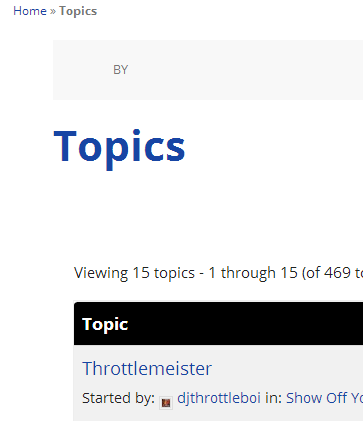
Looking at the source of your site I know see your using a Genesis theme, do you have the Genesis bbPress Extend plugin installed and activated? https://wordpress.org/plugins/bbpress-genesis-extend/ as you will need this.
One more thing is that this could be an issue with your rewrite rules. To fix this try resetting your permalinks. In your WordPress Administration Screens navigate to Settings > Permalinks, select a different permalink structure and save. Then select your preferred permalink structure and save again.
March 29, 2014 at 4:09 pm #144321In reply to: Importing from Mingle Forum finds nothing
kvr28
Participantthank-you, you want to see a awesome forum, look here
http://www.itinerantangler.com/blog/board/forums/
zach was kind enough to share his css with me on this thread
so I copied and pasted it into my themes custom css and tried it, some things worked well, some things didn’t with my theme, so it got me thinking, since I know pretty much nothing about css, I started looking at other bbpress forums and just started inspecting elements to see how they got the affect that I liked, I spent about two weeks doing this, here is the css I ended up with and I use that loop-forums on the other thread, not sure why it’s giving errors for you, I found another example of a loop-forums I found and tested on my staging server and it is pretty close to what you want I think, the link for that is on the other thread
.single .entry-title { display: none; } .entry-title { display: none; } div.bbp-template-notice.info { border: #B6A9A6 1px solid; background-color: #f0ead6; } #bbpress-forums div.even, #bbpress-forums ul.even { background-color: #fbfbfb; } #bbpress-forums div.odd, #bbpress-forums ul.odd { background-color: #fff; } /* =Breadcrumb and Tags -------------------------------------------------------------- */ div.bbp-breadcrumb { float: none; display:block; border: 1px solid #e4e4e4; padding:9px; -moz-border-radius: 3px; -webkit-border-radius: 3px; border-radius: 3px; -moz-background-clip: padding; -webkit-background-clip: padding-box; background-clip: padding-box; background-color: #f5f5f5; } div.bbp-breadcrumb p{ margin:0 !important; } .bbp-breadcrumb a{ position:relative; } .bbp-breadcrumb a:before{ border-bottom: 20px solid rgba(0, 0, 0, 0); border-left: 18px solid #E1E1E1; border-top: 20px solid rgba(0, 0, 0, 0); content: " "; display: block; height: 0; left: 100%; margin-left: -7px; margin-top: -19px; position: absolute; top: 49%; width: 0; z-index: 1; } .bbp-breadcrumb a:after{ border-bottom: 20px solid rgba(0, 0, 0, 0); border-left: 18px solid #F5F5F5; border-top: 20px solid rgba(0, 0, 0, 0); content: " "; display: block; height: 0; left: 100%; margin-left: -8px; margin-top: -19px; position: absolute; top: 49%; width: 0; z-index: 1; } a.bbp-breadcrumb-home, a.bbp-breadcrumb-root, a.bbp-breadcrumb-forum, a.bbp-breadcrumb-search, span.bbp-breadcrumb-current { display: inline-block; line-height: 20px; padding: 0 10px; font-size: 1em; color:#818181; } div.bbp-breadcrumb, div.bbp-topic-tags { font-size: 12px; } #bbpress-forums div.bbp-breadcrumb p, #bbpress-forums div.bbp-topic-tags p { margin-bottom: 10px } div.bbp-topic-tags { float: right; } div.topic-author-displayname, div.reply-author-displayname { color: #EB4B00; font-size: 16px; } .user-id-1 div.topic-author-displayname, .user-id-1 div.reply-author-displayname{ font-weight: bold; } /* =Forms -------------------------------------------------------------- */ #bbpress-forums fieldset.bbp-form legend { padding: 5px; } #bbpress-forums fieldset.bbp-form label { margin: 0; display: inline-block; } #bbp-edit-topic-tag.bbp-form fieldset.bbp-form label, #bbp-login fieldset label, #bbp-register fieldset label, #bbp-lost-pass fieldset label { width: 100px; } #bbpress-forums fieldset.bbp-form p, #bbpress-forums fieldset.bbp-form textarea, #bbpress-forums fieldset.bbp-form select, #bbpress-forums fieldset.bbp-form input { margin: 0 0 8px; } form#bbp-your-profile fieldset.submit { border: none; } textarea#bbp_reply_content, textarea#bbp_topic_content, textarea#bbp_forum_content { width: 98%; box-sizing: border-box; -webkit-box-sizing:border-box; -moz-box-sizing: border-box; -ms-box-sizing: border-box; } textarea#bbp_forum_content { height: 210px; } #bbpress-forums fieldset.bbp-forum-form-attributes { width: 200px; float: right; clear: none; margin-left: 25px; } .bbp-topic-form, .bbp-reply-form, .bbp-topic-tag-form { clear: left; } body.topic-edit .bbp-topic-form div.avatar img, body.reply-edit .bbp-reply-form div.avatar img, body.single-forum .bbp-topic-form div.avatar img, body.single-reply .bbp-reply-form div.avatar img { margin-right: 0; padding: 10px; border: 1px solid #ddd; line-height: 0; background-color: #efefef; } body.page .bbp-reply-form code, body.page .bbp-topic-form code, body.single-topic .bbp-reply-form code, body.single-forum .bbp-topic-form code, body.topic-edit .bbp-topic-form code, body.reply-edit .bbp-reply-form code { font-size: 10px; background-color: #f0fff8; border: 1px solid #CEEFE1; display: block; padding: 8px; margin-top: 5px; width: 369px; } .form-allowed-tags code { background: #bcd7f3 !important; font-size: 11px !important; border: none !important; width: auto !important; color:#333 !important; white-space: normal !important; } #merge_tag, #delete_tag { display: inline; } div.bbp-submit-wrapper { margin-top: 15px; float: left; clear: both; } #bbpress-forums div.odd,#bbpress-forums ul.odd { background-color: #f3f3f3; } #access { background: #D9D9D9; padding-left: 0 !important; padding-right: 0 !important; } #bbpress-forums li.bbp-header { background: #D9D9D9; border-top: none !important; width: 99%; border-bottom: 1px solid #d3d3d3 !important; } #footer-area { background: #D9D9D9; } .bbp-footer { background: #D9D9D9; } #bbpress-forums li.bbp-header { font-size: 1.3em; } .bbp-topic-title { font-size: 1.1em; } .widget_display_topics .bbp-author-avatar { display: none ! important; } .bbp-topic-freshness-author .bbp-author-avatar { display: none ! important; } blockquote:before {content: ‘\275d’; color: #555; font-size: 15px; width: 15px; height: 15px; line-height: 15px; margin-left: -70px; margin-top: 10px; float:left; } #bbpress-forums div.bbp-reply-header { background-color: #afafaf; } .bbp-admin-links a { color: #00548c !important; } .bbp-admin-links a:hover { color: #d54e21 !important; } -
AuthorSearch Results


